
1. Product Overview
The ShiftCam SnapLight is a compact LED selfie ring light designed to enhance your mobile photography and videography. It features adjustable brightness settings, a built-in battery, and a magnetic mount for easy attachment to smartphones.
- Adjustable LED Selfie Light: Provides four brightness settings for optimal illumination. The integrated battery offers up to 2 hours of continuous light.
- Flexible Flippable Hinge: Allows the light to be angled towards you, ensuring consistent illumination during live streams, vlogs, video calls, or selfies.
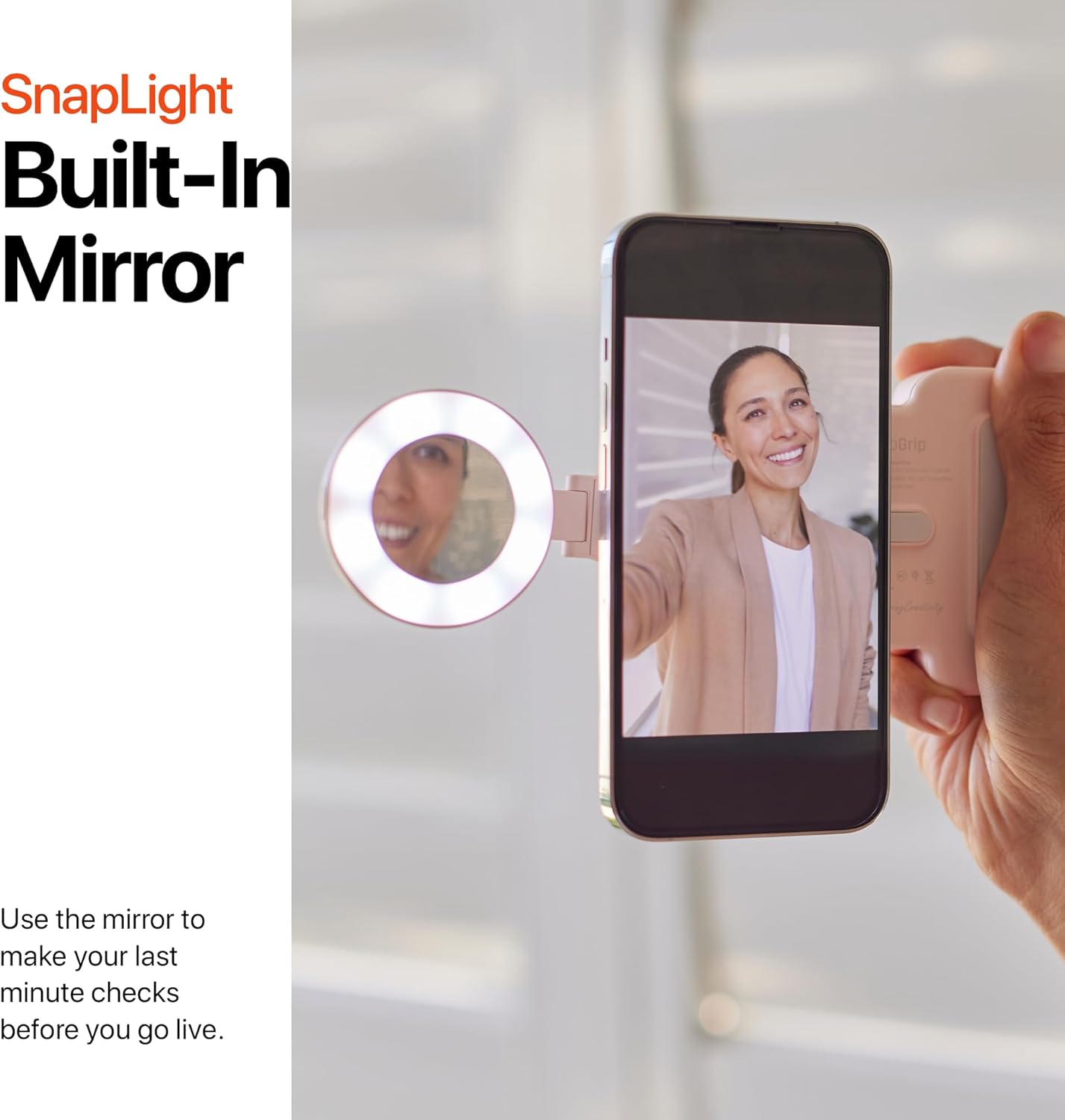
- Built-in Mirror: A convenient mirror is positioned at the center of the LED ring for quick visual checks before capturing content.
- Effortless Magnetic Attachment: Features a magnetic mount for quick and secure attachment to any smartphone. It is compatible with MagSafe directly or via an included MagSafe-compatible sticker for non-MagSafe phones.
- SnapGrip Ecosystem Compatibility: Works seamlessly with other ShiftCam SnapGrip ecosystem products like SnapGrip and SnapPod.
2. Setup and Installation
Attaching the SnapLight to Your Phone
The SnapLight offers versatile attachment options for various smartphones.
- For MagSafe Compatible Phones (iPhone 12 Series and Above): Simply align the SnapLight's magnetic base with the MagSafe area on the back of your phone or MagSafe-enabled case. The magnets will securely snap it into place.
- For Non-MagSafe Phones: Use the included MagSafe-compatible sticker. Peel off the adhesive backing from the sticker and carefully center it on the back of your phone or phone case. Press firmly to ensure a secure bond. Once the sticker is applied, you can attach the SnapLight magnetically as described above.


Product Video: SnapGrip Product Promo
Video: This promotional video from ShiftCam demonstrates the SnapLight's magnetic attachment, its use as a fill light, and its integration with other SnapGrip ecosystem products like the tripod, showcasing its versatility for content creation.
3. Operating Instructions
Powering On/Off and Adjusting Brightness
- Power On: Press and hold the power button located on the side of the SnapLight for a few seconds until the light illuminates.
- Adjust Brightness: Briefly press the power button repeatedly to cycle through the four available brightness settings.
- Power Off: Press and hold the power button again for a few seconds until the light turns off.

Using the Flippable Hinge and Built-in Mirror
- Flippable Hinge: The SnapLight features a flexible hinge that allows you to rotate the light 180 degrees. This enables you to direct the light forward for selfies or backward for illuminating subjects in front of your phone's rear camera.
- Built-in Mirror: Utilize the mirror located in the center of the LED ring for quick touch-ups or to check your appearance before starting a live stream or taking a photo.

4. Charging and Battery
The SnapLight features an integrated rechargeable battery. To charge the device, connect a USB-C cable (not included) to the charging port on the SnapLight and to a compatible USB power source. A full charge provides approximately 2 hours of continuous light, depending on the brightness setting used.
Note: A USB-C charger is required to charge the SnapLight. In line with environmental commitments, a charging cord is not included.
5. Maintenance
- Cleaning: Use a soft, dry cloth to wipe the exterior of the SnapLight. Avoid using harsh chemicals or abrasive materials, as these may damage the finish or the LED components.
- Storage: Store the SnapLight in a cool, dry place away from direct sunlight and extreme temperatures when not in use.
- Battery Care: To prolong battery life, avoid fully discharging the battery frequently. Charge the device regularly, even if not in constant use.
6. Troubleshooting
- Light Not Turning On: Ensure the battery is charged. Connect the SnapLight to a USB-C charger and allow it to charge for at least 30 minutes before attempting to power it on again.
- Weak Magnetic Connection: Verify that the SnapLight is properly aligned with your phone's MagSafe area or the applied MagSafe-compatible sticker. If using a phone case, ensure it is MagSafe-enabled or that the sticker is applied to the outer layer of the case.
- Inconsistent Brightness: Check the battery level. Low battery can affect light output. Recharge the device if necessary.
7. Specifications
| Feature | Detail |
|---|---|
| Brand | ShiftCam |
| Model | SnapLight |
| Color | BlueJay |
| Compatible Devices | Cellphone (MagSafe compatible or with MagSafe sticker) |
| Built-In Media | Light & Mirror |
| Number of LEDs | 8 |
| Brightness | 90 Lumens (4-Step Controls) |
| Color Temperature | 6000K |
| Battery Capacity | 300mAh (1.11Wh 3.7V) |
| Battery Average Life | 2 Hours |
| USB-C Input | 5W, DC5V/1A |
| Dimensions | 67.1 x 57 x 14.3mm |
| Water Resistance Level | Not Water Resistant |
8. Warranty and Support
The ShiftCam SnapLight comes with a 1-year warranty from the date of purchase. Please retain your proof of purchase for warranty claims.
For technical support, warranty inquiries, or further assistance, please visit the official ShiftCam website or contact their customer service department. Contact information can typically be found on the product packaging or the ShiftCam website.


