
Yard Force AL C40B
Yard Force 20V/4.0 Ah Lithium-Ion Battery User Manual
Model: AL C40B
1. Product Overview
The Yard Force 20V/4.0 Ah Lithium-Ion Battery (Model AL C40B) is a versatile power source designed for use with all Yard Force and PowerG 20V cordless tools. This battery provides reliable and consistent power for a wide range of garden and power tools, ensuring optimal performance and extended runtime.
Key Features:
- Universal Compatibility: Designed to power all Yard Force and PowerG 20V cordless tools.
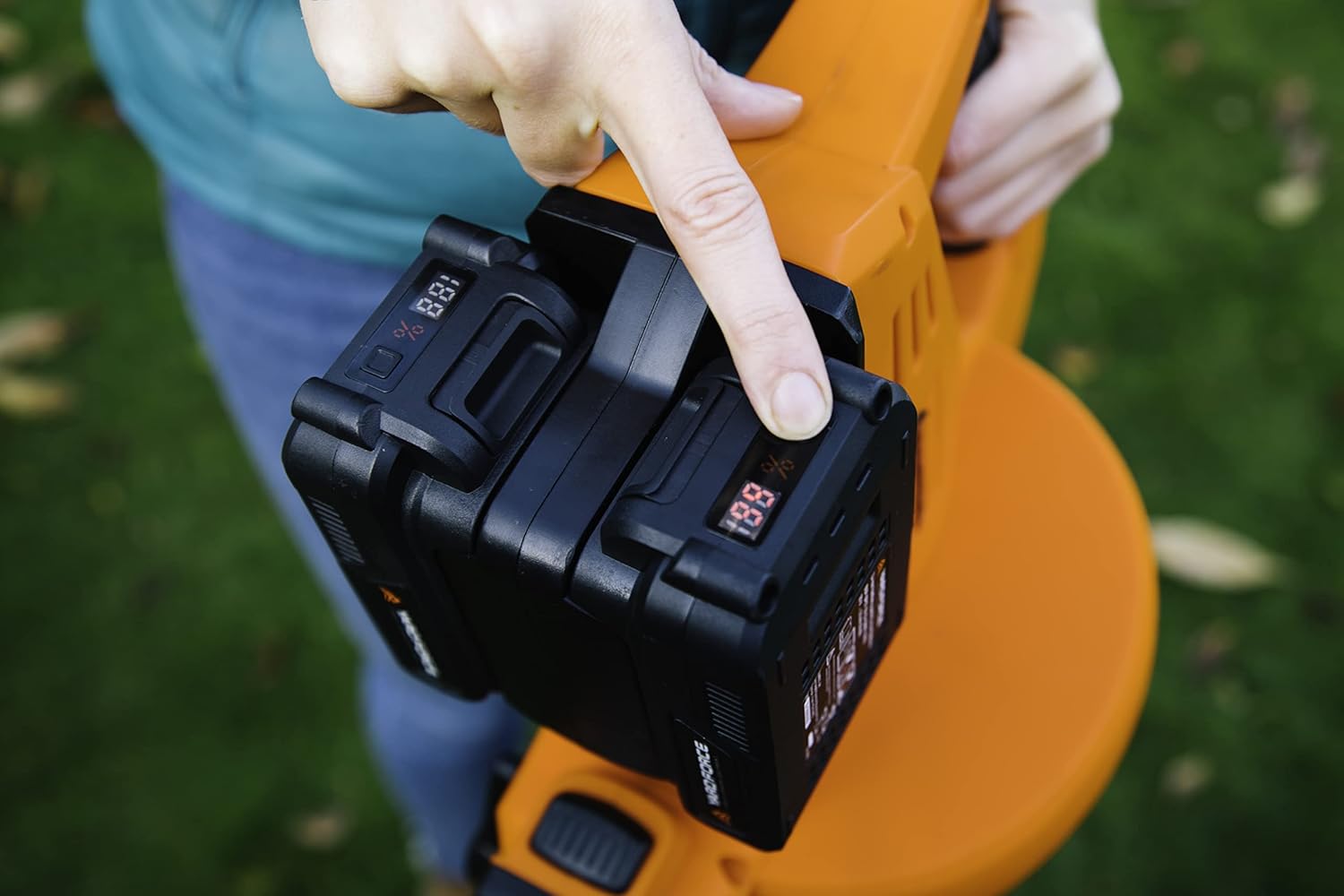
- Integrated LED Indicator: A three-level LED display provides a constant and clear indication of the battery's charge level.
- Advanced Battery Management: Features proactive battery management for maximum safety, including internal overload protection.
- Durable Design: Equipped with a rubberized casing for improved grip and enhanced durability.
- Rechargeable: Can be recharged at any time without damage, ensuring long-term usability.

2. Setup and Initial Use
2.1 Charging the Battery
Before first use, fully charge the battery using a compatible Yard Force 20V battery charger. Insert the battery into the charger, ensuring it clicks securely into place. The charger's indicator lights will show the charging status. Once fully charged, remove the battery from the charger.
2.2 Installing the Battery into a Tool
To install the battery, align the battery with the battery slot on your Yard Force 20V tool. Slide the battery into the slot until it locks securely into place with an audible click. Ensure the battery is firmly seated before operating the tool.

To remove the battery, press the release button(s) located on the battery or tool, and slide the battery out of the slot.
3. Operating the Battery
3.1 Checking Battery Charge Level
The battery features a three-level LED indicator. Press the button next to the LED lights to display the current charge level. This allows you to monitor the battery status during operation and plan for recharging.
3.2 Using with Various Tools
This 20V/4.0 Ah battery is suitable for a wide range of Yard Force and PowerG tools, including:
- Lawnmowers
- Brush Cutters
- Hedge Trimmers
- Leaf Blowers
- Chainsaws
- AquaJet Pressure Washers
- Other 20V power tools


4. Maintenance
Proper maintenance ensures the longevity and optimal performance of your battery.
- Charging: Always use the original Yard Force charger. Avoid overcharging or completely draining the battery for extended periods.
- Storage: Store the battery in a cool, dry place, away from direct sunlight and extreme temperatures. For long-term storage, it is recommended to store the battery with a partial charge (around 50%).
- Cleaning: Keep the battery contacts clean and free from dust and debris. Use a dry cloth to wipe the battery casing. Do not use liquids or solvents.
- Protection: The battery features internal overload protection. However, avoid exposing the battery to impacts or dropping it.
5. Troubleshooting
If you encounter issues with your Yard Force battery, refer to the following common troubleshooting steps:
| Problem | Possible Cause | Solution |
|---|---|---|
| Battery not charging | Charger not plugged in; faulty charger; battery too hot/cold; damaged battery. | Ensure charger is properly connected. Try a different outlet. Allow battery to reach room temperature. Inspect battery and charger for damage. Contact support if issues persist. |
| Tool not operating with battery | Battery not fully inserted; battery discharged; tool malfunction. | Ensure battery is securely clicked into place. Check battery charge level and recharge if necessary. Test with another charged battery if available. Refer to tool's manual for troubleshooting. |
| Reduced runtime | Battery not fully charged; battery aging; extreme operating conditions. | Ensure battery is fully charged before use. Battery capacity naturally decreases over time. Avoid operating in extremely hot or cold conditions. |
For problems not listed here or if solutions do not resolve the issue, please contact Yard Force customer support.
6. Specifications
| Attribute | Value |
|---|---|
| Model Number | AL C40B |
| Battery Type | Lithium-ion |
| Voltage | 20 Volts |
| Capacity | 4.0 Ah (4000 mAh) |
| Dimensions (L x W x H) | 14 x 8 x 7.5 cm |
| Reusability | Rechargeable |
| Compatibility | All Yard Force & PowerG 20V tools |
7. Warranty and Support
Yard Force products are manufactured to high-quality standards and come with a manufacturer's warranty. For specific warranty details, including duration and coverage, please refer to the warranty card included with your product or visit the official Yard Force website.
For technical assistance, spare parts, or any other inquiries, please contact Yard Force customer support. Contact information can typically be found on the product packaging, the official website, or through your retailer.
Please retain your proof of purchase for warranty claims.
Related documentsAL C40B


Ask a question about this manual
Ask about setup, troubleshooting, compatibility, parts, safety, or missing instructions. Manuals+ will review the question and use this page’s manual context to help answer it.