
1. Introduction
This manual provides detailed instructions for the installation, operation, and maintenance of your DEKCO DC5E UK 5MP Outdoor Security Camera. Please read this manual thoroughly before using the product to ensure correct usage and optimal performance. Keep this manual for future reference.
The DEKCO DC5E UK is a versatile outdoor security camera designed to provide reliable surveillance with features such as 5MP resolution, color night vision, motion tracking, two-way audio, and IP66 weather resistance.

Image 1.1: The DEKCO DC5E UK 5MP Outdoor Security Camera, shown with a smartphone displaying its live feed.
2. Package Contents
Please check the package contents upon unboxing. If any items are missing or damaged, contact DEKCO customer support.
- DEKCO DC5E UK Security Camera
- Power Adapter
- Mounting Screws and Wall Plugs
- User Manual (this document)
3. Setup and Installation
3.1 App Download and Account Registration
- Download the App: Search for "CloudEdge" in the Apple App Store (for iOS devices) or Google Play Store (for Android devices) and download the application.
- Register an Account: Open the CloudEdge app and follow the on-screen instructions to register a new account using your email address.
3.2 Camera Connection
- Power On: Connect the camera to the power adapter and plug it into an electrical outlet. The camera will power on and initiate its startup sequence.
- Placement for Setup: For initial setup, place the camera within 3 feet (approximately 1 meter) of your 2.4GHz Wi-Fi router. Note: The DEKCO DC5E UK camera supports 2.4GHz Wi-Fi networks only. 5GHz Wi-Fi is not supported.
- Add Device in App: In the CloudEdge app, tap the "+" icon to add a new device. Select "Power Plug Camera" from the list of device types.
- Follow In-App Instructions: The app will guide you through connecting the camera to your Wi-Fi network. This typically involves scanning a QR code displayed on your phone with the camera lens.

Image 3.1: Visual guide for app download, account registration, and device connection steps.
3.3 Physical Installation
Once the camera is successfully connected to your Wi-Fi network, you can proceed with physical installation.
- Choose a Location: Select an outdoor location that provides the desired viewing angle and has a stable Wi-Fi signal. Ensure the camera is within range of a power outlet.
- Mounting: Use the provided mounting screws and wall plugs to securely attach the camera bracket to a wall or suitable surface. The camera is designed for wall mounting.
- Adjust Angle: Adjust the camera's pan and tilt to cover the desired surveillance area.
4. Operating Instructions
4.1 Live View and Playback
- Live View: Open the CloudEdge app and select your camera to view the live feed. You can pan and tilt the camera remotely using the controls in the app.
- Playback: Access recorded footage through the "History" or "Cloud" sections in the app. The camera supports 24/7 continuous recording (with an SD card) and event-triggered recording.
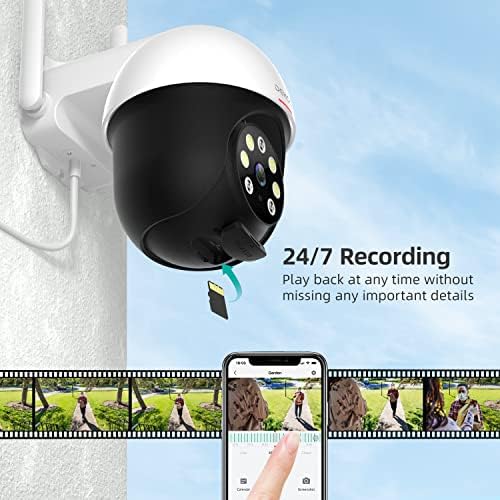
Image 4.1: The CloudEdge app interface showing 24/7 recording playback with a timeline.
4.2 Night Vision Modes
The camera offers three night vision modes for various lighting conditions:
- Infrared Mode: Provides clear black and white video in complete darkness using infrared LEDs.
- Full Color Mode: Utilizes built-in spotlights to provide full-color video even at night.
- Alarm Mode: Automatically activates spotlights and a sound alarm upon motion detection at night to deter intruders.

Image 4.2: Comparison of Infrared, Full Color, and Alarm night vision modes.
4.3 Motion Detection and Tracking
The camera features advanced motion detection and tracking capabilities:
- Motion Detection: Receive real-time alerts on your smartphone when motion is detected in the camera's field of view. You can customize detection zones and sensitivity settings in the app.
- Motion Tracking: The camera can automatically pan and tilt to follow detected movement, keeping the subject in frame.
- Sound-Light Alarm: When motion is detected, the camera can activate a sound alarm and flash its spotlights to deter potential intruders.

Image 4.3: Illustration of motion tracking, motion detection, and sound alarm features.
4.4 Two-Way Audio
The built-in microphone and speaker allow for two-way communication through the camera. You can listen to audio from the camera's location and speak through the camera using the CloudEdge app.

Image 4.4: A user interacting with the camera's two-way audio feature via the app.
4.5 Storage Options
The camera supports two storage methods for recorded footage:
- Micro SD Card: Insert a Micro SD card (8GB-128GB, not included) into the designated slot for local storage of recordings.
- Cloud Storage: Subscribe to the CloudEdge cloud storage service for secure, remote storage of your video footage.

Image 4.5: Visual representation of cloud and local (SD card) storage options.
4.6 Multi-Person Sharing
You can share access to your camera's live feed and recordings with up to 5 other users through the CloudEdge app, allowing family members or trusted individuals to monitor your property.
5. Maintenance
Regular maintenance ensures the longevity and optimal performance of your DEKCO security camera.
- Cleaning: Periodically wipe the camera lens and body with a soft, damp cloth to remove dust, dirt, or water spots. Avoid using harsh chemicals.
- Power Connection: Ensure the power adapter and cable are securely connected and free from damage.
- Wi-Fi Signal: Regularly check the Wi-Fi signal strength in the app to ensure a stable connection. Poor signal can affect video quality and connectivity.
- Firmware Updates: Keep the camera's firmware updated through the CloudEdge app to benefit from the latest features and security enhancements.

Image 5.1: The DEKCO camera demonstrating its IP66 waterproof rating in snowy conditions.
6. Troubleshooting
If you encounter issues with your DEKCO camera, refer to the following common problems and solutions:
- Camera Offline/Connection Loss:
- Check your Wi-Fi router and internet connection.
- Ensure the camera is within range of your 2.4GHz Wi-Fi network.
- If there was a power cut or short, the camera network may reset. You might need to re-add the camera to the app. This may require physically accessing the camera to perform a reset or re-pairing.
- Restart the camera by unplugging and re-plugging the power adapter.
- Poor Image Quality:
- Clean the camera lens to remove any dirt or smudges.
- Ensure adequate lighting, especially for color night vision.
- Check your Wi-Fi signal strength; a weak signal can degrade video quality.
- Note: While advertised as 5MP, the technical specifications indicate 3MP video resolution.
- Motion Detection Issues:
- Adjust motion detection sensitivity and detection zones in the CloudEdge app.
- Environmental factors like heavy rain, snow, or strong winds can sometimes trigger false alarms. Consider adjusting sensitivity or detection areas during adverse weather.
- If motion tracking is inconsistent, ensure the camera has a clear view and is not obstructed.
- Water on Lens/Fogging:
- Although IP66 rated, extreme weather conditions can sometimes cause water spots or fogging. Ensure the camera is installed under an overhang or consider a rain shield if persistent issues occur in heavy rain.
- Microphone Sensitivity:
- The microphone is highly sensitive. If unwanted background noise is an issue, check the app settings for any audio adjustment options. Note that disabling the microphone entirely may not be an available feature.
For further assistance, please contact DEKCO customer support.
7. Specifications
| Feature | Specification |
|---|---|
| Model Number | DC5E UK |
| Brand | DEKCO |
| Video Capture Resolution | 3 MP (Advertised as 5MP) |
| Effective Video Resolution | 3 MP |
| Connectivity Technology | Wired, Wireless (2.4GHz Wi-Fi only) |
| Power Source | Battery Powered (Note: Product description implies wired power, check specific model for battery option) |
| Mounting Type | Wall Mount |
| Indoor/Outdoor Usage | Outdoor |
| Special Feature | Night Vision (Color Night Vision), Motion Tracking, Two-Way Audio, IP66 Waterproof |
| Color | White |
| Item Dimensions (L x W x H) | 12.7 x 20.3 x 12.7 cm |
| Voltage | 12 Volts |
| Wattage | 3 watts |
| Storage | Micro SD Card (8-128GB), Cloud Storage |
| Compatible Devices | Smartphone |
Note: There is a discrepancy between the product title (5MP) and the technical specifications (3MP) regarding video resolution. Please refer to the manufacturer for clarification if this is critical for your application. The 'Battery Powered' specification might be a general category; this model typically uses wired power.
8. Warranty and Support
DEKCO products are designed for reliability and performance. For warranty information, please refer to the warranty card included with your product or visit the official DEKCO website. Customer support is available to assist with any questions or issues you may encounter.
For technical support or service inquiries, please contact DEKCO customer service through the contact information provided on their official website or within the CloudEdge app.


