
COWSAR NPLH5A-06C/X1E
COWSAR 10000 BTU Portable Air Conditioner User Manual
Model: NPLH5A-06C/X1E | Brand: COWSAR
1. Introduction and Overview
The COWSAR 10000 BTU Portable Air Conditioner is a versatile 4-in-1 unit designed to provide efficient cooling, dehumidification, and fan functions for rooms up to 450 sq. ft. With its user-friendly controls, remote operation, and easy mobility, it offers a comfortable environment during hot and humid conditions. This manual provides detailed instructions for setup, operation, and maintenance to ensure optimal performance and longevity of your unit.

Figure 1: COWSAR 10000 BTU Portable Air Conditioner with remote control.
2. Product Features
- Powerful Cooling: 10000 BTU capacity quickly cools rooms up to 450 sq. ft. with a temperature range of 62℉ to 86℉.
- 4-in-1 Functionality: Offers Cooling, Dehumidification, Fan, and Sleep modes for versatile climate control.
- 2-Speed Fan: Circulates air effectively to meet varying comfort needs.
- Sleep Mode & Timer: Features a quiet sleep mode and a 24-hour on/off timer for personalized comfort and energy saving.
- User-Friendly Controls: Equipped with an LED display and simple selection panel, plus a full-featured remote control with a range of 196 inches.
- Enhanced Mobility: Four castor wheels and hidden side handles allow for easy movement between rooms.
- Easy Installation: Compatible with both hanging and sliding windows, includes an adjustable window kit (13" to 50" height/length) and a 59'' exhaust hose.

Figure 2: The unit offers Cooling, Dehumidification, and Fan modes.

Figure 3: Cooling capacity and coverage area of the portable AC.
3. What's in the Box
Your COWSAR Portable Air Conditioner package includes all necessary components for immediate setup and operation:
- COWSAR Portable Air Conditioner Unit
- Window Mount Kit (adjustable for 13" to 50" height/length windows)
- Exhaust Hose (59'' long)
- Remote Control
- Drainage Hose (4ft)
- Connector
- Adapter
- Window Kits Screw
- Flat Screws (x2)
- User Manual

Figure 4: Complete accessory kit for the portable air conditioner.
4. Setup Instructions
Follow these steps to set up your portable air conditioner:
- Unpacking and Positioning: Carefully remove the unit from its packaging. Place the unit upright on a flat, stable surface for at least 4 hours before initial use to allow the refrigerant to settle.
- Mobility: The unit is equipped with four castor wheels and hidden side handles for easy movement. Simply push or pull the unit to your desired location.
- Window Kit Installation: The adjustable window kit is designed for both vertical and horizontal sliding windows. Extend the window kit to fit your window opening and secure it using the provided screws.
- Exhaust Hose Connection: Attach one end of the 59'' exhaust hose to the unit and the other end to the window kit adapter. Ensure a secure connection to prevent air leakage.
- Drainage Hose (for Dehumidification): For continuous drainage during dehumidification mode, connect the 4ft drainage hose to the unit's drainage port and direct the other end into a suitable drain or container.
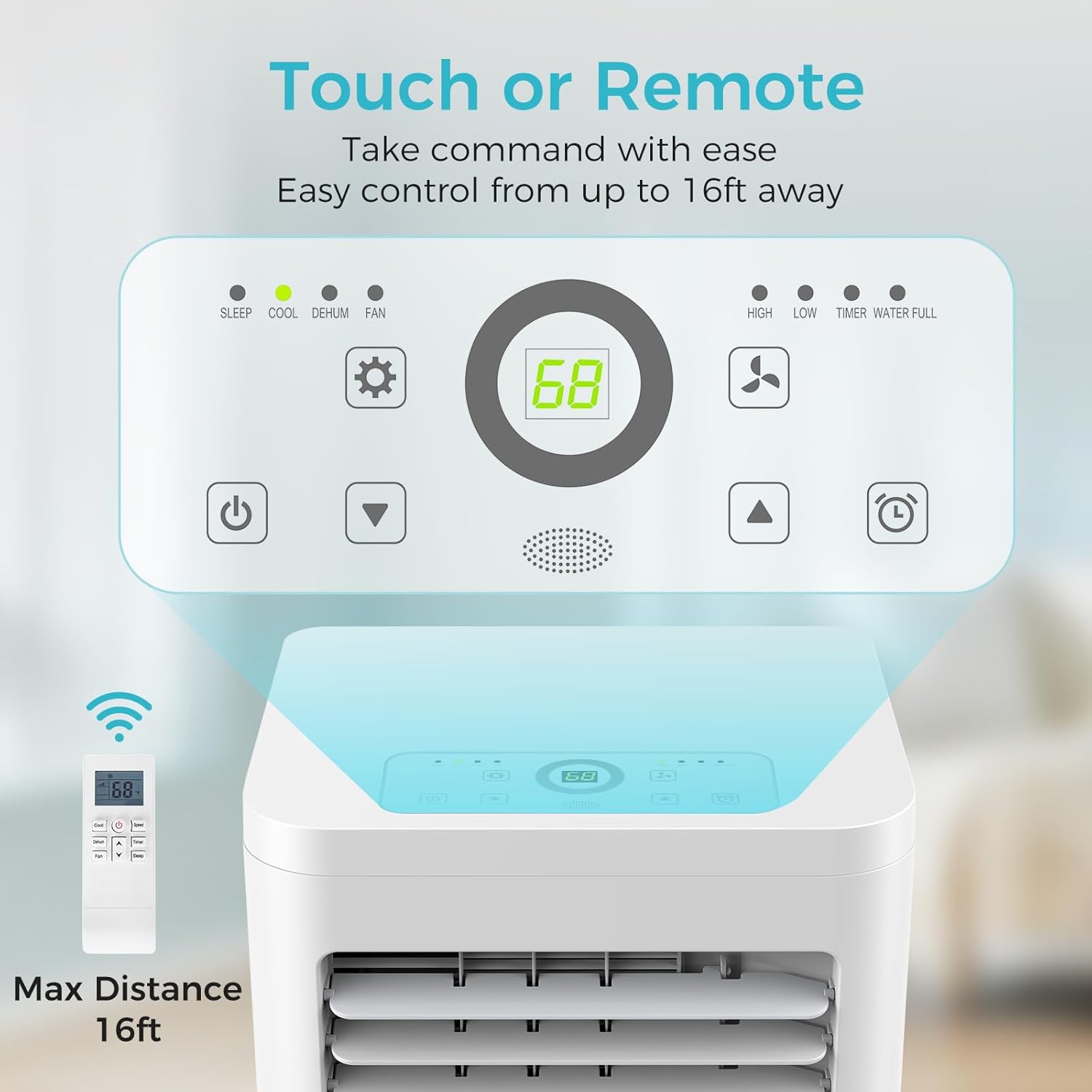
Figure 5: Built-in handles and universal wheels for easy portability.

Figure 6: Window kit compatibility for various window types.
5. Operating Instructions
Your COWSAR Portable Air Conditioner can be operated via the top-mounted control panel or the remote control.
5.1 Control Panel and Remote Control

Figure 7: Top-mounted control panel and remote control for easy operation.
The unit features an intuitive LED display and touch-sensitive buttons on its top panel. The remote control allows for convenient operation from up to 196 inches away.
5.2 Modes of Operation
- Cooling Mode: Provides powerful cooling for rooms up to 450 sq. ft. Set your desired temperature between 62℉ and 86℉.
- Dehumidification Mode: Removes excess moisture from the air, ideal for humid environments. The unit has a capacity of 50 liters (90 pints/day).
- Fan Mode: Circulates air without cooling. Choose between two fan speeds (High/Low) to suit your preference.
- Sleep Mode: Activates quiet operation (52dB) and adjusts temperature settings for comfortable sleep.
5.3 Timer Function
Use the 24-hour on/off timer to program the unit to start or stop automatically, optimizing energy usage and ensuring comfort when needed.
5.4 Louver Adjustment
Manually adjust the horizontal louvers on the front of the unit to direct the airflow as desired.
5.5 Official Product Video
Video 1: Overview of COWSAR 10,000 BTU Portable Air Conditioners, demonstrating key features and functionality.
6. Maintenance
Regular maintenance ensures efficient operation and extends the lifespan of your unit.
- Filter Cleaning: The unit features a washable filter located at the back. It is recommended to clean the filter every couple of months, or more frequently depending on usage and air quality. Simply remove the filter, rinse it with water, and allow it to dry completely before reinserting.
- Drainage: In dehumidification mode, water collects in the internal reservoir. If continuous drainage is not set up, the unit will indicate when the water tank is full. Drain the water regularly using the provided drainage hose to prevent overflow and maintain dehumidification efficiency.
- Exterior Cleaning: Wipe the exterior of the unit with a soft, damp cloth. Do not use harsh chemicals or abrasive cleaners.
7. Troubleshooting
If you encounter issues with your COWSAR Portable Air Conditioner, refer to the following common troubleshooting tips:
- Unit Not Turning On: Ensure the power cord is securely plugged into a grounded outlet. Check if the circuit breaker has tripped. Verify that the unit is placed upright and has been allowed to settle for at least 4 hours if recently moved.
- Insufficient Cooling: Check if the exhaust hose is properly installed and not kinked or blocked. Ensure windows and doors are closed to prevent warm air from entering the room. Clean the air filter if it is dirty. Verify the temperature setting is lower than the ambient room temperature.
- Water Leakage: Ensure the drainage hose is properly connected and directed to a drain or container. If the internal water tank is full, drain it manually.
- Unusual Noise: Check for any obstructions around the unit or in the air intake/exhaust vents. Ensure the unit is on a flat, stable surface.
- Remote Control Not Working: Check and replace the batteries in the remote control. Ensure there are no obstructions between the remote and the unit's sensor.
For persistent issues not resolved by these steps, please contact COWSAR customer support.
8. Specifications
| Feature | Specification |
|---|---|
| Brand Name | COWSAR |
| Model Info | NPLH5A-06C/X1E |
| Item Weight | 53.8 pounds |
| Product Dimensions | 13.39 x 11.81 x 27.09 inches |
| Capacity (Dehumidifier) | 50 Liters (90 pints/day) |
| Installation Type | Window |
| Form Factor | Portable |
| Special Features | Portable, Dehumidifier |
| Color | White |
| Voltage | 110 Volts |
| Wattage | 528 watts |
| Floor Area Coverage | Up to 450 sq. ft. |
| Cooling Power | 10000 British Thermal Units |
| Refrigerant | R 410A |
| Noise Level | 52 dB (in Sleep Mode) |
9. Warranty and Support
For warranty information, technical support, or any inquiries regarding your COWSAR Portable Air Conditioner, please refer to the contact details provided in the product packaging or visit the official COWSAR website. Customer support is available to assist you with any product-related concerns.
You can also find additional support and information by visiting the COWSAR Store on Amazon.
Related documentsNPLH5A-06C/X1E


Ask a question about this manual
Ask about setup, troubleshooting, compatibility, parts, safety, or missing instructions. Manuals+ will review the question and use this page’s manual context to help answer it.