
1. Product Overview
The Fszdorj Model F098 Smart Ceiling Fan with Light is a modern, multi-functional fixture designed to provide optimal air circulation and adjustable lighting for various indoor spaces such as bedrooms, living rooms, and kitchens. This 20-inch low-profile fan features a quiet DC motor, 6 adjustable wind speeds, dimmable LED lighting with adjustable color temperature, and convenient control via both a remote and a smartphone application.

Figure 1: Fszdorj Smart Ceiling Fan with Light, showcasing the fan unit, remote control, and smartphone app interface.
Key Features:
- Modern Design: 20-inch flush mount design, suitable for small rooms, with a high-strength iron frame and enclosed structure for stability and safety.
- Adaptable Lighting: No-grade adjustable brightness and color temperature (3000K-6500K), including a separate night light function.
- Quiet Operation: 110V DC motor with 6 adjustable wind speeds, operating quietly (below 30dB) for a peaceful environment.
- Smart Control: Control fan speed, light brightness, and color temperature via included remote control or user-friendly smartphone app.
- Memory Function: Retains your preferred settings for consistent comfort.
- Year-Round Comfort: Reversible motor allows for optimal air circulation in both summer (forward airflow) and winter (reverse airflow).
- Energy Efficient: 80-watt main lamp and 4-watt night light, coupled with 1/2/4/8 hours timer for energy saving.
- Easy Installation & Maintenance: Pre-assembled components and marked cables for straightforward installation. Easy to clean without disassembly.
2. Safety Information
Please read all safety instructions carefully before installation and use. Failure to follow these instructions may result in electric shock, fire, or serious personal injury.
- Electrical Safety:
- Always turn off power at the circuit breaker or fuse box before beginning installation or performing any maintenance.
- Ensure the electrical wiring meets all local and national electrical codes.
- Verify that the supply voltage (110 Volts) matches the fan's requirements.
- Consult a qualified electrician if you are unsure about wiring or installation.
- Installation Safety:
- Mount the fan only to an outlet box marked "Acceptable for Fan Support of 35 lbs (15.9 kg) or less" and use the mounting screws provided with the outlet box.
- Ensure there is adequate clearance between the fan blades and any obstacles.
- Do not bend the fan blades when installing or cleaning.
- Usage Precautions:
- Do not insert objects into the path of the fan blades.
- This appliance is intended for indoor use only.
- Keep the remote control and app-controlled device away from water and extreme temperatures.
3. Installation Guide
The Fszdorj Smart Ceiling Fan is designed for straightforward installation with pre-assembled components and marked cables. However, professional installation is recommended for safety and optimal performance.
Before You Begin:
- Ensure power is turned off at the circuit breaker.
- Gather necessary tools: screwdriver, wire strippers, electrical tape, drill (if needed for mounting).
- Verify the mounting location can support the fan's weight (approximately 7.5 pounds).
- Note the product dimensions: 19.68 inches (50cm) diameter, 5.71 inches (14.5cm) height.
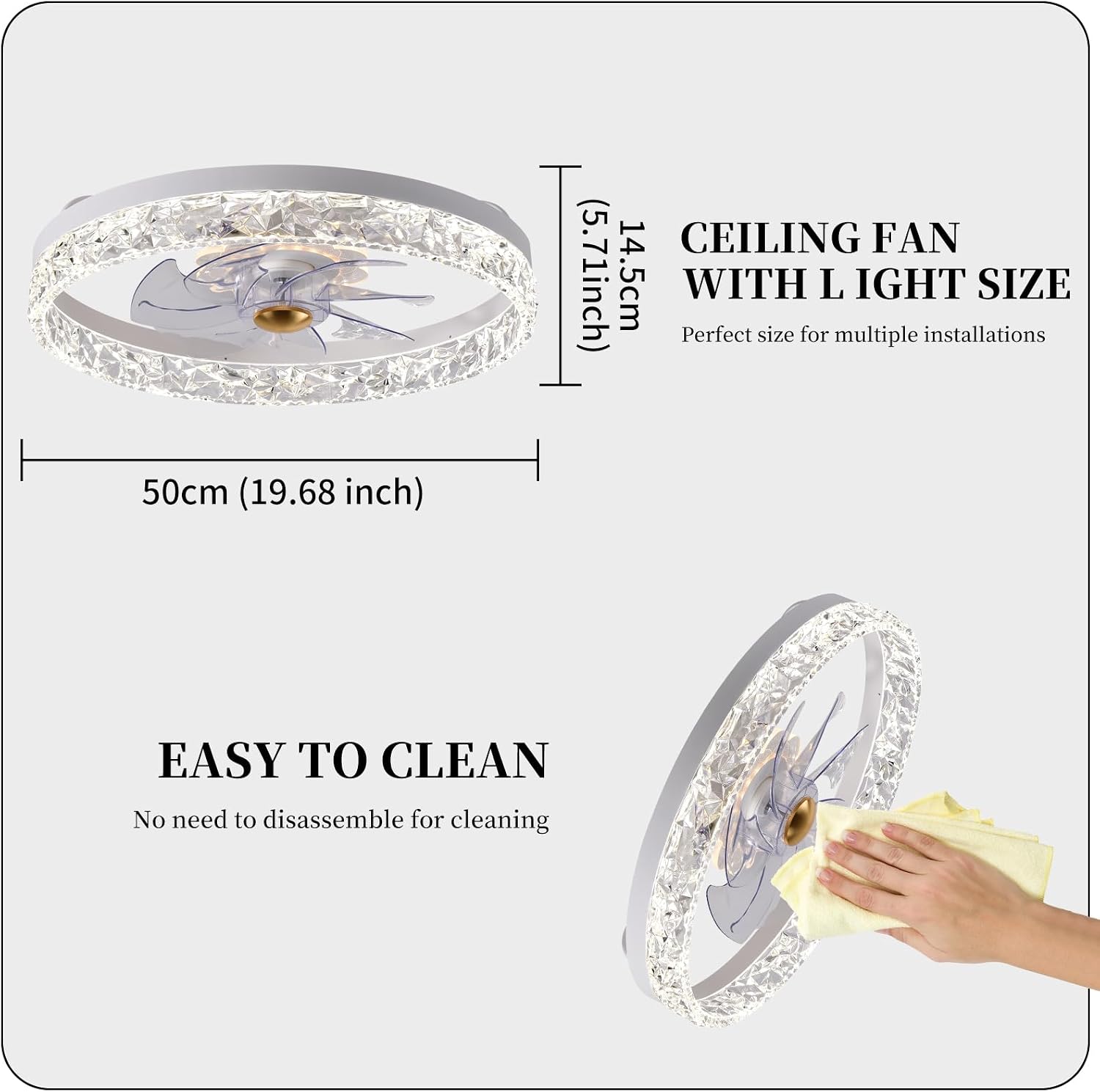
Figure 2: Product dimensions for installation planning.
Installation Steps:
- Prepare Mounting Location: Turn off power at the main circuit breaker. Remove any existing light fixture.
- Install Mounting Bracket: Secure the fan's mounting bracket to the ceiling electrical box. Ensure it is firmly attached and can support the fan's weight. You may need to drill 4 holes around the electrical box for secure mounting, as noted in some user experiences.
- Wire Connections: Connect the fan's electrical wires to the household wiring according to the marked cables (e.g., live, neutral, ground). Use wire nuts to secure connections.
- Attach Fan Body: Carefully lift the fan body and attach it to the mounting bracket. Ensure all screws are tightened securely.
- Final Checks: Once installed, ensure all connections are secure and the fan is stable. Restore power at the circuit breaker.
4. Operating Instructions
Your Fszdorj Smart Ceiling Fan can be controlled using the included remote control or a dedicated smartphone application.
4.1 Remote Control Operation
The remote control provides full functionality for your ceiling fan and light.

Figure 3: Remote control layout and smartphone app interface.
- Light Switch (ON/OFF): Turns the main light on or off.
- Night Light: Activates or deactivates the separate night light function.
- Color Change Temperature (K+/-): Adjusts the light color temperature between warm (3000K), neutral (4500K), and bright white (6000K).
- LED Dimming/Color Dimming (+/-): Adjusts the brightness of the light from 0% to 100%.
- Fan Forward/Invert: Switches between summer (forward airflow) and winter (reverse airflow) modes.
- Fan Speed (1-6): Selects one of six fan speeds. '1' is the lowest, '6' is the highest.
- Fan Off: Turns the fan off.
- Timer (1/2/4/8 hours): Sets the fan and/or light to turn off automatically after the selected duration.
- Memory Function: The fan remembers your last light and fan settings when turned off and on again.

Figure 4: Dimmable light settings and color temperature options.

Figure 5: Night lighting color options.

Figure 6: Reversible motor function for year-round comfort.
4.2 Smartphone App Control
For advanced control and convenience, download the dedicated smartphone app. Scan the QR code provided on the remote control image (Figure 3) or visit http://www.jasonghost.com/smartdevicecontrol/index-en.html to download the app.
- Pairing: Follow the in-app instructions to pair your fan with your smartphone.
- Full Control: The app provides all functionalities available on the remote, including fan speed adjustment, light brightness, color temperature control, and timer settings.
- Smart Features: Access additional smart features and customize settings through the app interface.
5. Maintenance
Regular maintenance ensures the longevity and optimal performance of your Fszdorj Smart Ceiling Fan.
Cleaning:
- Power Off: Always turn off power at the circuit breaker before cleaning.
- Dusting: Use a soft, dry cloth to dust the fan and light fixture.
- Wiping: For more thorough cleaning, use a slightly damp cloth with a mild, non-abrasive cleaner. Do not use harsh chemicals or abrasive materials.
- Easy Clean Design: The enclosed structure and transparent acrylic lampshade are designed for easy cleaning without disassembly.
Figure 7: Easy cleaning process for the fan and light fixture.
General Care:
- Periodically check all connections and mounting screws to ensure they remain tight.
- Do not paint the fan or light fixture, as this may affect its performance or appearance.
6. Troubleshooting
If you encounter issues with your Fszdorj Smart Ceiling Fan, refer to the following common problems and solutions:
| Problem | Possible Cause | Solution |
|---|---|---|
| Fan does not operate. | No power supply; remote control battery low; fan not paired with remote/app. | Check circuit breaker. Replace remote control batteries. Re-pair remote/app following instructions in Section 4. |
| Light does not turn on. | No power supply; light function off; LED failure (rare). | Check power. Ensure light is turned on via remote/app. Contact customer support if LEDs are suspected to be faulty. |
| Fan wobbles or makes excessive noise. | Loose mounting screws; unbalanced blades (though this model has enclosed blades); obstruction. | Ensure mounting bracket and fan body screws are tight. Check for any obstructions around the fan. |
| Remote control or app not responding. | Battery issue; interference; pairing lost. | Replace remote batteries. Ensure no strong interference sources nearby. Re-pair the remote/app. |
| Night light will not turn off / Center light stays on. | Specific setting or malfunction. | Ensure you are using the correct button on the remote/app for the night light. If the issue persists, try cycling power at the circuit breaker for 30 seconds. If problem continues, contact customer support. |
If the problem persists after trying these solutions, please contact Fszdorj customer support.
7. Specifications
| Feature | Detail |
|---|---|
| Brand | Fszdorj |
| Model Name | 1-F098 |
| Product Dimensions | 19.68 inches (50cm) diameter x 5.71 inches (14.5cm) height |
| Item Weight | 7.45 pounds (approx. 3.38 kg) |
| Material | Iron (frame), Acrylic (shade) |
| Color | White (with transparent crystal-like accents) |
| Light Source Type | LED |
| Number of Light Sources | 3 (main light, night light) |
| Brightness | 6500 Lumen (max) |
| Color Temperature | 3000K-6500K (adjustable) |
| Wattage | 80 watts (main lamp), 4 watts (night light) |
| Voltage | 110 Volts |
| Control Method | App, Remote Control |
| Fan Speeds | 6 Levels |
| Noise Level | ≤30 dB(A) |
| Installation Type | Flush Mount |
| Recommended Use Area | 107 - 269 ft² |
| Included Components | Remote Control |
8. Warranty and Support
Fszdorj is committed to providing quality products and ensuring customer satisfaction.
- Warranty: This product comes with a 2-YEAR WARRANTY. Please retain your proof of purchase for warranty claims.
- Customer Support: Our professional online after-sales team is available 24/7 to assist you with any questions, concerns, or issues you may encounter.
- Contact: For support, please contact us via Amazon message or visit the official Fszdorj Storefront: Fszdorj Store.