
1. Introduction
Thank you for purchasing the SHEHDS LED Par Stage Light. This 30W COB RGB 3in1 light is designed to provide impressive wash effects with vibrant colors for various events and settings. It features multiple control options including DMX, remote control, sound activation, and auto modes. This manual provides detailed instructions for safe operation, setup, and maintenance of your device.
2. Safety Information
- Always connect the device to a grounded power outlet.
- Ensure the voltage of the power supply matches the voltage specified on the device.
- Do not operate the device if the power cord is damaged.
- Avoid direct eye exposure to the light source.
- Keep the device away from water, moisture, and high temperatures.
- Ensure adequate ventilation around the unit to prevent overheating.
- Only qualified personnel should perform repairs or maintenance.
3. Package Contents
Verify that all items listed below are included in your package:
- SHEHDS LED Par Stage Light (2 units for 2-pack)
- Remote Control
- Mounting Bracket
- Power Cable
- Instruction Manual

Image: The package contents, showing the light unit, remote, mounting bracket, and documentation.
4. Product Overview
The SHEHDS LED Par Stage Light is a compact and powerful lighting fixture designed for various stage and event applications. It features a COB (Chip on Board) LED for efficient and bright illumination.
Components
- COB LED: Central light source providing RGB 3in1 color mixing.
- Mounting Bracket: Adjustable bracket for easy positioning and installation.
- Control Panel: Digital display and buttons for mode selection and settings.
- DMX IN/OUT Ports: For connecting to a DMX controller or daisy-chaining multiple units.
- Power Input: Standard power connection.
- Cooling Vents: Integrated design for heat dissipation.

Image: Front view of the LED Par Stage Light.
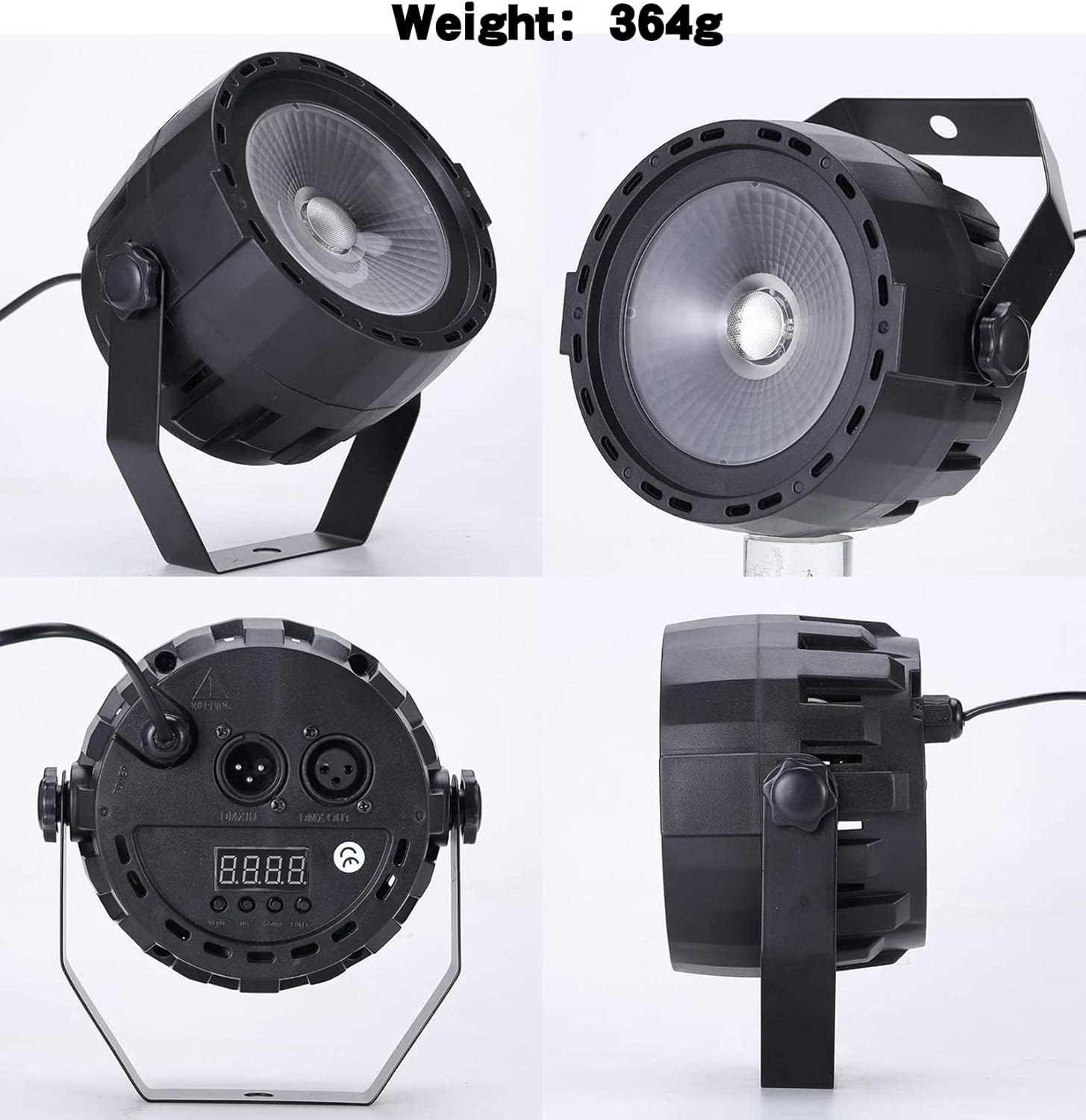
Image: Various angles of the light, including the back panel with DMX ports and control display.
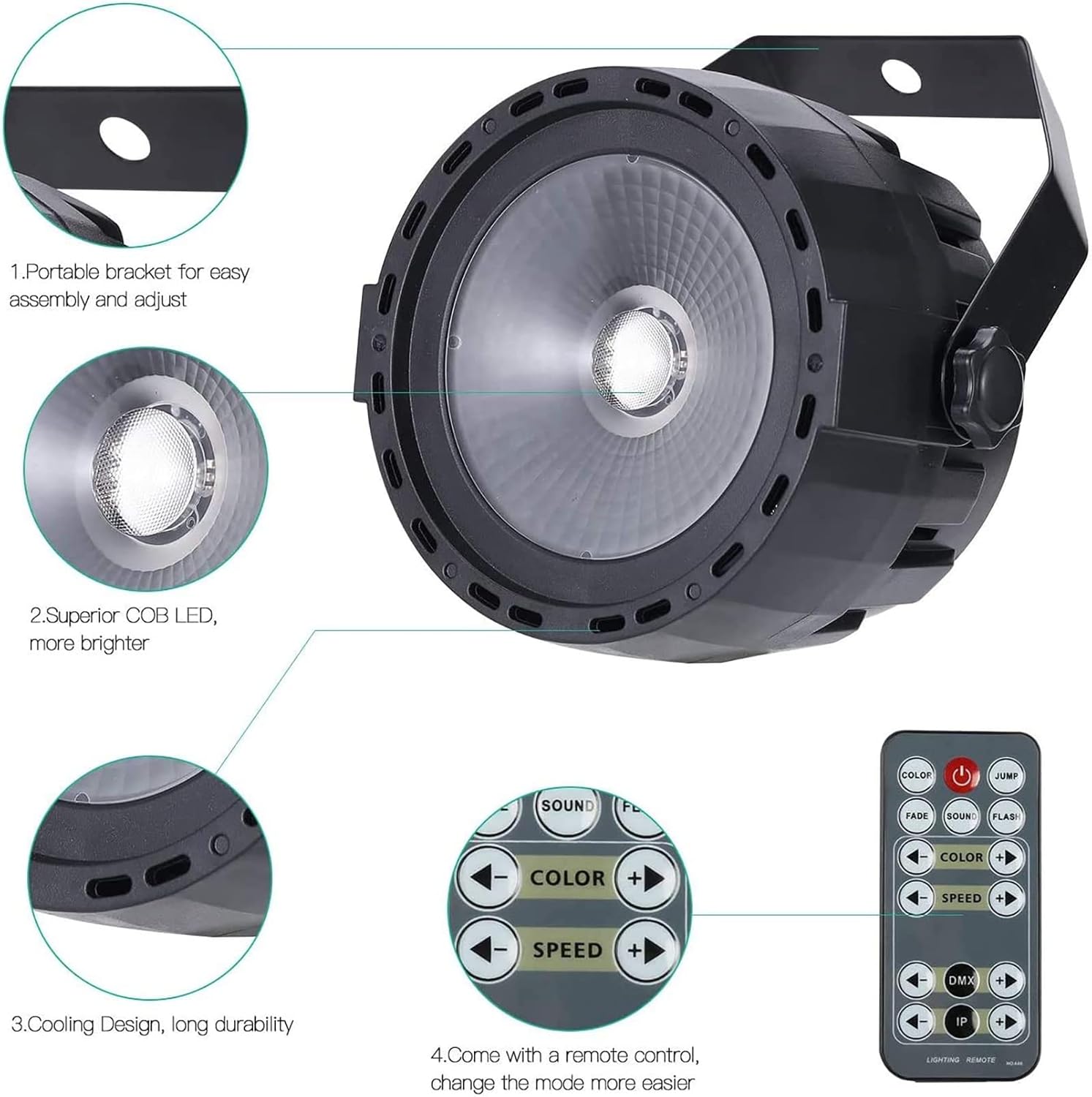
Image: Exploded view showing key features like the bracket, COB LED, cooling, and remote control.
5. Setup
5.1 Mounting
The included mounting bracket allows for versatile placement. Attach the bracket to the sides of the light using the provided screws. You can then position the light on a floor, truss, or stand. Ensure the light is securely fastened before operation.
5.2 Power Connection
Connect the power cable to the power input on the back of the unit and then plug it into a suitable power outlet. The unit will power on and the digital display will illuminate.
6. Operating Modes
The SHEHDS LED Par Stage Light offers several operating modes to suit different needs:
- Standalone Mode: Control colors and effects directly from the unit's display.
- Sound Activated Mode: The light reacts to music or ambient sound.
- Auto Mode: Pre-programmed light shows run automatically.
- DMX Mode: Full control via an external DMX controller.
- Master-Slave Mode: Link multiple units to synchronize their operation.

Image: The light producing a blue wash effect.

Image: Examples of blue, green, red, and mixed color outputs from the light.
7. DMX Control
The SHEHDS LED Par Stage Light supports 7-channel DMX control, allowing for precise manipulation of color, intensity, and effects. Connect your DMX controller to the DMX IN port using a 3-pin XLR cable. For daisy-chaining multiple units, connect the DMX OUT of the first unit to the DMX IN of the next.
Once the DMX address is set and confirmed by pressing the OK key, it will be preserved even after power cycling the device.

Image: DMX and Remote Control options.
8. Remote Control
The included remote control provides convenient access to various functions, including static colors (Red, Green, Blue), strobe effects, and sound activation. Refer to the remote control diagram for specific button functions.
Video: Demonstration of the Wireless Remote Control for the LED Par COB 30W RGB 3in1 Lighting.
9. Maintenance
Regular maintenance ensures optimal performance and longevity of your SHEHDS LED Par Stage Light.
- Cleaning: Periodically clean the lens and housing with a soft, lint-free cloth. Do not use abrasive cleaners or solvents.
- Inspection: Regularly check power cables and DMX connections for any signs of damage.
- Storage: When not in use, store the light in a dry, dust-free environment.
10. Troubleshooting
If you encounter issues with your SHEHDS LED Par Stage Light, refer to the following common problems and solutions:
| Problem | Possible Cause | Solution |
|---|---|---|
| No power | Power cable disconnected or faulty outlet. | Check power connections and try a different outlet. |
| No DMX signal | Incorrect DMX address or faulty DMX cable. | Verify DMX address settings and check DMX cable connections. |
| Light not responding to remote | Remote battery low or infrared sensor blocked. | Replace remote battery or ensure clear line of sight to the sensor. |
| Inconsistent color output | Internal fault or DMX signal interference. | Try resetting the unit. If using DMX, check for signal integrity. |
11. Specifications
| Feature | Detail |
|---|---|
| Model Number | SHE-RCPCOB30WC-2# |
| Light Source Type | LED 30W 3in1 RGB mixed |
| Wattage | 30 Watts |
| Voltage | 240 Volts |
| DMX Channels | 7 channels |
| Control Modes | Voice-activated / Auto / DMX / Master-slave |
| Material | Plastic |
| Product Dimensions | 3"L x 2"W x 3"H |
| Item Weight | 2.72 pounds |
12. Warranty and Support
SHEHDS products are designed for reliability and performance. For warranty information or technical support, please refer to the contact details provided with your purchase documentation or visit the official SHEHDS website. Keep your proof of purchase for any warranty claims.


