
1. Introduction and Safety Information
Thank you for choosing the Waykar 120 Pints Energy Star Dehumidifier. This manual provides essential information for the safe and efficient operation of your appliance. Please read it thoroughly before use and retain it for future reference.
Important Safety Instructions
- Always place the dehumidifier on a level, stable surface to prevent tipping.
- Ensure the power cord is not damaged and is properly plugged into a grounded outlet.
- Do not operate the unit with a damaged power cord or plug.
- Keep the unit at least 8 inches (20 cm) away from walls or furniture to ensure proper airflow.
- Do not block the air inlet or outlet.
- Unplug the unit before cleaning or performing any maintenance.
- Do not use the dehumidifier in areas where flammable gases or liquids are stored.
- This appliance is not intended for use by persons (including children) with reduced physical, sensory or mental capabilities, or lack of experience and knowledge, unless they have been given supervision or instruction concerning use of the appliance by a person responsible for their safety.
- Children should be supervised to ensure that they do not play with the appliance.
2. Product Features
- High Capacity: Removes up to 120 pints of moisture per day, suitable for spaces up to 6,000 sq. ft.
- 90° Auto Swing Airflow: Distributes dry air evenly, improving circulation and dehumidification efficiency.
- Smart Humidity Control: Adjustable humidity range from 30% to 80% RH for flexible drying.
- Energy Star Certified: Engineered for efficient operation, minimizing energy consumption.
- AI-Smart Protection System: Features automatic defrost and overload protection for reliable performance.
- Quiet Operation: Operates at approximately 42 dB, suitable for various environments including bedrooms.
- Flexible Drainage: Supports both manual drainage with a 1.14-gallon water tank and continuous gravity drainage with the included 3.3 ft drain hose.
- 24-Hour Timer: Allows scheduling of automatic on/off cycles for convenience and energy saving.
- Detachable & Washable Filter: Easy to remove and clean for consistent air quality.
- Portability: Equipped with caster wheels and integrated handles for easy movement.
3. Setup and Installation
Before first use, ensure the unit has been standing upright for at least 24 hours to allow the refrigerant to settle. Remove all packaging materials and tape from the unit.
Unboxing and Initial Placement

Image: The Waykar 120 Pints Dehumidifier positioned in a living room, showcasing its compact design and portability.
- Carefully remove the dehumidifier from its packaging.
- Place the unit on a firm, level surface in the desired location.
- Ensure there is at least 8 inches (20 cm) of space around the unit for proper air circulation.
Power Connection
Plug the power cord into a grounded electrical outlet. The unit is now ready for operation.
Video: Waykar 120 Pints Energy Star Dehumidifier Overview
Video Description: An official Waykar video demonstrating the key features and benefits of the 120 Pints Energy Star Dehumidifier, including its quiet operation, auto-swing function, and ease of use.
4. Operating Instructions
Control Panel Overview
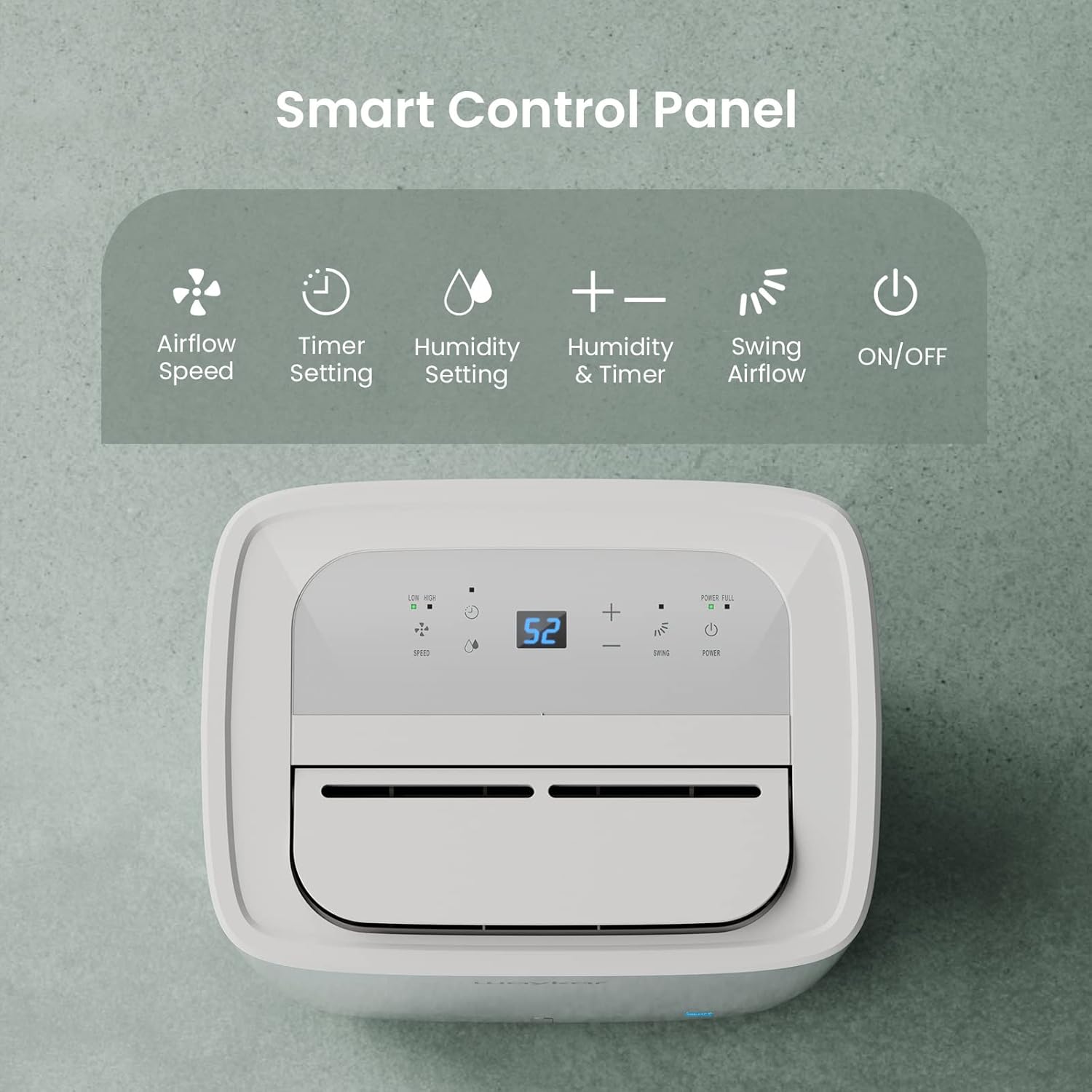
Image: A detailed view of the dehumidifier's smart control panel, showing buttons for Airflow Speed, Timer Setting, Humidity Setting, Swing Airflow, and ON/OFF.
- Power Button: Press to turn the unit ON or OFF.
- Humidity Setting: Use the '+' and '-' buttons to set your desired humidity level between 30% and 80% RH. The unit will operate until this level is reached.
- Fan Speed: Press the 'Speed' button to toggle between Low and High fan speeds.
- Swing Function: Press the 'Swing' button to activate or deactivate the 90° auto swing airflow.
- Timer: Press the 'Timer' button to set a 1-24 hour timer for automatic ON/OFF operation.
- Power Full Indicator: Illuminates when the water tank is full, and the unit will automatically shut off.
Setting Desired Humidity
Once powered on, the display will show the current room humidity. Use the '+' or '-' buttons to adjust the target humidity. The unit will run until the set humidity is achieved, then cycle on and off to maintain it.
Auto Defrost Function
The dehumidifier is equipped with an AI-Smart Protection System that automatically activates defrost mode when frost builds up on the evaporator coils, ensuring efficient operation in low temperatures.
5. Drainage Options
Your Waykar dehumidifier offers two convenient drainage methods:
Manual Drainage (Water Tank)

Image: The detachable water tank of the Waykar Dehumidifier, showing its visible water level indicator and washable design.
- When the 1.14-gallon water tank is full, the "Power Full" indicator will light up, and the unit will automatically stop operating.
- Carefully pull out the water tank from the front of the unit.
- Empty the collected water and slide the tank back into place until it clicks securely.
- The unit will resume operation automatically once the tank is reinserted.
Continuous Drainage (Drain Hose)

Image: The Waykar Dehumidifier illustrating its dual drainage capabilities: the removable water tank for manual emptying and the rear connection for a continuous drain hose.
- For continuous operation without emptying the tank, attach the included 3.3 ft drain hose to the drainage port at the back of the unit.
- Ensure the hose is sloped downwards to allow gravity drainage into a suitable floor drain or container.
- The drainage port uses a standard 3/4" garden hose connection for easy compatibility.
6. Maintenance
Regular maintenance ensures optimal performance and longevity of your dehumidifier.
Cleaning the Air Filter
- The detachable and washable filter should be cleaned every two weeks or more frequently depending on usage and air quality.
- Turn off the dehumidifier and unplug it from the power outlet.
- Remove the filter from the back of the unit.
- Wash the filter with warm, soapy water. Rinse thoroughly and allow it to air dry completely before reinserting.
- Never operate the dehumidifier without the filter in place.
Cleaning the Water Tank
- Clean the water tank periodically to prevent mold and bacteria growth.
- Remove the tank, empty any water, and wash it with mild detergent and warm water.
- Rinse thoroughly and dry before placing it back into the unit.
7. Troubleshooting
| Problem | Possible Cause | Solution |
|---|---|---|
| Dehumidifier does not turn on. | No power, tank full, temperature too low. | Check power connection, empty water tank, ensure room temperature is above 41°F (5°C). |
| Unit runs but does not dehumidify. | Filter clogged, room too large, doors/windows open. | Clean air filter, ensure unit is sized correctly for the space, close all doors and windows. |
| "Power Full" light is on, but tank is not full. | Float switch stuck or misaligned. | Remove and reinsert the water tank, check the float switch for obstructions. |
| Unit is noisy. | Unit not level, filter clogged, internal issue. | Place on a level surface, clean filter. If noise persists, contact customer support. |
8. Specifications
| Feature | Detail |
|---|---|
| Brand | Waykar |
| Model Name | JD-CE |
| Model Number | JD025CE-120 |
| Capacity | 120 Pints (95°F, 90% RH) / 15 Gallons per Day |
| Coverage Area | Up to 6,000 Sq. Ft |
| Tank Volume | 1.14 Gallons (4.3L) |
| Humidity Range | 30%–80% RH |
| Noise Level | Approximately 42 dB |
| Product Dimensions | 9.84"D x 13.39"W x 21.86"H |
| Item Weight | 34 Pounds |
| Wattage | 350 watts |
| Special Features | Auto swing, Automatic Defrost, ENERGY STAR Certified, Overheat Protection, Quiet Operation, Timer, Washable Filter |
| Included Components | Dehumidifier, Visible Water Tank, Drain Hose (3.3 ft), Detachable & Washable Filter, Power Cord |
9. Warranty and Support
Waykar is a U.S.-based brand with over 10 years of dehumidifier expertise. We are committed to providing reliable products and excellent customer service.
- Warranty: Each unit includes a 1-year warranty plus an additional free year upon registration.
- Customer Support: Our team is available 24/7 to assist with any questions or concerns.
- Contact Information: Please refer to the contact details provided in your product registration card or visit the official Waykar website for support.


