
1. Introduction
Thank you for choosing the OLIGHT Arkfeld EDC Flat Flashlight. This compact and powerful device is designed for everyday carry, offering both a bright white LED light and a precise green laser beam. Its innovative flat design, magnetic charging, and multiple lighting modes make it an indispensable tool for various situations, from outdoor adventures to professional presentations.

Figure 1: OLIGHT Arkfeld EDC Flat Flashlight with green laser beam.
2. What's in the Box
- OLIGHT Arkfeld Flashlight (Battery Included)
- MCC3 Magnetic USB Charging Cable x 1
- User Manual x 1

Figure 2: Included items: Arkfeld flashlight and MCC3 Magnetic USB Charging Cable.
3. Setup
3.1 Initial Charging
Before first use, fully charge your Arkfeld flashlight. The device is powered by a built-in rechargeable battery. Use the provided MCC3 Magnetic USB Charging Cable. Simply attach the magnetic end of the cable to the tail cap of the flashlight. The indicator light on the charging cable will show the charging status.

Figure 3: Connecting the MCC3 Magnetic USB Charging Cable to the Arkfeld flashlight.
4. Operating Instructions
4.1 Intuitive Interface
The Arkfeld features a central button and a convenient outer ring selector for easy operation. The central button controls power and brightness levels for the white LED. The outer ring allows you to switch between the white LED light and the green laser beam.

Figure 4: Intuitive interface with central button and selector for white LED or green beam.
4.2 Green Beam Operation
To activate the green laser beam, rotate the outer ring selector to the laser icon. The output of the green beam is ≤0.39mW, Class 1, ensuring it is within the safe range and poses no harm to humans or animals.
4.3 White LED Light Modes
The Arkfeld offers 5 brightness levels for the white LED, with a maximum output of 1,000 lumens. The flashlight can memorize the last used mode, providing convenience for daily use. The available modes are:
- Moon: Lowest setting for minimal light.
- Low: Suitable for indoor use and close-up tasks.
- Mid: General purpose brightness.
- High: Bright illumination for wider areas.
- Turbo: Maximum 1,000 lumens for powerful, temporary illumination.
- Strobe: For signaling or disorienting.

Figure 5: Arkfeld's 5 brightness levels with memory function.
4.4 Lockout and Unlock
- Lockout: When the flashlight is off, press and hold the center button for approximately 2 seconds.
- Unlock: Press and hold the center button for approximately 1 second.
Notice: If the flashlight cannot be turned on after charging, please check whether it is in the lockout mode. A red indicator at the bottom will light up for a short time if it is in lockout mode or battery power is low.
5. Battery Level Indicator
The Arkfeld features a 5-level power display, allowing you to easily monitor the remaining battery power at any time. The green indicator lights represent the battery charge:
- Four Green Lights: >75% battery
- Three Green Lights: 75% to 50% battery
- Two Green Lights: 50% to 25% battery
- One Green Light: 25% to 10% battery
- One Red Light: <10% battery (or in lockout mode)

Figure 6: Battery level indicator on the Arkfeld flashlight.
6. Unique Features and Applications
6.1 Slim Flat Design
The Arkfeld boasts a unique flat shape, weighing only 3.07oz and measuring 0.59 inches in thickness. This ultra-thin profile allows it to fit easily into pockets, purses, or toolkits, ensuring quick access and comfortable everyday carry. The unique one-piece molding process creates a streamlined, seamless body, making it extremely sturdy and durable.
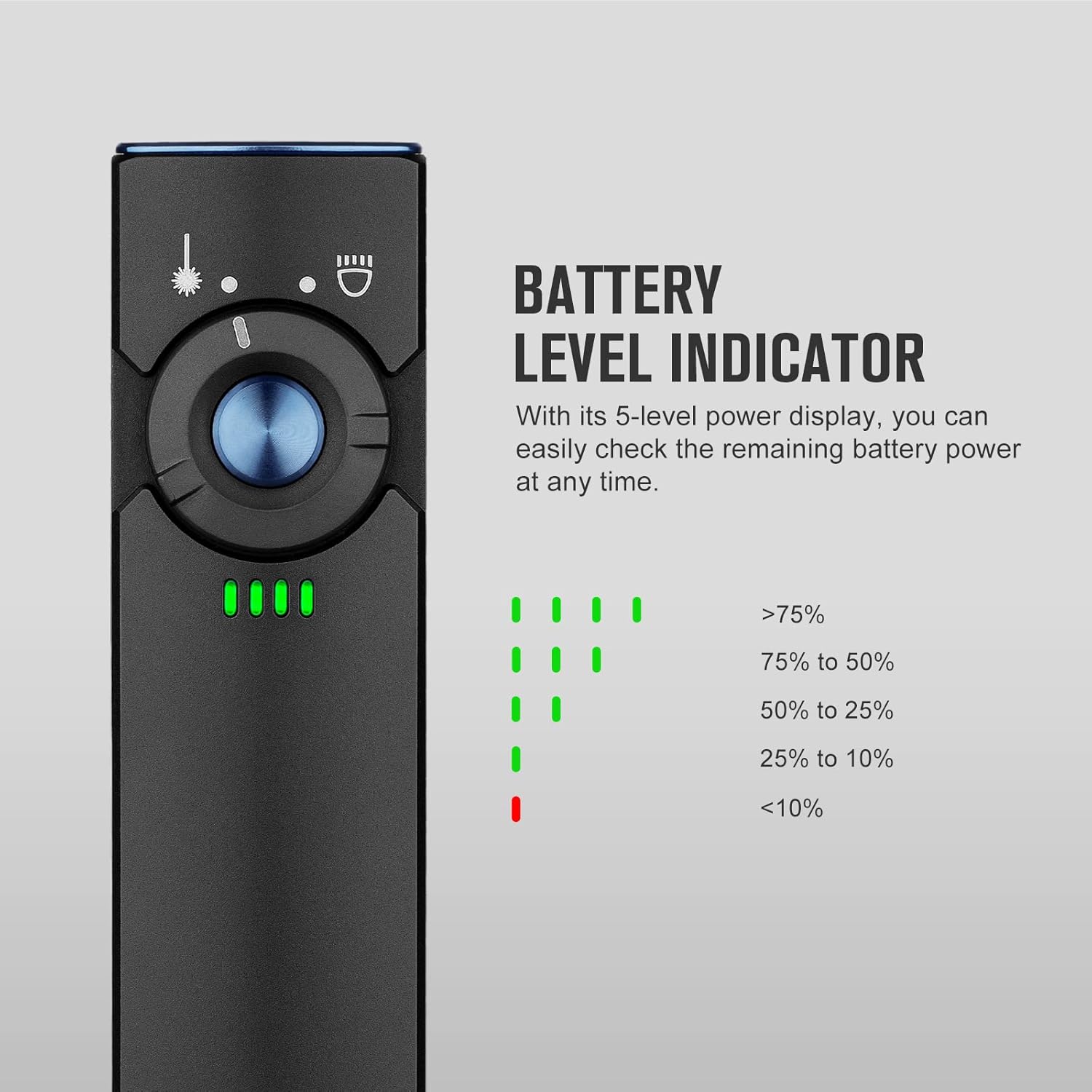
Figure 7: The Arkfeld's unique flat design for easy portability.
6.2 Magnetic Tail
Equipped with a magnetic tail, the Arkfeld can be easily attached to any metal surface, such as the body of a car or a metal workbench. This feature provides convenient hands-free illumination, making it perfect for outdoor use, vehicle maintenance, or any task requiring directed light without holding the device.
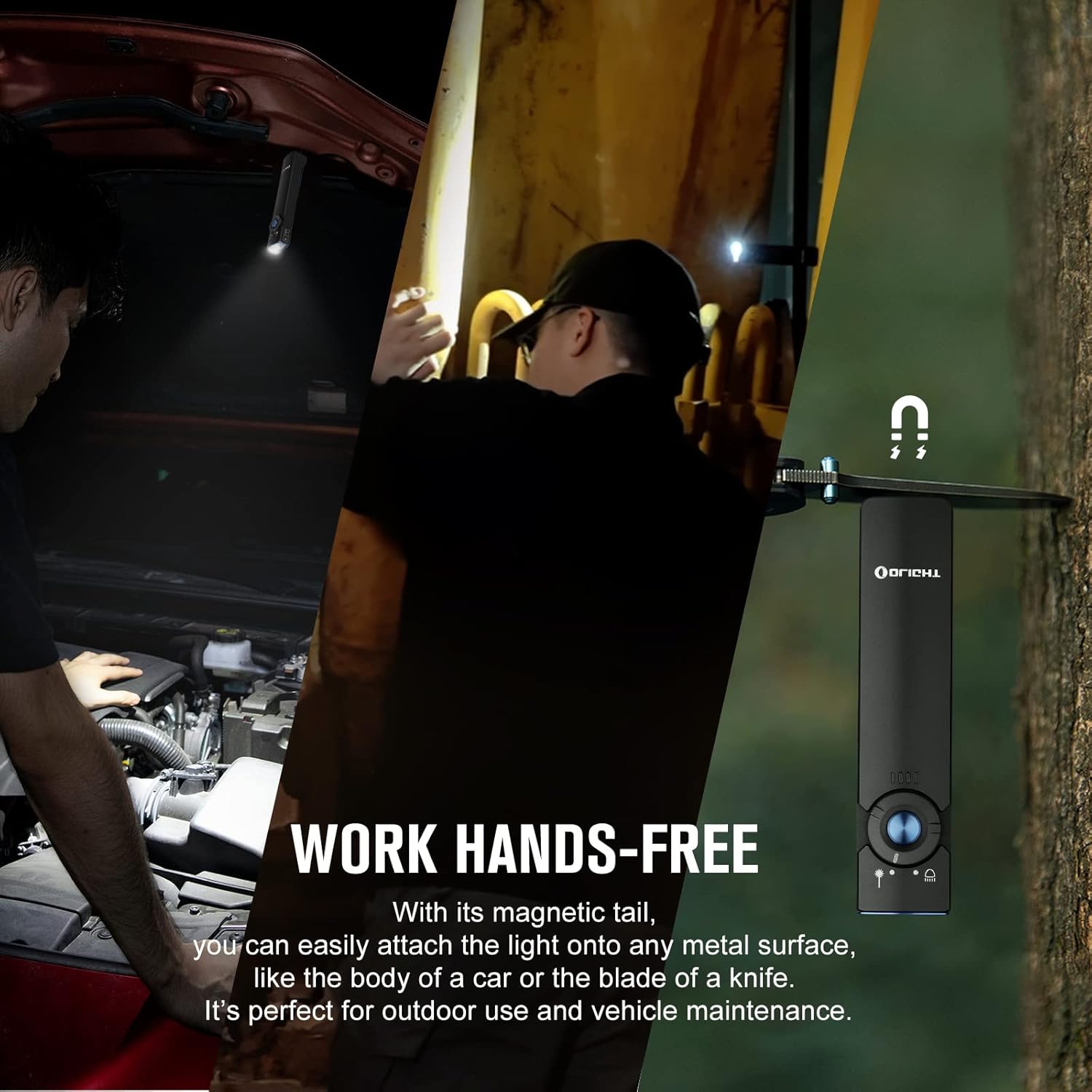
Figure 8: Magnetic tail allows for hands-free operation.
6.3 Versatile Applications
The Arkfeld is designed to meet a variety of lighting needs:
- Presentations: Use the green laser beam for professional and confident presentations.
- Outdoor Use: Provides a bright, clear view for navigating outdoor environments.
- Emergency: Perfect for power outages and other potential emergencies.
- Pet Toy: The green laser can be used to amuse or train pets to fetch objects.

Figure 9: Arkfeld's diverse applications.
7. Specifications
| Feature | Detail |
|---|---|
| White Brightness | 1000 Lumens (Max) |
| Light Path Distance | 101 Meters |
| Green Beam Output | ≤0.39mW, Class 1 |
| Power Source | Built-in Rechargeable Lithium Polymer Battery |
| Material | Aluminum |
| Product Dimensions (D x W x H) | 0.59" x 0.98" x 4.33" |
| Item Weight | 3.1 Ounces |
| Water Resistance Level | Waterproof (IPX7) |
| Runtime (Max) | 8 days (Moonlight mode) |

Figure 10: Detailed specifications and performance data.
8. Maintenance
To ensure the longevity and optimal performance of your OLIGHT Arkfeld flashlight, follow these maintenance guidelines:
- Keep the flashlight clean and dry. Wipe it with a soft cloth after use, especially if exposed to water or dirt.
- Avoid dropping the flashlight or subjecting it to strong impacts.
- Store the flashlight in a cool, dry place when not in use.
- Regularly charge the battery to maintain its health, even if not used frequently.
- Do not attempt to disassemble the flashlight, as this may void the warranty and cause damage.
9. Troubleshooting
9.1 Flashlight Not Turning On
If your Arkfeld flashlight does not turn on, consider the following:
- Check Battery Level: Ensure the battery is sufficiently charged. Refer to the Battery Level Indicator section (Section 5).
- Verify Lockout Mode: The flashlight might be in lockout mode. Press and hold the center button for approximately 1 second to unlock it. A red indicator light will briefly appear if it was in lockout mode.
- Charging Connection: Ensure the MCC3 Magnetic USB Charging Cable is properly connected and providing power.
If the issue persists after checking these points, please contact OLIGHT customer support for further assistance.
10. Warranty & Support
OLIGHT stands behind the quality of its products. The Arkfeld EDC Flat Flashlight comes with a Lifetime Warranty, reflecting OLIGHT's commitment to high-quality and durable products.

Figure 11: OLIGHT Lifetime Warranty.
For detailed warranty information, technical support, or service inquiries, please refer to the official OLIGHT website or contact their customer service directly. You can also find the full user manual in PDF format here.


