
Introduction
This manual provides detailed instructions for the installation, operation, and maintenance of your DWEII 12V to 5V DC-DC Buck Converter. This module is designed to efficiently step down a DC input voltage range of 6.3V-22V to a stable 5V DC output, suitable for various applications including automotive, LED displays, and solar systems. Please read this manual thoroughly before use to ensure proper function and safety.
Safety Information
Observe the following safety precautions to prevent injury or damage to the device:
- Ensure all power sources are disconnected before making any electrical connections.
- Verify input and output polarities carefully. Incorrect wiring can damage the converter and connected devices.
- Do not exceed the specified input voltage range (DC 6.3V-22V) or output current (3A).
- The converter is waterproof, but avoid submerging it in liquids for extended periods.
- Keep the device away from flammable materials and extreme temperatures.
- If the device shows signs of damage or malfunction, discontinue use immediately.
Product Features
- Input Voltage: DC 6.3V-22V (compatible with 12V/9V systems)
- Output Voltage: Stable DC 5V
- Output Current: 3A maximum
- Output Power: 15W maximum
- Conversion Efficiency: Over 95%
- Protection Features: Over-current protection, over-temperature protection, input reverse connection protection, short-circuit protection.
- Environmental Resistance: Waterproof, dust-proof, moisture-proof, shock-proof alloy housing.
- Applications: Suitable for car audio, LED displays, motors, speakers, auto map navigators, hard disk players, media devices, electric fans, toy cars, air conditioning, and solar energy systems.
Specifications
| Specification | Value |
|---|---|
| Input Voltage | DC 6.3V-22V |
| Output Voltage | DC 5V |
| Output Current | 3A |
| Output Power | 15W |
| Conversion Efficiency | Max 95% |
| Dimensions (approx.) | 35mm (L) x 26mm (W) x 21mm (H) / 1.37in x 1.02in x 0.82in |
| Item Weight | 2.39 ounces (approx. 0.07 kg) |
| Housing Material | Alloy |
Setup and Installation
Wiring Diagram
The converter features a simple two-wire input and two-wire output configuration. Ensure correct polarity when connecting to your power source and load.
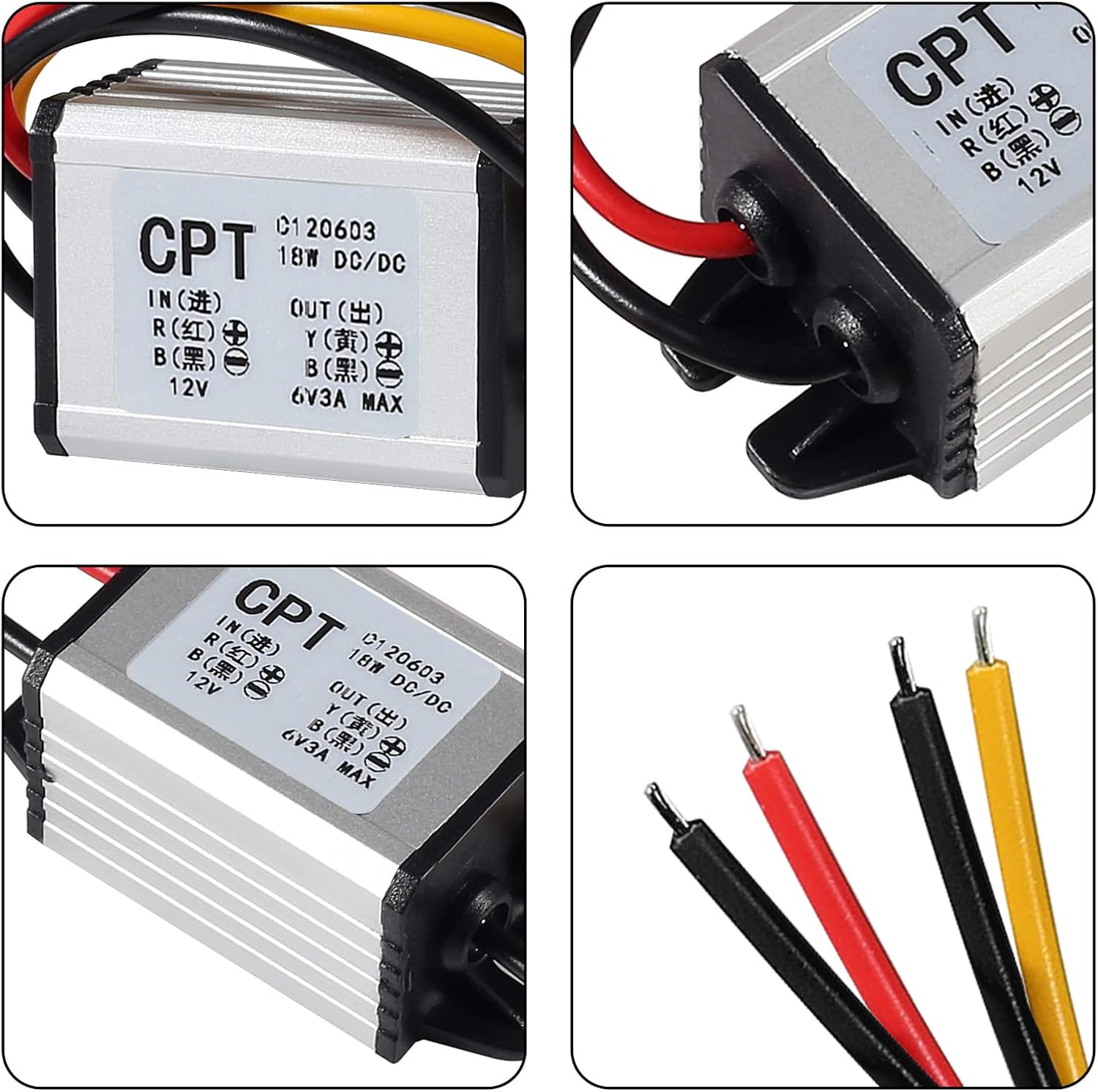
Image: Close-up view of the converter's wiring labels, indicating input (IN) and output (OUT) connections. The red wire is for input positive (+), black for input negative (-), yellow for output positive (+), and black for output negative (-).
- Input:
- Red wire: Input Positive (+)
- Black wire: Input Negative (-)
- Output:
- Yellow wire: Output Positive (+)
- Black wire: Output Negative (-)
Installation Steps
- Prepare Wires: Strip a small portion of insulation from the ends of the input and output wires if they are not already prepared.
- Connect Input: Connect the red wire of the converter to the positive (+) terminal of your DC power source (e.g., 12V battery). Connect the black input wire to the negative (-) terminal of the power source.
- Connect Output: Connect the yellow wire of the converter to the positive (+) terminal of your 5V DC load device. Connect the black output wire to the negative (-) terminal of the load device.
- Secure Connections: Ensure all connections are secure and insulated to prevent short circuits.
- Mount Converter: Mount the converter in a suitable location, away from excessive heat or mechanical stress. The waterproof design allows for installation in various environments.
- Verify: Double-check all wiring before applying power.

Image: An angled view of a single DWEII buck converter, illustrating the compact size and the attached input (red and black) and output (yellow and black) wires.
Operating Instructions
Once properly installed and wired, the DWEII 12V to 5V DC-DC Buck Converter operates automatically. When power is supplied to the input, the converter will regulate the voltage to a stable 5V DC at the output. No user adjustments are required for standard operation.
- Ensure the input voltage remains within the 6.3V-22V range.
- Do not draw more than 3A (15W) from the output to prevent overcurrent protection from activating.
- The converter is designed for continuous operation within its specified limits.

Image: Two DWEII 12V to 5V DC-DC Buck Converters displayed together, highlighting their identical design and pre-wired connections.
Maintenance
The DWEII 12V to 5V DC-DC Buck Converter requires minimal maintenance due to its robust and waterproof design.
- Periodically inspect the wiring for any signs of wear, corrosion, or loose connections.
- Keep the converter free from excessive dirt or debris, although its dust-proof nature reduces this concern.
- Ensure adequate ventilation if installed in an enclosed space, although the unit is designed for efficient heat dissipation.
Troubleshooting
If you encounter issues with your converter, refer to the following common problems and solutions:
- No Output Voltage:
- Check input power source: Ensure it is supplying voltage within the 6.3V-22V range.
- Verify wiring: Confirm input and output wires are connected correctly according to polarity.
- Check for short circuits: Disconnect the load and test the converter. If output appears, the load may have a short.
- Overload protection: If the load draws too much current (over 3A), the converter's protection may activate. Reduce the load.
- Unstable Output Voltage:
- Check input voltage stability: Ensure the input power source is stable and not fluctuating significantly.
- Verify connections: Loose connections can cause intermittent output.
- Converter is Hot:
- This is normal under load, but excessive heat may indicate an overload. Ensure the output current does not exceed 3A.
- Ensure adequate airflow around the unit.
Warranty and Support
DWEII products are manufactured to high-quality standards. For specific warranty information or technical support, please refer to the product packaging or contact your retailer. Keep your purchase receipt for warranty claims.