
Introduction
The Philips Hue Infuse Medium Ceiling Lamp in Black is a smart LED lighting solution designed to enhance your living space with customizable white and color ambiance. This lamp integrates seamlessly into the Philips Hue ecosystem, offering control via the Hue app, voice commands through compatible assistants like Alexa and Google Assistant, and Apple Homekit. It provides both powerful downlight and a subtle upward ring of light for a unique and immersive lighting experience.

Figure 1: Philips Hue Infuse Medium Ceiling Lamp, Black. This image displays the sleek, circular design of the ceiling lamp, highlighting its black finish and integrated light source.
What's Included
Upon unboxing your Philips Hue Infuse Medium Ceiling Lamp, you will find the following components:
- One (1) Philips Hue Infuse Medium Ceiling Lamp (Black finish)
- One (1) White and Color Ambiance Smart LED Bulb (integrated)
- Instruction Manual (this document)

Figure 2: Product packaging for the Philips Hue Infuse Medium Ceiling Lamp. The box clearly indicates the product name, brand, and key features such as color ambiance and smart home compatibility.
Key Features
- Millions of Colors & Shades of White: The White & Color Ambiance range offers both warm-to-cool white light and millions of colors, allowing you to instantly dim, brighten, and set the perfect mood.
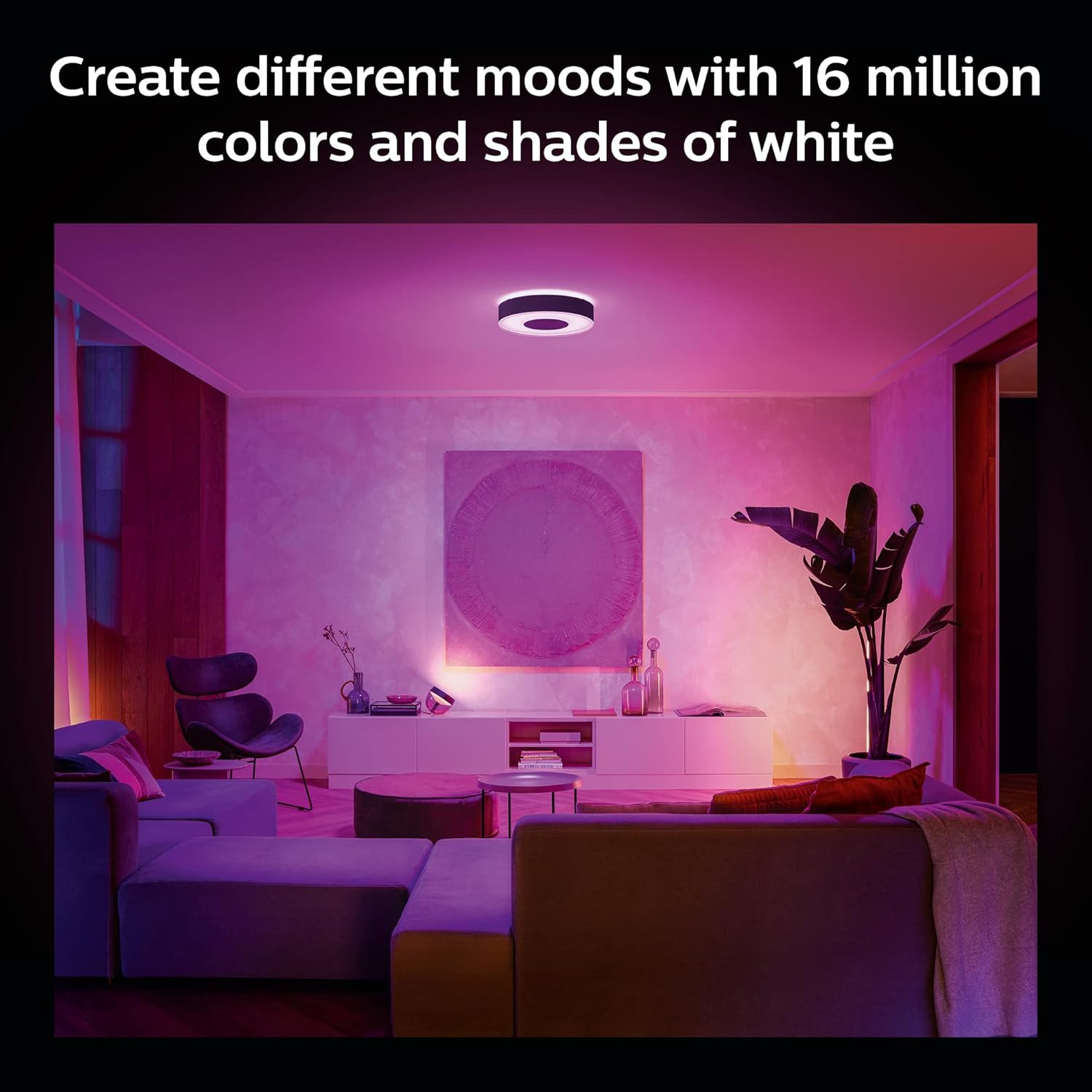
Figure 3: A living room illuminated with the Philips Hue Infuse lamp, demonstrating its ability to produce a wide spectrum of colors to create different moods.
- Voice Control Integration: Enjoy convenient smart control by setting up voice commands through the Hue app. Control your lights effortlessly using Alexa or Google Assistant.

Figure 4: This image illustrates two primary control methods: a hand interacting with the Philips Hue Bluetooth App on a smartphone, and an Amazon Echo Dot representing voice assistant control.
- Personalized Lighting: Create dynamic light effects with subtle changes in brightness and color. Customize these settings directly within the Philips Hue app to match your preferences.

Figure 5: A collage of images showcasing different lighting scenes and moods achievable with Philips Hue, from bright and energetic to relaxed and warm.
- Philips Hue Bridge Integration: For full functionality, including automations, control from anywhere, and a secure, stable connection that won't strain your Wi-Fi, add a Philips Hue Bridge. The Bridge also enables Matter compatibility for broader smart home integration.

Figure 6: An illustrative diagram depicting the Philips Hue Bridge as the central hub connecting various smart lights throughout a home, enabling full home control.
- Sleek Design: The Infuse lamp features a premium, minimalist design that complements various interior decors. It provides powerful downlight and a subtle ring of light directed upwards for a unique ambient effect.

Figure 7: A close-up view of the Philips Hue Infuse lamp, showcasing its sleek, black exterior and the subtle glow from its integrated light ring.
Setup Guide
Follow these steps to set up your Philips Hue Infuse Medium Ceiling Lamp and integrate it into your smart home system.
- Step 1: Install Your Lighting
Physically install the Philips Hue Infuse Medium Ceiling Lamp according to standard electrical installation procedures. Ensure power is off before installation. If you are unsure, consult a qualified electrician.
Figure 8: This diagram illustrates the initial setup choice between a Philips Hue Starter Kit or purchasing a Philips Hue Bridge and lights separately.
- Step 2: Connect the Philips Hue Bridge (Recommended for full functionality)
If you are using a Philips Hue Bridge for full smart home integration, connect it to your Wi-Fi router using an Ethernet cable and plug it into a power outlet. The Bridge creates a dedicated network for your Hue lights, ensuring stable and responsive control.
Figure 9: A visual guide demonstrating the connection of the Philips Hue Bridge to a router and power source, indicating its role in enabling remote control and scheduling.
- Step 3: Download the Philips Hue App
Download the official Philips Hue app from the App Store (for iOS devices) or Google Play Store (for Android devices). Open the app and follow the on-screen instructions to discover and pair your new Infuse Ceiling Lamp.
Figure 10: Screenshots of the Philips Hue mobile application, showing its user interface for managing rooms, scenes, and individual lights.
Operating Instructions
Once your Philips Hue Infuse Medium Ceiling Lamp is set up, you can control it using various methods:
- Philips Hue App: Use the intuitive Philips Hue app on your smartphone or tablet to:
- Turn lights on/off.
- Adjust brightness and color temperature (warm to cool white).
- Select from millions of colors.
- Apply pre-set scenes or create custom ones.
- Set schedules and automations.
- Group lights for synchronized control.
- Voice Control: Integrate your lamp with Amazon Alexa, Google Assistant, or Apple HomeKit. Once linked, use simple voice commands such as:
- "Alexa, turn on the living room light."
- "Hey Google, set the ceiling lamp to blue."
- "Siri, dim the lights to 50%."
- Philips Hue Accessories: Enhance your control with optional Philips Hue accessories (sold separately), such as:
- Hue Dimmer Switch: For instant dimming, brightening, and scene selection.
- Hue Motion Sensor: To automate lighting based on movement.

Figure 11: This graphic illustrates the comprehensive control ecosystem of Philips Hue, including the Hue app, smart switches, motion sensors, and voice control integration with popular assistants.
Maintenance
The Philips Hue Infuse Medium Ceiling Lamp is designed for long-lasting performance with minimal maintenance.
- Cleaning: Ensure the lamp is powered off and cool before cleaning. Use a soft, dry cloth to wipe the surface. Do not use abrasive cleaners, solvents, or harsh chemicals, as these can damage the finish.
- Bulb Replacement: The LED bulb in this fixture is integrated and not user-replaceable. If the light source fails, the entire fixture may need servicing or replacement.
- Software Updates: Regularly check the Philips Hue app for firmware updates for your lamp and Hue Bridge. Updates often include performance improvements, new features, and security enhancements.
Troubleshooting
If you encounter issues with your Philips Hue Infuse Medium Ceiling Lamp, try the following troubleshooting steps:
| Problem | Possible Cause | Solution |
|---|---|---|
| Lamp not responding to app/voice commands. |
|
|
| Lamp is flickering or dimming unexpectedly. |
|
|
| Cannot connect to Hue Bridge. |
|
|
Specifications

Figure 12: Technical drawing illustrating the dimensions of the Philips Hue Infuse Medium Ceiling Lamp, showing its 15-inch length and width, and 3.31-inch height.
| Attribute | Detail |
|---|---|
| Brand | Philips Hue |
| Model Name | Infuse White and Color |
| Model Number | 579847 |
| Color | Black |
| Material | Metal |
| Light Fixture Form | Close to Ceiling |
| Room Type | Living Room, Bedroom |
| Product Dimensions | 15"L x 15"W x 3.31"H |
| Indoor/Outdoor Usage | Indoor |
| Power Source | AC |
| Installation Type | Flush Mount or Semi Flush Mount |
| Special Feature | Energy Efficient, Adjustable Color Temperature, Dimmable |
| Control Method | App |
| Light Source Type | LED |
| Finish Type | Polished |
| Shade Material | Metal |
| Number of Light Sources | 50 (LEDs) |
| Voltage | 120 Volts |
| Light Color | White and Color Ambiance |
| Included Components | Bulb (integrated) |
| Lighting Method | LED |
| Item Weight | 8.8 Pounds (approx. 4 kg) |
| Wattage | 33.5 watts |
| Bulb Base | GU24 (integrated) |
| Controller Type | Remote Control, Google Assistant, Amazon Alexa |
| Switch Type | Push Button (via app/accessories) |
| Water Resistance Level | Not Water Resistant |
| Connectivity Protocol | Bluetooth, Zigbee |
| Brightness | 2350 Lumen |
| Efficiency | 69.64 lumens per watt |
| Mounting Type | Ceiling Mount |
| Assembly Required | No |
| UPC | 046677579845 |
Warranty Information
The Philips Hue Infuse Medium Ceiling Lamp is covered by a manufacturer's warranty.
- Warranty Period: 2 years from the date of purchase.
- For detailed warranty terms and conditions, please refer to the official Philips Hue website or contact customer support.
Support
For further assistance, product registration, or to explore more Philips Hue products and accessories, please visit the official Philips Hue Store or contact their customer support.
Philips Hue Store: Visit the Philips Hue Store on Amazon


