
1. Introduction
This manual provides detailed instructions for the setup, operation, maintenance, and troubleshooting of your XTUGA MB1404FX Professional 14-Channel Audio Mixer. Please read this manual thoroughly before operating the device to ensure proper use and to maximize its performance and longevity.
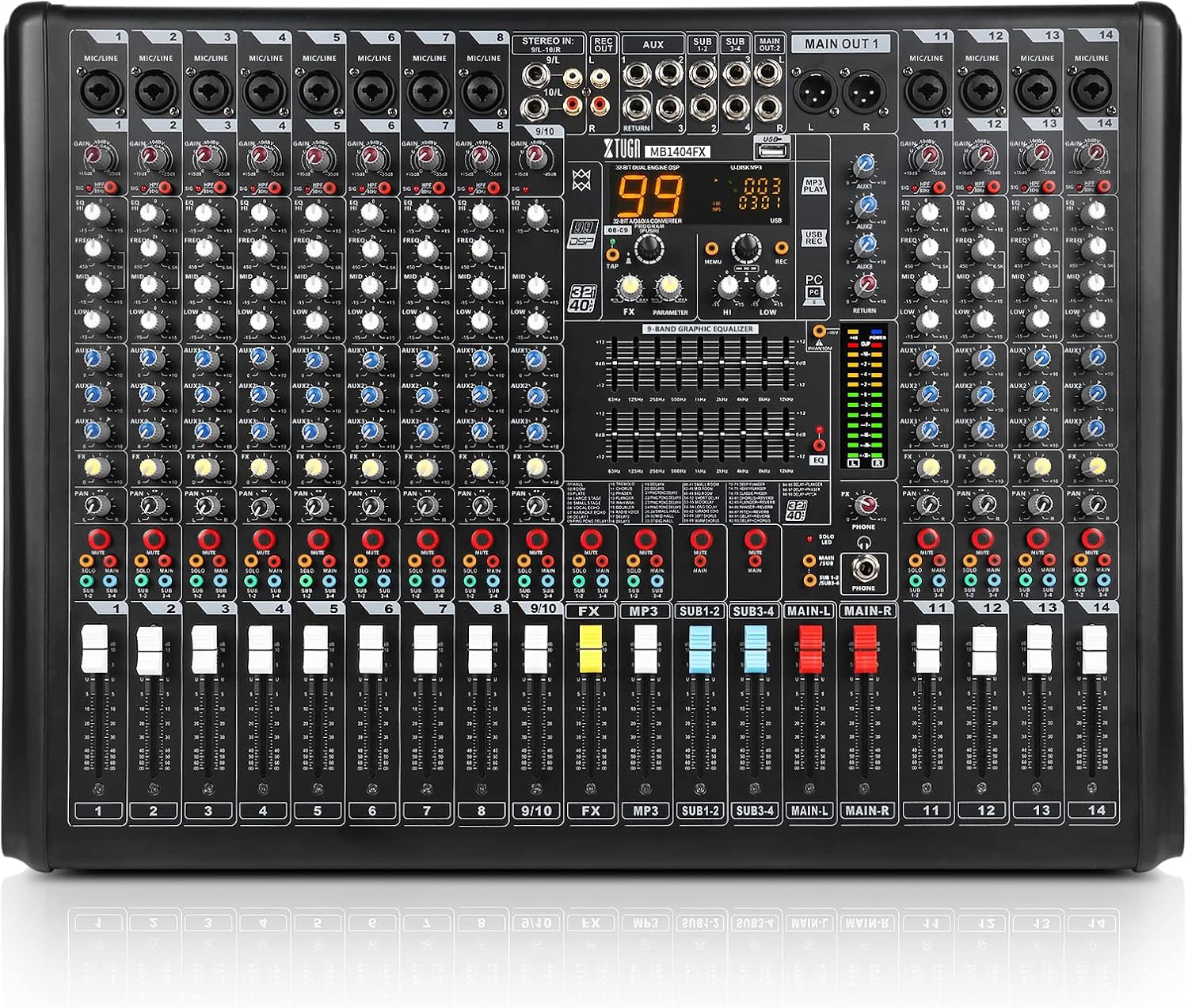
Figure 1: Front view of the XTUGA MB1404FX Professional 14-Channel Audio Mixer. This image displays the full layout of the mixer's controls, including input channels, faders, equalizers, and the central DSP effect section.
2. Product Overview and Features
The XTUGA MB1404FX is a professional 14-channel audio mixer designed for various audio applications, including live performances, DJ sets, recording studios, and wedding ceremonies. It features a comprehensive set of controls and connectivity options.
Key Features:
- 14 Input Channels: Includes 12 mono inputs and 1 stereo input, providing flexibility for various audio sources.
- 99 DSP Effects: Built-in digital signal processing with 99 selectable effects for enhancing audio.
- Dual 9-Band EQ: Graphic equalizer for precise frequency adjustments on the main output.
- +48V Phantom Power: Essential for condenser microphones.
- Bluetooth Connectivity: For wireless audio streaming from smart devices.
- USB Interface: Allows connection to computers for mixing and recording, and playback from USB flash drives.
- 4 Group Outputs: Provides efficient and flexible signal routing.
- Independent Solo Key: For monitoring individual channels.

Figure 2: Illustration of the mixer's input section, highlighting the 12 mono inputs, 1 stereo input, and auxiliary inputs. This visual aids in understanding the various connection points for microphones and line-level devices.

Figure 3: Close-up of the independent SOLO key. Pressing this button allows monitoring of a specific channel through headphones without affecting the main mix, crucial for sound checks and precise adjustments.

Figure 4: View of the integrated 99 DSP effect processor. This section allows users to select and apply various digital effects to enhance the audio output, such as reverb, delay, and chorus.

Figure 5: Detail of the 4 group output controls. These controls enable signals from multiple channels to be mixed into a sub-group, offering flexible routing and control over specific instrument or vocal sections.

Figure 6: Diagram showing the mixer's USB connectivity. The mixer can connect to a computer for recording and playback, or directly play MP3 files from a USB flash drive.

Figure 7: Illustration of the mixer's wireless Bluetooth function. This feature allows users to stream audio wirelessly from compatible smart devices directly to the mixer.

Figure 8: Overview of various mixer functions including mute buttons, level indicators for monitoring signal strength, fader design for precise volume control, and the +48V phantom power switch for condenser microphones.
3. Setup
3.1 Unpacking and Inspection
- Carefully remove the mixer from its packaging.
- Inspect the unit for any signs of damage that may have occurred during transit. If damage is found, contact your dealer immediately.
- Ensure all accessories are present: power adapter, USB cable, and this user manual.
3.2 Power Connection
- Locate the power socket (25) on the rear panel of the mixer.
- Connect the provided power adapter to the power socket.
- Plug the power adapter into a suitable electrical outlet.
- Ensure the power switch (26) is in the 'OFF' position before connecting power.
3.3 Audio Input Connections
Refer to Figure 9 for control locations.
- Microphones: Connect dynamic or condenser microphones to the Mic input jacks (1) using XLR cables. For condenser microphones, activate the +48V Phantom Power switch (21).
- Line-Level Devices: Connect instruments (keyboards, guitars with preamps), CD players, or other line-level devices to the Mic input jacks (1) using 1/4-inch TRS or TS cables, or to the Stereo input (10) for stereo sources.
3.4 Audio Output Connections
Refer to Figure 9 for control locations.
- Main Output: Connect your main speakers or power amplifier to the Main out jack (14) using XLR cables.
- Monitor Output: Connect headphones to the Monitor jack (24) for personal monitoring.
- Recording Output: Use the Recording output (11) to send the mixed signal to a recording device.
- Auxiliary Send: Connect external effects processors or monitor speakers to the Auxiliary send (12).
- Group Output: Utilize the Group output (13) for routing sub-mixes to specific destinations.
4. Operating Instructions
This section details the functions of each control on the XTUGA MB1404FX mixer. Refer to the labeled diagram (Figure 9) for the location of each control.

Figure 9: Detailed labeled diagram of the XTUGA MB1404FX mixer's front panel and rear connections. Each control is numbered for easy identification and reference in the operating instructions.
4.1 Channel Controls (Mono Channels 1-12)
- 1. Mic Input Jacks: XLR/TRS combo jacks for connecting microphones or line-level instruments.
- 2. Gain Control: Adjusts the input sensitivity for each channel. Set this to achieve a strong signal without clipping (indicated by the Level light, 22).
- 3. Equalizer (HIGH, MID, LOW): Three-band EQ for shaping the tone of each channel. Adjust HIGH for treble, MID for mid-range, and LOW for bass frequencies.
- 4. Aux Control: Sends a portion of the channel signal to the auxiliary send (12) for external effects or monitor mixes.
- 5. FX Control: Sends a portion of the channel signal to the internal DSP effects processor.
- 6. Pan Control: Positions the channel's sound within the stereo field (left to right).
- 7. Mute Switch: Silences the channel's output to the main mix and groups.
- 8. Function Keys (SOLO, MAIN, SUB1-2/3-4):
- SOLO: Routes the channel signal to the monitor output (headphones) for isolated listening.
- MAIN: Routes the channel signal to the main stereo output.
- SUB1-2/3-4: Routes the channel signal to the respective group outputs.
- 9. Channel Faders: Adjust the volume level of each individual channel.
4.2 Master Section Controls
- 10. Stereo Input: TRS/RCA inputs for connecting stereo line-level devices.
- 11. Recording Output: RCA outputs for connecting to an external recording device.
- 12. Auxiliary Send: Output for sending signals to external effects or monitor systems.
- 13. Group Output: Outputs for the four sub-groups (SUB1-2, SUB3-4).
- 14. Main Out Jack: XLR outputs for the main stereo mix, connecting to power amplifiers or main speakers.
- 15. Effect Adjustment: Controls parameters of the selected DSP effect.
- 16. Effect Control: Selects the desired DSP effect program (1-99).
- 17. Reverb Delay: Specific control for reverb and delay effects.
- 18. 9-Band Stereo Graphic Equalizer: Adjusts the frequency response of the main stereo output.
- 19. USB Jack: For connecting a USB flash drive for MP3 playback or connecting to a computer for audio interface functions.
- 20. Music Adjustment: Controls for USB/Bluetooth audio playback (e.g., play/pause, track skip).
- 21. Phantom +48V Switch: Activates +48V phantom power for condenser microphones connected to XLR inputs.
- 22. Level Light: LED indicators showing the output level of the main mix. Aim for levels in the green/yellow range, avoiding red (clipping).
- 23. Monitor Volume Adjustment: Controls the volume of the headphone output.
- 24. Monitor Jack: 1/4-inch TRS headphone output.
- 25. Power Socket: Connection for the external power adapter.
- 26. Power Switch: Turns the mixer on or off.
4.3 Bluetooth Operation
- Ensure the mixer is powered on.
- Activate Bluetooth on your smart device.
- Search for Bluetooth devices and select "PRO AUDIO".
- Once paired, audio from your device will play through the mixer. Use the Music Adjustment (20) controls for playback.
4.4 USB Playback/Recording
- USB Playback: Insert a USB flash drive containing MP3 files into the USB jack (19). The mixer will automatically detect and begin playback. Use Music Adjustment (20) for control.
- USB Recording/Interface: Connect the mixer to a computer via the USB jack (19). The mixer will function as an audio interface, allowing you to record the main mix or play audio from your computer. Refer to your computer's audio settings for configuration.
5. Maintenance
5.1 Cleaning
- Always disconnect the power before cleaning.
- Use a soft, dry cloth to wipe the surface of the mixer.
- For stubborn dirt, use a slightly damp cloth and then dry thoroughly.
- Do not use abrasive cleaners, solvents, or waxes, as these can damage the finish.
5.2 Storage
- Store the mixer in a cool, dry place away from direct sunlight and extreme temperatures.
- If storing for an extended period, cover the unit to protect it from dust.
6. Troubleshooting
If you encounter issues with your XTUGA MB1404FX mixer, refer to the following common problems and solutions:
| Problem | Possible Cause | Solution |
|---|---|---|
| No power | Power cable not connected; Power switch off; Faulty power outlet | Check power cable connections; Ensure power switch (26) is ON; Try a different power outlet. |
| No sound output | Main fader down; Channel fader down; Mute engaged; Incorrect input/output connections; Speakers off/unconnected | Raise main fader and channel faders (9); Disengage Mute switch (7); Verify all audio connections; Check external speaker power and connections. |
| No microphone signal | Gain too low; Phantom power off (for condenser mics); Faulty mic/cable | Increase Gain control (2); Activate +48V Phantom Power switch (21) if using a condenser mic; Test with a different microphone or cable. |
| Bluetooth not connecting | Bluetooth not enabled on device; Incorrect pairing; Device too far | Ensure Bluetooth is active on your device; Re-scan and pair with "PRO AUDIO"; Move device closer to the mixer. |
| Distorted audio | Input gain too high; Output level too high; Faulty cable | Reduce Gain control (2); Lower channel faders (9) or main fader; Check Level light (22) for clipping; Replace cables if necessary. |
7. Specifications
| Feature | Detail |
|---|---|
| Model Number | MB1404FX |
| Brand | XTUGA |
| Number of Channels | 14 (12 Mono, 1 Stereo) |
| Connectivity Technology | Bluetooth, USB |
| DSP Effects | 99 built-in effects |
| Equalizer | Dual 9-band graphic EQ on main output, 3-band EQ on channels |
| Phantom Power | +48V |
| Power Source | Corded Electric |
| Item Weight | 11.75 pounds (5.34 Kilograms) |
| Package Dimensions | 25.2 x 21.2 x 7.2 inches |
8. Safety Information
- Do not expose this appliance to rain or moisture.
- Do not remove the cover. There are no user-serviceable parts inside. Refer all servicing to qualified personnel.
- Ensure proper ventilation around the unit. Do not block ventilation openings.
- Use only the power adapter supplied with the unit.
- Avoid placing the unit near heat sources or in direct sunlight.
- Protect the power cord from being walked on or pinched.