
1. Introduction
Thank you for choosing the Baseus 15W Qi Wireless Car Charger Phone Mount. This device is designed to provide convenient and fast wireless charging for your compatible smartphone while securely holding it in your vehicle. Please read this manual carefully before use to ensure proper installation and operation.

Image 1.1: Overview of the Baseus 15W Qi Wireless Car Charger Phone Mount.
2. Product Features
- 15W Qi Fast Wireless Charging: Supports fast charging for compatible iPhone and Samsung devices, and other Qi-enabled phones (4.7-7.5 inches). Requires a QC 3.0 car charger adapter (not included) for 7.5W, 10W, and 15W output.
- One-Hand Operation: High-sensitivity touch buttons allow for easy opening and closing of the stand with a single touch. Anti-mistouch design prevents accidental opening.
- Firm and Stable Grasp: Features hollow soft silica gel pads to cushion impact and a triangle clamp design for a secure, noise-free hold, even on bumpy roads.
- Excellent Magnetic Power: Supports wireless charging through phone cases up to 7mm thick. Note: Metal cases, external attachments (magnets, credit cards, grips, stands) may interfere with wireless charging.
- 360° Rotation: Universal ball head allows for arbitrary rotation and adjustment, providing optimal viewing angles for navigation or calls.
- Dual Anti-loose Structure: Utilizes a steel hook to fasten to the air outlet and a base nut that rotates and fastens, ensuring a secure and stable installation.

Image 2.1: Illustration of 15W Max Wireless Fast Charging capabilities and phone size compatibility.
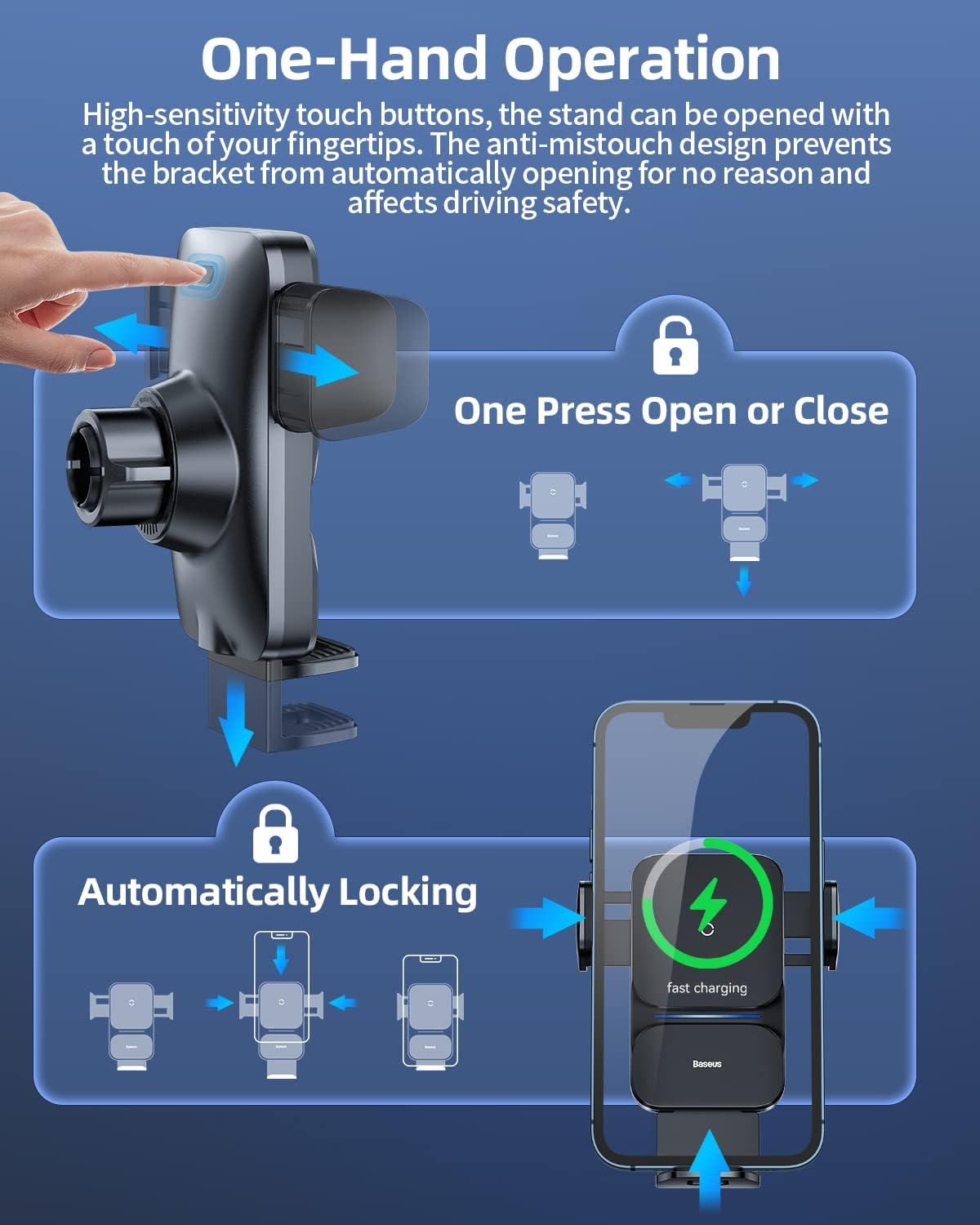
Image 2.2: Demonstrates the one-hand operation and automatic locking mechanism.
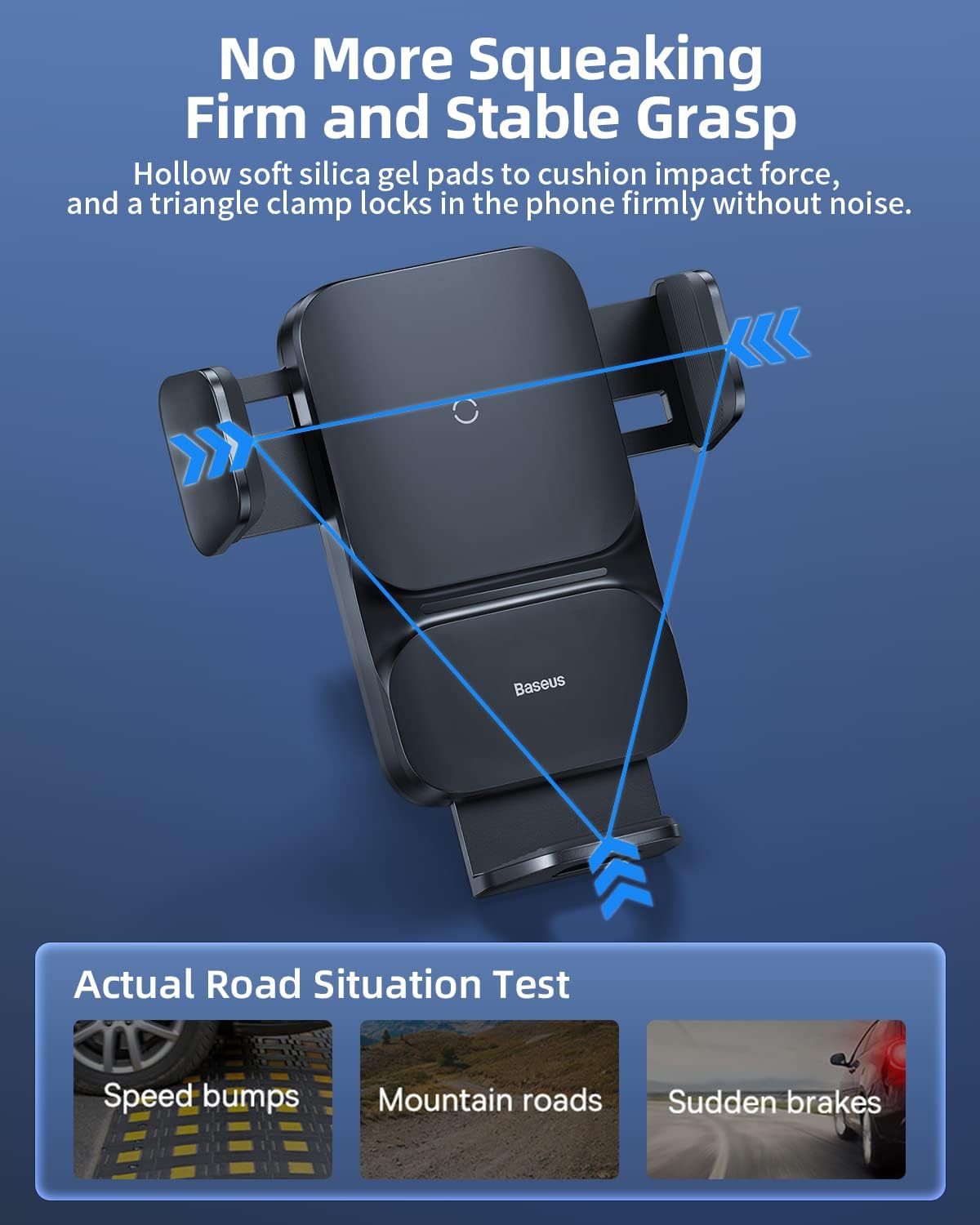
Image 2.3: Shows the firm and stable grip of the charger mount, tested on various road conditions.

Image 2.4: Explains the magnetic charging capability and limitations with certain phone cases or attachments.

Image 2.5: Illustrates the 360-degree rotation feature and compatible/incompatible air vent types.

Image 2.6: Details the dual anti-loose structure for secure attachment to the air vent.
3. Package Contents
Please check the package for the following items:
- Baseus 15W Qi Wireless Car Charger Phone Mount
- Air Vent Clip Ball Head
- USB-C Charging Cable (for power input to the charger)
- User Manual (this document)
Note: A QC 3.0 car charger adapter is required for fast charging and is not included in the package.
4. Installation Guide
Follow these steps to install your Baseus car charger mount:
- Step 1: Snap the air outlet clip ball head together with the nut into the back of the bracket body.
- Step 2: Gently tighten the nut clockwise to secure the ball head to the bracket.
- Step 3: Rotate the nut at the ball head to adjust the length of the steel hook to fit your air vent.
- Step 4: Select an appropriate position on your car's air vent to fasten the steel hook and tighten the nut at the ball head to secure the mount firmly.

Image 4.1: Step-by-step visual guide for installing the car charger mount.
Important Installation Notes:
- Ensure the air vent type is compatible (horizontal/vertical slats are generally suitable; round, movable air outlets are not). Refer to Image 2.5 for examples.
- Pay attention to how tight it is installed to avoid damage to the air outlet during the installation.
- Immediately reinforce a loose support after long-term operation.
5. Operating Instructions
Once installed and powered, the charger is ready for use:
- Power Connection: Connect the provided USB-C cable to the charger mount and plug the other end into a compatible car charger adapter (e.g., QC 3.0 for fast charging).
- Placing Your Phone: Gently place your Qi-enabled smartphone into the mount. The auto-clamping arms will automatically close and secure your phone.
- Wireless Charging: The device will automatically begin wireless charging. The indication light on the charger will breathe during charging and remain steadily on when fully charged.
- Removing Your Phone: To release your phone, touch the high-sensitivity button on the side of the mount. The arms will open, allowing you to remove your device.

Image 5.1: Highlights the fast and Qi-certified charging capabilities.

Image 5.2: Depicts the internal components responsible for efficient wireless charging.
6. Maintenance
To ensure the longevity and optimal performance of your Baseus car charger mount:
- Keep the device clean by wiping it with a soft, dry cloth. Avoid using harsh chemicals or abrasive cleaners.
- Ensure the charging surface is free of dust and debris to maintain efficient wireless charging.
- Avoid exposing the device to extreme temperatures or direct sunlight for prolonged periods. The operating environment temperature should be maintained at 0-25°C. Too high or too low temperature will affect the wireless charging efficiency.
- Do not attempt to disassemble or repair the device yourself. Contact customer support if issues arise.
7. Troubleshooting
If you encounter issues with your charger, refer to the following:
| Problem | Possible Cause | Solution |
|---|---|---|
| Phone not charging or charging slowly. |
|
|
| Indication light blinks fast. | Abnormality detected (FOD alarm, overvoltage, undervoltage, high temperature). | Remove phone and check for foreign objects. Ensure proper power input. Allow device to cool if hot. If issue persists, contact support. |
| Mount feels loose on air vent. | Improper installation or loosening over time. | Re-tighten the nut at the ball head and ensure the steel hook is securely fastened to the air vent. |
8. Specifications
| Parameter | Value |
|---|---|
| Model Number | CGZX000001 |
| Input | 5V/2A, 9V/2A, 12V/1.67A |
| Output | 5W, 7.5W, 10W, 15W (Max) |
| Item Weight | 5 ounces |
| Package Dimensions | 5.39 x 3.7 x 3.11 inches |
| Mounting Type | Vent |
| Wireless Charging Coupling Distance | 6mm |
| Operating Temperature | 0-25°C |
9. Warranty and Support
Baseus offers 24/7 customer service and a lifetime warranty for this product. If you have any questions or require assistance, please feel free to contact Baseus customer support via email. Refer to the product packaging or the official Baseus website for specific contact details.


