
Neo SFP-STM-MOP-COP
Neo 10-in-1 1500W Steam Cleaner User Manual
Model: SFP-STM-MOP-COP
Brand: Neo
Introduction
The Neo 10-in-1 Steam Cleaner is a versatile and powerful cleaning appliance designed to effectively clean various surfaces using the power of steam. This lightweight and compact unit is ideal for tackling dirt and grime on floors, carpets, windows, and more, offering a chemical-free cleaning solution for your home. This manual provides essential information for safe and efficient operation, maintenance, and troubleshooting.

Image: The Neo 10-in-1 Steam Cleaner shown with its full array of accessories, including various brushes, nozzles, and pads, highlighting its multi-functional design.
Important Safety Information
Please read all instructions carefully before using the appliance. Failure to follow these instructions may result in electric shock, fire, or serious injury.
- Always ensure the appliance is unplugged from the power outlet before filling with water, cleaning, or performing maintenance.
- Do not leave the steam cleaner unattended while it is plugged in or operating.
- Keep out of reach of children and pets.
- Use only clean tap water. Do not add cleaning solutions, perfumes, or other chemicals to the water tank, as this may damage the appliance or create hazardous fumes.
- Steam is hot. Avoid direct contact with steam. Keep hands, face, and body away from the steam nozzle.
- Do not immerse the appliance in water or any other liquid.
- Do not operate the appliance if the cord or plug is damaged.
- Use the appliance only for its intended household cleaning purposes as described in this manual.
Product Overview
Familiarize yourself with the components of your Neo 10-in-1 Steam Cleaner.

Image: The steam cleaner is depicted in both its upright mop configuration and its detached handheld mode, illustrating its 2-in-1 functionality. Key features like the ergonomic handle, 5m cable, and 180-degree swivel head are highlighted.
Main Unit Features:
- Ergonomic Handle: Designed for comfortable grip and ease of use.
- Water Tank: 400 ml capacity for extended cleaning sessions.
- Steam Ready Indicator: Light indicates when the unit is ready to produce steam (approx. 30 seconds).
- Variable Steam Control: Adjust steam output for different surfaces and cleaning needs.
- 180° Swivel Head: Allows for easy maneuverability around furniture and into tight spaces.
- 5m Power Cable: Provides ample reach without frequent outlet changes.
- 2-in-1 Functionality: Easily converts from an upright steam mop to a handheld steam cleaner.
Included Accessories:

Image: A detailed view of the 10-piece accessory set, including various brushes, nozzles, a measuring cup, and microfiber pads, demonstrating the versatility of the steam cleaner.
- Measuring Cup
- Window Squeegee
- Small Round Brass Brush
- Grout Brush
- Fine Brush
- Scraper Tool
- Carpet Tool / Glider
- Fabric Tool
- Jet Nozzle
- Nylon Brush
- Washable Microfiber Pad(s)
Setup and Assembly
- Unpack: Carefully remove all components from the packaging.
- Assemble Handle: Insert the handle into the main body of the steam cleaner until it clicks securely into place.
- Attach Mop Head (for floor cleaning): Slide the mop head onto the main unit. Ensure it is firmly attached.
- Attach Microfiber Pad: Secure the washable microfiber pad to the bottom of the mop head.
- Fill Water Tank: Open the water tank cap. Use the provided measuring cup to fill the tank with up to 400 ml of clean tap water. Do not overfill. Close the cap securely.
- Select Accessory (for handheld use): For handheld cleaning, detach the main unit from the mop head. Select the appropriate accessory (e.g., jet nozzle, brush) and attach it firmly to the handheld unit's nozzle.
Operating Instructions
General Operation:
- Ensure the water tank is filled and the desired attachment is secured.
- Plug the power cord into a grounded electrical outlet. The indicator light will illuminate.
- Wait approximately 30 seconds for the unit to heat up and produce steam. The indicator light may change or turn off when ready, depending on the model.
- Press the steam trigger or button to release steam. Adjust the variable steam control as needed.
- Begin cleaning the desired surface. Move the steam cleaner slowly over the area to allow the steam to penetrate and clean effectively.
- When finished, release the steam trigger/button, unplug the unit, and allow it to cool down before emptying any remaining water and storing.
Specific Cleaning Applications:
The Neo 10-in-1 Steam Cleaner is suitable for all floor types, and its accessories allow for targeted cleaning.

Image: Multiple Neo 10-in-1 Steam Cleaners in different colors are displayed on a wooden floor, with labels indicating suitability for Carpet, Tile, Stone, and Hard Floor surfaces.
Floor Cleaning (Mop Mode):
- Attach the mop head and a clean microfiber pad.
- For hard floors (tile, sealed hardwood, laminate, stone), move the mop slowly and steadily across the surface.
- For carpets, attach the carpet glider over the mop head and microfiber pad. Glide the unit over the carpet to refresh and sanitize.
- The steam cleaner is designed to kill 99.99% of bacteria on surfaces.

Image: This graphic illustrates key performance features: "Ready to use in 30 seconds," "Variable steam control," and "Large 400ml tank," along with an icon indicating it "Kills 99.99% of bacteria."
Handheld Cleaning (with accessories):
- Jet Nozzle: Ideal for concentrated steam on stubborn dirt in tight spaces, such as stovetops or bathroom fixtures.

Image: The handheld steam cleaner with the jet nozzle attachment is shown directing steam onto a stovetop burner, demonstrating its use for focused cleaning.
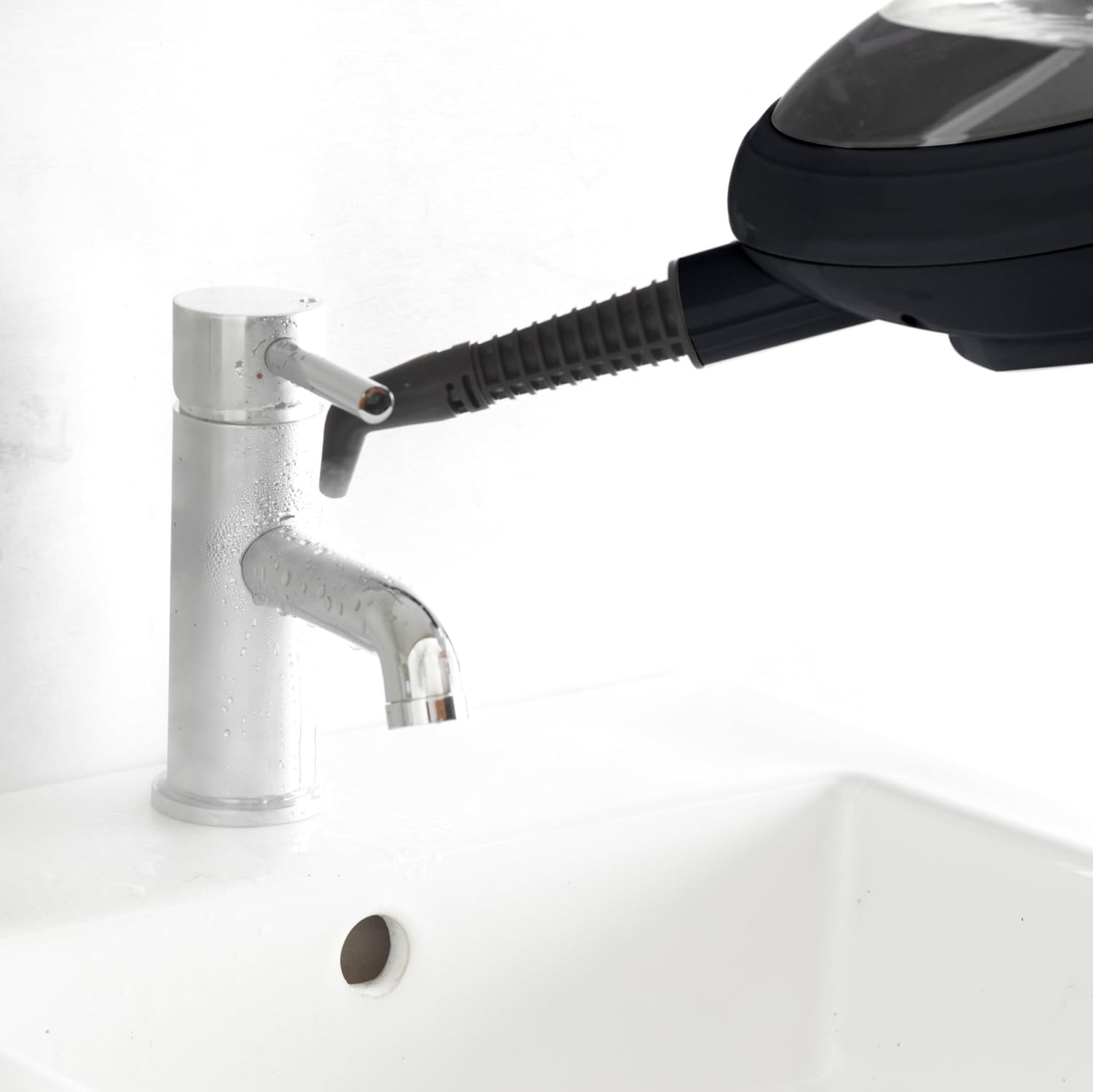
Image: The handheld steam cleaner with the jet nozzle is used to clean around a bathroom faucet, illustrating its effectiveness in sanitizing fixtures.
- Grout Brush: Use with the jet nozzle for deep cleaning grout lines between tiles.

Image: The handheld steam cleaner with the grout brush attachment is shown cleaning the grout lines between white tiles, demonstrating its precision cleaning capability.
- Window Squeegee: Attach for streak-free cleaning of windows, mirrors, and glass surfaces.
- Fabric Tool: Use with a microfiber cloth for steaming garments, upholstery, and curtains to remove wrinkles and refresh fabrics.
- Brass Brush: For very tough, baked-on grime on durable surfaces (e.g., oven racks, BBQ grills). Use with caution to avoid scratching.
- Nylon Brush: General purpose scrubbing brush for various surfaces.
- Scraper Tool: For removing sticky residues or dried-on spills.
Maintenance and Cleaning
Regular maintenance ensures optimal performance and extends the life of your steam cleaner.
- Empty Water Tank: After each use, unplug the unit and allow it to cool. Empty any remaining water from the tank.
- Clean Microfiber Pads: The microfiber pads are washable. Remove them from the mop head and machine wash with mild detergent. Do not use bleach or fabric softener. Air dry or tumble dry on low.
- Wipe Down Unit: Wipe the exterior of the steam cleaner with a damp cloth. Do not use abrasive cleaners.
- Descale (if necessary): If you notice reduced steam output or mineral buildup, descale the unit. Consult the manufacturer's website or customer support for specific descaling instructions, as this may vary by model.
- Store: Store the steam cleaner in a cool, dry place, away from direct sunlight and extreme temperatures.
Troubleshooting
| Problem | Possible Cause | Solution |
|---|---|---|
| No steam or low steam output. |
|
|
| Water leaking from unit. |
|
|
| Unit not turning on. |
|
|
If the problem persists after trying these solutions, please contact customer support.
Specifications
- Model: SFP-STM-MOP-COP
- Power: 1500 Watts
- Voltage: 220-240 Volts
- Water Tank Capacity: 400 Milliliters
- Heat-up Time: Approximately 30 seconds
- Continuous Steam Time: Up to 30 minutes per tank
- Weight: 2.3 Kilograms
- Dimensions (L x W x H): 9 x 30 x 119 cm
- Power Cable Length: 5 meters
- Special Features: Lightweight, Variable Steam Control, 2-in-1 Mop and Handheld Function, 180° Swivel Head
Warranty and Support
For warranty information, product registration, and customer support, please refer to the documentation included with your purchase or visit the official Neo website. Keep your proof of purchase for any warranty claims.
Manufacturer: Neo
Related documentsSFP-STM-MOP-COP


Ask a question about this manual
Ask about setup, troubleshooting, compatibility, parts, safety, or missing instructions. Manuals+ will review the question and use this page’s manual context to help answer it.