
Runleader RL-HM069B
Runleader RL-HM069B Digital Hour Meter Instruction Manual
Model: RL-HM069B
1. Introduction
This manual provides detailed instructions for the installation, operation, and maintenance of the Runleader RL-HM069B Digital Hour Meter. This device is designed to record the total running hours of various equipment, offering reliable performance with its waterproof design and wide voltage compatibility.
2. Key Features
- Hour Meter Function: Records total running hours (0 to 999,999 hours) with an option to set initial hours for new meter replacements. Allows viewing of hours during a single working period.
- Mounting: Easy screw-on and plug-in installation with a panel cut-out size of φ51.50mm (2.13 inches).
- Power Connection: Simple connection to external power equipment via an 8-hole connector assembly.
- Water Resistance: Features a transparent PC protective window and 100% epoxy resin sealing craft, achieving an IP68 waterproof rating.
- Additional Features: LED light indicator, viewable working data saved by a built-in CR2430 battery, display lock-down, and low battery alert.
3. Setup and Installation
3.1 Product Dimensions and Accessories
Before installation, familiarize yourself with the product dimensions and included accessories.

Image: Product dimensions (56.20mm width, 33.50mm height, 40.00mm depth) and a list of included accessories: Runleader color box, user manual, cut-out sticker, cushion rubber, connector wiring, gray connector kit, connector pins, screws, and fixed support.
3.2 Panel Cut-out and Mounting
The hour meter is designed for easy panel mounting. Ensure the panel cut-out size is accurate for a secure fit.

Image: Diagram showing a circular panel cut-out with a diameter of φ51.50mm (2.13 inches) and an illustration of the hour meter being snap-mounted into the panel.
- Create a panel cut-out with a diameter of φ51.50mm (2.13 inches).
- Insert the hour meter into the cut-out.
- Secure the meter using the provided screws and fixed support for a snap-in mounting.
3.3 Power Connection
Properly connect the hour meter to the power source. The meter supports AC 85V to 250V and DC 60V to 150V.
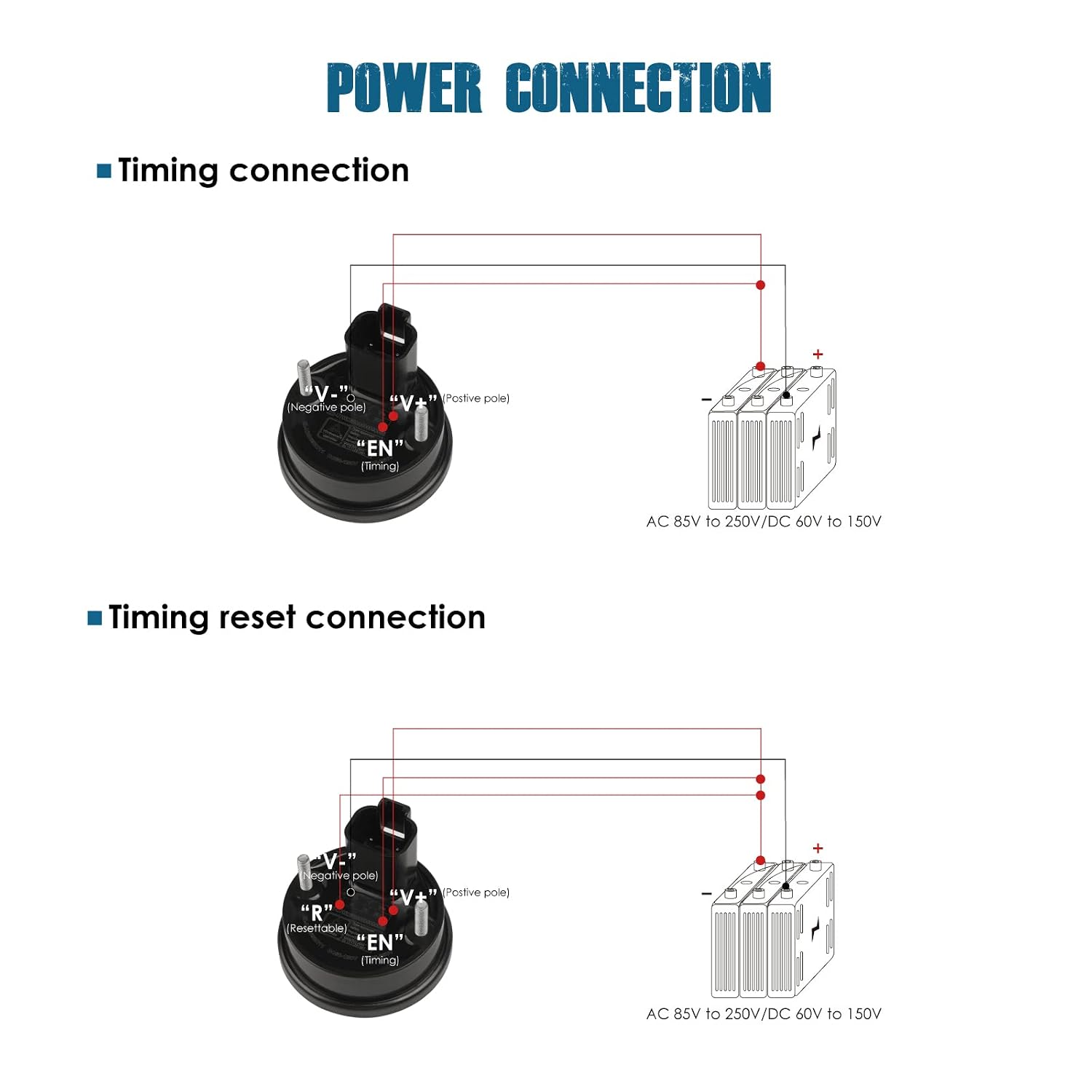
Image: Two wiring diagrams. The top diagram shows a "Timing connection" with V- (negative pole), V+ (positive pole), and EN (timing) connected to a power source (AC 85V to 250V / DC 60V to 150V). The bottom diagram shows a "Timing reset connection" with V-, V+, R (resettable), and EN (timing) connected to a power source.
- Identify the V- (negative pole), V+ (positive pole), and EN (timing) terminals on the meter.
- Connect the corresponding wires from your power source (AC 85V-250V or DC 60V-150V) to these terminals using the 8-hole connector assembly.
- For timing reset functionality, connect the 'R' (resettable) terminal as per the diagram.
Video: This video demonstrates the connection process for a Quartz Hour Meter, showing how to attach wires to the meter's terminals. While not the exact model, the connection principles are similar for general hour meters.
4. Operation
4.1 Recording Total Hours (TOT)
The meter continuously records the total operating hours of the equipment when power is supplied. The total hours (TOT) value is resettable and ranges from 0 to 999,999 hours.

Image: The hour meter displaying "TOT 999999.9 HOURS" and a separate display showing "h-SEt" for setting initial hours. This indicates the total accumulated operating time.
- Upon power-up, the meter will display the accumulated total hours.
- To set an initial hour value (e.g., for a new meter replacing an old one), refer to the "h-SEt" function in the user manual.
4.2 Resettable Job Timer (JOB)
The JOB timer records partial hours for a single working period and can be reset as needed. The JOB timer range is 0 to 999,999 hours.

Image: A sequence showing the JOB timer. Pressing the "SET" button once switches from TOT to JOB display. Pressing and holding the "SET" button resets the JOB timer to 0.0.
- Press the SET button once to switch the display from Total Hours (TOT) to Job Timer (JOB).
- To reset the Job Timer, press and hold the SET button until the JOB display resets to 0.0.
5. Maintenance
5.1 Display Lock Down
The LCD display can be locked down to conserve the built-in CR2430 battery and extend its lifetime.

Image: The hour meter displaying "TOT 68.0" with an arrow pointing to "Press and hold" the SET button, indicating the action to lock down the display.
- To lock down the display, press and hold the SET button for several seconds until the display turns off or indicates a locked state.
- This feature helps prolong the life of the internal CR2430 battery.
5.2 Water Resistance
The RL-HM069B features a robust IP68 waterproof design, ensuring durability in various environments.

Image: The hour meter submerged in a "Testing Tank" with an "IP68 Waterproof Rate" icon, demonstrating its strong water resistance.
- The meter is constructed with 100% epoxy resin sealing, providing an IP68 waterproof rating.
- This design protects the internal components from water ingress, making it suitable for outdoor and harsh conditions.
6. Troubleshooting
| Problem | Possible Cause | Solution |
|---|---|---|
| Display is blank | No power supply or low internal battery. | Check power connections. If power is present, the internal CR2430 battery might be low; replace if necessary (refer to battery replacement instructions in the full manual). |
| Hours not recording | Incorrect wiring or meter not receiving timing signal. | Verify all power and timing connections are secure and correctly wired according to the diagrams in Section 3.3. |
| Job timer not resetting | SET button not pressed correctly or held long enough. | Ensure the SET button is pressed and held for the required duration to reset the JOB timer as described in Section 4.2. |
7. Specifications
| Feature | Detail |
|---|---|
| Model Number | RL-HM069B |
| Working Voltage | AC 85V to 250V and DC 60V to 150V |
| Hour Range | 0 to 999,999 hours |
| Waterproof Rating | IP68 |
| Panel Cut-out Size | φ51.50mm (2.13 inches) |
| Internal Battery | CR2430 (for data saving) |
| Manufacturer | Ningbo Jiangbei Run Leader Electronics Co., Ltd |
| Country of Origin | China |
| UPC | 728062433245 |
8. Applications
The Runleader RL-HM069B Digital Hour Meter is suitable for a wide range of equipment operating within AC 85V to 250V and DC 60V to 150V.

Image: Icons and text illustrating various applications for the hour meter, including golf carts, tractors, generators, boats, compressors, and forklifts.
- Golf carts
- Tractors
- Generators
- Boats
- Compressors
- Forklifts
- Other industrial and outdoor power equipment.
9. Warranty Information
This Runleader RL-HM069B Digital Hour Meter comes with a 2 Year Manufacturer Warranty. Please retain your proof of purchase for any warranty claims.
10. Customer Support
For technical assistance, troubleshooting, or warranty inquiries, please contact Runleader customer support. Refer to the packaging or the official Runleader website for contact details.
Manufacturer Contact Information: No.1-2 Xinheng six road, Cicheng county, Jiangbei district, Ningbo, Zhejiang, China.
Related documentsRL-HM069B


Ask a question about this manual
Ask about setup, troubleshooting, compatibility, parts, safety, or missing instructions. Manuals+ will review the question and use this page’s manual context to help answer it.