
MAIDeSITe SN1
MAIDeSITe SN1 Electric Height Adjustable Desk User Manual
Model: SN1
Brand: MAIDeSITe
1. Introduction
Thank you for choosing the MAIDeSITe SN1 Electric Height Adjustable Desk. This manual provides detailed instructions for assembly, operation, and maintenance to ensure you get the most out of your new ergonomic workstation. Designed for comfort and productivity, this desk allows you to effortlessly switch between sitting and standing positions, promoting a healthier work environment.

Figure 1: The MAIDeSITe SN1 Electric Height Adjustable Desk, showcasing its sleek design and integrated accessories.
2. Components and Package Contents
Before assembly, please ensure all components listed below are present in your package. If any parts are missing or damaged, please contact customer support.
- Desktop Surface (120 x 60 cm)
- Electric Lifting Columns (2)
- Desk Feet (2)
- Control Box
- Multifunction LED Control Panel
- Power Cable
- Cable Management Net
- Headphone Hook
- Side Storage Organizer
- Message Board
- 360° Swivel Casters (4)
- Assembly Tools & Hardware Kit

Figure 2: Included accessories for enhanced organization and convenience.

Figure 3: Exploded view illustrating the desk's main components and straightforward assembly process.
3. Setup and Assembly
The MAIDeSITe SN1 desk is designed for easy assembly. All necessary tools are included in the package. Please follow the step-by-step instructions provided in the separate assembly guide for detailed visual instructions.
General Assembly Steps:
- Attach the desk feet to the lifting columns.
- Connect the lifting columns to the crossbar and control box.
- Secure the desktop surface to the assembled frame.
- Install the control panel and connect all cables to the control box.
- Attach optional accessories such as the cable management net, headphone hook, side organizer, and message board as desired.
- Ensure all screws are tightened and connections are secure before plugging in the power cable.
Important: Do not plug in the power cable until all components are fully assembled and secured.
4. Operation
4.1 Control Panel Overview
The desk is operated via a multifunction LED control panel, offering intuitive control over height adjustments and memory functions.

Figure 4: The intuitive multifunction LED control panel.
- Up/Down Buttons (↑ / ↓): Press and hold to adjust the desk height upwards or downwards.
- Memory Presets (1, 2, 3, 4): Store and recall preferred height settings.
- USB Charging Port: Conveniently charge your devices.
- Child Safety Lock: Prevents accidental height adjustments.
- LED Display: Shows the current desk height in centimeters.
4.2 Height Adjustment
To adjust the desk height, simply press and hold the Up (↑) or Down (↓) button until the desk reaches your desired height. The LED display will show the current height in real-time.
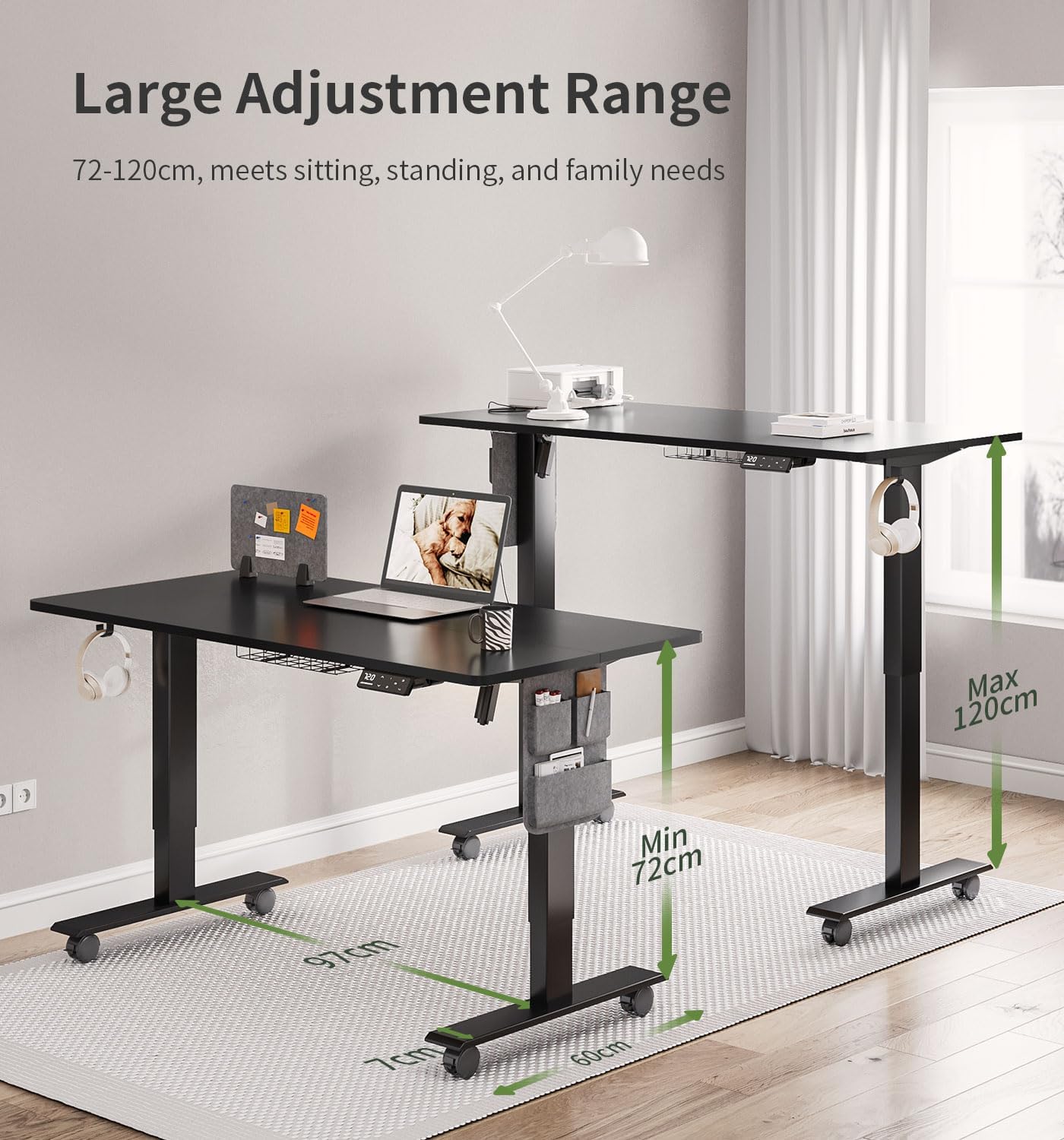
Figure 5: The desk offers a wide adjustment range from 72cm to 120cm.
4.3 Setting Memory Presets
The desk allows you to save up to four preferred height settings for quick recall:
- Adjust the desk to your desired height using the Up/Down buttons.
- Press the 'M' button. The LED display will show 'S-'.
- Within 3 seconds, press the desired memory button (1, 2, 3, or 4). The display will show 'S-1', 'S-2', etc., indicating the height has been saved.
To recall a saved height, simply press the corresponding memory button (1, 2, 3, or 4). The desk will automatically move to the saved position.
4.4 Child Safety Lock
To activate the child safety lock, press and hold the 'M' button for 5 seconds until 'LOC' appears on the display. This will disable all buttons. To deactivate, press and hold the 'M' button again for 5 seconds until 'LOC' disappears.
4.5 Anti-Collision System
The desk is equipped with an anti-collision system. If the desk encounters an obstacle during height adjustment, it will automatically stop and reverse slightly to prevent damage. This feature enhances safety during operation.
5. Key Features
5.1 Ergonomic Design
The MAIDeSITe SN1 desk supports a healthy work-life balance by allowing seamless transitions between sitting and standing. Its wide height adjustment range (72-120 cm) accommodates various user heights and preferences, reducing fatigue from prolonged sitting.
5.2 Robust Construction
Constructed from 100% industrial-grade carbon steel, the desk frame offers exceptional stability and durability. It can support a maximum load capacity of 80 kg (176 lbs) without wobbling, ensuring a secure workstation for your equipment.
5.3 Integrated Accessories
The desk comes with several thoughtful accessories to help you maintain an organized and efficient workspace:
- Cable Management Net: Keeps cables tidy and out of sight.
- Headphone Hook: Provides a convenient spot to hang your headphones.
- Side Storage Organizer: Offers additional storage for small items and documents.
- Message Board: A dedicated space for notes and reminders.
- 360° Swivel Casters: Allows for easy mobility of the desk, with locking mechanisms for stability when stationary.
Figure 6: Detailed view of the practical accessories included with the desk.
6. Maintenance
To ensure the longevity and optimal performance of your MAIDeSITe SN1 desk, follow these simple maintenance guidelines:
- Cleaning: Wipe the desktop surface and frame with a soft, damp cloth. Avoid using harsh chemicals or abrasive cleaners, as they may damage the finish.
- Cable Management: Periodically check and organize cables to prevent tangles and ensure smooth operation of the lifting mechanism.
- Screw Tightness: Occasionally check all screws and bolts to ensure they remain tight. Retighten if necessary.
- Obstacle Clearance: Ensure there are no obstacles in the desk's path during height adjustments to prevent activation of the anti-collision system and potential wear.
7. Troubleshooting
If you encounter any issues with your MAIDeSITe SN1 desk, please refer to the following common problems and solutions:
| Problem | Possible Cause | Solution |
|---|---|---|
| Desk does not move. | Power cable disconnected; Child safety lock activated; Overload. | Check power connection; Deactivate child safety lock (see section 4.4); Reduce weight on desk. |
| Desk moves unevenly or makes unusual noise. | Loose connections; Obstruction in lifting mechanism. | Check all cable connections; Ensure no objects are obstructing the legs; Contact customer support if issue persists. |
| Error code displayed on panel. | Specific system error. | Refer to the detailed error code list in the separate technical manual or contact customer support with the specific code. A common solution is to unplug the desk for 10 minutes and then plug it back in to reset. |
| Anti-collision system frequently triggers. | Obstacles in the desk's path; Sensitivity setting too high. | Ensure clear path for desk movement; Consult technical manual for sensitivity adjustment if available. |
If the problem persists after attempting these solutions, please contact MAIDeSITe customer support for further assistance.
8. Specifications
| Feature | Detail |
|---|---|
| Model Number | SN1 |
| Brand | MAIDeSITe |
| Desktop Dimensions (L x W) | 120 cm x 60 cm (47.2 x 23.6 inches) |
| Height Adjustment Range | 72 cm - 120 cm (28.3 - 47.2 inches) |
| Material | Industrial Carbon Steel (Frame), Engineered Wood (Desktop) |
| Max. Load Capacity | 80 kg (176 lbs) |
| Weight | 22.5 Kilograms (49.6 lbs) |
| Control Panel | Multifunction LED Touch Screen with 4 Memory Presets |
| Special Features | USB Charging Port, Child Safety Lock, Anti-Collision System, 360° Swivel Casters |
9. Warranty and Support
9.1 Warranty Information
The MAIDeSITe SN1 Electric Height Adjustable Desk comes with a 5-year warranty, covering defects in materials and workmanship under normal use. Please retain your proof of purchase for warranty claims.
9.2 Return Policy
You may return the product within 30 days of purchase for a refund or replacement, subject to the seller's return policy.
9.3 Customer Support
For technical assistance, troubleshooting, or warranty inquiries, please contact MAIDeSITe customer support. Contact details can typically be found on the product packaging or the official MAIDeSITe website. Our team is dedicated to providing professional technical support to help resolve any issues you may encounter.
Related documentsSN1


Ask a question about this manual
Ask about setup, troubleshooting, compatibility, parts, safety, or missing instructions. Manuals+ will review the question and use this page’s manual context to help answer it.