
Introduction
This manual provides detailed instructions for the safe and efficient use of your REMAX TWS-27 True Wireless Bluetooth Earphones. Please read this manual thoroughly before using the product and retain it for future reference.
The REMAX TWS-27 earphones offer a high-fidelity audio experience with the convenience of true wireless connectivity, designed for various activities including music listening, calls, workouts, and travel.
Package Contents
Verify that all items are present in your package:
- REMAX TWS-27 True Wireless Earphones (Left and Right)
- Charging Case
- USB Charging Cable
- User Manual
- (Potentially) Multiple sizes of ear tips
Setup
1. Initial Charging
Before first use, fully charge the earphones and the charging case. Connect the provided USB charging cable to the charging port on the case and a compatible USB power source. The LED indicator on the case will show charging status.
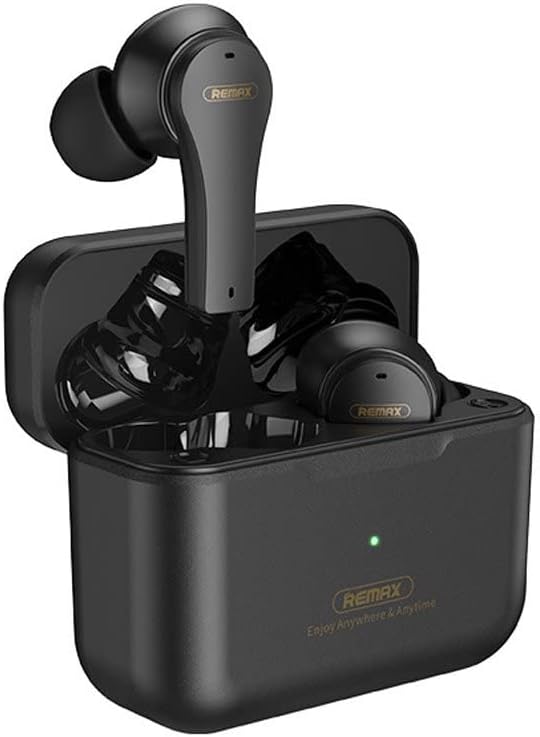
Image Description: This image shows the REMAX TWS-27 True Wireless Earphones securely placed within their compact charging case. The case is open, revealing the earbuds and a small LED indicator light, typically showing charging status.
2. Pairing with a Bluetooth Device
- Ensure the earphones are charged.
- Open the charging case. The earphones will automatically power on and enter pairing mode.
- On your device (smartphone, tablet, etc.), enable Bluetooth and search for available devices.
- Select "REMAX TWS-27" from the list of found devices.
- Once connected, you will hear a confirmation tone, and the LED indicator on the earphones may change.
The earphones will automatically connect to the last paired device when removed from the case, provided Bluetooth is enabled on the device.

Image Description: A detailed view of the REMAX TWS-27 True Wireless Earphones, highlighting their ergonomic design and in-ear tips. The earbuds are black with subtle branding.
Operating Instructions
Power On/Off
- Power On: Open the charging case, or long-press the touch area on both earbuds for a few seconds.
- Power Off: Place the earbuds back into the charging case and close the lid, or long-press the touch area on both earbuds for a few seconds until they power off.
Touch Controls
The REMAX TWS-27 earphones feature intuitive touch controls on each earbud. The specific functions may vary slightly, but common controls include:
- Play/Pause: Single tap on either earbud.
- Next Track: Double tap on the right earbud.
- Previous Track: Double tap on the left earbud.
- Answer/End Call: Single tap on either earbud during an incoming call or active call.
- Reject Call: Long press on either earbud during an incoming call.
- Activate Voice Assistant: Triple tap on either earbud (e.g., Siri, Google Assistant).
- Volume Control: Specific gestures for volume up/down may be available (refer to quick start guide for precise model-specific gestures if different).
Battery Life and Charging
The earphones provide up to 4 hours of continuous playback on a single charge. The charging case extends the total playback time to approximately 16 hours, allowing for up to 4 full charges of the earbuds.

Image Description: An infographic illustrating the battery performance of the REMAX TWS-27 earphones. It shows 16 hours of total playback, 4 hours of earbud play time per charge, 1.5 hours charging time for the case, and the ability to get 4 full charges from the 320 mAh charging case.
- Charging Earbuds: Place them into the charging case. They will automatically begin charging.
- Charging Case: Connect the USB cable to the case and a power source. The charging time for the case is approximately 1.5 hours.
- LED Indicators: Refer to the quick start guide for specific LED light patterns indicating battery levels and charging status for both earbuds and the case.
Maintenance
- Cleaning: Use a soft, dry, lint-free cloth to clean the earbuds and charging case. Do not use harsh chemicals or abrasive materials.
- Water Resistance: The REMAX TWS-27 earphones are IPX4 rated, meaning they are resistant to splashing water from any direction. They are not designed for submersion in water. Avoid exposing them to excessive moisture.
- Storage: When not in use, store the earphones in their charging case to protect them and keep them charged. Store in a cool, dry place away from extreme temperatures.
Troubleshooting
If you encounter issues with your REMAX TWS-27 earphones, refer to the following common solutions:
- Earphones not pairing:
- Ensure both earbuds are charged.
- Turn off Bluetooth on your device and turn it back on.
- Delete "REMAX TWS-27" from your device's Bluetooth list and attempt to pair again.
- Try resetting the earphones (refer to quick start guide for specific reset procedure if available).
- No sound from one earbud:
- Ensure both earbuds are charged and properly connected.
- Place both earbuds back into the charging case, close the lid, wait a few seconds, then take them out again.
- Check your device's audio balance settings.
- Charging issues:
- Ensure the charging cable is securely connected to both the case and the power source.
- Try a different USB cable or power adapter.
- Clean the charging contacts on the earbuds and inside the case with a dry cotton swab.
- Poor sound quality:
- Ensure the earbuds are properly seated in your ears for a good seal.
- Clean any debris from the earbud nozzles.
- Move closer to your connected device to avoid interference.
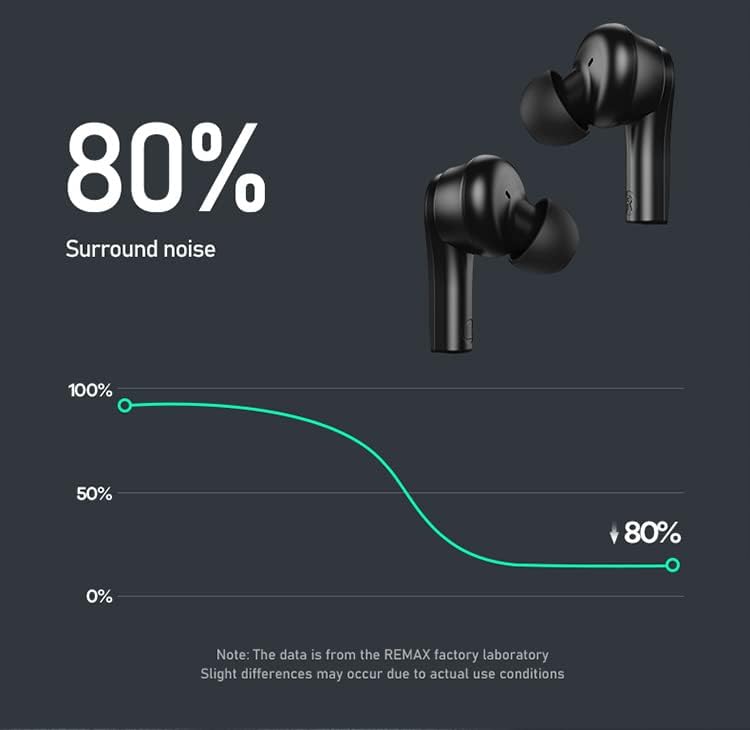
Image Description: A graph illustrating the noise reduction capability of the REMAX TWS-27 earphones, indicating an 80% reduction in surround noise. A note states that data is from the REMAX factory laboratory and slight differences may occur due to actual use conditions.
Specifications
| Brand Name | Remax |
| Model Name | TWS 27 |
| Manufacturer Reference | TWS-27 |
| Manufacturer | REMAX |
| Connectivity Technology | Wireless |
| Wireless Communication Technology | Bluetooth |
| Headphones Form Factor | In Ear |
| Noise Control | Active Noise Cancellation (ANC) |
| Control Type | Voice Control (and Touch) |
| Material | Plastic |
| Color | Black (other colors may be available) |
| IP Rating | IPX4 (Splash resistant) |
| Package Dimensions | 17.8 x 10.8 x 3.6 cm |
| Weight | 140 g |
| Date First Available | 6 July 2022 |

Image Description: This image presents two sets of REMAX TWS-27 earphones and their charging cases, one in black and one in white, showcasing the available stylish color options.
Warranty and Support
For warranty information and customer support, please refer to the warranty card included in your product packaging or visit the official Remax website. Keep your proof of purchase for warranty claims.


