
1. Introduction
This manual provides detailed instructions for the installation, operation, maintenance, and troubleshooting of your HEANTLE Fingerprint Smart Deadbolt, Model A3-BBF. Please read this manual thoroughly before installation and use to ensure proper function and security.
2. Product Overview
The HEANTLE Smart Deadbolt offers multiple access methods and smart features for enhanced home security and convenience.
Key Features:
- 7-in-1 Unlock Methods: App control, passcode, fingerprint recognition, IC fob, mechanical key, remote control (requires WiFi Hub), and voice control (via Alexa or Google Assistant).
- Biometric Access Management: Stores up to 300 passcodes, 250 fingerprints, and over 1000 IC fobs.
- Fast Fingerprint Recognition: Unlocks in approximately 0.3 seconds.
- Remote Access & Auto-Lock: Control the lock remotely, view access logs, and enable automatic locking after a set time (requires WiFi Gateway).
- Easy Installation: Designed for most US standard doors without requiring extra drilling.
Product Components:
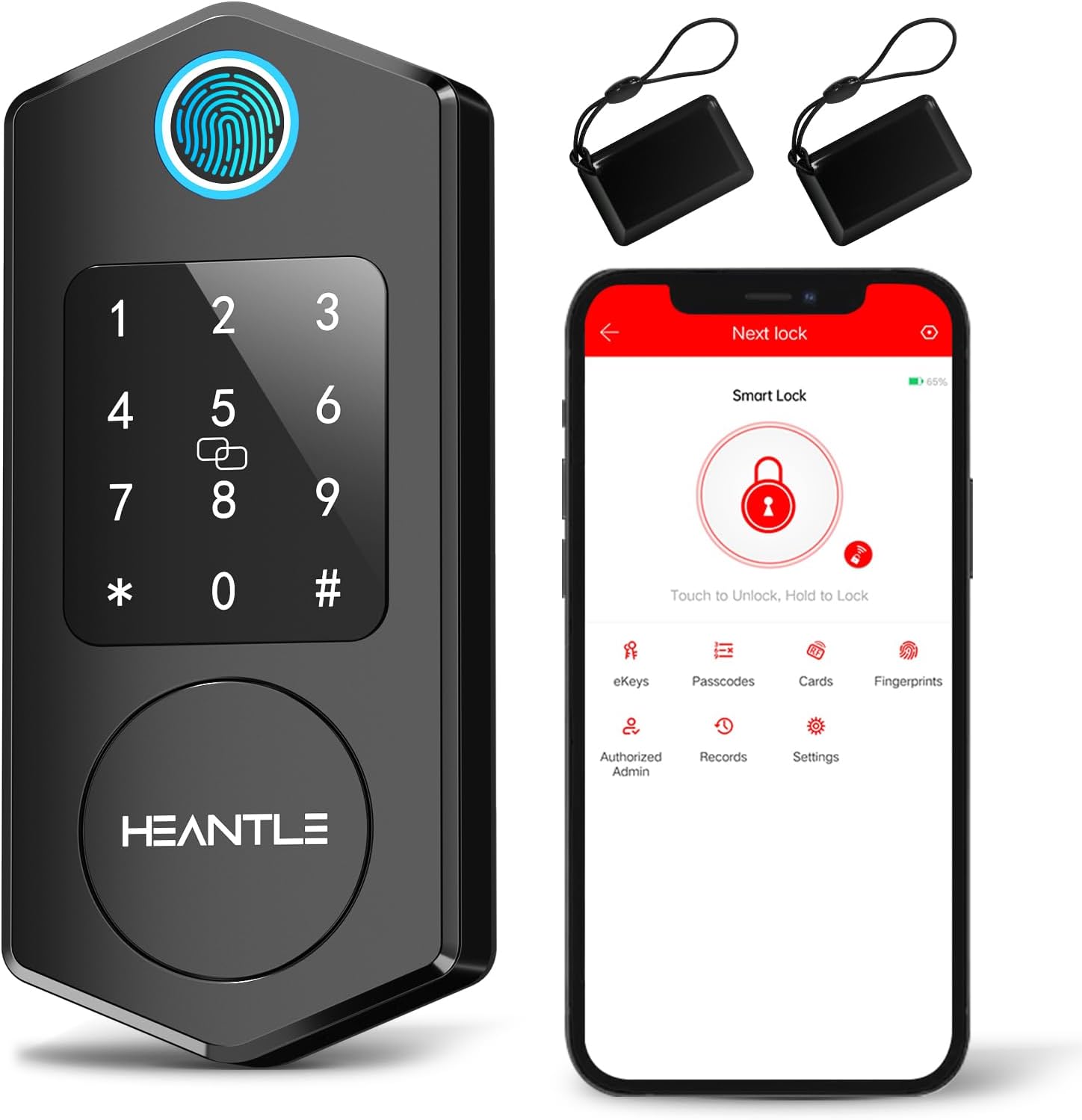
Figure 2.1: HEANTLE Smart Deadbolt, showing the exterior unit with keypad and fingerprint sensor, two IC fobs, and the mobile application interface.

Figure 2.2: Visual representation of the five primary methods to unlock the smart deadbolt: fingerprint, mobile application, numerical passcode, traditional mechanical keys, and IC card.
3. Setup & Installation
Follow these steps to install your HEANTLE Smart Deadbolt. A screwdriver is typically the only tool required.
Installation Video Guide:
Video 3.1: A detailed animation demonstrating the installation process for the HEANTLE Smart Lock, including latch and main unit assembly.
Step-by-Step Installation:
- Prepare the Door: Ensure your door meets the standard dimensions for deadbolt installation. The lock is designed to fit most US standard doors.
- Install the Latch: Determine the backset depth (60mm or 70mm). If 60mm, install directly. If 70mm, rotate the latch 180 degrees, then adjust and extend its length. Ensure the arrow on the latch is facing UP. Fix the latch into place, keeping it in an unlocked status during installation.
- Install the Mounting Plate: Route the cable from the exterior unit through the hole on the bottom of the mounting plate. Fix the mounting plate to the door using screws.
- Attach Exterior Unit: Carefully connect the cable from the exterior unit to the interior unit. Ensure the spindle is horizontal and correctly aligned with the latch mechanism.
- Install Interior Unit: Secure the interior unit to the mounting plate. Insert 4 AA batteries (not included) into the battery compartment and slide the cover on.
- Test Functionality: Ensure the deadbolt works smoothly by manually locking and unlocking it.

Figure 3.1: Illustration of the easy installation process, showing the latch mechanism being secured into the door frame.

Figure 3.2: A diagram detailing the dimensions and components for installation, highlighting that no extra drilling is required for standard setups.
4. Operating Instructions
Your HEANTLE Smart Deadbolt offers multiple convenient ways to secure and access your property.
Operation Overview Video:
Video 4.1: A short video showcasing various unlocking methods of the HEANTLE Smart Deadbolt, including fingerprint, passcode, and app control, as well as the auto-lock feature.
Unlocking Methods:
- Fingerprint: Place your registered finger on the sensor. The lock will unlock in approximately 0.3 seconds.
- Passcode: Enter your registered numerical passcode on the touchscreen keypad.
- IC Fob: Tap the IC fob against the designated area on the lock.
- Mechanical Key: Use the provided mechanical key as a traditional backup.
- App Control: Use the dedicated mobile application to remotely lock or unlock the door. The app also allows you to generate one-time, permanent, scheduled, or recurring codes.
- Remote Control (with WiFi Hub): If a WiFi Hub is connected, you can control the lock remotely from anywhere.
- Voice Control (with WiFi Hub): Integrate with Amazon Alexa or Google Assistant for voice commands (WiFi Hub required).

Figure 4.1: Demonstrates the fast and reliable fingerprint recognition feature for quick access.

Figure 4.2: Illustrates the smart voice control capability through Amazon Alexa or Google Assistant, requiring an additional gateway.
Auto-Lock Feature:
Enable the auto-lock feature via the mobile application to automatically lock your door after a user-defined period, providing additional security and peace of mind.

Figure 4.3: Shows the smart auto-lock feature, which automatically secures the door after a set time, enhancing security.
5. Maintenance
Battery Replacement:
The HEANTLE Smart Deadbolt requires 4 AA batteries (not included). When the battery level is low, the lock will provide an alert. To replace batteries, remove the interior unit's cover, replace the old batteries with new ones, and reattach the cover. Ensure correct polarity.
Cleaning:
Wipe the exterior of the lock with a soft, damp cloth. Avoid using abrasive cleaners or solvents, as these can damage the finish and electronic components.
6. Troubleshooting
- Keypad Locked: If more than 5 failed attempts are made to enter a passcode, the keypad will temporarily lock for 5 minutes as a security measure. Wait for the lockout period to expire before trying again.
- Battery Issues: If the lock exhibits erratic battery readings or does not respond after battery replacement, ensure the batteries are new, correctly inserted, and fully charged. If issues persist, contact customer support.
- Connectivity Problems: If the lock is not connecting to the app or voice assistants, ensure your WiFi Gateway (if used) is properly configured and within range. Check your device's Bluetooth connection for direct app control.
- Mechanical Key Not Working: Ensure the key is fully inserted and turned correctly. If the issue persists, the internal mechanism may require inspection.

Figure 6.1: Illustrates the 'Protected Mode' where the keypad locks for 5 minutes after multiple failed entry attempts.
7. Specifications
| Feature | Detail |
|---|---|
| Brand | HEANTLE |
| Model Number | A3-BBF |
| Special Feature | Fingerprint, Smart Lock |
| Lock Type | Biometric |
| Item Dimensions (L x W x H) | 6.54 x 2.56 x 1.57 inches |
| Material | Metal |
| Recommended Uses | Home Security |
| Color | Matte Black |
| Number of Pieces | 1 |
| Controller Type | Amazon Alexa, Google Assistant |
| Control Method | Remote |
| Connectivity Protocol | Bluetooth |
| Item Weight | 2.75 pounds |
| Batteries Included? | No |
| Batteries Required? | Yes |
8. Warranty & Support
HEANTLE provides a free 1-year warranty for the Smart Lock from the date of purchase. Life-time free technical support is also available.
Contact Information:
- Email: heantleservice@hotmail.com
- Toll Free: (888) 986-6899


