
Pronomic Powermake 600
Pronomic Powermake 600 User Manual
Model: Powermake 600
1. Introduction
The Pronomic Powermake 600 is a versatile 6-channel powered mixer designed for various audio applications, including live performances, events, and studio use. It integrates a powerful amplifier, a comprehensive multi-effect processor, and a media player with Bluetooth and USB capabilities. This manual provides essential information for the safe and effective operation of your Powermake 600.
2. Safety Instructions
- Read all instructions before operating the device.
- Keep this manual for future reference.
- Do not expose the unit to rain or moisture to prevent fire or electric shock.
- Ensure proper ventilation; do not block ventilation openings.
- Only use attachments/accessories specified by the manufacturer.
- Disconnect the power cord during lightning storms or when unused for long periods.
- Refer all servicing to qualified service personnel.
- Do not open the casing; there are no user-serviceable parts inside.
3. Package Contents
Please check that all items are included in your package:
- 1 x Pronomic Powermake 600 Powered Mixer
- 2 x UHF Wireless Microphones
- 1 x Power Cable
- 1 x User Manual (this document)

Image: The Pronomic Powermake 600 powered mixer, shown with its two accompanying UHF wireless microphones.
4. Product Overview
The Powermake 600 combines a mixer, amplifier, and effects unit into one compact device. Key features include:
- 6 Input Channels: Each with XLR microphone input and 6.3mm line input.
- Channel Controls: Gain, 3-band Equalizer (±15 dB), Aux, FX, Panorama, Mute, PFL, and 60mm Volume Faders.
- Integrated Amplifier: Delivers 2x 380 Watt RMS at 4 Ohm, suitable for passive PA speakers.
- 24-Bit Multi-Effect Processor: 100 selectable effects (e.g., Reverb, Delay, Chorus) assignable to individual channels.
- Media Player/Recorder: Supports Bluetooth audio streaming and USB playback/recording.
- 7-Band Graphic Equalizer: For precise master output tone shaping.
- +48V Phantom Power: Switchable for condenser microphones.
- Connectivity: Headphone output, AUX output, FX send/return.
- Wireless Microphone Receiver: Built-in for the two included UHF microphones.

Image: A detailed view highlighting the key features of the Pronomic Powermake 600.
5. Setup
5.1 Power Connection
Connect the supplied power cable to the AC IN socket on the rear panel of the Powermake 600 and then to a suitable power outlet (220-240V ~ 50Hz).
5.2 Speaker Connection
The Powermake 600 features an integrated amplifier. Connect your passive PA speakers to the SPEAKER outputs on the rear panel using Speaker-Twist or 6.3mm jack cables. Ensure correct polarity and impedance matching (4 Ohm minimum).

Image: The rear panel of the Powermake 600, illustrating power and speaker connections.
5.3 Microphone and Line Input Connections
Connect wired microphones to the XLR inputs and line-level devices (e.g., keyboards, CD players) to the 6.3mm LINE IN jacks for channels 1-6. For the included wireless microphones, ensure their antennas are connected to the ANT-A and ANT-B ports on the rear panel.

Image: Detail of the mixer's input section, showing XLR and 6.3mm jack connections.
6. Operating Instructions
6.1 Basic Operation
- Power On: Flip the POWER switch on the rear panel to the 'ON' position.
- Master Volume: Slowly raise the MASTER VOLUME (left/right) faders to a desired listening level.
- Channel Volume: Adjust individual channel volume faders as needed.
6.2 Channel Controls
- GAIN: Adjusts the input sensitivity for each channel. Set it so the PFL LED occasionally flashes, but does not stay lit.
- EQUALIZER (HIGH, MID, LOW): Adjusts the treble, midrange, and bass frequencies for each channel.
- AUX: Controls the level of the signal sent to the AUX output (e.g., for stage monitoring).
- FX: Controls the level of the signal sent to the internal effects processor.
- PAN: Pans the channel signal between the left and right stereo outputs.
- MUTE: Mutes the channel output.
- PFL (Pre-Fader Listen): Sends the channel signal to the headphones for monitoring before the fader.
6.3 Wireless Microphones
The Powermake 600 includes two UHF wireless microphones. To use them:
- Insert 2 AA batteries into each microphone (not included).
- Turn on the microphones.
- Press the SYNC button on the mixer's wireless receiver section to automatically synchronize the microphone frequencies.
Note: Both wireless microphones operate on Channel 1 of the mixer and share its tone controls. Individual EQ adjustments for each wireless microphone are not possible.

Image: Illustration of the wireless microphone system setup.
6.4 Effects Processor
The 24-bit multi-effect processor offers 100 different effects. Use the PROGRAM (PUSH) knob to select an effect. The selected effect number will be displayed. Adjust the FX knob on each channel to send the desired amount of signal to the effects processor. The RETURN knob controls the overall level of the effects returning to the main mix.
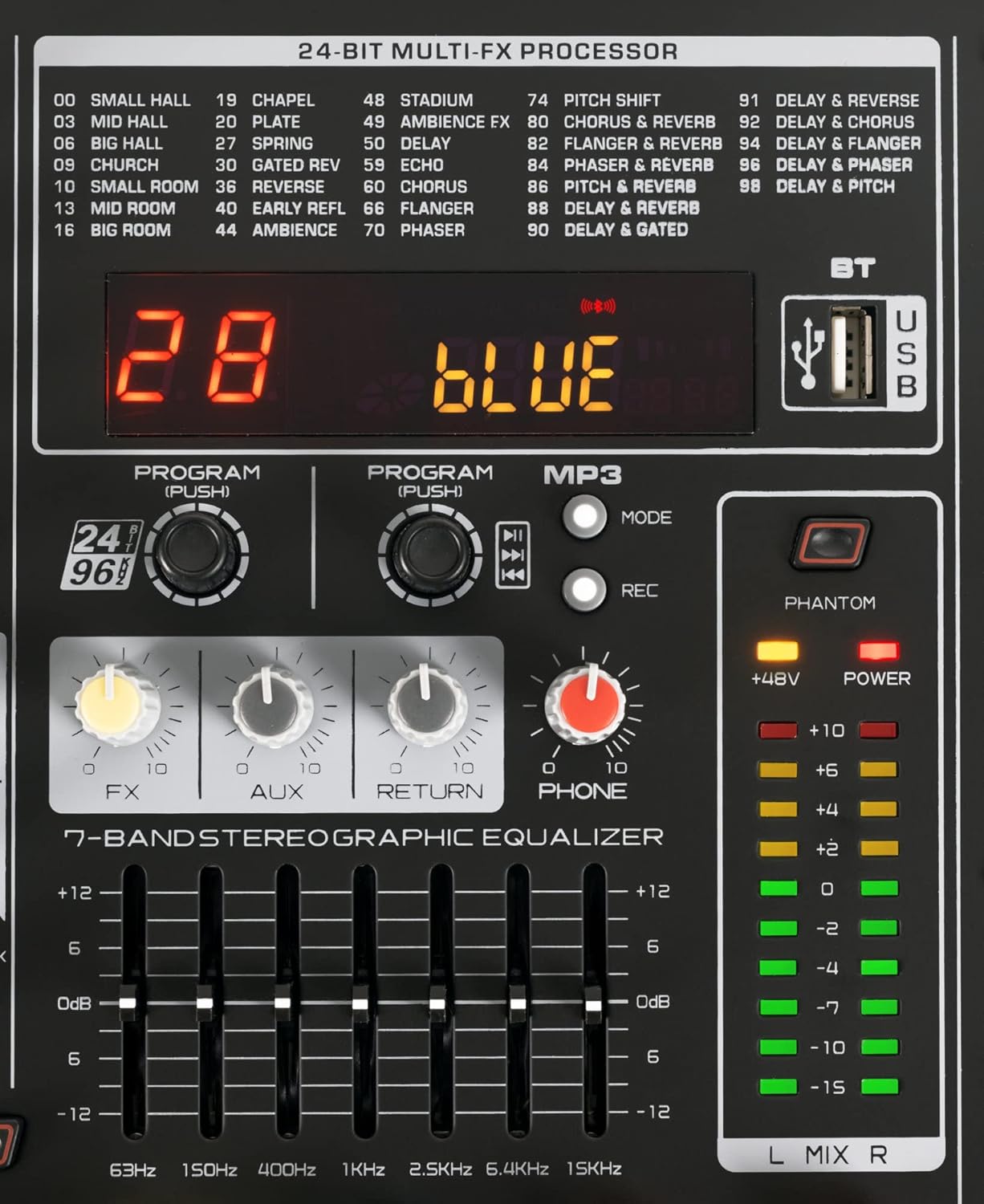
Image: Detailed view of the multi-effect processor and graphic equalizer controls.
6.5 Media Player/Recorder (Bluetooth/USB)
The integrated media player supports Bluetooth and USB playback. To use Bluetooth, activate Bluetooth on your device (e.g., smartphone, tablet) and select 'Powermake 600' from the list of available devices. For USB playback, insert a USB drive with audio files. Use the MP3 section controls for playback (Play/Pause, Next/Previous, Mode). To record, press the REC button while a USB drive is inserted.

Image: Illustration of Bluetooth connectivity with the Powermake 600.
6.6 Graphic Equalizer
The 7-band graphic equalizer allows you to fine-tune the overall sound of your mix. Adjust the sliders for specific frequency bands (63Hz, 150Hz, 400Hz, 1KHz, 2.5KHz, 6.4KHz, 15KHz) to shape the master output's tonal characteristics.
6.7 Phantom Power (+48V)
If you are using condenser microphones, activate the +48V PHANTOM POWER switch. Ensure all connections are made before activating phantom power to prevent damage to equipment.
7. Maintenance
To ensure the longevity and optimal performance of your Powermake 600:
- Cleaning: Use a soft, dry cloth to clean the exterior. Do not use liquid cleaners or solvents.
- Storage: Store the unit in a cool, dry place away from direct sunlight and extreme temperatures.
- Ventilation: Ensure the ventilation fan and vents are clear of dust and obstructions.
8. Troubleshooting
| Problem | Possible Cause | Solution |
|---|---|---|
| No sound output | Power off; Master volume low; Speaker cables disconnected; Channel faders down. | Check power, raise master and channel volumes, ensure speaker cables are securely connected. |
| Wireless microphone not working | Dead batteries; Not synchronized; Out of range. | Replace batteries, re-sync microphones with the mixer, ensure microphones are within operating range. |
| Loud fan noise | Normal operation characteristic; Dust in fan. | This can be a characteristic of the unit, especially at higher loads. Ensure fan vents are clear. If excessive, contact support. |
| Distorted sound | Input gain too high; Master volume too high. | Reduce input GAIN on channels, lower master volume. Ensure PFL LEDs are not constantly lit. |
9. Specifications
- Model: Pronomic Powermake 600
- Channels: 6
- Output Power: 2x 380 Watt RMS @ 4 Ohm (760 Watt total RMS)
- Dimensions (W x H x D): 38.7 x 15.5 x 40.5 cm
- Weight: 8.2 kg
- Color: Black
- Connectivity: Bluetooth, USB, Auxiliary, XLR, 6.3mm Jack
- Wireless Microphone Frequency Range: 823 - 830 MHz
- Effects: 100 24-bit Multi-Effects
- Equalizer: 3-band per channel, 7-band graphic master EQ
- Phantom Power: +48V switchable
10. Warranty and Support
For warranty claims, technical support, or service inquiries, please contact your retailer or the manufacturer directly. The product is sold by Musikhaus Kirstein GmbH. Please refer to your purchase documentation for specific warranty terms and conditions.
For further assistance, you may visit the Pronomic brand store: Pronomic Store
Related documentsPowermake 600


Ask a question about this manual
Ask about setup, troubleshooting, compatibility, parts, safety, or missing instructions. Manuals+ will review the question and use this page’s manual context to help answer it.