
1. Introduction
Thank you for purchasing the Teesa TSA5001.1 Portable Cooler and Warmer. This device is designed to keep your food and beverages cool or warm, making it ideal for travel, camping, picnics, and other outdoor activities. Please read this manual carefully before use to ensure proper operation and to prevent damage to the unit.
2. Safety Instructions
To reduce the risk of fire, electric shock, or injury, always follow these basic safety precautions:
- Read all instructions before operating the appliance.
- Do not immerse the appliance, cord, or plug in water or other liquids.
- Ensure the power supply matches the voltage specified on the rating label (12V DC or 220-240V AC).
- Keep ventilation openings clear and unobstructed. Do not block the fan or vents.
- Do not use the appliance near heat sources or in direct sunlight for extended periods.
- Unplug the appliance from the power outlet when not in use, before cleaning, or before performing any maintenance.
- This appliance is not intended for use by persons (including children) with reduced physical, sensory or mental capabilities, or lack of experience and knowledge, unless they have been given supervision or instruction concerning use of the appliance by a person responsible for their safety.
- Do not use the appliance if the power cord or plug is damaged. Contact qualified service personnel for repair.
- Avoid placing hot items directly into the cooler when in cooling mode, or cold items when in heating mode, as this can reduce efficiency.
3. Product Overview
The Teesa TSA5001.1 is a versatile portable cooler and warmer utilizing a thermoelectric Peltier system, which is CFC-free. It features a 25-liter capacity and can be powered by both a 12V DC car outlet or a standard 220-240V AC household outlet.


4. Setup
- Unpacking: Carefully remove the cooler from its packaging. Retain the packaging for future storage or transport.
- Placement: Place the cooler on a flat, stable surface. Ensure there is adequate space around the ventilation openings (located on the lid) for proper airflow. Do not place it directly against a wall or in an enclosed space.
- Power Connection:
- For AC (Household) Use: Connect the AC power cord to the cooler's AC input, then plug the other end into a standard 220-240V AC wall outlet.
- For DC (Vehicle) Use: Connect the DC power cord to the cooler's DC input, then plug the other end into your vehicle's 12V cigarette lighter socket.
Ensure the power switch on the control panel is in the "OFF" position before connecting or disconnecting power.

The included AC (left) and DC (right) power cables for versatile power options.
5. Operating Instructions
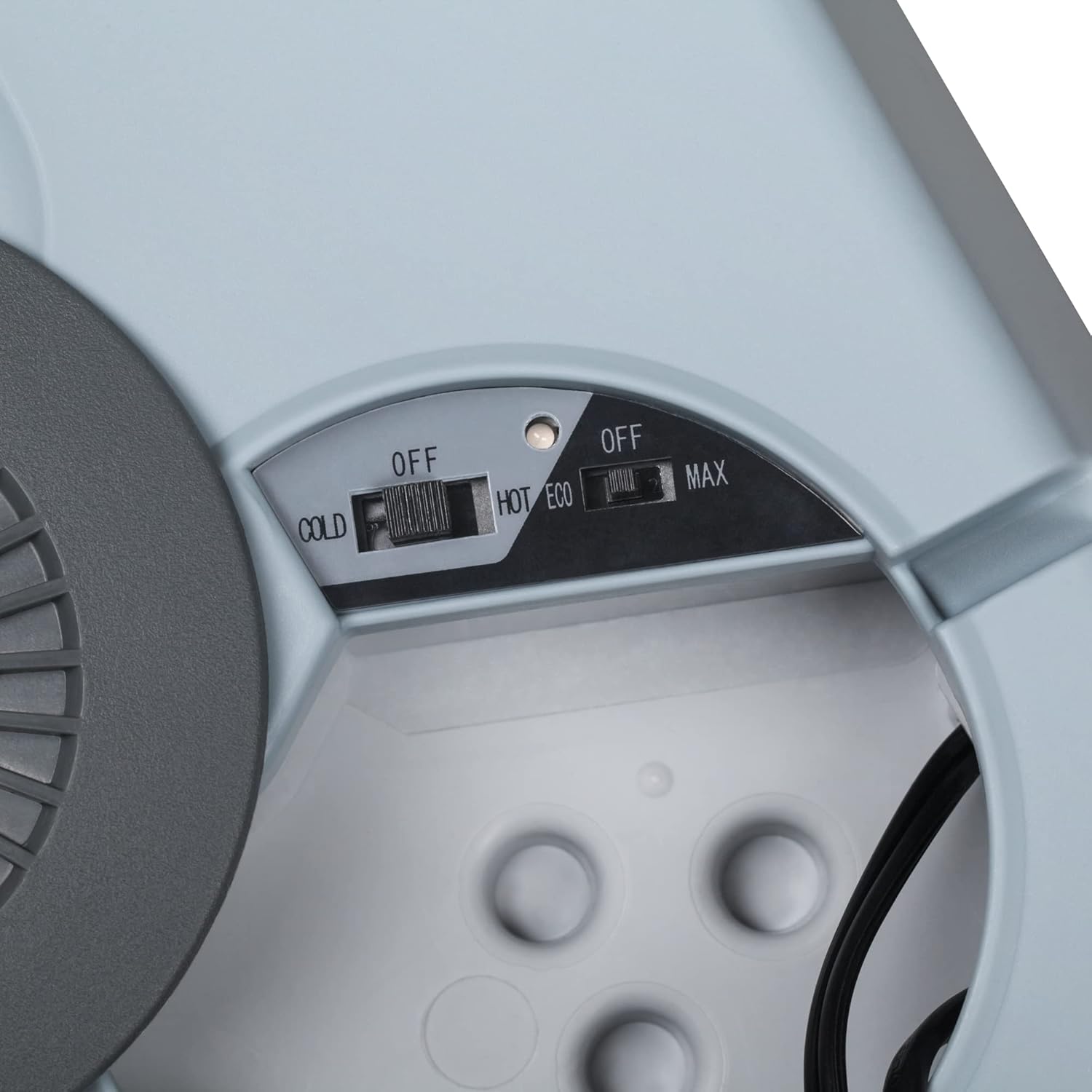
The Teesa TSA5001.1 features both cooling and heating functions, controlled by switches on the lid's control panel.

- Loading Contents: Place items inside the cooler. For optimal performance, pre-chill or pre-heat items before placing them in the unit. Ensure the lid is securely closed after loading.
- Selecting Mode:
- Cooling Mode: Slide the main switch to the "COLD" position. The cooler will begin to cool its contents. It can cool items to 18-22°C below ambient temperature, with a minimum temperature of approximately 6°C.
- Heating Mode: Slide the main switch to the "HOT" position. The cooler will begin to heat its contents, maintaining a temperature of up to +65°C.
- Power Mode (AC only): When operating on AC power, you can select between two power modes:
- ECO Mode: Slide the secondary switch to "ECO" for energy-efficient operation. This mode is suitable for maintaining temperature over longer periods.
- MAX Mode: Slide the secondary switch to "MAX" for maximum cooling or heating power. This mode is recommended for initial cooling or heating of contents.
Note: The ECO/MAX switch is typically only active when the unit is powered by AC (220-240V). When using 12V DC, the unit usually operates at maximum power.
- Switching Off: To turn off the appliance, slide the main switch to the "OFF" position. Disconnect the power cord from the outlet when not in use.
6. Maintenance
Regular maintenance ensures the longevity and efficient operation of your cooler and warmer.
- Cleaning: Always unplug the unit before cleaning. Wipe the interior and exterior surfaces with a damp cloth and a mild detergent. Do not use abrasive cleaners, solvents, or immerse the unit in water. Ensure the unit is completely dry before reconnecting power.
- Ventilation: Periodically check and clean the ventilation openings on the lid to ensure they are free from dust and debris. A soft brush or vacuum cleaner can be used. Blocked vents can reduce efficiency and cause overheating.
- Storage: When not in use, store the cooler in a clean, dry place, away from direct sunlight and extreme temperatures. Ensure the lid is slightly ajar to prevent odors and mildew.
7. Troubleshooting
If you encounter issues with your Teesa TSA5001.1, refer to the following common problems and solutions:
- Unit is not cooling/heating:
- Check if the power cord is securely connected to both the unit and the power source.
- Ensure the power switch is set to "COLD" or "HOT" as desired.
- Verify that the power outlet (AC) or vehicle socket (DC) is functioning correctly.
- Poor cooling/heating performance:
- Ensure the lid is closed tightly.
- Check that the ventilation openings are not blocked.
- Avoid overfilling the cooler, as this can impede air circulation.
- For best results, pre-chill or pre-heat items before placing them in the unit.
- In cooling mode, ambient temperature significantly affects performance. The unit cools relative to the surrounding temperature.
- Unusual noise from the fan:
- Check if the fan or vents are obstructed by debris. Clean if necessary.
- If the noise persists and is excessive, contact customer support.
8. Specifications
| Parameter | Value |
|---|---|
| Model | TSA5001.1 |
| Capacity | 25 Liters |
| Cooling Type | Peltier system, CFC-free |
| Insulation Material | Cyclopentane |
| DC Power (Cooling) | 40 W ± 20% |
| DC Power (Heating) | 48 W ± 20% |
| AC Power (Cooling) | 52 W ± 20% |
| AC Power (Heating) | 58 W ± 20% |
| AC Standby Power | 8 W |
| Cooling Performance | 18-22°C below ambient temperature (minimum approx. 6°C) |
| Heating Performance | Up to +65°C |
| Noise Level | ~60 dB |
| Power Supply | 12 V DC, 220-240 V AC, 50-60 Hz |
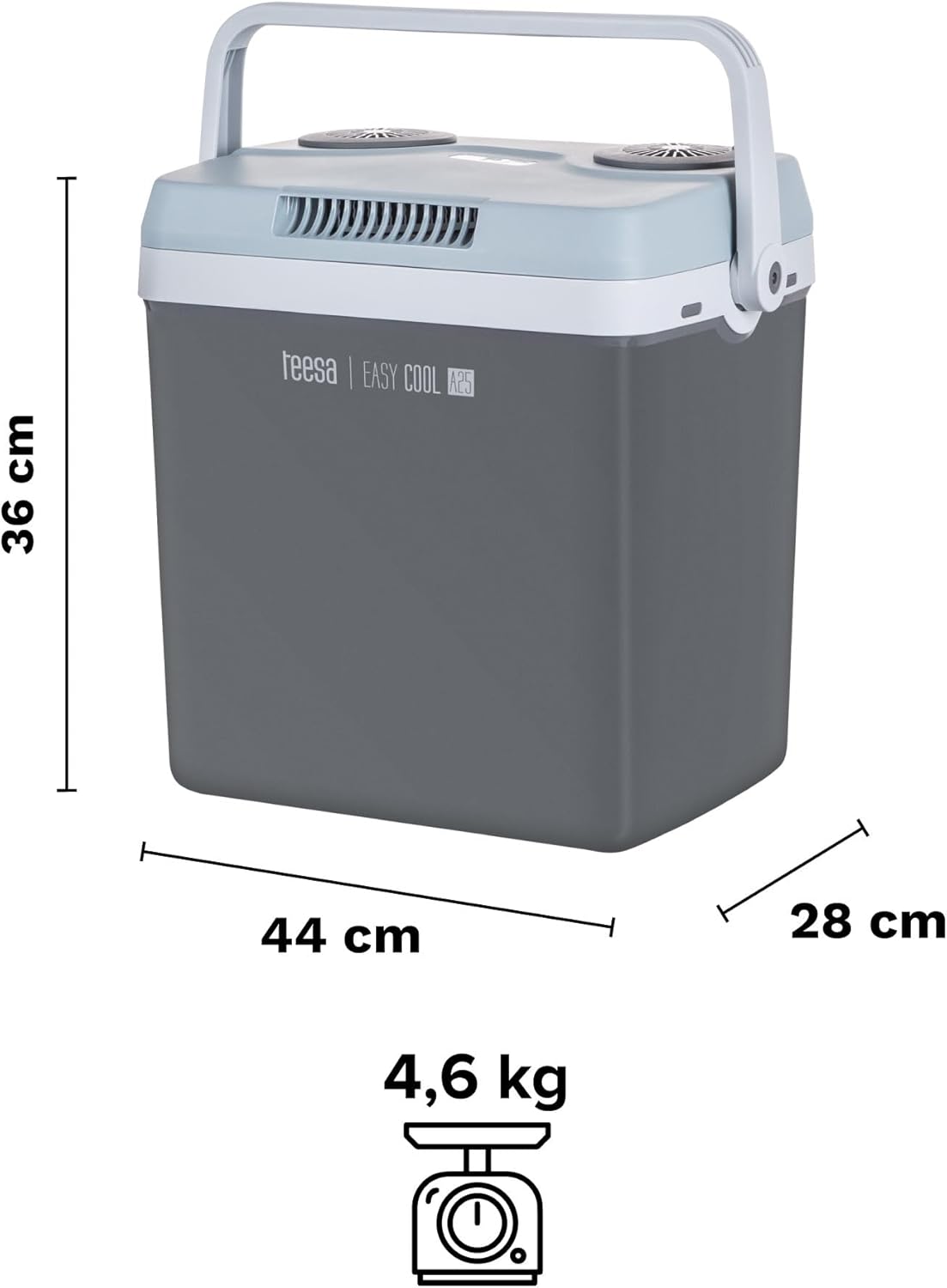
| Product Dimensions (H x W x D) | 44 cm x 28 cm x 36 cm |
| Product Weight | 4.6 kg |
9. Warranty and Support
For warranty information, please refer to the documentation provided at the time of purchase or contact your retailer. Keep your proof of purchase for warranty claims.
If you require technical assistance or have questions not covered in this manual, please contact Teesa customer support through their official website or the contact information provided with your product.


