
SEDETA SD-1
SEDETA Gaming Desk Instruction Manual
Model: SD-1
Introduction
This manual provides detailed instructions for the assembly, operation, and maintenance of your SEDETA Gaming Desk. This ergonomic gaming computer desk is designed to enhance your gaming and working experience with features such as a monitor stand, LED lights, storage shelves, and a CPU holder. Please read this manual thoroughly before beginning assembly to ensure proper setup and safe use.
Safety Information
Adherence to the following safety guidelines is crucial for safe operation and to prevent damage to the product or injury.
- Ensure proper assembly following the instructions provided.
- Do not exceed the maximum weight capacity of 300 lbs (136 kg).
- Use adjustable leg pads to maintain a sturdy construction on uneven surfaces.
- Keep all small parts and packaging materials away from children.
- Avoid placing hot items directly on the desk surface without protection.
Assembly Instructions
The SEDETA Gaming Desk is designed for straightforward assembly. It is recommended that two people assemble the desk to facilitate the process, especially for larger components. All necessary tools and numbered parts are included.
- Unpack Components: Carefully remove all parts from the packaging. Verify that all numbered parts and hardware are present according to the included parts list.
- Assemble Frame: Begin by assembling the main frame components. Follow the step-by-step diagrams provided in the separate assembly guide. Ensure all screws are tightened securely but do not overtighten.
- Attach Desktop: Secure the desktop to the assembled frame. Pay attention to the orientation of the desktop to ensure proper alignment for the monitor stand and cable management grommets.
- Install Shelves and Hutch: Attach the two large storage shelves and the top hutch according to the instructions. These provide ample space for your CPU, gaming consoles, books, and decorative items.
- Mount Monitor Stand: Position and secure the integrated monitor stand. This stand is ergonomically designed to elevate your screens to a comfortable viewing height, reducing neck and eye strain.
- Connect LED Lights: Install the RGB LED light strip. Refer to the "Operating Instructions" section for details on connecting and controlling the LED lights.
- Final Adjustments: Once assembled, use the adjustable feet to level the desk on uneven floors, ensuring stability.

Figure 1: Fully assembled SEDETA Gaming Desk, showcasing its spacious design and integrated features.
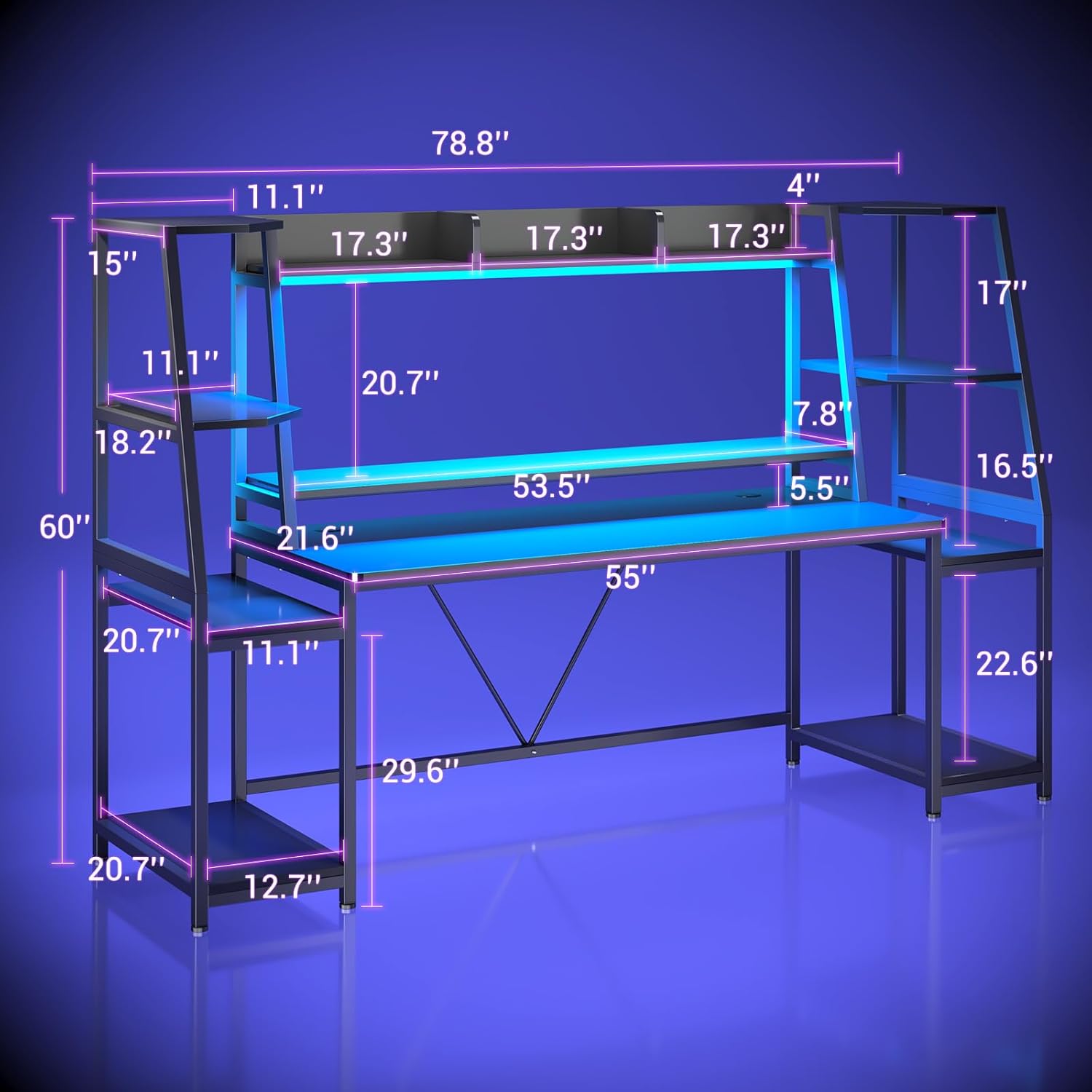
Figure 2: Detailed dimensions of the SEDETA Gaming Desk, including desktop, hutch, and shelf measurements.
Operating Instructions
LED Light System
The SEDETA Gaming Desk features an integrated RGB LED light strip to enhance your gaming or working atmosphere. The lights are controlled via a dedicated app or remote control.
- Power On/Off: Connect the LED light strip to a power source. Use the remote control or app to turn the lights on or off.
- Color Selection: Choose from over 60,000 colors using the color wheel in the app or dedicated color buttons on the remote.
- Flashing Modes: Select from 29 different flashing modes to create dynamic lighting effects.
- Music Sync Function: Utilize the built-in sensitivity-adjustable microphone. The LED light color will change in rhythm with ambient sounds or music.
- Timer Function: Set a timer for the lights to automatically turn off, allowing for smart energy management.

Figure 3: The LED light system in operation, highlighting color options and app control features.
Maintenance
To ensure the longevity and appearance of your SEDETA Gaming Desk, follow these simple maintenance guidelines:
- Cleaning: Wipe the desk surfaces with a dry, soft cloth. For stubborn marks, a slightly damp cloth can be used, followed immediately by a dry cloth. Avoid abrasive cleaners or harsh chemicals.
- Spills: The desk surface is waterproof and easy to clean. In case of spills, wipe them immediately to prevent any potential damage.
- Hardware Check: Periodically check all screws and fasteners to ensure they remain tight. Retighten if necessary to maintain stability.
- Weight Distribution: Distribute weight evenly across the desktop and shelves to prevent stress on any single point.
Troubleshooting
If you encounter any issues with your SEDETA Gaming Desk, please refer to the following common solutions:
- Desk Wobbles: Ensure all assembly screws are securely tightened. Adjust the leveling feet at the bottom of the desk legs to compensate for uneven floor surfaces.
- LED Lights Not Working: Check that the LED light strip is properly connected to its power source and that the power adapter is plugged into a working outlet. Verify that the remote control batteries are functional or that the app is correctly paired.
- Missing Parts or Damage: If your item arrives damaged, scratched, or with missing parts, please contact SEDETA customer service immediately for assistance.
Specifications
| Feature | Detail |
|---|---|
| Brand | SEDETA |
| Model Number | SD-1 |
| Product Dimensions (D x W x H) | 21.6\"D x 78.8\"W x 60\"H |
| Color | Black |
| Material | Engineered Wood (Top), Alloy Steel (Legs), Metal (Hutch) |
| Item Weight | 88.66 Pounds (40.21 kg) |
| Maximum Weight Recommendation | 300 Pounds (136 kg) |
| Number of Shelves | 2 (Open) + Hutch |
| Assembly Required | Yes (Recommended 2 people) |
| Special Features | Ergonomic Monitor Stand, RGB LED Lights, CPU Holder, Cable Management Grommets, Adjustable Feet |
Warranty and Support
Your SEDETA Gaming Desk comes with a Standard Warranty, which is a Limited Warranty covering parts and labor. For specific details regarding the warranty period and coverage, please refer to the warranty card included with your product or contact SEDETA customer service.
For any questions, assistance with assembly, missing parts, or warranty claims, please contact SEDETA customer support:
- Customer Service: Refer to the contact information provided on the product packaging or the official SEDETA website.
- Online Resources: Visit the official SEDETA store for FAQs and additional product information: SEDETA Store on Amazon
Related documentsSD-1

Ask a question about this manual
Ask about setup, troubleshooting, compatibility, parts, safety, or missing instructions. Manuals+ will review the question and use this page’s manual context to help answer it.