
1. Product Overview
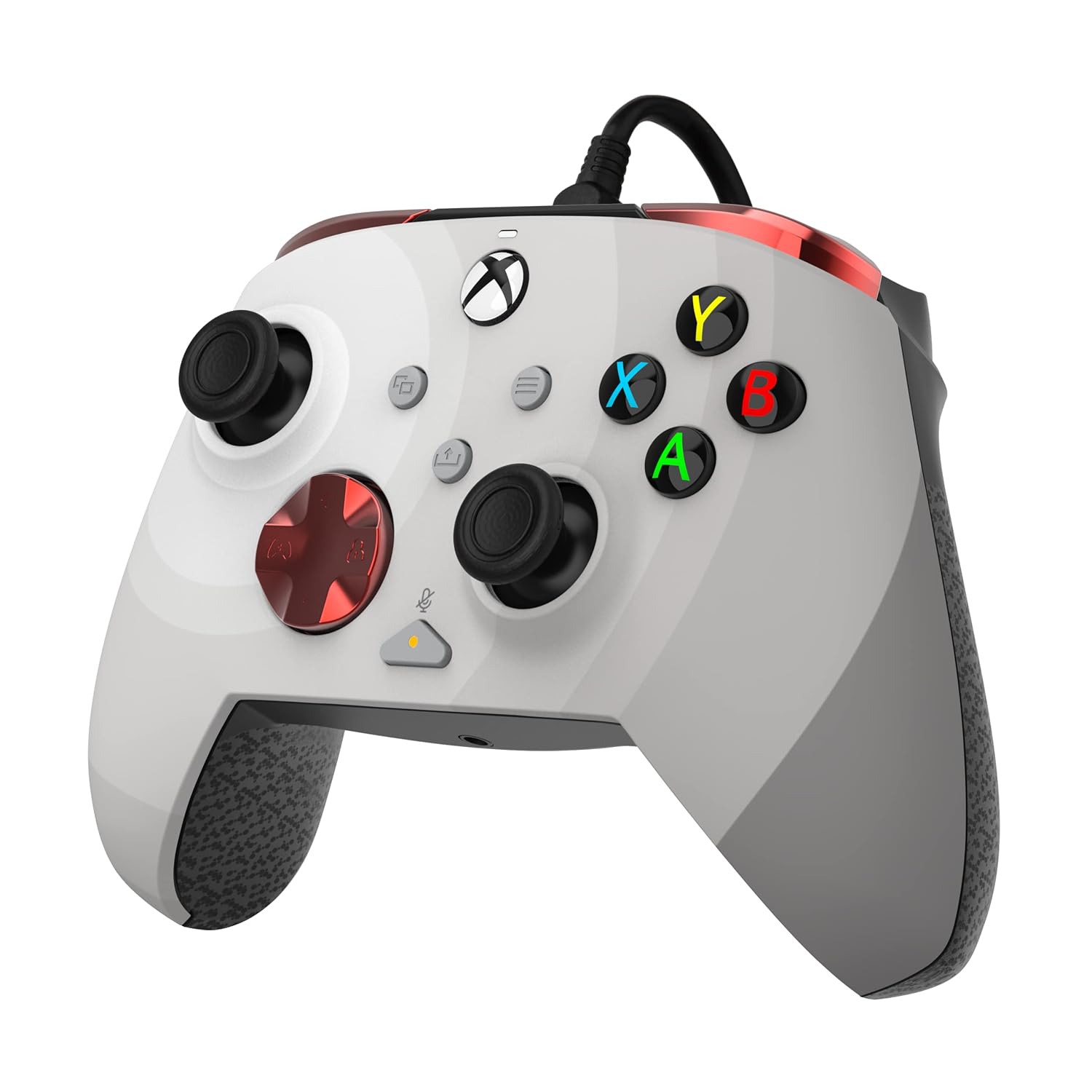
The PDP Gaming REMATCH Enhanced Wired Controller is officially licensed for Xbox Series X|S, Xbox One, and PC/Windows. This controller is designed to provide enhanced features and customizability for an optimized gaming experience. It includes mappable back buttons, advanced customization options via the PDP Control Hub app, textured grips, and integrated audio controls for efficient gameplay and communication.
The controller connects via an 8-foot USB-C cable, ensuring a lag-free experience without the need for batteries.
2. Key Features
- Customizable Settings: Utilize the free PDP Control Hub App to re-map buttons, re-configure triggers, adjust dead zones, and update controller firmware.
- Integrated Audio Controls: Link your headset using the 3.5mm audio jack. Mute your microphone by double-tapping the "Function" button. Adjust game and chat audio on-the-fly using the controls located on the D-pad.
- Programmable Back Buttons: Two programmable back buttons allow for mapping of controller functions for quicker responses and improved efficiency.
- Wired Compatibility: Features an 8-foot detachable USB-C cable for unlimited playtime without batteries and broad compatibility with Xbox Series X|S, Xbox One, and Windows 10/11.
- Dedicated Share Button: Easily share captured images and videos with the dedicated share button located in the center of the controller.
3. Setup Guide
3.1 Connecting the Controller
- Connect the included 8-foot USB-C cable to the USB-C port on the top of the controller.
- Plug the other end of the USB-C cable into an available USB port on your Xbox console (Xbox Series X|S, Xbox One) or PC (Windows 10/11).
- The controller will automatically power on and connect to your device.
3.2 Installing the PDP Control Hub App
To unlock the full customization potential of your controller, download the free PDP Control Hub App from the Microsoft Store on your Xbox console or Windows PC. This app allows for button re-mapping, trigger configuration, dead zone adjustments, and firmware updates.
4. Operating Instructions
4.1 Basic Controls
The controller features standard Xbox button layouts including A, B, X, Y buttons, D-pad, left and right analog sticks, View button, Menu button, and Share button. It also includes left and right bumpers (LB, RB) and triggers (LT, RT).
4.2 Customizing Back Buttons
The two programmable back buttons (located on the underside of the controller) can be mapped to any standard controller function using the PDP Control Hub App. This allows for quick access to frequently used actions without removing your thumbs from the analog sticks.
4.3 Audio Controls
- Headset Connection: Plug your 3.5mm compatible headset into the audio jack at the bottom of the controller.
- Mic Mute: Double-tap the "Function" button (located below the right analog stick) to quickly mute or unmute your microphone.
- Volume Adjustment: Use the D-pad in conjunction with the "Function" button to adjust game and chat audio levels.
4.4 Sharing Content
Press the dedicated Share button (located in the center of the controller, below the Xbox button) to capture screenshots or record game clips, depending on your console or PC settings.
5. Maintenance
5.1 General Care
Keep the controller clean by wiping it with a dry, soft cloth. Avoid using harsh chemicals or abrasive materials. Store the controller in a cool, dry place when not in use to prevent damage.
5.2 Firmware Updates
Regularly check for firmware updates via the PDP Control Hub App to ensure optimal performance and access to the latest features. Follow the on-screen instructions within the app to perform any available updates.
6. Troubleshooting
If you encounter any issues with your PDP Gaming REMATCH controller, please consider the following:
- Controller Not Responding: Ensure the USB-C cable is securely connected to both the controller and your console/PC. Try plugging the cable into a different USB port.
- Audio Issues: Verify your headset is fully plugged into the 3.5mm jack. Check the in-game and console/PC audio settings. Ensure the mic is not muted via the controller's function button.
- Customization Problems: Make sure the PDP Control Hub App is up to date. Restart the app and reconnect the controller.
- Firmware Update Failure: Ensure a stable internet connection during updates. Do not disconnect the controller during the update process.
For further assistance, refer to the official PDP support website or contact customer service.
7. Specifications
| Feature | Detail |
|---|---|
| Model Number | 049-023-RW |
| Compatibility | Xbox Series X|S, Xbox One, PC (Windows 10/11) |
| Connectivity | Wired (8-foot detachable USB-C cable) |
| Audio Jack | 3.5mm |
| Dimensions | 3.23 x 6.89 x 6.89 inches |
| Weight | 10.56 ounces (approx. 299g) |
| Manufacturer | PDP |
| Release Date | October 12, 2022 |
8. Official Product Videos
Introducing the all new REMATCH Controller for Xbox
This video provides an official introduction to the PDP REMATCH Controller for Xbox, highlighting its design and key features.
PDP Licensed Gaming Accessories Xbox Nintendo Playstation
An overview video showcasing various PDP licensed gaming accessories, including the REMATCH controller, across different platforms.
9. Product Images



10. Warranty and Support
For information regarding product warranty, technical support, or replacement parts, please visit the official PDP support website or contact their customer service department. Keep your purchase receipt as proof of purchase for any warranty claims.


