
1. Introduction
This manual provides essential information for the safe and efficient use of your Metro Mobility 4-Wheel Outdoor Mobility Scooter. Designed for comfort and independence, this scooter offers enhanced mobility for both indoor and outdoor environments. Please read this manual thoroughly before operating the scooter to ensure proper usage and to maximize its lifespan.
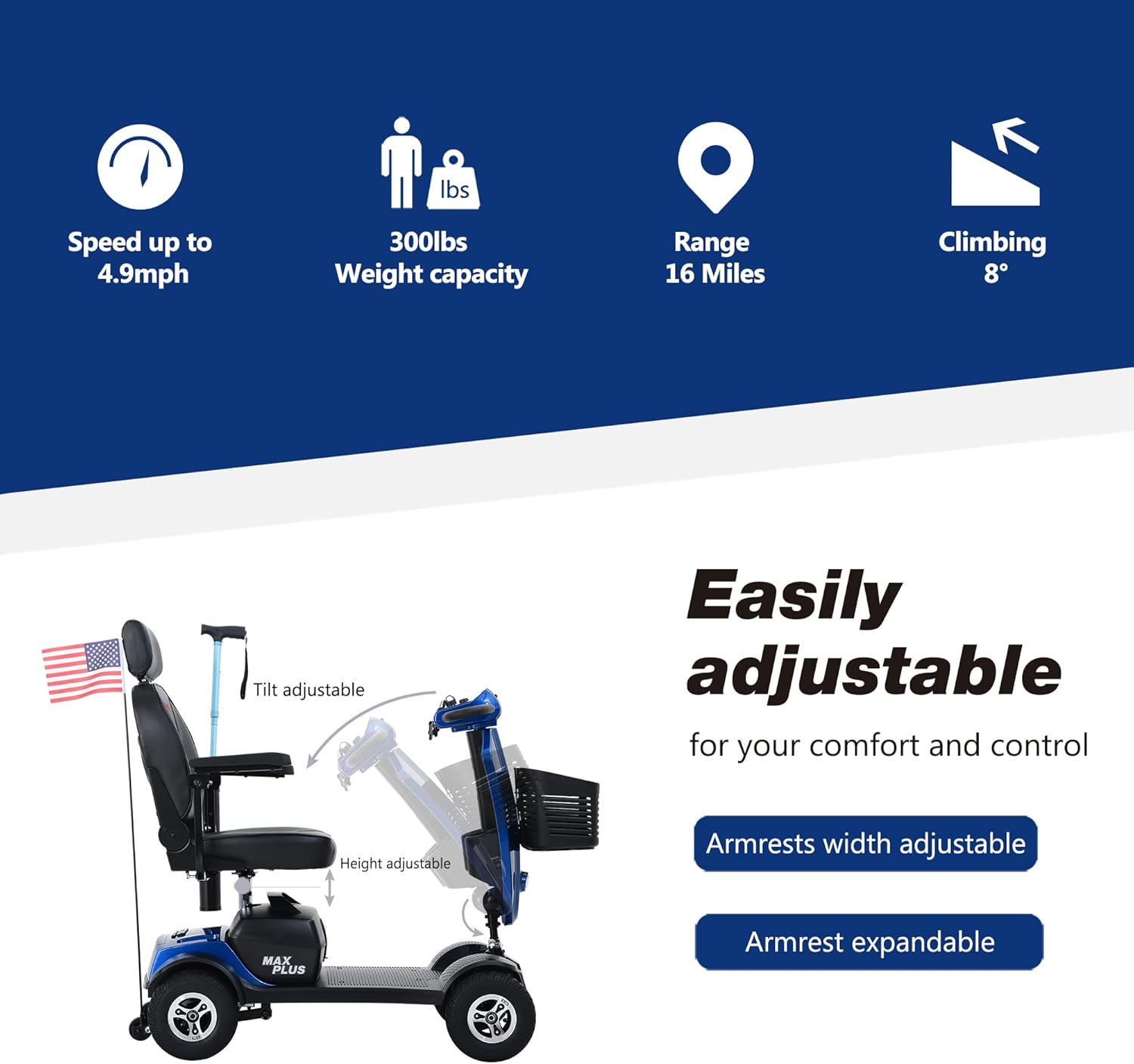
The Metro Mobility 4-Wheel Scooter is engineered to support up to 300 pounds, featuring 9-inch pneumatic tires, a top speed of 8 mph, and a range of up to 16 miles per charge. Key features include a 4.7-inch ground clearance, 20 Ah battery capacity, and a 43.3-inch turning radius.
2. Safety Information
Your safety is paramount. Always adhere to the following guidelines:
- Pre-Operation Check: Before each use, ensure the battery is fully charged, tires are properly inflated, and all controls are functioning correctly.
- Weight Capacity: Do not exceed the maximum weight capacity of 300 lbs.
- Speed Control: Always adjust your speed according to the environment and your comfort level. Use the shift dial to set the maximum speed.
- Visibility: Use headlights in low-light conditions and ensure brake lights are operational.
- Incline Safety: Be cautious on inclines. The scooter is designed to handle certain gradients, but extreme slopes should be avoided.
- Environmental Awareness: Be aware of your surroundings, including pedestrians, vehicles, and obstacles.
- Emergency Braking: Familiarize yourself with the braking system and practice emergency stops in a safe area.
- Storage: Store the scooter in a dry, safe place away from extreme temperatures.
Legal Disclaimer: Statements regarding this product have not been evaluated by the FDA and are not intended to diagnose, treat, cure, or prevent any disease or health condition. Consult with a healthcare professional for personal medical advice.
3. Product Features
The Metro Mobility 4-Wheel Outdoor Mobility Scooter is equipped with several features designed for user comfort, convenience, and safety:
- Enhanced Battery Capacity: Upgraded to 2*20Ah lead-acid batteries, providing a travel range of up to 16 miles on a single charge.
- Comfortable Seating: Features a fully upholstered faux leather seat with adjustable height and padded armrests that can be adjusted and flipped up for easy access.
- Extended Foot Pedal: The foot pedal has been extended from 9 inches to 12.5 inches for increased legroom and comfort.
- Intuitive Control Panel: Located on the tiller console, it allows for speed adjustment, forward/reverse switching, headlight activation, and a battery life indicator.
- Pneumatic Tires: 9-inch pneumatic tires provide a smooth ride over various surfaces.
- Anti-Tipping Wheels: Provides extra stability on inclines and uneven surfaces.
- USB Charging Port: Conveniently located for charging mobile devices on the go.
- Cup Holders: Integrated cup holders keep beverages secure.
- Crutch Box Feature: An added feature for users requiring crutch storage.
- Freewheel Function: Allows for safe, controlled stops and smooth operation on slopes.
Visual Features Overview


4. Setup
Follow these steps to set up your Metro Mobility Scooter:
- Initial Battery Charge: Charge the battery completely before using the scooter for the first time. Refer to the charging section for detailed instructions.
- Seat Adjustment: Adjust the seat height and armrests to a comfortable position. Ensure the seat is securely locked in place.
- Tiller Adjustment: Adjust the tiller (handlebar) to a comfortable height and angle for easy access to controls.
- Basket Attachment: Securely attach the front basket if desired.
Assembly and Portability

5. Operation
Operating your Metro Mobility Scooter is straightforward:
- Power On: Insert the key into the ignition and turn it to the "ON" position.
- Speed Selection: Use the shift dial on the tiller console to set your desired maximum speed.
- Direction Control: Use the hand controls to move forward or reverse.
- Lighting: Activate the headlights as needed for visibility.
- Horn: Use the horn button to alert others when necessary.
- Battery Indicator: Monitor the color-coded battery life indicator on the display to check battery status.
- Charging Devices: Utilize the built-in USB charging port to power your mobile devices.
Operational Videos
6. Maintenance
Regular maintenance ensures the longevity and optimal performance of your scooter:
- Battery Care: Always charge the battery after each use or when the battery level is low. Avoid fully discharging the battery.
- Cleaning: Wipe down the scooter regularly with a damp cloth. Avoid using harsh chemicals or abrasive cleaners.
- Tire Pressure: Check tire pressure periodically and inflate to the recommended levels.
- Inspections: Periodically inspect all moving parts, connections, and wiring for any signs of wear or damage.
- Professional Service: For any complex repairs or issues, contact authorized service personnel.
7. Troubleshooting
If you encounter issues with your scooter, refer to the following common troubleshooting tips:
| Problem | Possible Cause | Solution |
|---|---|---|
| Scooter does not power on. | Battery not charged, key not fully inserted, power switch off. | Ensure battery is charged, key is fully inserted and turned, and power switch is on. |
| Reduced speed or range. | Low battery charge, worn battery, incorrect speed setting. | Charge battery fully. If issue persists, battery may need replacement. Check speed dial setting. |
| Unusual noises during operation. | Loose components, motor issue, wheel obstruction. | Inspect for loose parts. Clear any obstructions from wheels. If noise persists, seek professional service. |
| Difficulty on inclines. | Low battery, exceeding weight capacity, overly steep incline. | Ensure battery is charged. Verify weight is within limits. Avoid inclines steeper than recommended. |
If you cannot resolve the issue using these steps, please contact Metro Mobility customer support.
8. Specifications
| Feature | Detail |
|---|---|
| Product Dimensions | 43.7"D x 20.47"W x 36.22"H |
| Battery Capacity | 2 x 12V20AH Lead Acid Battery |
| Max Speed | Up to 8 mph (Note: Some reviews indicate closer to 5 mph) |
| Max Range | Up to 16 miles |
| Weight Capacity | 300 lbs |
| Ground Clearance | 4.7 inches |
| Turning Radius | 43.3 inches |
| Material | Metal, Clinker, Leather |
| Manufacturer | Metro Mobility USA LLC |
| ASIN | B0B3T8C1SP |
9. Warranty & Support
Metro Guarantee: Your Metro Mobility Scooter comes with a 1-year limited guarantee. Please retain your proof of purchase for warranty claims.
For customer support, service inquiries, or to make a warranty claim, please contact Metro Mobility USA LLC directly. Contact information can typically be found on the product packaging or the official Metro Mobility website.
Metro Mobility USA has established after-sales service centers in the United States, Japan, Germany, and other countries to serve customers effectively.


