
Tronsmart 910200
Tronsmart Wireless Earbuds User Manual
Model: Onyx Pure One
Introduction
Thank you for choosing Tronsmart Onyx Pure One Wireless Earbuds. These earbuds are designed to provide an immersive audio experience with advanced features such as Dual Driver Technology, Bluetooth 5.3 connectivity, 3EQ Modes for customized sound, and intuitive touch controls. With a comfortable ergonomic design and IPX5 water resistance, they are perfect for music, sports, and travel.
Package Contents
Please check the box to ensure all items are present:
- Wireless Earbuds
- Wireless Charging Case
- Type-C Charging Cable
- 3 Pairs of Ear Tips (S, M, L)

The image displays the complete package contents of the Tronsmart Onyx Pure One, including the earbuds, charging case, charging cable, and various sizes of ear tips.
Product Overview
The Tronsmart Onyx Pure One earbuds feature a compact design with advanced audio components for superior sound quality.

This image shows the Tronsmart Onyx Pure One earbuds in their charging case, highlighting their sleek black finish and compact design.
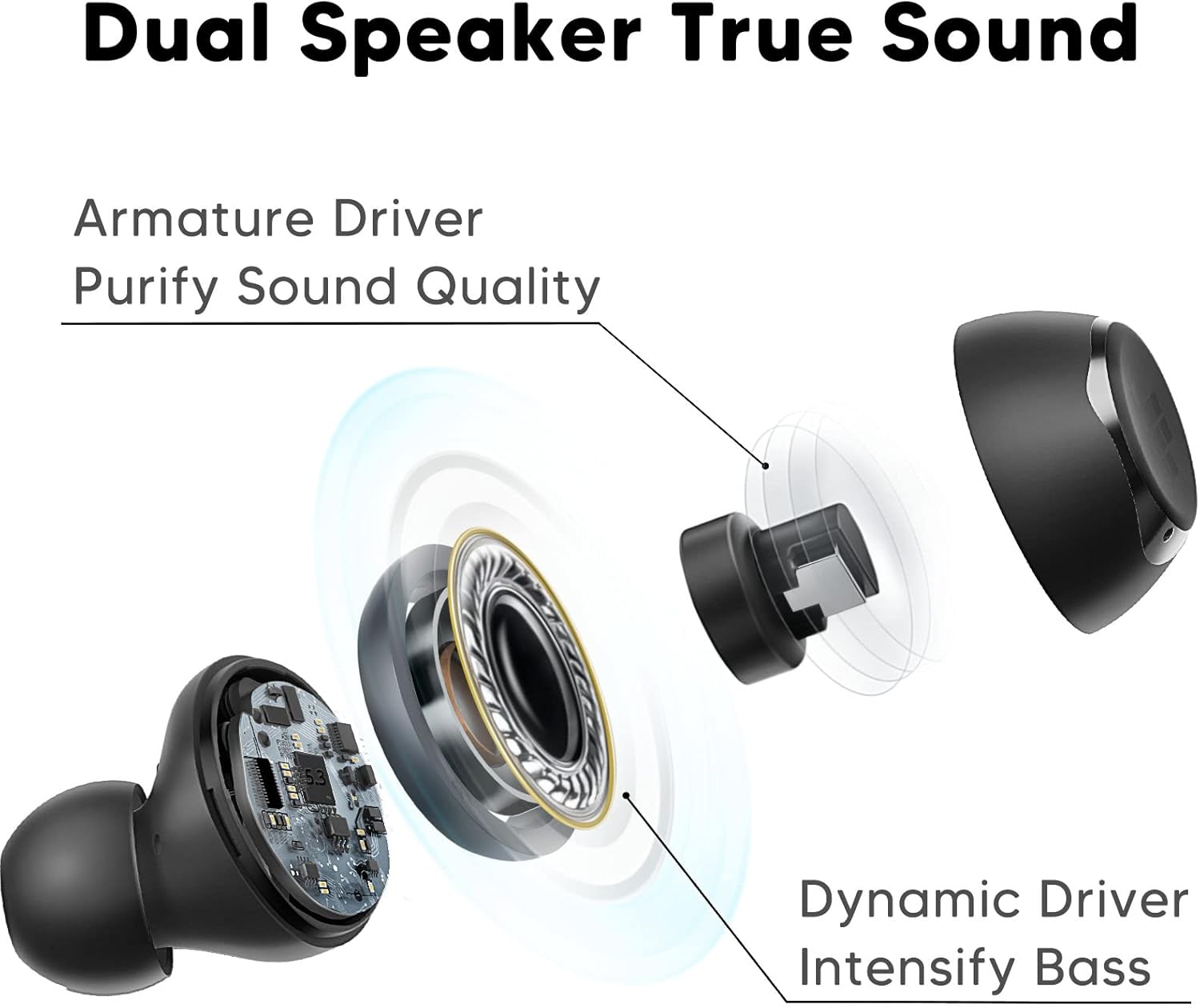
A detailed diagram showcasing the innovative Dual Driver Technology, featuring both an armature driver for sound clarity and a dynamic driver for intensified bass.
Setup
1. Charging the Earbuds and Case
Before first use, fully charge the charging case and earbuds. Connect the provided Type-C charging cable to the charging port on the case and a power source. The indicator light on the case will show charging status. The earbuds will charge automatically when placed inside the case.

This image highlights the impressive battery life of over 32 hours with the charging case, and 7 hours on a single charge for the earbuds.
2. Initial Pairing
The Tronsmart Onyx Pure One earbuds feature one-step auto pairing for convenience.
- Open the charging case. The earbuds will automatically enter pairing mode.
- On your device (smartphone, tablet, laptop), enable Bluetooth and search for new devices.
- Select "Tronsmart Onyx Pure" from the list of available devices to connect.
- Once connected, the earbuds will automatically reconnect to your device when taken out of the case after the first pairing.

This image demonstrates the one-step auto pairing process, showing the earbuds ready to connect to a device via Bluetooth.
3. Wearing the Earbuds
For optimal sound quality and comfort, choose the correct ear tips and ensure a secure fit.
- Select the ear tips (S, M, L) that best fit your ear canals.
- Gently insert the earbud into your ear.
- Twist the earbud slightly to lock it into place, ensuring a snug and comfortable fit.
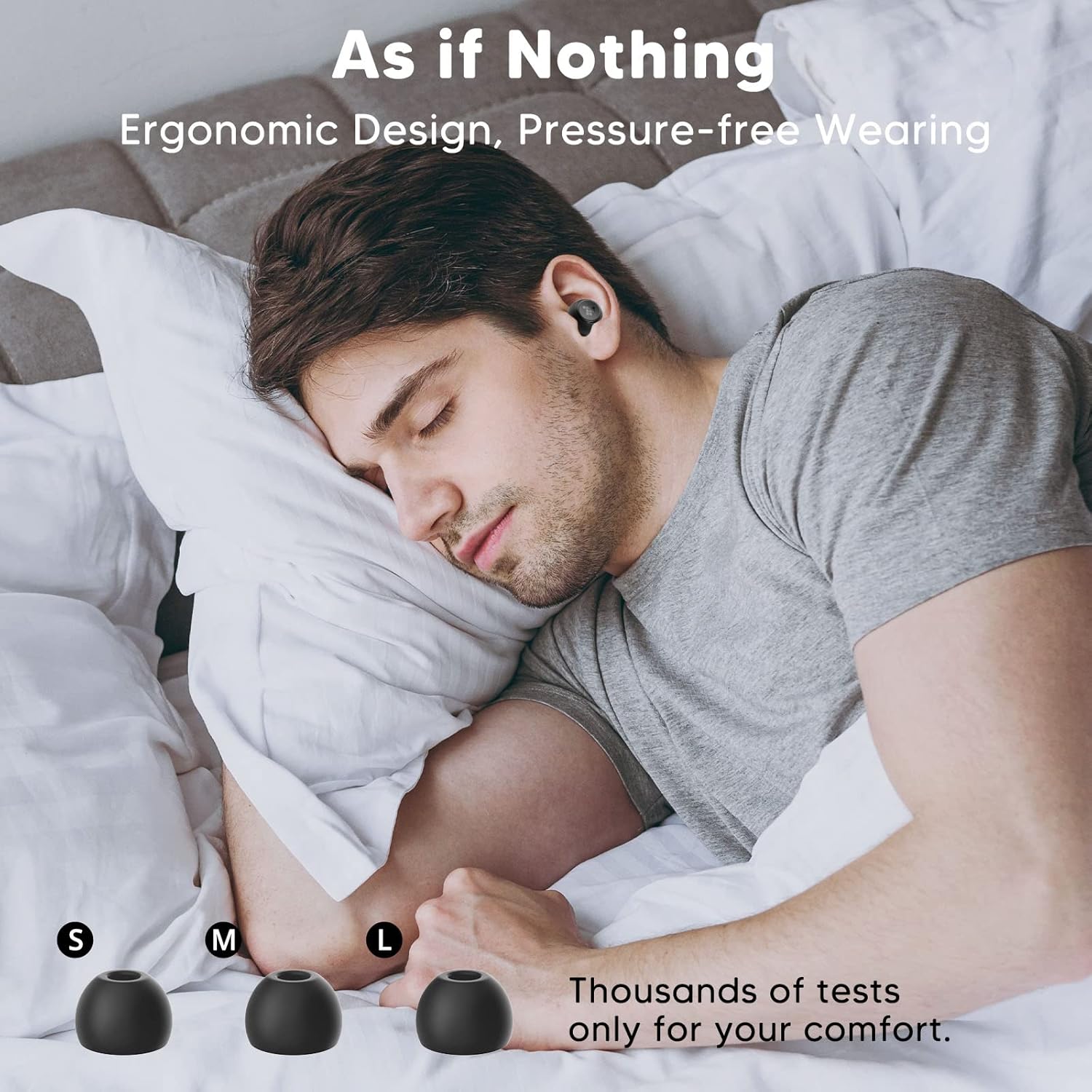
This image illustrates the ergonomic design of the earbuds, providing a comfortable and pressure-free wearing experience, even during sleep.

A visual guide demonstrating the three simple steps to properly wear the earbuds: select ear tips, insert, and twist to lock for a secure and comfortable fit.
Operating the Earbuds
Touch Controls
The Tronsmart Onyx Pure One earbuds feature intuitive touch controls for easy management of music, calls, and voice assistant.
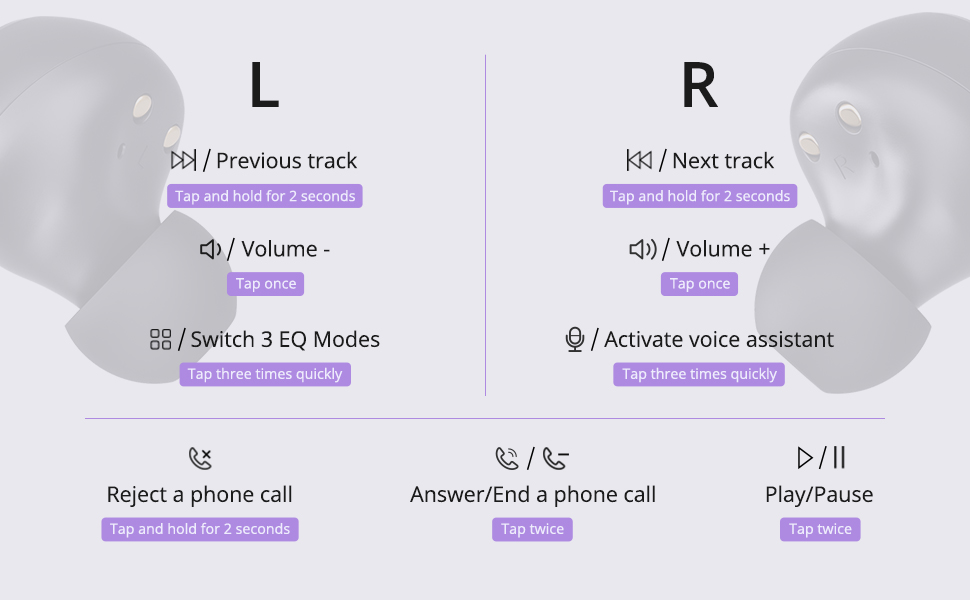
This diagram provides a comprehensive overview of all touch control functions for both the left and right earbuds, including music playback, volume adjustment, call management, and voice assistant activation.
| Function | Left Earbud | Right Earbud |
|---|---|---|
| Play/Pause | Tap twice quickly | |
| Volume Down | Tap once | |
| Volume Up | Tap once | |
| Previous Track | Tap and hold for 2 seconds | |
| Next Track | Tap and hold for 2 seconds | |
| Switch EQ Modes | Tap three times quickly | |
| Activate Voice Assistant | Tap three times quickly | |
| Answer/End Call | Tap twice quickly | |
| Reject Call | Tap and hold for 2 seconds | |
EQ Modes
The earbuds are equipped with 3 EQ Modes to enhance your listening experience:
- Normal Mode: Delivers well-balanced bass, perfect for casual listening.
- Bass Mode: Enhances deep bass, ideal for immersive music.
- Pure Mode: Presents clear vocals, suitable for opera, podcasts, and audiobooks.

This image visually represents the three distinct EQ modes (Normal, Bass, Pure) available, allowing users to choose the suitable mode for an optimized sound experience.
Calls and Voice Assistant
Manage your calls and activate your device's voice assistant directly from the earbuds.
This video demonstrates the functionality of the Tronsmart Onyx Pure One Wireless Earbuds, including activating the voice assistant and answering calls, showcasing their seamless integration into daily use.
Maintenance
Cleaning
To maintain optimal performance and hygiene, regularly clean your earbuds and charging case:
- Use a soft, dry, lint-free cloth to wipe the earbuds and charging case.
- Remove ear tips and clean them with mild soap and water, then dry thoroughly before reattaching.
- Gently clean the charging contacts on both the earbuds and the case with a dry cotton swab.
Water Resistance (IPX5)
The Tronsmart Onyx Pure One earbuds are IPX5 water-resistant, meaning they can withstand splashes and sweat. They are suitable for workouts and light rain, but are not designed for submersion in water.

This image visually confirms the IPX5 water resistance of the earbuds, showing them with water droplets, making them suitable for various activities.
Troubleshooting
If you encounter any issues with your Tronsmart Onyx Pure One earbuds, please refer to the following common solutions:
- Earbuds not pairing: Ensure both earbuds are charged. Place them back in the case, close the lid, wait a few seconds, then open the lid again. On your device, forget the "Tronsmart Onyx Pure" Bluetooth connection and try pairing again.
- Only one earbud working: Check if both earbuds are charged. Try placing both earbuds back into the charging case, close the lid, and then take them out again to re-establish the connection.
- No sound: Check the volume level on both your device and the earbuds. Ensure the earbuds are properly connected to your device. Try playing audio from a different application or device.
- Charging issues: Ensure the charging cable is securely connected to both the case and the power source. Try using a different charging cable or power adapter. Clean the charging contacts on the earbuds and case.
- Poor sound quality: Ensure the ear tips provide a snug fit to your ear canal. Try different sized ear tips. Clean any debris from the earbud nozzles.
If the issue persists, please contact Tronsmart customer support for further assistance.
Specifications
Detailed technical specifications for the Tronsmart Onyx Pure One Wireless Earbuds:
| Feature | Detail |
|---|---|
| Model Name | Onyx Pure One |
| Connectivity Technology | Wireless, Bluetooth 5.3 |
| Wireless Communication Technology | Bluetooth |
| Control Type | Touch Control |
| Battery Life | 32 Hours (with charging case) |
| Audio Driver Type | Hybrid Driver (Dual Driver Technology) |
| Water Resistance Level | IPX5 (Waterproof) |
| Material | Silicone, Plastic |
| Item Weight | 40 Milligrams (earbuds) |
| Product Dimensions | 0.71 x 0.83 x 1.02 inches |
| Compatible Devices | Smartphones, Tablets, Laptops, Desktops, Smart Speakers |

This image illustrates the wide compatibility of the Tronsmart Onyx Pure One earbuds with various devices, including smartphones, tablets, laptops, and desktops.
Warranty and Support
Tronsmart products are built with quality and reliability in mind. Your Tronsmart Onyx Pure One Wireless Earbuds come with a standard manufacturer's warranty. For detailed warranty information, please refer to the warranty card included in your package or visit the official Tronsmart website.
If you require technical support, have questions about your product, or need assistance with troubleshooting, please contact Tronsmart customer service through their official channels. Our professional technical team is ready to assist you.
You can find contact information on the Tronsmart official website or through the retailer where you purchased the product.
Related documents910200


Ask a question about this manual
Ask about setup, troubleshooting, compatibility, parts, safety, or missing instructions. Manuals+ will review the question and use this page’s manual context to help answer it.