Introduction
This manual provides essential information for the proper use, installation, and maintenance of your Dyson Soft Roller Cleaner Head Assembly. This is a genuine Dyson OEM replacement part, designed to ensure optimal performance and maintain the warranty of your Dyson vacuum cleaner.
Part Number: 966489-10
Compatible Models: This cleaner head assembly is specifically designed for Dyson vacuum cleaner models DC58, DC59, DC61, DC62, DC72, and DC74. Please verify your vacuum's model number to ensure compatibility before installation.
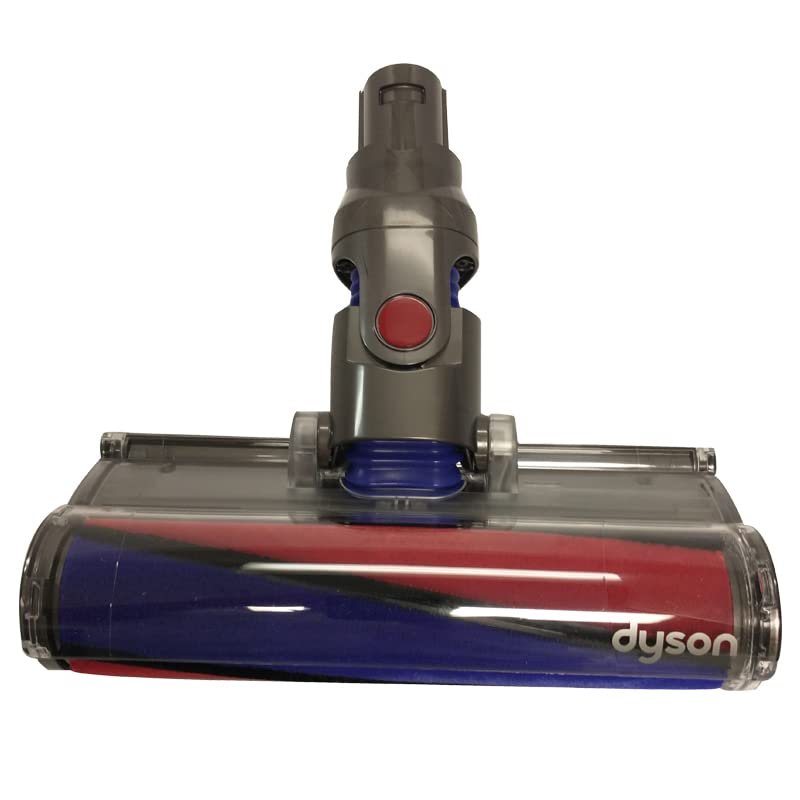
Image: The Dyson Soft Roller Cleaner Head Assembly, featuring a clear housing, purple and red soft roller brush bar, and a gray connection mechanism. This head is designed for effective cleaning of hard floors.
Setup and Installation
- Safety First: Before beginning installation, ensure your Dyson vacuum cleaner is turned OFF and unplugged from the power outlet.
- Remove Old Head (if applicable): Locate the release button or latch on your current cleaner head where it connects to the vacuum wand. Press the button and gently pull the old cleaner head away from the wand.
- Attach New Cleaner Head: Align the new Soft Roller Cleaner Head Assembly with the end of the vacuum wand. Push the cleaner head firmly onto the wand until it clicks securely into place. A distinct click indicates a proper connection.
- Verify Connection: Gently tug on the cleaner head to ensure it is securely attached and will not detach during operation.
Operating Instructions
The Dyson Soft Roller Cleaner Head is engineered for optimal performance on hard floors, effectively capturing both large debris and fine dust simultaneously. It is not primarily designed for deep pile carpets.
- Power On: Once the cleaner head is securely attached, plug in your vacuum cleaner and turn it on.
- Floor Type: This cleaner head is ideal for delicate hard floors such as wood, laminate, tile, and vinyl.
- Movement: Glide the cleaner head across the floor in a steady, controlled motion. The soft roller will gently pick up debris without scratching surfaces.
Maintenance and Care
Regular maintenance ensures the longevity and efficiency of your Soft Roller Cleaner Head Assembly.
- Cleaning the Soft Roller:
- Turn off and unplug the vacuum.
- Locate the end cap on the side of the cleaner head and twist it to release the soft roller.
- Remove any tangled hair, threads, or debris from the roller and its housing.
- The soft roller can be washed with cold water. Do not use detergents. Allow it to air dry completely for at least 24 hours before reinserting. Ensure it is completely dry to prevent damage to the vacuum.
- Reinsert the dry soft roller and secure the end cap.
- Checking for Blockages: Periodically inspect the cleaner head's airway for any obstructions that may reduce suction. Clear any blockages found.
- Exterior Cleaning: Wipe the exterior of the cleaner head with a damp cloth. Do not immerse the entire head in water.
Troubleshooting
If you encounter issues with your Soft Roller Cleaner Head, refer to the following common problems and solutions:
| Problem | Possible Cause | Solution |
|---|---|---|
| Cleaner head not picking up debris effectively. | Soft roller is tangled or blocked. | Clean the soft roller and remove any obstructions as per the Maintenance section. |
| Soft roller not spinning. | Obstruction in the brush bar mechanism or motor. | Turn off and unplug the vacuum. Inspect the brush bar area for blockages and clear them. Ensure the roller is correctly reinserted. |
| Cleaner head detaches easily. | Not securely attached to the wand. | Ensure the cleaner head is pushed firmly onto the wand until it clicks into place. |
Specifications
| Attribute | Detail |
|---|---|
| Manufacturer | Dyson |
| Item Model Number | DC58, DC59, DC61, DC62, DC72, and DC74 |
| Part Number | 966489-10 |
| ASIN | B0B323RCCT |
| Package Dimensions | 13 x 12 x 4 inches |
| Item Weight | 2.5 pounds |
Warranty and Support
Using genuine Dyson OEM replacement parts, such as this Soft Roller Cleaner Head Assembly, is crucial for maintaining the performance of your Dyson vacuum and protecting its warranty.
For further assistance, technical support, or warranty inquiries, please refer to the official Dyson support channels or your vacuum cleaner's original user manual. You can also visit the official Dyson website for more information.
Note: Specific warranty terms and conditions may vary by region and product. Always consult your original product documentation for detailed warranty information.


