
1. Introduction
Welcome to the Radiant Miami Smartwatch user manual. This guide provides essential information for setting up, operating, maintaining, and troubleshooting your new smartwatch. The Radiant Miami Smartwatch (Model RAS21005) is designed for both men and women, offering a blend of modern design and advanced health monitoring features.
Key features include heart rate monitoring, blood pressure measurement, sleep tracking, and various activity tracking functions. It also supports notifications for calls and messages from compatible smartphones.

Image 1.1: The Radiant Miami Smartwatch worn on a wrist, showcasing its sleek design.
2. Setup
2.1 Charging the Smartwatch
Before initial use, fully charge your Radiant Miami Smartwatch. Connect the charging cable to the charging port on the back of the watch and plug the USB end into a standard USB power adapter (not included) or a computer's USB port. A full charge typically takes approximately 2 hours and provides up to 10 days of battery life, depending on usage.
2.2 App Installation and Pairing
- Download the Companion App: Search for the official Radiant companion app on your smartphone's app store (compatible with iOS 8.4+ and Android 4.4+).
- Enable Bluetooth: Ensure Bluetooth is enabled on your smartphone.
- Open the App: Launch the Radiant app and follow the on-screen instructions to create an account or log in.
- Pair Device: Within the app, navigate to the 'Device' or 'Add Device' section. Select your Radiant Miami Smartwatch from the list of available devices. Confirm the pairing request on both your phone and the smartwatch if prompted.
Once paired, the smartwatch will synchronize time and data with your smartphone.
3. Operating the Smartwatch
3.1 Basic Navigation
- Swipe Up/Down: Scroll through menus and notifications.
- Swipe Left/Right: Access quick functions or different data screens.
- Tap: Select an item or confirm an action.
- Side Button: Press to return to the home screen or wake the device.
3.2 Health Monitoring
The Radiant Miami Smartwatch continuously monitors various health metrics:
- Heart Rate: Access the heart rate monitor from the main menu or a quick-access screen. The watch will display your current heart rate in beats per minute (BPM).
- Blood Pressure: Initiate a blood pressure measurement from the dedicated function. Ensure the watch is snug on your wrist for accurate readings.
- Blood Oxygen (SpO2): Measure your blood oxygen saturation level.
- Sleep Monitor: The watch automatically tracks your sleep patterns, including awake, light, and deep sleep stages. View detailed sleep data in the companion app.
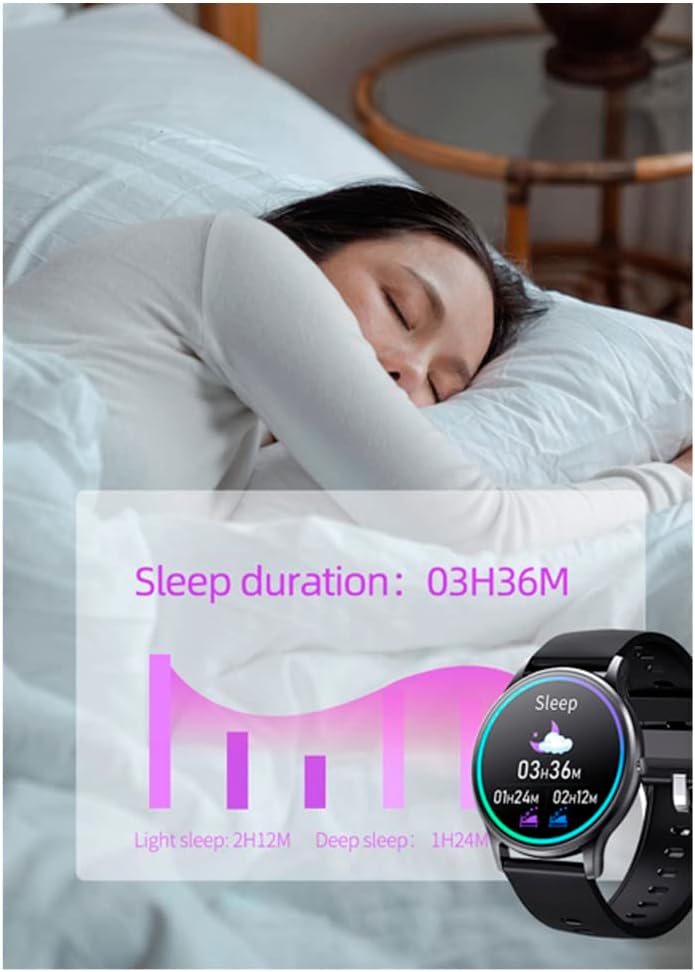
Image 3.1: The smartwatch screen showing sleep duration and different sleep stages (light, deep).
3.3 Activity Tracking
Track your daily activities and workouts:
- Steps, Distance, Calories: The watch automatically records your steps, estimated distance, and calories burned throughout the day.
- Multi-Sport Modes: Select specific sport modes (e.g., running, walking, cycling) to get more accurate data for your workouts.

Image 3.2: Examples of activity tracking screens on the smartwatch, showing metrics for different exercises.
3.4 Notifications and Calls
Receive notifications directly on your smartwatch:
- Message Alerts: Get alerts for messages from apps like WhatsApp and Facebook. You can view the message text on your watch.
- Incoming Calls: See who is calling and reject calls directly from your smartwatch.
- Vibration Reminders: The watch provides vibration alerts for sedentary reminders, alarm clocks, low battery, and water intake reminders.

Image 3.3: The smartwatch screen showing an incoming message notification from Facebook.
3.5 Customization
Personalize your smartwatch experience:
- Watch Faces: Change the watch face through the companion app's 'Dial Center' to match your style.

Image 3.4: The companion app's 'Dial Center' displaying multiple watch face options for customization.
4. Maintenance
4.1 Cleaning
Regularly clean your smartwatch and strap to prevent skin irritation and maintain functionality. Use a soft, damp cloth to wipe the screen and strap. Avoid using harsh chemicals or abrasive materials.
4.2 Battery Care
To prolong battery life:
- Avoid extreme temperatures.
- Charge the watch before the battery is completely depleted.
- Do not leave the watch charging for extended periods after it is full.
5. Troubleshooting
5.1 Smartwatch Not Turning On
Ensure the watch is fully charged. If it still doesn't turn on, try connecting it to the charger for at least 30 minutes.
5.2 Unable to Pair with Smartphone
- Check if Bluetooth is enabled on your smartphone.
- Ensure the smartwatch is within Bluetooth range of your phone.
- Restart both your smartphone and the smartwatch.
- Try unpairing and re-pairing the device through the app.
5.3 Inaccurate Health Readings
For accurate readings, ensure the smartwatch is worn snugly on your wrist, about one finger's width above the wrist bone. Avoid excessive movement during measurements. Note that the smartwatch is not a medical device and readings are for reference only.
5.4 Notifications Not Appearing
- Verify that notifications are enabled in the companion app settings.
- Check your smartphone's notification settings to ensure the app has permission to send notifications.
- Ensure the smartwatch is connected via Bluetooth.
6. Specifications
| Feature | Specification |
|---|---|
| Model Number | RAS21005 |
| Battery Type | 1 Lithium metal battery (required) |
| Battery Life | Up to 10 days (standby) |
| Charging Time | Approx. 2 hours |
| Compatibility | iOS 8.4+ / Android 4.4+ |
| Manufacturer | RADIANT |
| Product Dimensions | 16.3 x 14.5 x 3.5 cm |
| Item Weight | 100 grams |
7. Warranty and Support
Radiant is a recognized and respected Spanish brand in the watch industry, known for producing high-quality watches for decades. For warranty information or technical support, please refer to the documentation included with your purchase or visit the official Radiant website. Keep your proof of purchase for warranty claims.
For further assistance, please contact Radiant customer service through their official channels.