1. Introduction
The NEEWER NW-82 is a slender and lightweight 14-inch condenser microphone designed for use with DSLR/mirrorless cameras and camcorders. It is suitable for various applications including interviewing, broadcasting, filmmaking, and conferencing, both indoors and outdoors. This microphone features uni-directional pickup patterns (cardioid and hypercardioid) to focus on desired audio sources while minimizing ambient noise. It can be powered by a 1.5V AA battery or 48V phantom power.

Image 1.1: The NEEWER NW-82 microphone with a fur windshield, mounted on a camera rig.
2. Package Contents
The NEEWER NW-82 Condenser Camera Microphone package includes the following items:
- 1 x NEEWER NW-82 Condenser Microphone
- 1 x Fur Windshield
- 1 x Foam Windscreen
- 1 x Mic Clip with Cold Shoe Adapter
- 1 x Mic Clip with 5/8" Threaded Hole
- 1 x XLR to 3.5mm Cable (3.3ft / 1m)
- 1 x XLR to 6.35mm Cable (26ft / 8m)
- 1 x User Manual

Image 2.1: Key components and features of the NW-82 microphone.
3. Setup
3.1. Powering the Microphone
The NW-82 microphone can be powered in two ways:
- 1.5V AA Battery: Insert a single 1.5V AA battery into the microphone body, ensuring correct polarity. The LED battery indicator will show real-time battery status (dims or goes off when low). Note: This microphone does not support rechargeable batteries.
- 48V Phantom Power: Connect the microphone to a device that provides 48V phantom power (e.g., an audio mixer or some camcorders) using an XLR cable. If using phantom power, ensure the AA battery is removed from the microphone to prevent potential damage.
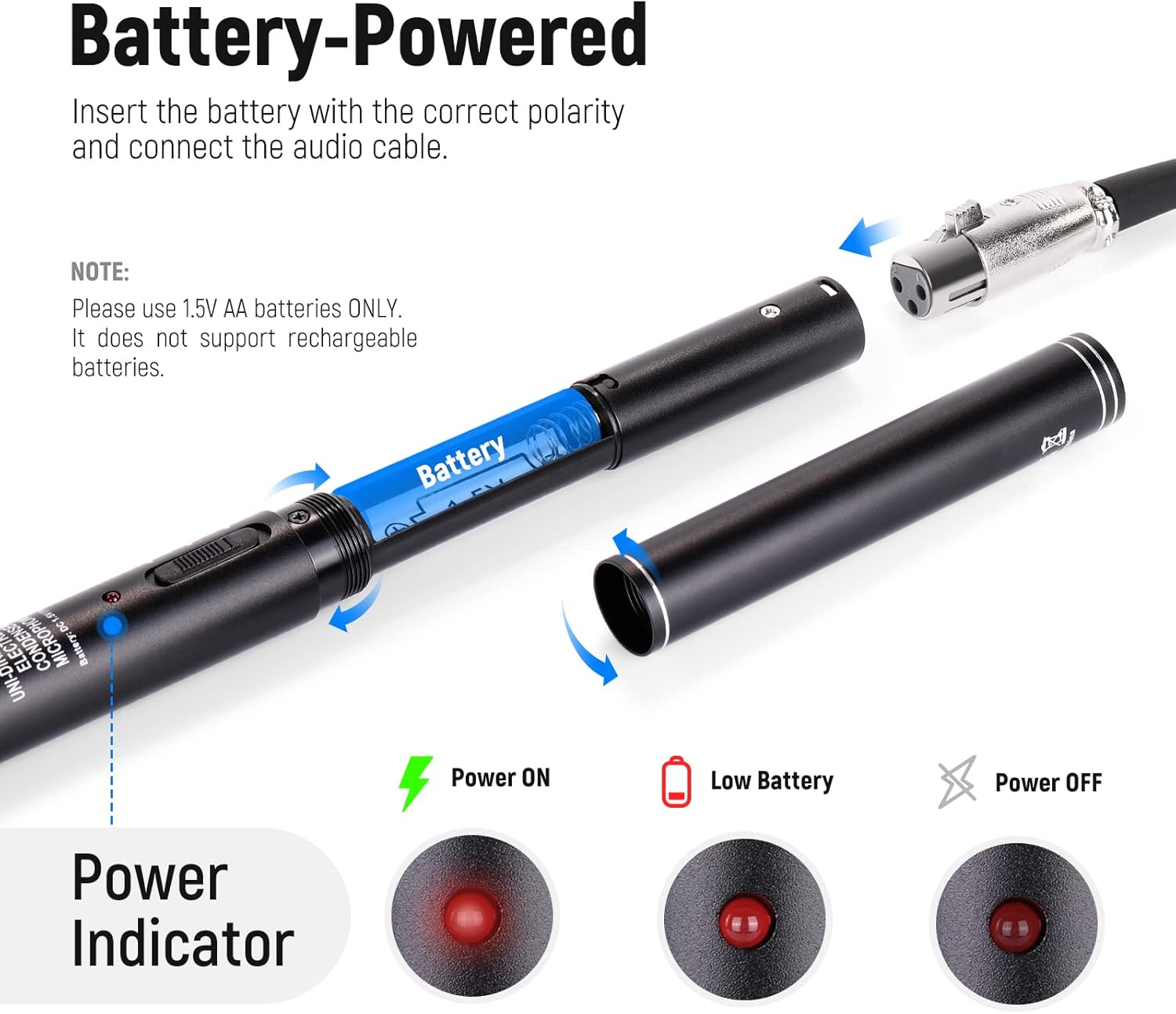
Image 3.1: Battery installation and power indicator details.
3.2. Mounting the Microphone
Two mic clips are provided for versatile mounting:
- Cold Shoe Mount: Use the mic clip with the cold shoe adapter to attach the microphone directly to a DSLR camera, mirrorless camera, or camcorder.
- 5/8" Mounting Thread: Use the mic clip with the 5/8" threaded hole to connect the microphone to a light stand or a boom pole.

Image 3.2: Available mounting options for the microphone.
3.3. Connecting to Devices
The microphone connects via XLR. Two XLR cables are included:
- XLR to 3.5mm Cable: For connecting to DSLR cameras or camcorders with a 3.5mm audio input.
- XLR to 6.35mm Cable: For connecting to audio mixers or other professional audio equipment with a 6.35mm input.
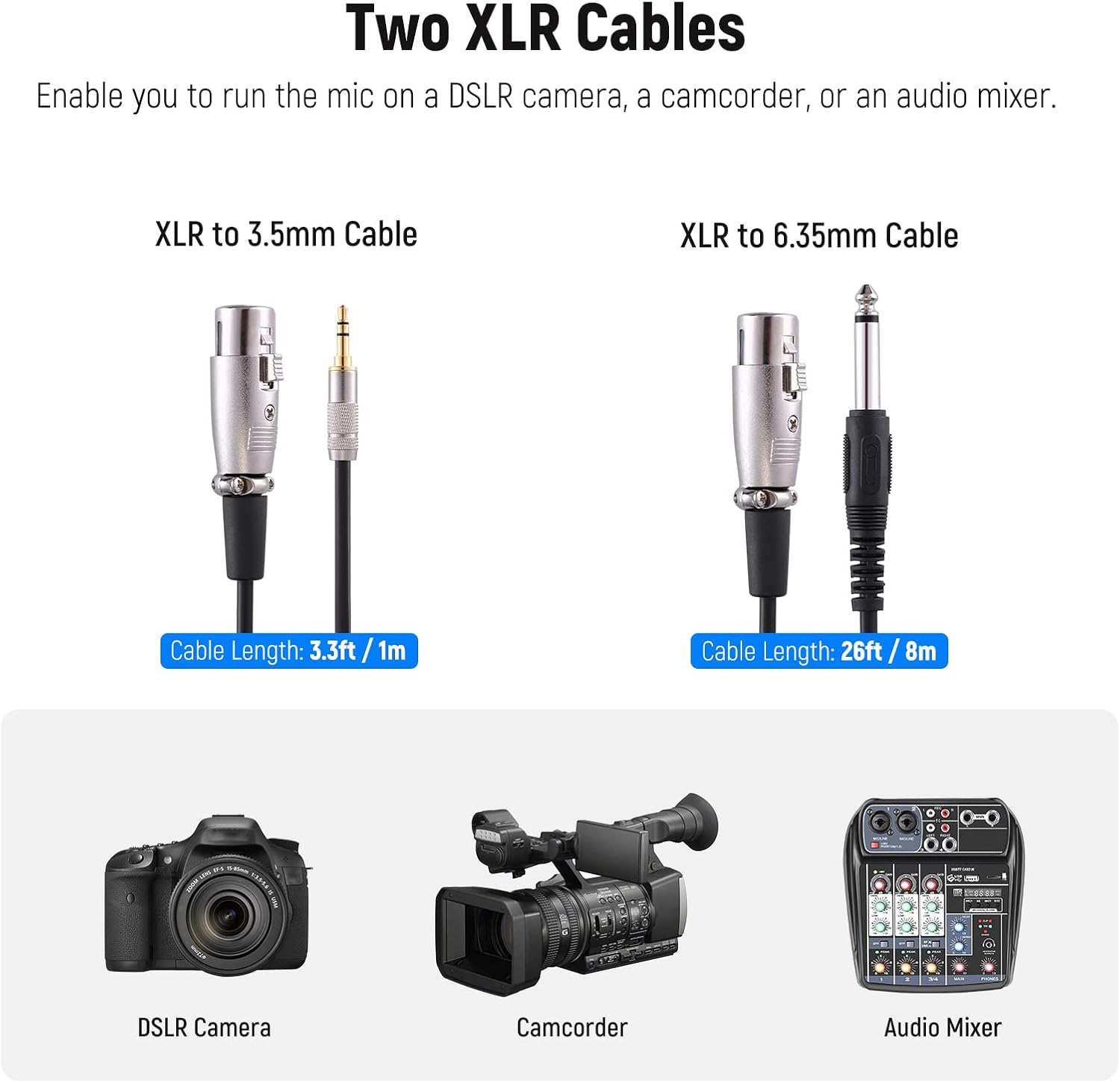
Image 3.3: XLR cable types and their applications.
4. Operating Instructions
4.1. Selecting Pickup Pattern
The microphone features a switch to select between two pickup patterns:
- NORMAL Mode (Cardioid): Ideal for close-up recording, such as on-location interviewing, news broadcasting, or online teaching. This mode emphasizes voice pickup directly in front of the microphone.
- TELE Mode (Hypercardioid): Suitable for remote recording, filmmaking, video production, and vlogging, where the sound source is further away. This pattern is more directional, minimizing ambient noise from the sides.
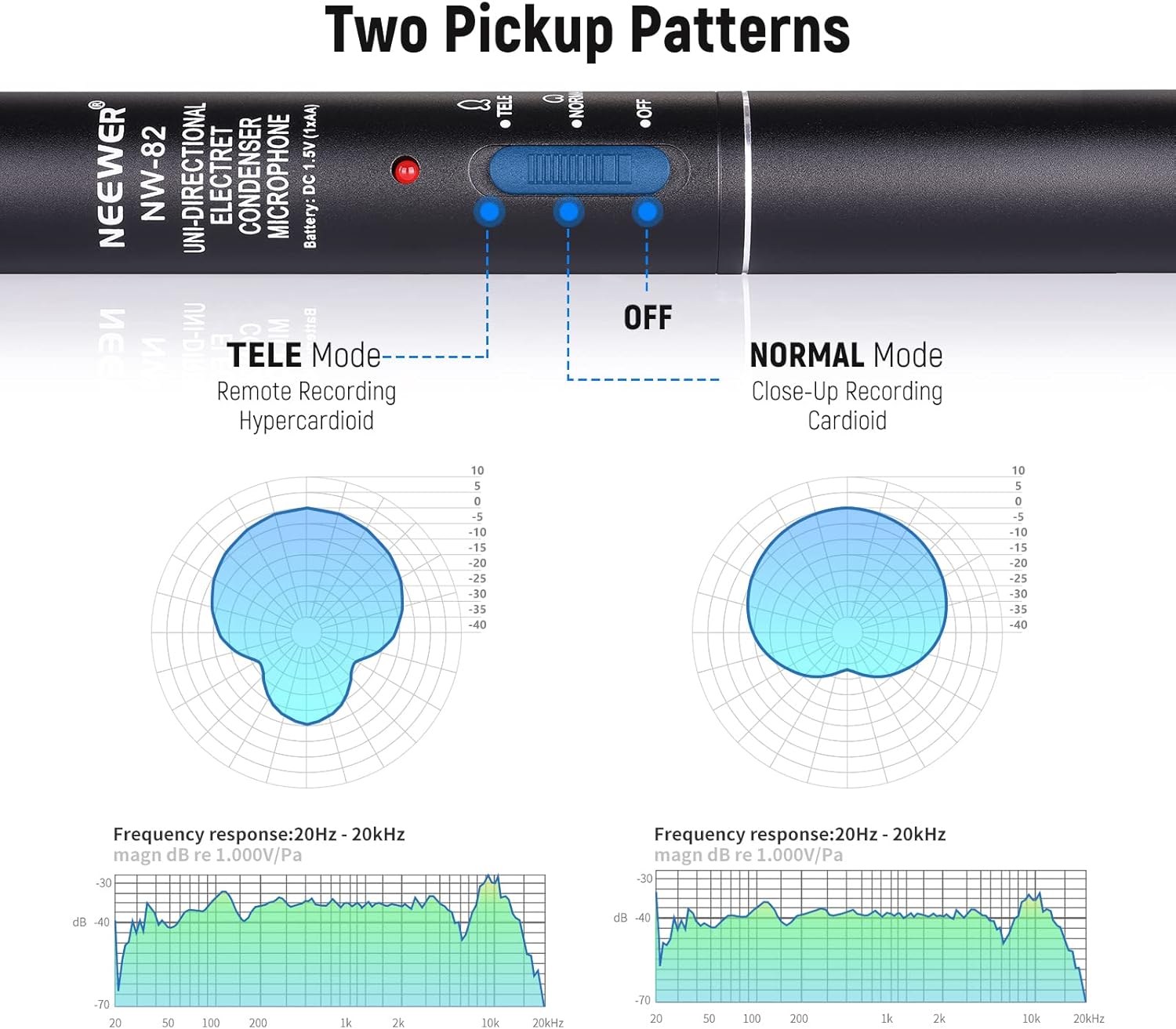
Image 4.1: Pickup pattern selection switch and corresponding polar patterns.
4.2. Noise Reduction Accessories
To reduce plosive sounds and wind noise, especially when recording outdoors, use the included accessories:
- Foam Windscreen: Provides basic wind and plosive noise reduction.
- Fur Windshield (Dead Cat): Offers superior wind noise reduction for outdoor recording in windy conditions.

Image 4.2: Microphone with foam windscreen for close-up use.

Image 4.3: Microphone with fur windshield for remote recording.
5. Maintenance
- Keep the microphone clean by wiping it with a soft, dry cloth.
- Avoid exposing the microphone to extreme temperatures, humidity, or direct sunlight.
- Store the microphone in its original packaging or a protective case when not in use to prevent dust and physical damage.
- Ensure the battery is removed if the microphone will not be used for an extended period to prevent leakage.
6. Troubleshooting
- No Sound Output:
- Check if the microphone is powered on (LED indicator should be lit).
- Ensure the battery is correctly installed and not depleted, or that phantom power is active if used.
- Verify that the XLR cable is securely connected to both the microphone and the recording device.
- Confirm the recording device's input settings and volume levels are correctly configured.
- Distorted Audio:
- The microphone is highly sensitive. Reduce the input gain on your recording device or mixer.
- Ensure the microphone is not too close to the sound source, especially in NORMAL mode.
- Check for any physical obstructions or damage to the microphone's pickup area.
- Excessive Wind Noise:
- Attach the foam windscreen or, for stronger wind, the fur windshield.
- Position the microphone to minimize direct exposure to wind.
7. Specifications
| Feature | Detail |
|---|---|
| Brand | NEEWER |
| Model Number | 21000025 |
| Microphone Form Factor | Shotgun |
| Polar Pattern | Unidirectional (Cardioid or Hypercardioid) |
| Audio Sensitivity | 45 Decibels |
| Signal-to-Noise Ratio | 78 dB |
| Frequency Response | 100Hz–16KHz |
| Power Source | Battery Powered (1.5V AA) or 48V Phantom Power |
| Connectivity Technology | XLR |
| Connector Type | 3.5 mm Jack, XLR |
| Compatible Devices | Camera, Camcorder |
| Material | Foam, Fur (for accessories) |
| Item Weight | 1.83 pounds |
| Package Dimensions | 17.56 x 6.61 x 2.13 inches |
8. Warranty and Support
For warranty information and technical support, please refer to the official NEEWER website or contact their customer service directly. Keep your purchase receipt for any warranty claims.
Visit the NEEWER Store for more products and information.


