
Introduction
The Midland BTR1 Advanced Twin is a state-of-the-art Bluetooth motorcycle intercom system designed for enhanced communication and audio experience during your rides. This device is certified according to the strict EN 2206 standard and features RCF High Definition Audio for superior sound quality. With a robust design and advanced functionalities, it ensures clear communication and entertainment for up to four riders.
Key features include a 1.2 Km communication range, up to 23 hours of battery life, advanced noise cancellation, and Crystal Voice Processing (CVP) technology. It also supports Parallel Audio and Universal Connectivity, allowing seamless integration with various devices and other intercom brands.
Package Contents
The Midland BTR1 Advanced Twin package includes the following items:
- 2 x BTR1 Advanced units
- 2 x Stereo audio systems with 40mm High Definition RCF speakers
- 4 x Ear pads
- 4 x Spacers
- 2 x Wired microphones
- 2 x Rigid boom anti-turbulence microphones
- 2 x Magnetic helmet mounting systems (with bi-adhesive and clamp options)
- 2 x USB Type-C cables
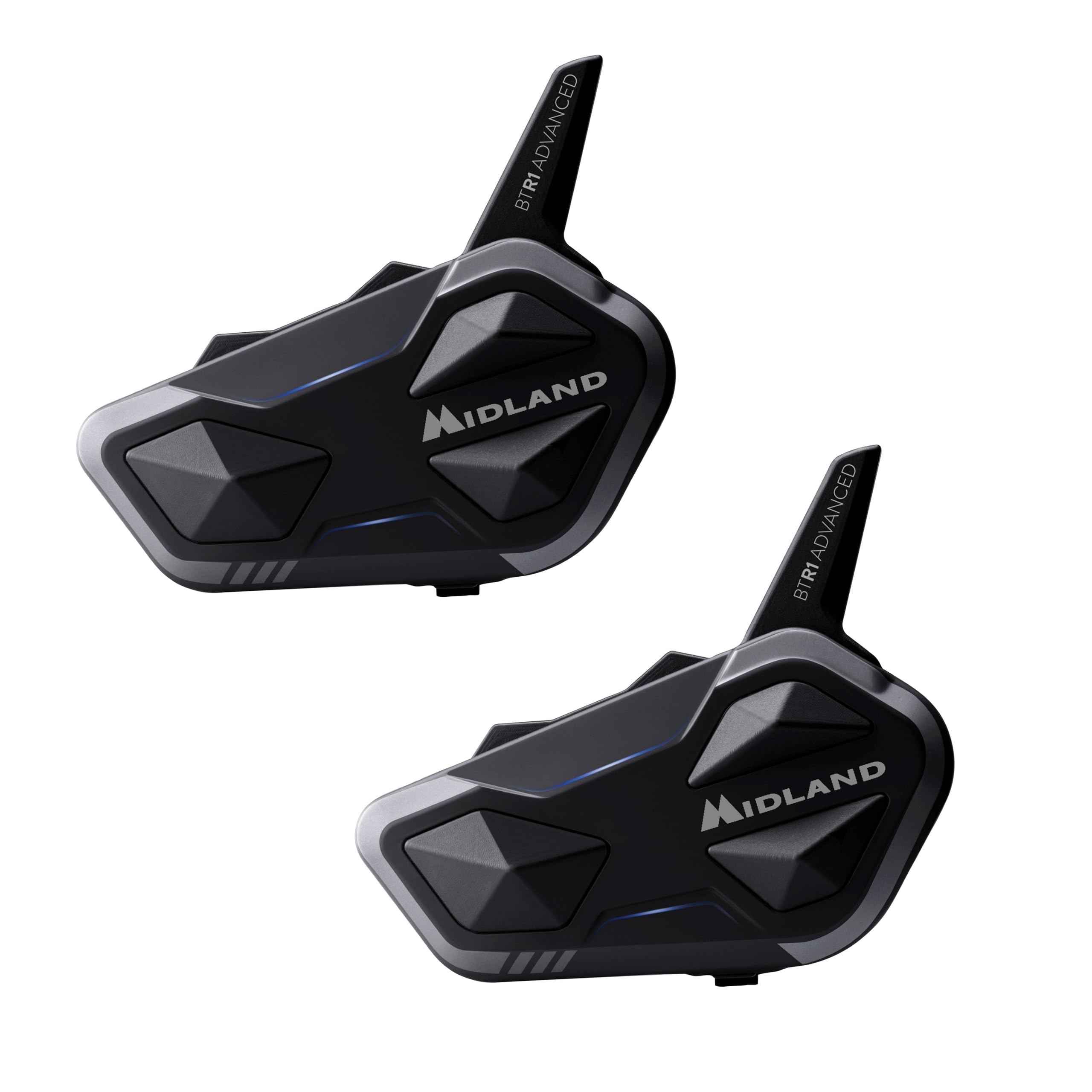
Image: The main product image showing the two Midland BTR1 Advanced Twin intercom units along with their included accessories like speakers, microphones, and mounting hardware.
Safety Information
Before using the Midland BTR1 Advanced Twin, please read all safety information carefully. This document contains important instructions for safe operation and to prevent damage to the device or injury to yourself. For detailed safety guidelines, refer to the official Safety Information PDF document provided by Midland.
Important: Always prioritize road safety. Do not operate the device in a way that distracts you from driving. Ensure the device is securely mounted and does not obstruct your vision or movement.
The device is water-resistant (IPX6), but avoid prolonged submersion or exposure to high-pressure water jets.
Setup
1. Charging the Device
Before initial use, fully charge your BTR1 Advanced Twin unit. Connect the supplied USB Type-C cable to the charging port on the intercom unit and to a compatible USB power source. The LED indicator will show the charging status. A full charge provides up to 23 hours of continuous use.
2. Helmet Installation
The BTR1 Advanced Twin offers two magnetic helmet mounting options:
- Bi-adhesive Mount: Clean the desired area on the helmet surface. Remove the protective film from the bi-adhesive pad and firmly press the mount onto the helmet.
- Clamp Mount: Slide the clamp between the helmet shell and the inner padding. Ensure it is securely fastened without damaging the helmet structure.
Once the mount is in place, attach the BTR1 Advanced Twin unit magnetically. Connect the speakers and microphone to the unit. Position the 40mm RCF speakers inside the helmet's ear pockets for optimal audio. Choose between the wired microphone or the rigid boom anti-turbulence microphone based on your helmet type and preference.

Image: A Midland BTR1 Advanced Twin intercom unit securely mounted on the side of a motorcycle helmet, illustrating its compact design and placement.
3. Initial Pairing
To pair your BTR1 Advanced Twin with your smartphone or another intercom:
- Turn on the BTR1 Advanced Twin unit.
- Enter pairing mode (refer to the quick start guide for specific button combinations).
- On your smartphone, enable Bluetooth and select "Midland BTR1 Advanced Twin" from the list of available devices.
- For intercom-to-intercom pairing, ensure both units are in pairing mode and follow the instructions in the quick start guide.
The Universal Connectivity feature allows pairing with intercoms from other brands like Cardo or Sena.

Image: A visual representation of the Midland BTR1 Advanced Twin's connectivity options, including Bluetooth Universal Connectivity and connection to multiple devices like phones, GPS, and TFT systems.
Operating Instructions
Basic Functions
- Power On/Off: Press and hold the main button for X seconds.
- Volume Control: Use the dedicated volume buttons (+/-) on the unit. The raised buttons are designed for easy tactile recognition while riding.
- Voice Assistant: Activate your smartphone's voice assistant (Siri, Google Assistant) by pressing a specific button (refer to the quick start guide).
Intercom Communication
The BTR1 Advanced Twin supports conference communication for up to 4 people within a 1.2 Km range.
- To initiate a conversation with a paired intercom, press the intercom button.
- To add more riders to a conference, follow the specific pairing and connection steps outlined in the full manual.
The Digital Noise Killer and Crystal Voice Processing (CVP) technologies reduce wind and engine noise by up to 80%, ensuring clear voice transmission.
Music and GPS Audio
With the Parallel Audio function, you can listen to music or GPS instructions in the background while engaged in an intercom conversation. The audio from your phone or GPS will automatically lower when intercom communication is active and resume when the conversation ends.

Image: A detailed view of the RCF High Definition Sound speakers with PEEK membrane, highlighting the audio technology that provides deeper bass and improved speech comprehension.
Phone Calls
- Answering/Ending Calls: Press the main button once to answer or end a call.
- Rejecting Calls: Press and hold the main button for X seconds to reject an incoming call.
- Redialing: Double-press the main button to redial the last number.
The call audio quality is designed to be clear, minimizing static or annoying background noise for your interlocutors.
TFT System Compatibility
The BTR1 Advanced Twin is compatible with TFT multimedia systems from various motorcycle brands, including BMW, KTM, Ducati, and Honda. This allows for seamless integration with your motorcycle's onboard controls and display.
Maintenance
- Cleaning: Use a soft, damp cloth to clean the intercom unit. Do not use abrasive cleaners or solvents.
- Storage: Store the device in a cool, dry place when not in use.
- Battery Care: To prolong battery life, avoid fully discharging the battery frequently. Charge the device regularly, especially if storing for extended periods.
- Water Resistance: While IPX6 water-resistant, avoid exposing the charging port to moisture when not in use. Ensure the port cover is securely closed.
Troubleshooting
| Problem | Possible Cause | Solution |
|---|---|---|
| No power | Battery discharged | Charge the unit using the supplied USB Type-C cable. |
| Cannot pair with phone/intercom | Device not in pairing mode; Bluetooth off on phone; distance too far | Ensure both devices are in pairing mode. Check phone's Bluetooth settings. Reduce distance between devices. |
| Poor audio quality / Static | Speakers incorrectly positioned; microphone obstructed; interference; outdated firmware | Adjust speaker and microphone placement. Check for obstructions. Move away from sources of interference. Update firmware via desktop application. |
| Intercom disconnects frequently | Out of range; obstacles; low battery; outdated firmware | Stay within the 1.2 Km range. Avoid physical obstacles. Ensure units are charged. Update firmware. |
| App connectivity issues | Bluetooth connection unstable; app version outdated | Ensure stable Bluetooth connection. Update the app to the latest version. Restart the app and the intercom unit. |
For persistent issues, consider updating the device firmware using the desktop application. The mobile application for managing updates and functions may require improvements, so a desktop update is often recommended for stability.
Specifications
- Brand: Midland
- Model Number: C1529.01
- Color: Black
- Number of Channels: 8
- Special Feature: Microphone included
- Frequency Spectrum: 300 MHz - 3 GHz
- Maximum Talk Range: 1.2 Kilometers
- Voltage: 12 Volts
- Water Resistance Level: IPX6 (Water Resistant)
- Product Dimensions (DxWxH): 23P x 22l x 7H cm
- Number of Batteries: 2 D batteries (included)
- Noise Level: 30 Decibels
- Compatible Devices: Other two-way radios (Midland and other brands)
- Temperature Range: -10°C to +45°C
- Average Battery Life: 23 Hours
- Connectivity Protocol: Bluetooth

Image: A graphic illustrating the IPX6 waterproof rating and the 23-hour battery life of the Midland BTR1 Advanced Twin intercom.
Warranty
The Midland BTR1 Advanced Twin comes with a 2-year manufacturer's warranty from the date of purchase. This warranty covers defects in materials and workmanship under normal use. It does not cover damage caused by misuse, accidents, unauthorized modifications, or normal wear and tear. Please retain your proof of purchase for warranty claims.
Support
For further assistance, technical support, or warranty claims, please contact Midland customer service. You can find contact information and additional resources on the official Midland website.
Online Resources:
- Official Midland Website: www.midlandeurope.com
- Product Support Page: (Refer to the official website for specific product support pages)
- Firmware Updates: Available via the Midland desktop application.


