
awei T13 Pro
AWEI T13 PRO True Wireless Bluetooth Earbuds User Manual
Model: T13 Pro
Introduction
Thank you for choosing the AWEI T13 PRO True Wireless Bluetooth Earbuds. These in-ear headphones are designed for a seamless audio experience, featuring IPX6 waterproofing, a matte black finish, and an integrated wireless charging case for extended use. This manual provides detailed instructions on how to set up, operate, maintain, and troubleshoot your earbuds to ensure optimal performance.
Safety Information
- Do not disassemble or modify the product.
- Keep the earbuds and charging case away from extreme temperatures, direct sunlight, and moisture.
- Avoid prolonged exposure to high volume levels to prevent hearing damage.
- Clean the earbuds and charging case with a soft, dry cloth. Do not use harsh chemicals.
- Dispose of the product responsibly according to local regulations.
Package Contents
- AWEI T13 PRO True Wireless Bluetooth Earbuds (Left and Right)
- Wireless Charging Case
- USB Charging Cable
- User Manual
- Eartips (various sizes)
Product Overview
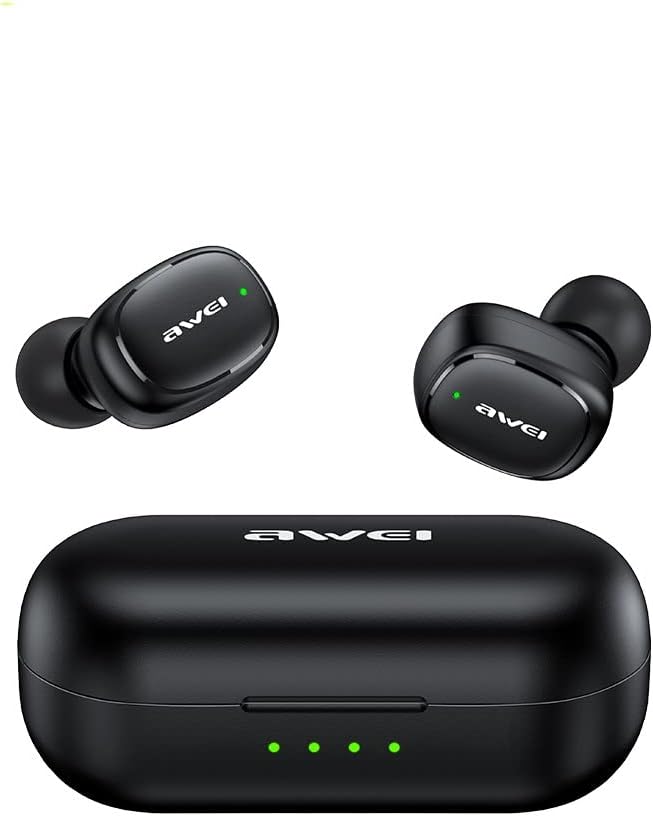
Image: The AWEI T13 PRO True Wireless Bluetooth Earbuds, showing both the left and right earbuds along with their charging case. The earbuds are black with a matte finish, and the charging case is also black with LED indicators on the front.

Image: The AWEI T13 PRO charging case is shown open, with both earbuds securely placed inside their respective charging slots. The internal design of the case and the charging contacts for the earbuds are visible.

Image: A close-up view of the AWEI T13 PRO earbuds, removed from their charging case. This image highlights the ergonomic design of the earbuds, including the ear tips and the outer surface with the AWEI logo.
Earbud Components:
- Touch Control Area: For managing music playback, calls, and voice assistant.
- LED Indicator: Shows pairing status, charging status, and power.
- Microphone: For hands-free calls.
- Charging Contacts: Connects with the charging case for power.
Charging Case Components:
- Earbud Charging Slots: Holds and charges the earbuds.
- Charging Port: USB port for charging the case.
- Battery Indicator LEDs: Shows the charging status and battery level of the case.
Setup
1. Charging the Earbuds and Case
Before first use, fully charge both the earbuds and the charging case.
- Charging the Case: Connect the provided USB charging cable to the charging port on the case and a USB power source (e.g., computer, wall adapter). The LED indicators on the case will light up to show charging progress. All LEDs will be solid when fully charged.
- Charging the Earbuds: Place the earbuds into their respective slots in the charging case. Ensure the charging contacts align. The earbuds will automatically begin charging. The LED indicators on the earbuds will show their charging status (e.g., solid red while charging, off when fully charged).
2. Pairing with a Bluetooth Device
The earbuds will automatically enter pairing mode when taken out of the charging case.
- Ensure the earbuds are charged.
- Open the charging case and remove both earbuds. They will automatically power on and attempt to pair with each other.
- On your device (smartphone, tablet, laptop), enable Bluetooth.
- Search for new Bluetooth devices. You should see "AWEI T13 PRO" in the list of available devices.
- Select "AWEI T13 PRO" to connect. Once connected, a voice prompt will confirm the successful pairing, and the earbud LED indicators will turn off or flash slowly.
- If pairing fails, place the earbuds back into the case, close the lid, wait a few seconds, and then repeat the steps.
Note: The earbuds will automatically reconnect to the last paired device when removed from the case, if Bluetooth is enabled on the device.
Operating Instructions
Power On/Off:
- Power On: Remove earbuds from the charging case. They will power on automatically. Alternatively, press and hold the touch control area on both earbuds for 3 seconds.
- Power Off: Place earbuds back into the charging case and close the lid. They will power off automatically. Alternatively, press and hold the touch control area on both earbuds for 5 seconds.
Music Playback:
- Play/Pause: Single tap the touch control area on either earbud.
- Next Track: Double tap the touch control area on the right earbud.
- Previous Track: Double tap the touch control area on the left earbud.
- Volume Up: Triple tap the touch control area on the right earbud.
- Volume Down: Triple tap the touch control area on the left earbud.
Call Management:
- Answer/End Call: Single tap the touch control area on either earbud.
- Reject Call: Press and hold the touch control area on either earbud for 2 seconds.
Voice Assistant:
- Activate Voice Assistant (Siri/Google Assistant): Press and hold the touch control area on either earbud for 2 seconds (when not on a call).
Maintenance
Cleaning:
- Regularly clean the earbuds, especially the ear tips and charging contacts, with a soft, dry, lint-free cloth.
- Do not use abrasive cleaners, alcohol, or chemical solvents.
- Ensure no moisture enters the earbud openings or charging case ports.
Storage:
- When not in use, store the earbuds in their charging case to protect them and keep them charged.
- Store the product in a cool, dry place, away from direct sunlight and extreme temperatures.
Water Resistance (IPX6):
The AWEI T13 PRO earbuds are IPX6 waterproof, meaning they are protected against powerful water jets. This makes them suitable for sports and light rain. However, they are not designed for submersion in water, swimming, or showering. Ensure the earbuds are dry before placing them back into the charging case to prevent damage.
Troubleshooting
| Problem | Possible Cause | Solution |
|---|---|---|
| Earbuds not powering on. | Low battery. | Place earbuds in the charging case and ensure the case is charged. |
| Earbuds not pairing with device. | Bluetooth off; earbuds not in pairing mode; interference. | Ensure Bluetooth is enabled on your device. Place earbuds back in case, then remove to re-enter pairing mode. Try pairing again. Move closer to your device. |
| Only one earbud working. | Earbuds not paired with each other; one earbud low battery. | Place both earbuds back in the charging case, close the lid, then open and remove them together. Ensure both earbuds are charged. |
| No sound or low volume. | Device volume too low; earbuds not connected; dirty earbud mesh. | Increase volume on your device and earbuds. Reconnect earbuds. Clean earbud mesh gently. |
| Charging case not charging. | Faulty cable or power source. | Try a different USB cable and power adapter. Ensure the cable is securely connected. |
Specifications
| Feature | Detail |
|---|---|
| Model Name | T13 PRO |
| Connectivity Technology | Wireless, Bluetooth |
| Wireless Communication Technology | Bluetooth |
| Included Components | Wireless Charging Case |
| Material | Plastic |
| Specific Uses for Product | Travel, Music, Sport |
| Compatible Devices | Tablets, Telephones, Desktops, Laptops, Smart Speaker |
| Water Resistance Level | IPX6 Waterproof |
| Manufacturer | AWEI |
| Special Features | Sweatproof, Lightweight |
| Product Dimensions | 4 x 11 x 9 cm |
| Item Weight | 80 Grams |
| Colour | Black |
| Ear Placement | In Ear |
| Form Factor | In Ear |
Warranty and Support
For warranty information and technical support, please refer to the warranty card included in your product packaging or visit the official AWEI website. If you encounter any issues not covered in this manual, please contact AWEI customer service for assistance.
Please retain your proof of purchase for warranty claims.
Related documentsT13 Pro


Ask a question about this manual
Ask about setup, troubleshooting, compatibility, parts, safety, or missing instructions. Manuals+ will review the question and use this page’s manual context to help answer it.