
1. Introduction
This instruction manual provides essential information for the HIWONDER Mecanum 4WD Vehicle Chassis, Model RM-HIWO-00F. This platform is designed for robotics enthusiasts and developers, offering a robust base for projects involving Arduino, Raspberry Pi, and ROS. It features a 4-wheel drive system with Mecanum wheels, enabling omni-directional movement, and is equipped with 12V encoder geared motors for precise control.
Please read this manual thoroughly before assembly and operation to ensure proper use and longevity of the product.

Image 1.1: The HIWONDER Mecanum 4WD Vehicle Chassis, showcasing its green metal frame and four Mecanum wheels.
2. Product Overview
2.1 Key Features
- Omni-directional Movement: Equipped with Mecanum wheels, allowing movement in any direction, including sideways and diagonally.
- Robust Construction: Features a high-strength aluminum alloy chassis for durability and stability.
- Precise Control: Includes 12V encoder geared motors for accurate speed and position control.
- Damping Effect: Motors provide a good damping effect for smoother operation.
- Versatile Compatibility: Designed to be compatible with various sensors, modules, and controllers, including Arduino, Raspberry Pi, and ROS systems. It can also integrate with robotic arms like JetMax.
2.2 Components Included
The HIWONDER Mecanum 4WD Vehicle Chassis kit typically includes the following main components:
- Main Chassis Frame (Green, Aluminum Alloy)
- 4 x Mecanum Wheels
- 4 x 12V Encoder Geared Motors
- Motor Driver Board (or similar control module)
- Necessary cables and mounting hardware
- Additional mounting plates for accessories
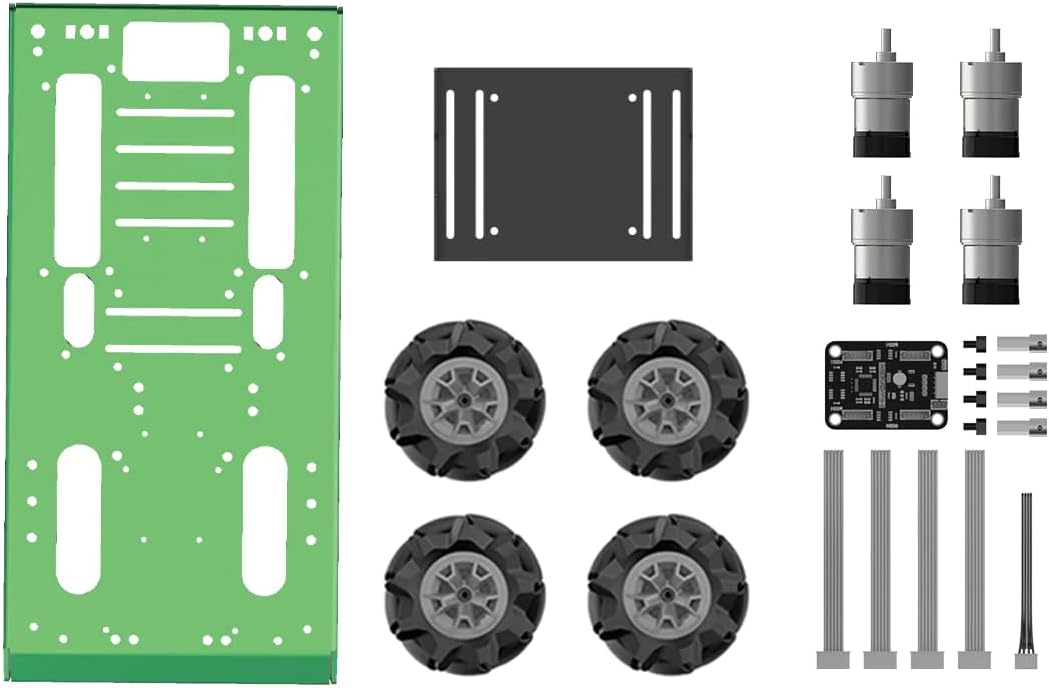
Image 2.1: Overview of the main components included in the chassis kit.
3. Setup and Assembly
Detailed assembly instructions are typically provided with the product packaging or available for download from the manufacturer's website. The general steps involve:
- Chassis Preparation: Unpack all components and verify against the parts list.
- Motor Installation: Mount the 12V encoder geared motors onto the chassis frame using the provided hardware. Ensure motors are securely fastened.
- Wheel Attachment: Attach the Mecanum wheels to the motor shafts. Confirm they rotate freely and are properly aligned.
- Electronics Mounting: Securely mount your chosen controller (e.g., Arduino, Raspberry Pi) and motor driver board onto the chassis. Utilize the pre-drilled holes and mounting plates as needed.
- Wiring: Connect the motors to the motor driver board, and the driver board to your controller. Ensure all power and signal connections are correct according to your controller's documentation. Pay attention to motor encoder connections for precise control.
- Power Supply: Connect a suitable 12V power supply to your motor driver board and controller. Verify polarity before powering on.
For specific wiring diagrams and programming examples, refer to the HIWONDER official documentation or community resources for Arduino, Raspberry Pi, or ROS integration.
4. Operating Instructions
The Mecanum wheel system allows for highly versatile movement. Understanding the wheel rotation patterns is key to controlling the chassis effectively.
4.1 Basic Movement Patterns
The chassis can perform various movements by coordinating the rotation of its four Mecanum wheels:
- Forward/Backward: All wheels rotate in the same direction (e.g., all forward for forward movement).
- Sideways (Strafe): Wheels on one side rotate forward, and wheels on the other side rotate backward.
- Diagonal Movement: A combination of forward/backward and sideways rotation.
- Rotation (Spin): Wheels on opposite corners rotate in opposite directions.

Image 4.1: Illustration of Mecanum wheel coordination for different movement types.
4.2 Programming and Control
To operate the chassis, you will need to program your chosen microcontroller (Arduino, Raspberry Pi, etc.) to send appropriate signals to the motor driver board. The encoder feedback from the motors can be used for precise speed control and odometry.
Consider using libraries or frameworks specific to Mecanum wheel control for your chosen platform to simplify programming. Resources for ROS (Robot Operating System) are also available for advanced control and navigation.
5. Maintenance
Regular maintenance ensures the optimal performance and longevity of your HIWONDER Mecanum 4WD Vehicle Chassis.
- Cleaning: Periodically clean the chassis and wheels to remove dust, dirt, and debris. Pay special attention to the small rollers on the Mecanum wheels to ensure they rotate freely.
- Fastener Check: Regularly inspect all screws and fasteners to ensure they are tight. Vibrations during operation can sometimes loosen connections.
- Motor Inspection: Check motor wires for any signs of wear or damage. Ensure motors are free from obstructions.
- Wheel Condition: Inspect Mecanum wheels for any damage to the rollers or the main wheel structure. Replace damaged components as necessary.
- Storage: When not in use, store the chassis in a clean, dry environment away from extreme temperatures and direct sunlight.
6. Troubleshooting
This section addresses common issues you might encounter with your Mecanum chassis.
- Chassis Not Moving:
- Verify power supply connections and ensure the battery is charged.
- Check all motor wiring connections to the driver board and controller.
- Confirm that the motor driver board is receiving control signals from the microcontroller.
- Inspect motors for any physical obstructions or damage.
- Erratic Movement or Incorrect Direction:
- Review your motor wiring. Incorrect polarity for one or more motors can cause unexpected movement.
- Check your programming logic for motor control. Ensure the correct commands are being sent for desired movements.
- Inspect Mecanum wheels for any stuck or damaged rollers that might impede smooth movement.
- Motors Not Responding to Commands:
- Ensure the motor driver board is correctly initialized and communicating with the microcontroller.
- Check for any short circuits or loose connections in the motor or driver board circuitry.
- Verify that the power supply can deliver sufficient current for all motors under load.
If issues persist, consult the HIWONDER support resources or relevant online communities for your specific controller and programming environment.
7. Specifications
Detailed technical specifications for the HIWONDER Mecanum 4WD Vehicle Chassis (Model RM-HIWO-00F):
| Feature | Detail |
|---|---|
| Model Number | RM-HIWO-00F |
| Product Dimensions | 11.8 x 9.6 x 3.9 inches (297 x 250 x 85 mm approx.) |
| Item Weight | 4.18 pounds (1.9 kg approx.) |
| Chassis Material | High-strength Aluminum Alloy |
| Drive System | 4-Wheel Drive (4WD) |
| Wheels | Mecanum Wheels (Omni-directional) |
| Motors | 12V Encoder Geared Motors |
| Compatibility | Arduino, Raspberry Pi, ROS, JetMax robotic arm, various sensors and modules |
| Manufacturer Recommended Age | 15 years and up |

Image 7.1: Dimensional drawing of the chassis.
8. Warranty Information
Specific warranty details for the HIWONDER Mecanum 4WD Vehicle Chassis (Model RM-HIWO-00F) are not provided in the available product information. Please refer to the product packaging or contact HIWONDER directly for warranty terms and conditions.
9. Support and Contact
For technical assistance, additional documentation, or inquiries regarding the HIWONDER Mecanum 4WD Vehicle Chassis, please visit the official HIWONDER website or contact their customer support channels. Online forums and communities dedicated to Arduino, Raspberry Pi, and ROS robotics can also be valuable resources for project development and troubleshooting.
Manufacturer: HIWONDER
Website: Visit the HIWONDER Store on Amazon (for general brand information)