
1. Introduction
Thank you for choosing the Glangeh B15 Adjustable Aluminum Laptop Stand. This manual provides essential information for the proper setup, operation, and maintenance of your new laptop stand. Designed for ergonomic comfort and improved device cooling, this stand is compatible with laptops ranging from 10 to 16 inches.
2. Product Features
- Ergonomic Adjustment: Easily adjust height and angle to achieve an optimal viewing position, reducing neck and shoulder strain. Maximum adjustment angle of 55 degrees, corresponding to a maximum height of 21 cm.
- Robust and Stable Construction: Features a two-axle swivel design made from thickened aluminum alloy, ensuring stability for laptops up to 4 kg (8.8 lbs). Equipped with non-slip silicone pads to prevent movement and scratches.
- Portable and Multifunctional: Lightweight and compact, the stand folds for easy storage and transport in a laptop bag or backpack. It also provides space underneath for organizing office supplies like keyboards or mice.
- Enhanced Heat Dissipation: The hollow design promotes airflow, preventing your laptop from overheating during extended use.
- Wide Compatibility: Suitable for all laptops from 10 to 16 inches, including MacBook, MacBook Pro, MacBook Air, ThinkPad, Google Pixelbook, Chromebook, Acer, ASUS, and MateBook models.
3. Package Contents
- 1 x Glangeh B15 Laptop Stand
4. Setup Guide
- Unfold the Stand: Gently pull the two arms of the stand outwards from the base until they are fully extended and locked into position.
- Adjust Height and Angle: The stand features a two-axle swivel design. Hold the base firmly and adjust the upper platform to your desired height and viewing angle. The hinges are designed to be firm to maintain stability.
- Place Your Laptop: Carefully place your laptop onto the stand's platform, ensuring it rests securely against the front hooks and on the silicone pads.
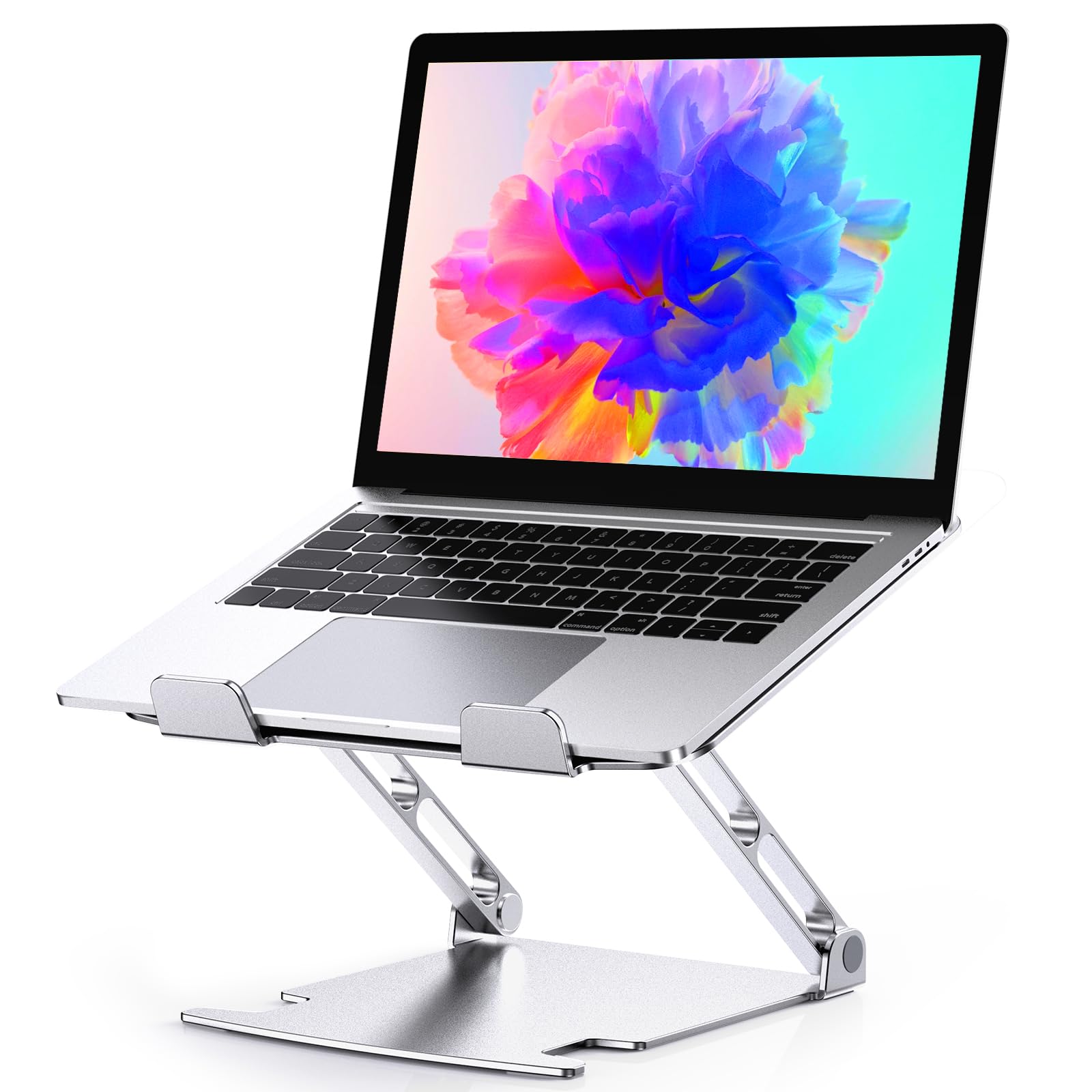
Image 1: The Glangeh B15 laptop stand in use with a laptop, showcasing its multi-angle and height adjustment capabilities. The stand can be adjusted up to a maximum angle of 55 degrees and a maximum height of 21 cm, promoting an ergonomic working posture.
5. Operation
Once set up, the Glangeh B15 stand provides a stable and elevated platform for your laptop. Adjustments can be made as needed to suit different working environments or user preferences.
- Ergonomic Positioning: Position your laptop screen at eye level to prevent slouching and reduce strain on your neck and back.
- Stability: The robust aluminum construction and non-slip silicone pads ensure your laptop remains stable during typing and use.
- Cooling: The open design allows for natural air circulation, which is crucial for maintaining optimal laptop performance and longevity.

Image 2: This image compares an incorrect sitting posture without a laptop stand to a correct, ergonomic posture achieved by using the Glangeh B15 laptop stand, illustrating how it helps reduce neck and shoulder strain.

Image 3: The image displays a laptop on the Glangeh B15 stand, with arrows indicating the improved airflow beneath the device. The hollow design facilitates better ventilation, preventing laptop overheating.
6. Care and Maintenance
- Cleaning: Wipe the stand with a soft, damp cloth. Avoid using abrasive cleaners or solvents that could damage the aluminum finish or silicone pads.
- Storage: When not in use, fold the stand to its compact form for easy storage. Store in a dry place away from direct sunlight.
- Inspection: Periodically check the hinges and silicone pads for any signs of wear or damage.

Image 4: A detailed view of the Glangeh B15 laptop stand, highlighting its premium aluminum construction, anti-slip silicone pads on the surface and base, and secure hooks designed to prevent the laptop from sliding or falling.

Image 5: This image shows the Glangeh B15 laptop stand being folded compactly and stored in a backpack, emphasizing its lightweight and portable design for easy transport.
7. Troubleshooting
- Stand feels unstable: Ensure the stand is fully unfolded and placed on a flat, stable surface. Verify that the laptop is centered and resting securely on the silicone pads and hooks.
- Difficulty adjusting angle/height: The hinges are designed to be firm to hold heavy laptops. Apply steady, even pressure when adjusting. Do not force the hinges beyond their intended range of motion.
- Laptop sliding: Confirm that the laptop is positioned correctly against the front hooks and that all silicone pads are clean and intact.
8. Specifications
| Model Name | B15 |
| Brand | Glangeh |
| Material | Aluminum |
| Color | Silver |
| Compatible Devices | Laptops 10-16 inches (e.g., MacBook Air/Pro, Dell, HP) |
| Maximum Load Capacity | 4 kg (8.8 lbs) |
| Maximum Adjustment Angle | 55 degrees |
| Maximum Height | 21 cm |
| Item Weight | 0.6 Kilograms |
| UPC | 726133420323 |

Image 6: A diagram showing the dimensions of the Glangeh B15 laptop stand and its universal compatibility with laptops ranging from 10 to 16 inches, supporting devices up to 4 kg (8.8 lbs).
9. Warranty and Support
For warranty information or customer support, please refer to the product packaging or contact your retailer. Keep your purchase receipt for any warranty claims.