
Satisfyer G-Spot Flex 2 (Model 4043791)
Satisfyer G-Spot Flex 2 Vibrator User Manual
Model: G-Spot Flex 2 (Model 4043791)
Introduction
Welcome to the Satisfyer G-Spot Flex 2 user manual. This guide provides essential information for the safe and effective use of your new vibrator. The G-Spot Flex 2 is designed for versatile stimulation, featuring a flexible body, 12 vibration programs, and a waterproof design for use in various environments. Please read these instructions carefully before first use and retain them for future reference.
Product Features
- Flexible Design: The internal wire allows the device to be bent and adjusted to various angles, enabling both G-spot and clitoral stimulation.
- 12 Vibration Programs: Offers a range of intense vibration patterns for diverse experiences.
- Body-Friendly Silicone: Made from smooth, skin-friendly silicone for comfort and hygiene.
- Waterproof (IPX7): Suitable for use in the shower or bath, protected against immersion in water up to 1 meter deep for up to 30 minutes.
- Magnetic USB Charging: Convenient and secure charging with the included magnetic USB cable.
- Ergonomic Shape: Designed for comfortable handling and targeted stimulation.
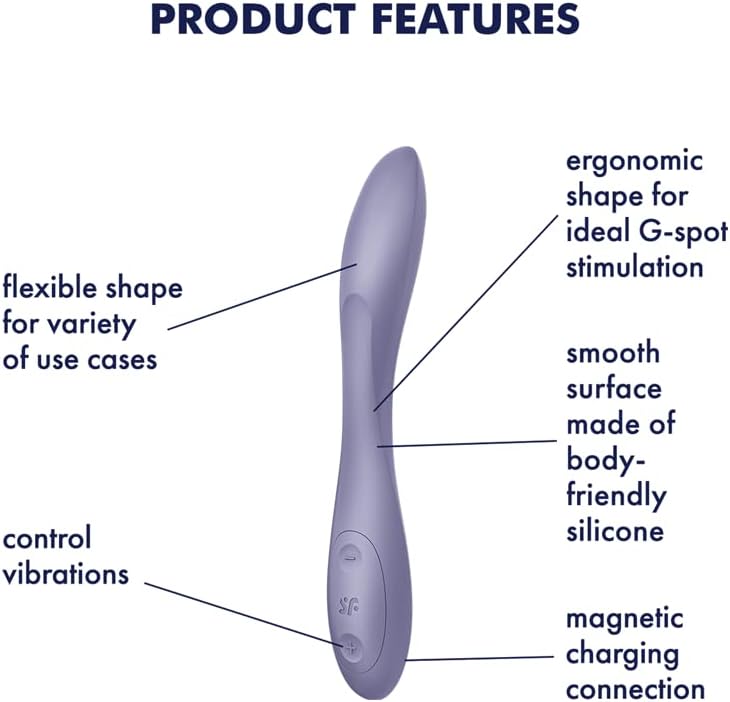
Image: Diagram illustrating the key features of the Satisfyer G-Spot Flex 2, including its ergonomic shape, flexible design, smooth silicone surface, control buttons, and magnetic charging connection.

Image: The Satisfyer G-Spot Flex 2 vibrator demonstrating its bendable and flexible design, allowing for customized angles of use.
Setup
1. Initial Charging
Before first use, fully charge your Satisfyer G-Spot Flex 2. Connect the magnetic USB charging cable to the charging points on the device and plug the USB end into a compatible USB power source (e.g., computer, USB wall adapter). The indicator light will show charging status (refer to the device's specific light indicators if available, otherwise assume a general charging indication). A full charge typically takes approximately 2-3 hours.

Image: The base of the Satisfyer G-Spot Flex 2, showing the magnetic charging contact points.
2. Cleaning Before First Use
Clean the device thoroughly with warm water and a mild, toy-safe cleaner before its initial use. Rinse well and allow it to air dry completely.
Operating Instructions
1. Power On/Off
Press and hold the power button (often indicated by a wave or circular icon) for 2-3 seconds to turn the device on or off.
2. Adjusting Vibration Programs
Once powered on, press the '+' button to increase vibration intensity or cycle through programs. Press the '-' button to decrease intensity or cycle backward through programs. The G-Spot Flex 2 offers 12 distinct vibration programs.

Image: Close-up of the control panel on the Satisfyer G-Spot Flex 2, showing the power button and '+' and '-' buttons for adjusting vibration settings.
3. Utilizing Flexibility
The internal wire allows you to bend the device to your desired shape. This enables customized angles for G-spot stimulation or can be shaped to provide simultaneous G-spot and clitoral stimulation, similar to a rabbit vibrator. Experiment to find the most comfortable and stimulating positions.

Image: The Satisfyer G-Spot Flex 2 vibrator bent into a curved position, highlighting its adaptable form for varied use.
4. Waterproof Use
The G-Spot Flex 2 is waterproof (IPX7 rated), making it safe for use in the shower or bath. Ensure the charging contacts are dry before charging after water exposure.
Product Overview Video
Video: An official product video showcasing the Satisfyer G-Spot Flex 2 in Dark Violet, demonstrating its features such as 12 vibration programs, flexible design, body-friendly silicone, dual motors, flat shaft with tongue-like tip, waterproof rating, and magnetic USB charging. This video is provided by EIS-Inc., a seller of the product.
Maintenance and Care
1. Cleaning After Use
Always clean your G-Spot Flex 2 after each use. Wash with warm water and a mild, toy-safe cleaner. Rinse thoroughly to remove all soap residue and allow to air dry completely before storing.
2. Storage
Store the device in a clean, dry place, away from direct sunlight and extreme temperatures. Avoid storing with other silicone products to prevent material degradation.
3. Charging
Recharge the device when the battery is low. Do not overcharge. Ensure the charging contacts are dry before connecting the magnetic USB cable.
Troubleshooting
- Device not turning on: Ensure the device is fully charged. If it has been stored for a long period, it may require a longer initial charge.
- Weak or no vibrations: Check battery level and recharge if necessary. If the issue persists after charging, contact customer support.
- Charging issues: Ensure the magnetic charging cable is properly connected and the USB power source is functional. Clean the charging contacts on both the device and the cable to remove any debris.
- Device feels sticky or degraded: This can happen if stored with other silicone products or certain lubricants. Always use water-based lubricants and store separately.
Specifications
| Brand | Satisfyer |
| Model Number | 4043791 |
| Material | Silicone |
| Product Dimensions | 10 x 2 x 2.7 inches |
| Weight | 3.1 ounces |
| Batteries | 1 Lithium Ion battery (included) |
| Waterproof Rating | IPX7 |
Warranty and Support
The Satisfyer G-Spot Flex 2 comes with a 15-year warranty, ensuring long-lasting satisfaction. For warranty claims, technical support, or any questions regarding your device, please contact Satisfyer customer service through their official website or the retailer where the product was purchased.
Related documentsG-Spot Flex 2 (Model 4043791)


Ask a question about this manual
Ask about setup, troubleshooting, compatibility, parts, safety, or missing instructions. Manuals+ will review the question and use this page’s manual context to help answer it.