
BOYA BY-XM6-S2
BOYA BY-XM6 S2 2.4GHz Dual Wireless Lavalier Microphone System User Manual
Model: BY-XM6-S2
1. Introduction
The BOYA BY-XM6 S2 is a 2.4GHz dual-channel wireless microphone system designed to capture clear, broadcast-quality sound. It is ideal for a wide range of applications including vlogging, live streaming, interviews, and mobile journalism. This system offers stable signal transmission, high-fidelity recording, and an intuitive OLED display, making your audio recording process efficient and reliable.
2. Package Contents
Please verify that all items listed below are included in your package:
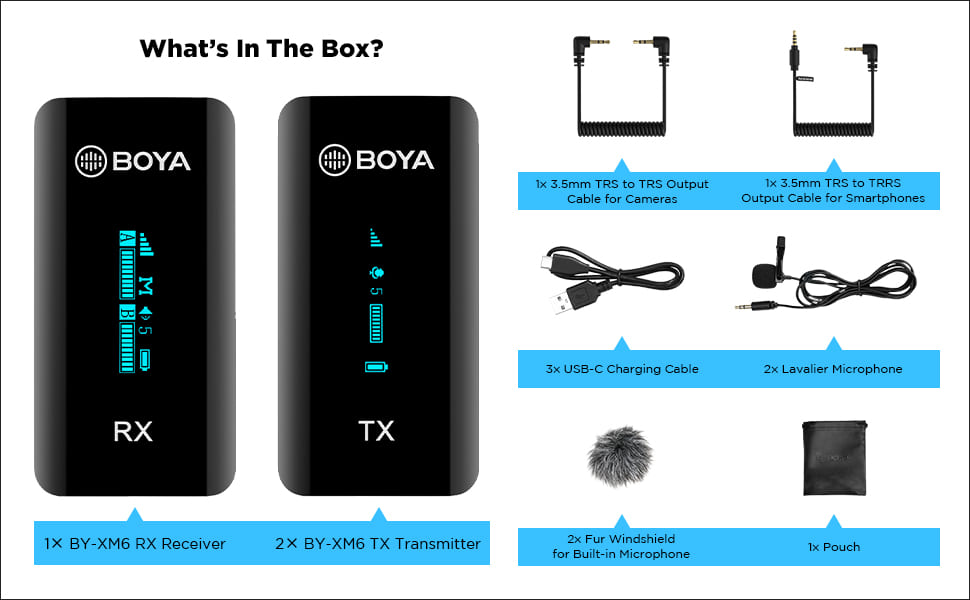
Image: All components included in the BOYA BY-XM6 S2 system package.
- 1x BY-XM6 RX Receiver
- 2x BY-XM6 TX Transmitter
- 1x 3.5mm TRS to TRS Output Cable for Cameras
- 1x 3.5mm TRS to TRRS Output Cable for Smartphones
- 3x USB-C Charging Cable
- 2x Lavalier Microphone
- 2x Fur Windshield for Built-in Microphone
- 1x Pouch
3. Product Overview
3.1 Components
The BY-XM6 S2 system consists of two transmitters (TX) and one receiver (RX). Each unit is compact and features an OLED display for easy monitoring of settings and battery life.

Image: The BOYA BY-XM6 S2 system, including the receiver (RX) and two transmitters (TX).
3.2 Key Features
- 2.4GHz Digital Frequency: Ensures stable and reliable wireless transmission up to 100 meters (328 feet) without obstacles.
- Dual Channel System: Supports two person interviewing or recording simultaneously.
- High-Fidelity Recording: Built-in low-noise microphone and included lavalier microphones provide clear audio.
- OLED Display: Easy-to-read screen shows battery level, signal strength, audio levels, and more.
- Multiple Input Modes: Can be used with the built-in microphone or external lavalier microphones.
- Real-time Headphone Monitoring: Allows you to monitor audio output directly from the receiver.
- Mono/Stereo Switch: Provides flexibility for post-production by allowing selection between mono and stereo recording modes.
- Long Battery Life: Up to 7 hours of operation time on a single charge.
- Compact and Portable: Lightweight design for easy carrying and discreet use.

Image: Key features of the BOYA BY-XM6 S2 system, highlighting its wireless capabilities and display.
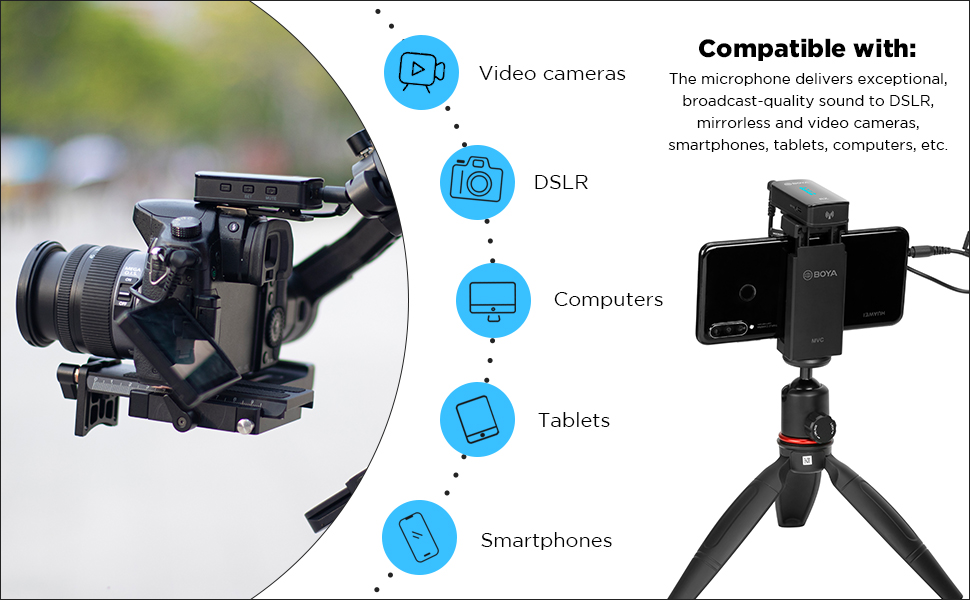
Image: The BOYA BY-XM6 S2 is compatible with various devices including cameras, smartphones, and computers.

Multiple input modes

Up to 7 hours operation time

Ultra compact size
4. Setup Guide
4.1 Charging the Devices
Before first use, fully charge the transmitter (TX) and receiver (RX) units using the provided USB-C charging cables. Connect the cables to a standard USB power adapter (not included) or a computer's USB port. The OLED display will indicate charging status.
4.2 Powering On/Off
- Power On: Long press the power button on both the TX and RX units until the OLED display illuminates.
- Power Off: Long press the power button again on both units until the display turns off.
4.3 Connecting to Recording Devices
The BY-XM6 S2 system is designed for plug-and-play operation. The TX and RX units will automatically pair upon powering on. If pairing fails, refer to the troubleshooting section.
- For Cameras (DSLR/Mirrorless): Use the 3.5mm TRS to TRS output cable. Connect one end to the RX's 'OUT' port and the other end to your camera's microphone input.
- For Smartphones/Tablets: Use the 3.5mm TRS to TRRS output cable. Connect one end to the RX's 'OUT' port and the other end to your smartphone's headphone/microphone jack. For devices without a 3.5mm jack, an appropriate adapter (e.g., USB-C to 3.5mm or Lightning to 3.5mm) may be required (not included).
- Connecting Lavalier Microphone: Plug the lavalier microphone into the 'MIC IN' port on the TX unit. Ensure it is securely connected.
5. Operating Instructions
5.1 Mute Function
To mute the transmitter, short press the mute button on the TX unit. A mute icon will appear on the OLED display. Short press again to unmute.
5.2 Gain Control
Adjust the audio input gain on the TX unit to optimize sound levels and prevent distortion. Use the '+' and '-' buttons to increase or decrease the gain. Monitor the audio level bar on the OLED display to ensure levels are within the optimal range.
5.3 Mono/Stereo Mode Selection
The receiver (RX) allows you to switch between mono and stereo output modes. Navigate through the menu on the RX unit to select the desired mode. In mono mode, both transmitter audio signals are mixed into a single channel. In stereo mode, each transmitter's audio is output to a separate channel (left/right).
5.4 Real-time Monitoring
Connect headphones to the 3.5mm headphone jack on the RX unit to monitor the audio in real-time. This allows you to check audio quality and levels during recording.
6. Maintenance
- Cleaning: Use a soft, dry cloth to clean the units. Do not use harsh chemicals or abrasive materials.
- Storage: Store the system in a cool, dry place away from direct sunlight and extreme temperatures. Use the provided pouch for protection.
- Battery Care: For optimal battery life, avoid fully discharging the units frequently. Charge them regularly, even if not in use for extended periods.
- Windshields: Regularly clean or replace the fur windshields to maintain effective wind noise reduction.
7. Troubleshooting
| Issue | Possible Cause | Solution |
|---|---|---|
| No sound or low volume | Incorrect cable connection; low gain setting; muted transmitter; low battery. | Ensure cables are securely connected. Adjust gain on TX. Check if TX is muted. Charge units. |
| Voice breaks or signal dropouts | Obstacles between TX and RX; exceeding operating range; strong interference. | Reduce distance between TX and RX. Ensure clear line of sight. Avoid areas with strong Wi-Fi or other 2.4GHz devices. |
| Poor noise cancellation / Excessive background noise | Improper microphone placement; no windshield used; high ambient noise. | Ensure lavalier mic is placed correctly (e.g., 6-8 inches from mouth). Use the fur windshield, especially outdoors. Record in quieter environments. |
| Units not pairing | Units too far apart; interference; pairing error. | Bring TX and RX closer together. Power cycle both units. Refer to manual for manual pairing steps if auto-pairing fails. |
| OLED display not working | Low battery; unit not powered on; hardware issue. | Charge the unit. Long press power button to ensure it's on. If issue persists, contact support. |
8. Technical Specifications
| Feature | Specification |
|---|---|
| Transmission Type | 2.4GHz Digital Frequency |
| Operating Range | Up to 100m (328ft) (without obstacle) |
| RF Output Power | <10mW |
| Polar Pattern | Omnidirectional |
| Frequency Response | 35Hz-18KHz |
| Maximum SPL (Built-in Mic) | 120dB SPL |
| Maximum SPL (Lavalier Mic) | 110dB SPL |
| Sensitivity (Built-in Mic) | -39dB |
| Sensitivity (Lavalier Mic) | -39dB |
| SNR | > 84dB |
| Power Requirements | Built-in Li-ion Battery or USB-C DC 5V |
| Built-in Battery Life | Approx. 7 hours |
| Audio Inputs | 3.5mm TRS MIC/LINE IN Jack or Built-in Microphone |
| Weight (TX/RX) | Approx. 32g (1.13oz) each |
| Dimensions (TX/RX) | 62.1 × 31.6 × 16.5mm |
| Audio Output Connector | 3.5mm Headphone Jack; 3.5mm TRS Output Jack |
| Audio Output Level | –60 dBV to -20dBV |
9. Warranty and Support
This product is covered by a manufacturer's warranty. For specific warranty terms and conditions, please refer to the documentation provided with your purchase or visit the official BOYA website. For technical support, service, or inquiries regarding your BOYA BY-XM6 S2 system, please contact the importer/packer:
Dexter Ventures Pvt. Ltd.
New Delhi and Thane Maharashtra
Email: contact@dexterventures.in
Related documentsBY-XM6-S2


Ask a question about this manual
Ask about setup, troubleshooting, compatibility, parts, safety, or missing instructions. Manuals+ will review the question and use this page’s manual context to help answer it.