
Introduction
This manual provides essential information for the safe and effective operation, maintenance, and troubleshooting of your HIKOKI DS18DAWCZ 18V Cordless Driver Drill. The DS18DAWCZ is a compact and lightweight cordless driver drill designed for high performance and efficiency. It features a 2-speed gear system, a 20-stage clutch function, and a built-in LED light that activates when the trigger is pulled. Please read this manual thoroughly before using the tool.
Safety Information
Always observe basic safety precautions to reduce the risk of fire, electric shock, and personal injury. Keep this manual for future reference.
- Work Area Safety: Keep the work area clean and well-lit. Cluttered or dark areas invite accidents. Do not operate power tools in explosive atmospheres, such as in the presence of flammable liquids, gases, or dust.
- Electrical Safety: Avoid body contact with earthed or grounded surfaces such as pipes, radiators, ranges, and refrigerators. Do not expose power tools to rain or wet conditions.
- Personal Safety: Always wear eye protection. Use hearing protection when operating the tool for extended periods. Dress properly; avoid loose clothing or jewelry. Secure long hair.
- Tool Use and Care: Do not force the power tool. Use the correct power tool for your application. Disconnect the battery pack from the power tool before making any adjustments, changing accessories, or storing power tools.
- Battery Pack Use and Care: Recharge only with the charger specified by the manufacturer. Do not use battery packs with any other power tools. When the battery pack is not in use, keep it away from other metal objects.
Package Contents
Verify that all items are present upon unpacking:
- HIKOKI DS18DAWCZ Cordless Driver Drill
- 18V Lithium-ion Batteries (2 included)
- Battery Charger
- Driver Bit
- Carry Case
Setup
1. Charging the Battery
Before first use, fully charge the battery pack. Insert the battery pack into the charger, ensuring it clicks into place. The charger indicator light will show the charging status. Once fully charged, remove the battery from the charger.
2. Installing/Removing the Battery
To install the battery, slide it into the base of the drill handle until it locks securely. To remove, press the battery release button (usually located at the front or sides of the battery) and slide the battery out.
3. Installing/Removing Drill Bits or Driver Bits

The HIKOKI DS18DAWCZ features a 13mm keyless chuck for quick and easy bit changes. To install a bit, rotate the chuck counter-clockwise to open the jaws. Insert the bit fully into the chuck, then rotate the chuck clockwise to tighten the jaws firmly around the bit. Ensure the bit is centered and secure before operation. To remove, rotate the chuck counter-clockwise to loosen and pull the bit out.
Operating Instructions
1. Powering On/Off and Variable Speed Trigger
The drill is activated by pressing the trigger switch. The speed of the drill is variable and controlled by the amount of pressure applied to the trigger. Pressing lightly results in lower speed, while pressing fully results in maximum speed. Release the trigger to turn the drill off.
2. Forward/Reverse Rotation Switch
A switch located above the trigger controls the direction of rotation. Push the switch to the left for forward (clockwise) rotation, suitable for drilling and driving screws. Push it to the right for reverse (counter-clockwise) rotation, used for removing screws or freeing a jammed drill bit. Ensure the switch is in the desired position before starting the drill.
3. 2-Speed Gear Selector
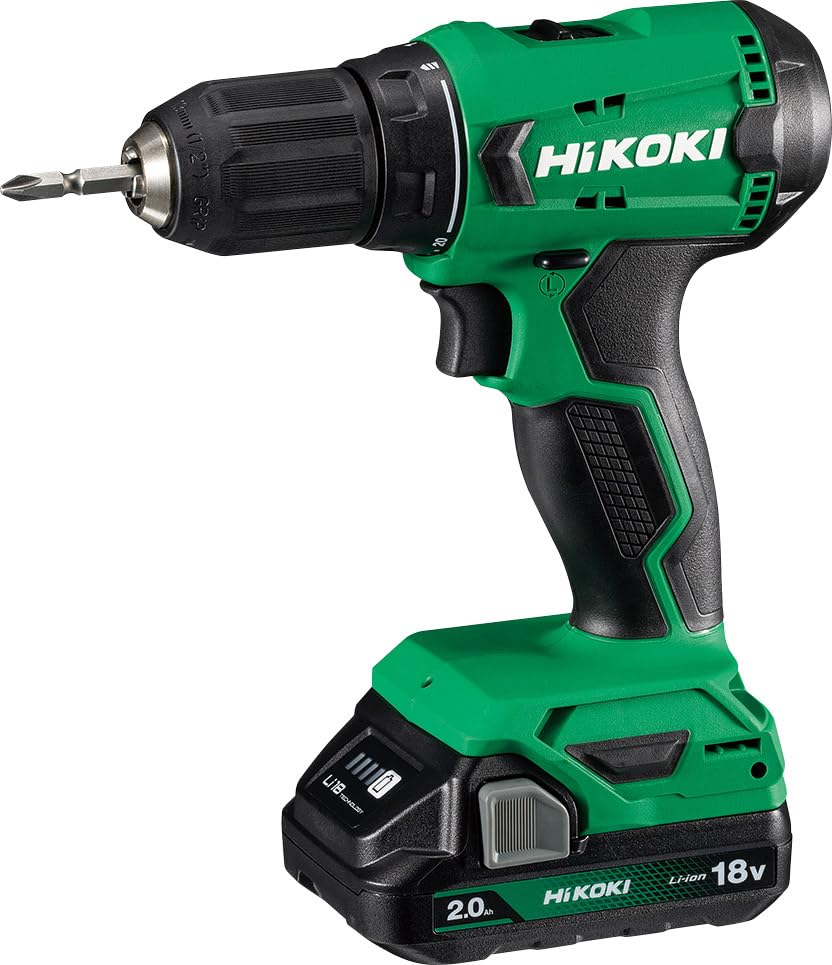
The drill features a 2-speed gear selector switch located on top of the tool. Position '1' provides lower speed and higher torque, ideal for driving screws and drilling larger holes. Position '2' provides higher speed and lower torque, suitable for faster drilling of smaller holes. Always select the appropriate gear before starting the drill.
4. Torque Adjustment Collar (20-Stage Clutch)
The torque adjustment collar, located behind the chuck, allows you to set the desired torque for screw driving applications. It has 20 settings, plus a drill mode. Rotate the collar to align the desired number with the indicator mark. Lower numbers provide less torque, preventing over-tightening or stripping screw heads. The drill symbol bypasses the clutch for maximum torque, suitable for drilling.
5. Built-in LED Light
The integrated LED light illuminates the work area when the trigger is pulled, improving visibility in dimly lit conditions.
6. Drilling and Screw Driving

For drilling, select the drill mode on the torque collar and the appropriate speed gear. Apply steady, even pressure. For screw driving, select a torque setting appropriate for the screw size and material. Start slowly and increase speed as needed. The clutch will disengage when the set torque is reached, preventing over-driving.

The drill is capable of drilling up to 13mm in mild steel and 36mm in wood. For screw driving, it can handle wood screws up to 6 x 75mm.
Maintenance
1. Cleaning
Regularly clean the ventilation openings of the tool to prevent overheating. Use a soft, damp cloth to wipe down the exterior. Do not use harsh chemicals or abrasive cleaners. Keep the chuck jaws free of debris.
2. Battery Care
Store batteries in a cool, dry place away from direct sunlight and extreme temperatures. Do not store fully discharged batteries for extended periods. Recharge batteries before they are completely depleted to prolong their lifespan.
3. Storage
When not in use, store the drill, batteries, and charger in the provided carry case in a secure, dry location out of reach of children.
Troubleshooting
- Drill does not start: Ensure the battery is fully charged and properly inserted. Check the forward/reverse switch is not in the center (locked) position.
- Loss of power during operation: The battery may be low. Recharge the battery.
- Bit not holding securely: Ensure the chuck is tightened sufficiently. Check for debris in the chuck jaws.
- Over-tightening screws: Adjust the torque collar to a lower setting.
- Drill bit getting stuck: Reduce pressure, ensure the correct bit is used for the material, and clear any debris from the hole.
If problems persist, contact HIKOKI customer support.
Specifications
| Feature | Specification |
|---|---|
| Brand | HIKOKI |
| Model Number | DS18DAWCZ |
| Power Source | Battery Powered (18V) |
| Maximum Rotational Speed | 1400 RPM |
| Amperage | 2 Amps |
| Maximum Chuck Size | 13 Millimeters (Keyless) |
| Maximum Torque | 50 Newton Meters |
| Number of Speeds | 2 |
| Torque Settings | 20 Stage Clutch |
| Drilling Capacity (Wood) | 36 Millimeters |
| Drilling Capacity (Metal) | 13 Millimeters |
| Item Weight | 0.9 Kilograms (Tool only) |
| Product Dimensions | 8.1L x 22.1W x 17.3H Centimeters |
| Special Feature | Variable Speed, Built-in LED Light |
| Country of Origin | China |
Warranty Information
This HIKOKI product is covered by the manufacturer's standard warranty. Please refer to the warranty card included with your purchase or visit the official HIKOKI website for detailed terms and conditions. Keep your purchase receipt as proof of purchase for any warranty claims.
Support
For technical assistance, spare parts, or service, please contact HIKOKI customer support. You can find contact information on the official HIKOKI website or through your local dealer. When contacting support, please have your product model number (DS18DAWCZ) and serial number (if applicable) ready.
Manufacturer: HIKOKI INDIA PVT LTD, Plot no. 9A, 1st Phase, Peenya Industrial Area, Bengaluru - 560058. India


