
1. Introduction
The ATUVOS Air Tracker Tag is a compact Bluetooth device designed to help you locate your personal belongings using the Apple Find My network. This manual provides essential information for setup, operation, and maintenance of your tracker tags.
2. Product Overview
The ATUVOS Air Tracker Tag (Model AT2301) is a small, square-shaped device with a built-in button and a keyhole for easy attachment. It is designed to be discreet and durable, with an IP67 waterproof rating.

Figure 1: Three ATUVOS Air Tracker Tags. These tags are compact and designed for easy attachment to various items.
3. Setup
The ATUVOS Air Tracker Tags are compatible exclusively with iOS devices via the Apple Find My app. Android devices are not supported.
- Enable Bluetooth: Ensure Bluetooth is enabled on your iOS device.
- Open Find My App: Launch the 'Find My' application on your iOS device.
- Add Item: Navigate to the 'Items' tab and tap the "+" icon, then select "Add Other Item".
- Pairing: Press and hold the button on your ATUVOS Air Tracker Tag for 30 seconds until you hear a beep. Your device will detect the tag.
- Connect: Follow the on-screen prompts to connect the tag, name it, and assign an emoji.
- Confirm: Agree to link the item to your Apple ID and complete the setup.

Figure 2: Visual guide for pairing your ATUVOS Air Tracker Tag with the Apple Find My app.
Video 1: Demonstrates the pairing and reset operation for the ATUVOS Air Tracker Tag.
4. Operating Instructions
Locating Nearby Items
When your ATUVOS Air Tracker Tag is within Bluetooth range (up to 200 ft), you can use the Find My app or Siri to make it emit a loud beeping sound (up to 100dB) to help you pinpoint its exact location.

Figure 3: Using the Find My app to play a sound and locate a nearby ATUVOS tag.
Locating Far Away Items (Lost Mode)
If your item is out of Bluetooth range, the Apple Find My network, composed of millions of Apple devices worldwide, can help locate it. When another Apple device comes within range of your lost tag, its location will be anonymously and securely relayed to your Find My app.

Figure 4: The Find My app providing directions to a lost ATUVOS tag located by the Apple Find My network.
Left Behind Remind
Enable the "Left Behind Remind" feature in the Find My app to receive instant notifications if your ATUVOS Air Tracker Tag disconnects from your iOS device's Bluetooth connection. This helps prevent leaving your belongings behind.

Figure 5: An iPhone showing a notification for an ATUVOS tag left behind.
Lost Mode
If your item is lost, you can enable "Lost Mode" in the Find My app. This allows you to display contact information (phone number or email) to anyone who finds your tag. When a finder scans the tag with an NFC-enabled smartphone, they will see your contact details and can reach out to you. The Find My network will also notify you when your item's location becomes available.

Figure 6: The Find My app interface for enabling Lost Mode and setting contact information.
Item Sharing (iOS 17+)
With iOS 17 or later, you can share your ATUVOS Air Tracker Tag with up to 5 other individuals in the Find My app. This allows them to view the item's location on a map. Borrowers will not receive tracking notifications when the item moves with them.
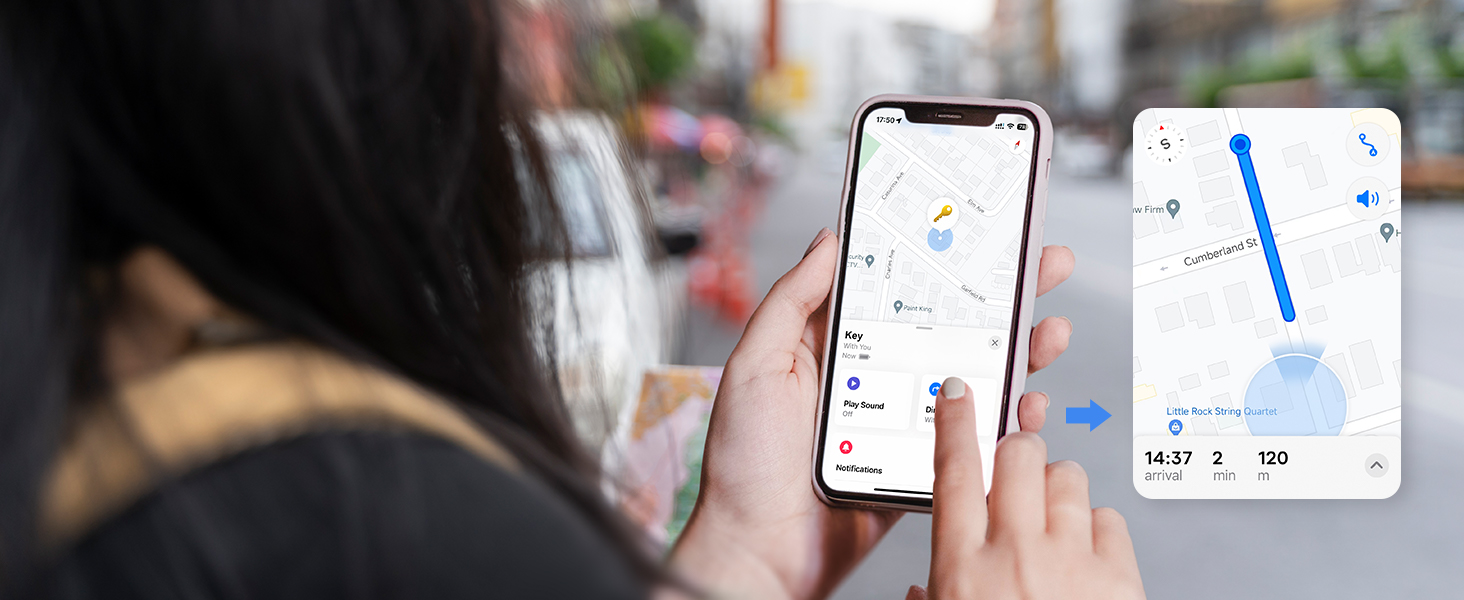
Figure 7: Sharing an ATUVOS tag with others using the Find My app on iOS 17.
5. Battery Replacement
The ATUVOS Air Tracker Tag uses a replaceable CR2032 coin cell battery, which typically lasts for approximately one year. The Find My app will notify you when the battery level is low.
- Open the Tag: Gently press the product with your index finger and turn your thumb in the direction of unlocking to open the cover.
- Remove Old Battery: Carefully remove the old CR2032 battery.
- Insert New Battery: Place a new CR2032 battery into the compartment with the positive (+) side facing up.
- Close the Tag: Align the cover and twist it shut until it clicks securely.

Figure 8: Step-by-step guide for replacing the CR2032 battery in your ATUVOS tag.
Video 2: Instructions on how to replace the battery of an ATUVOS Tag.
6. Maintenance
To ensure optimal performance and longevity of your ATUVOS Air Tracker Tag, follow these maintenance guidelines:
- Keep Clean: Wipe the tag with a soft, dry cloth to remove dust and dirt. Avoid harsh chemicals.
- Water Resistance: The tag is IP67 waterproof, meaning it can withstand splashes, rain, and brief submersion. However, avoid prolonged submersion or exposure to high-pressure water.
- Battery Check: Monitor battery levels via the Find My app and replace the CR2032 battery annually or when prompted.
7. Troubleshooting
Pairing Failure
If you experience issues pairing your ATUVOS Air Tracker Tag, it may be due to interference from too many Bluetooth devices in the vicinity. Move to an area with fewer Bluetooth devices and attempt the pairing process again.
Resetting the Tag
To reset your ATUVOS Air Tracker Tag, long press and hold the button. You will hear 6 short beeps, followed by a long beep. Continue holding until you hear the long beep, then release. The tag is now reset and ready for re-pairing.
8. Specifications
| Feature | Detail |
|---|---|
| Model Number | AT2301 |
| Product Dimensions | 1.37"L x 1.37"W x 0.39"Th |
| Item Weight | 2.29 ounces |
| Battery Type | CR2032 Lithium Metal (included) |
| Battery Life | Approximately 1 year (replaceable) |
| Connectivity | Bluetooth |
| Waterproof Rating | IP67 |
| Beeping Sound Level | Up to 100dB |
| Bluetooth Range | Up to 200 ft / 60m |
| Material | Plastic |
9. Safety Information
The ATUVOS Air Tracker Tags are designed with privacy in mind. All communication on the Apple Find My network is anonymous and encrypted. Location data and history are not stored on the tags.
10. Customer Support
For any questions regarding the use of your ATUVOS Air Tracker Tags, please contact our 24-hour customer service. We are committed to providing assistance and resolving any issues you may encounter.


