
1. Introduction
This manual provides detailed instructions for the operation and maintenance of your PRUNUS J-985 Mini AM/FM Stereo Radio and PRUNUS J-328 Mini Portable Pocket FM Walkman Radio with Recorder. Please read this manual thoroughly before using the product to ensure proper function and longevity.
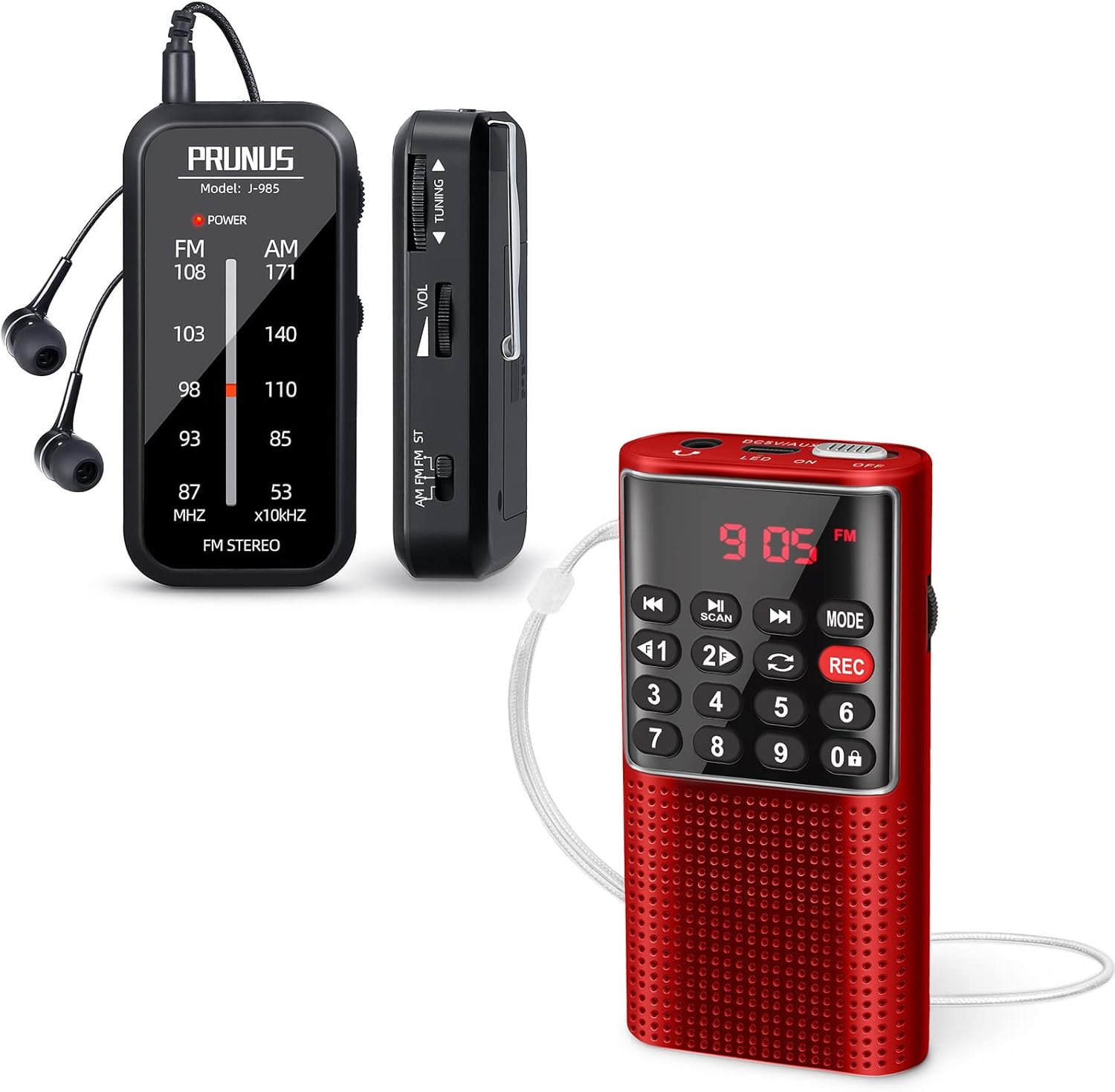
Figure 1: PRUNUS J-985 (left) and J-328 (right) Mini Portable Radios.
2. Product Features
2.1 PRUNUS J-985 Features
- Excellent Reception: Supports AM (530-1710KHz) and FM (87-108MHz) frequencies. Utilizes a high-quality DSP chip and earphone wire as an antenna for stable signal reception.
- Compact and Portable: Measures approximately 1.65 x 0.71 x 3.42 inches and weighs 40g (without batteries). Includes a back clip for convenient carrying.
- User-Friendly Design: Features an earphone jack, ON/OFF switch, tuning wheel, volume wheel, band switch, and a traditional tuner dial with a power indicator.
- Stereo Sound: Designed for use with headphones to provide a stereo audio experience.

Figure 2: The J-985 radio demonstrating its excellent reception capabilities, utilizing the earphone wire as an antenna.

Figure 3: Labeled components of the J-985 radio, highlighting its simple and intuitive controls.

Figure 4: Comparison of the J-985 radio's compact size, illustrating its portability.
2.2 PRUNUS J-328 Features
- Multifunctional: Supports FM (87.5-108MHz), AUX input, TF Card music playback, and recording functions.
- Recording Capability: Allows recording of radio stations or personal voice memos onto a TF card.
- Auto Screen Off: Features an auto screen off function to conserve battery life during playback.
- Lock Button: Includes a lock button to prevent accidental operation.
- Integrated Antenna: Equipped with a hidden antenna integrated into the strap for durability and sleek design.

Figure 5: The J-328 radio, highlighting its sound quality from the integrated speaker.

Figure 6: The J-328 radio's universal compatibility, showing its ability to play FM radio, MP3s from TF cards, and audio via AUX input.

Figure 7: The J-328 radio demonstrating its hidden antenna, integrated into the wrist strap.
3. Setup
3.1 Battery Installation (J-985)
The J-985 radio operates on batteries (not included). To install:
- Locate the battery compartment cover on the back of the unit.
- Slide or lift the cover to open.
- Insert the required batteries, ensuring correct polarity (+/-) as indicated inside the compartment.
- Replace the battery compartment cover securely.
Note: The J-328 radio typically has a built-in rechargeable battery. Refer to its specific charging instructions if applicable.
3.2 Initial Power On
For both models, locate the ON/OFF switch. Slide it to the "ON" position to power on the device. The J-985 will show a power indicator light. The J-328 will display information on its screen.
4. Operating Instructions
4.1 PRUNUS J-985 Operation
- Connecting Headphones: Insert the 3.5mm jack of your headphones into the earphone jack on the top of the radio. The earphone wire acts as the antenna for optimal reception.
- Selecting Band: Use the AM/FM/FM-ST switch on the side to select between AM, FM, or FM Stereo modes.
- Tuning to a Station: Rotate the "TUNING" wheel on the side to scan through frequencies. The dial on the front will indicate the current frequency.
- Adjusting Volume: Rotate the "VOL" wheel on the side to increase or decrease the audio volume.

Figure 8: The J-985 radio in use with headphones, illustrating its FM Stereo capability.
4.2 PRUNUS J-328 Operation
- Power On/Off: Use the dedicated power button or switch to turn the device on or off.
- Mode Selection: Press the "MODE" button to cycle through available modes: FM Radio, AUX Input, TF Card Playback.
- FM Radio Tuning: In FM mode, use the scan button or number pad to tune to desired stations.
- TF Card Playback: Insert a TF (Micro SD) card loaded with MP3 files into the designated slot. The radio will automatically detect and begin playing audio files.
- Recording:
- Ensure a TF card is inserted.
- Press the "REC" button to start recording.
- Press "REC" again to stop recording. Recordings are saved to the TF card.
- Lock Function: Activate the "LOCK" button to prevent accidental button presses during transport or activity.
5. Maintenance
- Cleaning: Use a soft, dry cloth to clean the exterior of the radio. Do not use liquid cleaners or abrasive materials.
- Storage: When not in use for extended periods, remove batteries from the J-985. Store both radios in a cool, dry place away from direct sunlight and extreme temperatures.
- Battery Care (J-328): For the J-328 with a built-in rechargeable battery, avoid fully discharging the battery frequently. Charge regularly to maintain battery health.
6. Troubleshooting
| Problem | Possible Cause | Solution |
|---|---|---|
| No power (J-985) | Dead or incorrectly inserted batteries. | Replace batteries or check polarity. |
| No power (J-328) | Battery discharged. | Charge the radio using the provided cable. |
| Poor reception (J-985) | Headphones not connected or not fully extended; weak signal area. | Ensure headphones are plugged in and wire is extended. Try moving to an open area. |
| Poor reception (J-328) | Antenna not extended or weak signal area. | Ensure the hidden antenna (strap) is positioned for best reception. Try moving to an open area. |
| No sound | Volume too low; headphones not connected (J-985); faulty headphones/speaker. | Increase volume. Check headphone connection. Test with different headphones (J-985) or verify speaker function (J-328). |
| J-328 buttons unresponsive | Lock function is active. | Deactivate the lock function. |
7. Specifications
7.1 PRUNUS J-985 Specifications
- Model: J-985
- Frequency Range: AM: 530-1710KHz; FM: 87-108MHz
- Dimensions: 1.65"L x 0.71"W x 3.42"H (41.9mm x 18.1mm x 86.8mm)
- Weight: Approximately 40g (without batteries)
- Power Source: Battery Operated (Batteries not included)
- Connectivity: 3.5mm Earphone Jack
- Special Features: DSP Chip, Earphone wire as antenna, Back clip
7.2 PRUNUS J-328 Specifications
- Model: J-328
- Frequency Range: FM: 87.5-108MHz
- Functions: FM Radio, AUX Input, TF Card Music Play, Recording
- Speaker: 3W magnetic speaker
- Antenna: Hidden antenna (integrated into strap)
- Special Features: Auto Screen Off, Lock Button
8. What's in the Box
The standard package for the PRUNUS J-985 includes:
- PRUNUS J-985 Mini AM/FM Stereo Radio
- Earphones
- User Manual (this document)
The standard package for the PRUNUS J-328 typically includes:
- PRUNUS J-328 Mini Portable Pocket FM Walkman Radio with Recorder
- USB Charging Cable
- User Manual (this document)
Note: Specific contents may vary slightly based on package configuration.
9. Warranty and Support
PRUNUS products typically come with a manufacturer's warranty. For specific warranty details, please refer to the warranty card included with your product or visit the official PRUNUS website. For technical support or customer service inquiries, please contact PRUNUS customer support through their official channels.
You can find more information and support on the PRUNUS Store on Amazon.


