
GIDEALED D5-E
GIDEALED D5-E 5-Channel DMX Decoder User Manual
Model: D5-E
1. Product Overview
The GIDEALED D5-E is an industrial-level 5-channel DMX512 decoder designed for controlling various LED light strips and modules. It features PWM output and common anode configuration, fully complying with DMX512 standard protocols.
Key features include RDM bi-directional communication, a 3-digit digital display for easy DMX decode start address setting via buttons, and selectable PWM frequencies (250/500/1000/2000/4000/8000Hz). It operates with a constant voltage input of 12-48VDC, providing a high power output of Max 20A (4A per channel) across its 5 channels. The unit is equipped with over-heat, over-load, and short-circuit protection, with automatic recovery. It is compatible with RGBCCT, RGBW, RGB, CCT, and single-color LED light strips and modules.

Figure 1: GIDEALED D5-E 5-Channel DMX Decoder
2. Product Components and Interfaces
Familiarize yourself with the various components and connection interfaces of the D5-E DMX Decoder.

Figure 2: Labeled diagram of the D5-E DMX Decoder showing DMX input/output, digital display, setting keys, power input, and LED output terminals.
- Digital Display: Shows the current DMX address or setting.
- Setting Keys (M, Up, Down): Used to navigate menus and adjust settings.
- DMX Input/Output (RJ45): Standard RJ45 ports for DMX512 signal connection.
- Power Input (12-48VDC): Terminal block for connecting the DC power supply.
- Output Terminals (R, G, B, W1, W2): Screw terminals for connecting LED light strips (Red, Green, Blue, White 1, White 2).
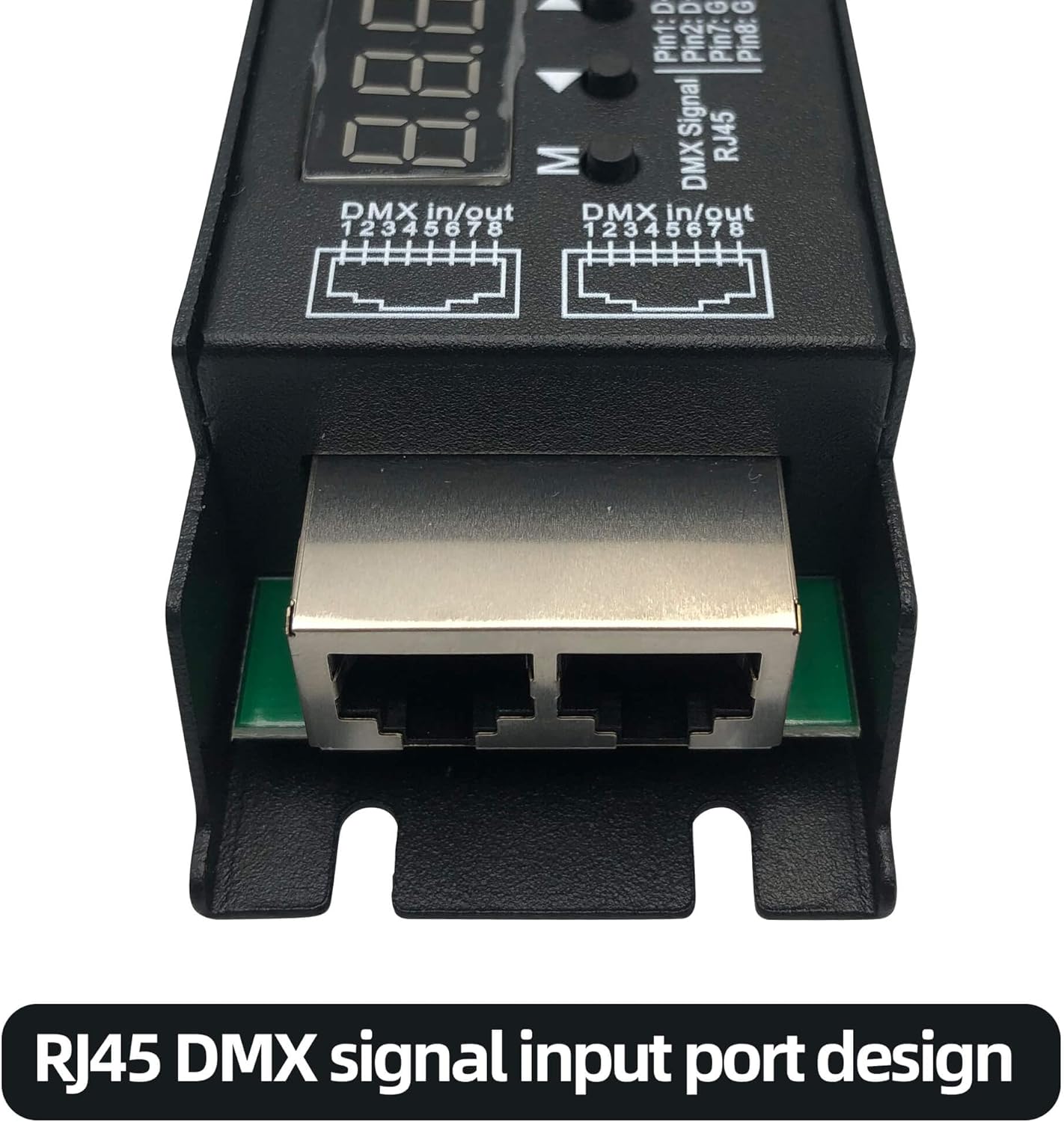
Figure 3: Close-up view of the RJ45 DMX signal input/output ports, designed for reliable DMX signal transmission.

Figure 4: Close-up view of the high power output terminals, providing 5 channels with 6 wires for up to 4A per channel.
3. Setup and Installation
Follow these steps to properly set up your GIDEALED D5-E DMX Decoder.
- Power Connection: Connect a 12-48VDC constant voltage power supply to the "IN PUT 12-48VDC" terminals. Ensure correct polarity (+ to + and - to -).
- LED Strip Connection: Connect your LED light strips to the "OUTPUT" terminals. The decoder supports RGBCCT, RGBW, RGB, CCT, and single-color LED light strips. Match the R, G, B, W1, W2 outputs to the corresponding inputs on your LED strip.
- DMX Signal Connection: Connect your DMX master controller to the DMX In/Out RJ45 ports. If using multiple decoders, daisy-chain them using the DMX In/Out ports.

Figure 5: Connection diagrams for RGB-CCT, RGBW, and 5-group White LED strips, illustrating how to connect them to the D5-E decoder with a DMX Master and power supply.
Important: Ensure all connections are secure before applying power. Incorrect wiring can damage the device or connected LEDs.
Video 1: Demonstration of the DMX512 Decoder, highlighting its RDM function and basic operation.
4. Operating Instructions
The D5-E decoder features a digital display and three buttons (M, Up, Down) for configuration.
- Setting DMX Address:
- Press the 'M' button to enter the setting mode.
- Use the 'Up' and 'Down' buttons to adjust the DMX start address. The digital display will show the current address.
- Press 'M' again to confirm and exit the setting mode.
- RDM Functionality: If your DMX master console supports RDM (Remote Device Management), you can set the DMX address of the decoder directly from the console. Refer to your DMX master console's manual for RDM setup instructions.
- PWM Frequency Selection:
- While in setting mode (after pressing 'M'), press and hold the 'M' button for a few seconds to cycle through PWM frequency options.
- Available frequencies are 250Hz, 500Hz, 1000Hz, 2000Hz, 4000Hz, and 8000Hz.
- Release the 'M' button when the desired frequency is displayed.
5. Maintenance
To ensure optimal performance and longevity of your D5-E DMX Decoder, follow these maintenance guidelines:
- Keep the device clean and free from dust. Use a soft, dry cloth for cleaning.
- Ensure proper ventilation around the unit to prevent overheating.
- Avoid exposing the device to moisture, extreme temperatures, or corrosive environments.
- Regularly check all cable connections for tightness and signs of wear.
- Do not attempt to open or repair the device yourself. Refer to qualified personnel for service.
6. Troubleshooting
If you encounter issues with your D5-E DMX Decoder, refer to the following common troubleshooting steps:
| Problem | Possible Cause | Solution |
|---|---|---|
| LEDs not lighting up. | No power, incorrect wiring, DMX signal issue, LED strip fault. | Check power supply connection and voltage. Verify LED strip wiring polarity. Ensure DMX master is sending a signal and DMX address is correctly set. Test LED strip independently. |
| Incorrect colors or flickering. | Incorrect DMX address, faulty DMX cable, interference, PWM frequency mismatch. | Confirm DMX address matches master output. Replace DMX cable. Check for strong electromagnetic interference. Adjust PWM frequency if flickering persists. |
| Digital display not working. | No power, internal fault. | Verify power supply. If power is present and display remains off, contact support. |
| Over-heat/Over-load protection activated. | Excessive load on output channels, insufficient ventilation. | Reduce the load on the output channels. Ensure adequate airflow around the decoder. The unit should recover automatically once the condition is resolved. |
7. Specifications
Technical specifications for the GIDEALED D5-E DMX Decoder:
- Model: D5-E
- Color: Black
- Material: Metal
- Input Voltage: 12-48VDC
- Max Input Current: 20.5A
- Output Channels: 5 channels (Common Anode)
- Output Current: 5 x 4A (Max 20A total)
- Output Power: 5 x (48-192)W (depending on input voltage)
- PWM Frequency: Selectable (250/500/1000/2000/4000/8000Hz)
- Signal Format: DMX512
- Communication: RDM bi-directional communication support
- Connector Type: RJ45 (DMX In/Out)
- Operating Temperature Range: -30°C to +55°C
- Product Dimensions: 6.89"L x 1.81"W x 1.26"H
- Item Weight: 9.6 ounces
- Protection: Over-heat, Over-load, Short circuit protection with auto-recovery
8. Warranty and Support
GIDEALED products are designed for reliability and performance. For specific warranty information, please refer to the product packaging or contact GIDEALED customer support directly. Protection plans may be available for extended coverage.
For technical assistance, troubleshooting, or any inquiries regarding your D5-E DMX Decoder, please visit the official GIDEALED website or contact their customer service team. You can also refer to the Safety Information (PDF) for additional details.
Related documentsD5-E

Ask a question about this manual
Ask about setup, troubleshooting, compatibility, parts, safety, or missing instructions. Manuals+ will review the question and use this page’s manual context to help answer it.