
1. Product Overview
The Monster N-Lite 200 AirLinks are lightweight, in-ear wireless earbuds designed for comfort and high-quality stereo sound. They feature touch controls, deep bass, a built-in microphone for noise reduction during calls, and an IPX5 waterproof rating, making them suitable for sports and daily use. The earbuds come with a portable charging case that supports both USB-C and wireless charging.

Image: Monster N-Lite 200 AirLinks earbuds and their charging case, showcasing their compact design.
2. What's in the Box
- Monster N-Lite 200 AirLinks Earbuds (Left and Right)
- Portable Charging Case
- USB-C Charging Cable
- 3 Pairs of Ear Tips (Small, Medium, Large - Medium size pre-installed)
- User Manual (this document)
3. Setup
3.1. Fitting the Ear Tips
For optimal sound quality and comfort, select the ear tips that best fit your ears. The Monster N-Lite 200 AirLinks come with three sizes: Small (S), Medium (M), and Large (L). The medium size is pre-installed.
- Gently remove the pre-installed ear tips by pulling them off the earbud nozzle.
- Select a different size ear tip and align it with the earbud nozzle.
- Push the ear tip onto the nozzle until it is securely attached.
- Test the fit by inserting the earbuds into your ears. A good fit should feel snug and create a seal that blocks out most ambient noise.

Image: Illustration showing the three sizes of ear tips (S, M, L) and a person fitting an earbud for comfortable wear.
3.2. Initial Pairing
The Monster N-Lite 200 AirLinks feature one-step pairing for convenience.
- Ensure your mobile device's Bluetooth is turned on.
- Open the charging case and remove both earbuds. They will automatically enter pairing mode.
- On your mobile device, go to Bluetooth settings and select "Monster N-Lite 200 AirLinks" from the list of available devices.
- Once connected, you will hear an audible "Connected" prompt from the earbuds.

Image: A hand holding the open earbud case next to a smartphone displaying a successful Bluetooth connection to "Monster N-Lite 200 AirLinks".
After the initial pairing, the earbuds will automatically connect to the last paired device when removed from the charging case.
4. Operating Instructions
The Monster N-Lite 200 AirLinks feature high-sensitivity touch controls on each earbud for easy management of calls and music playback.

Image: A visual representation of the earbud's touch-sensitive area and the various functions it controls, including play/pause, skip tracks, volume, and voice assistant activation.
4.1. Touch Control Functions
| Action | Function |
|---|---|
| Tap (either earbud) | Answer/End a Call |
| Short Press (either earbud) | Play/Pause Music |
| Double-tap (Left earbud) | Decrease Volume |
| Double-tap (Right earbud) | Increase Volume |
| Long Press for 2 seconds (Left earbud) | Previous Song |
| Long Press for 2 seconds (Right earbud) | Next Song |
| Triple-tap (either earbud) | Activate Voice Assistant (Siri, Google Assistant) |
4.2. Mono/Stereo Mode
The earbuds support both stereo and mono modes. You can use both earbuds together for a stereo experience or use a single earbud (left or right) independently for mono audio, which is useful for calls or when you need to be aware of your surroundings.

Image: Depicts various usage scenarios including sharing earbuds, using one for calls, and both for stereo music, highlighting the versatility of mono and stereo modes.
5. Charging
The Monster N-Lite 200 AirLinks charging case supports both USB-C wired charging and wireless charging.
5.1. Charging the Earbuds
- Place the earbuds into the charging case. Ensure they are correctly seated in their respective slots.
- The indicator light on the case will show the charging status.
- A single charge provides over 4.5 hours of playtime.
5.2. Charging the Case
- USB-C Charging: Connect the provided USB-C cable to the charging port on the case and the other end to a USB power source (e.g., wall adapter, computer USB port).
- Wireless Charging: Place the charging case on a compatible wireless charging pad. Ensure the case is centered on the pad for efficient charging.
- The charging case provides a total of 21 hours of playtime for the earbuds.
- Fast charging allows for quick power replenishment.
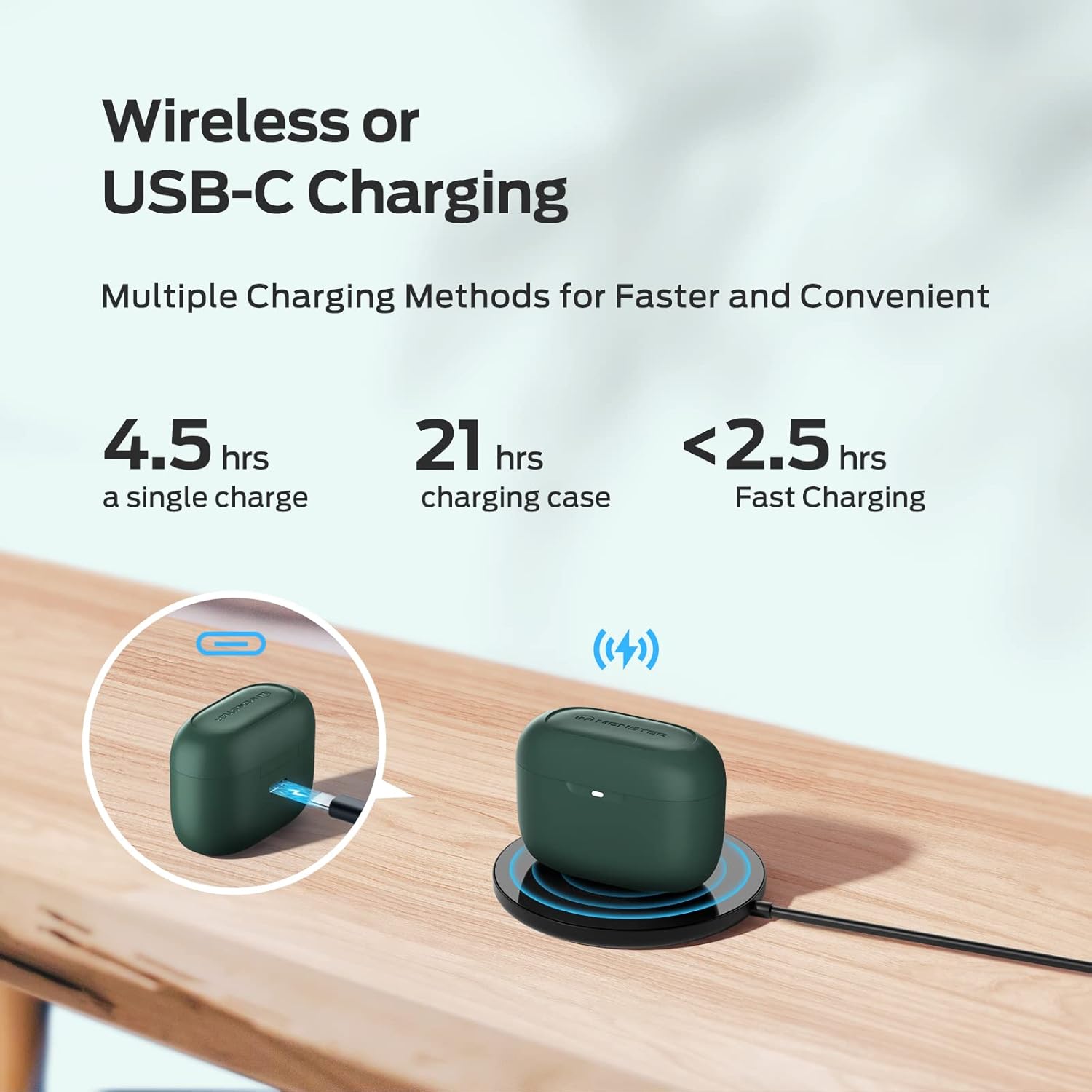
Image: Demonstrates the two charging methods for the earbud case: wired USB-C charging and wireless charging on a pad, along with battery life indicators.
6. Maintenance
Proper maintenance ensures the longevity and optimal performance of your Monster N-Lite 200 AirLinks earbuds.
6.1. Cleaning
- Regularly clean the earbuds and charging case with a soft, dry, lint-free cloth.
- Remove ear tips and clean them separately with mild soap and water if necessary. Ensure they are completely dry before reattaching.
- Gently clean the mesh and charging contacts on the earbuds and inside the case using a dry cotton swab. Avoid using sharp objects.
6.2. Water Resistance (IPX5)
The earbuds are rated IPX5 waterproof, meaning they are resistant to splashes and sweat. This makes them suitable for workouts and outdoor activities. However, they are not designed for submersion in water or for use during swimming.

Image: An illustration showing water splashing on the earbuds, signifying their IPX5 waterproof capability.
6.3. Storage
When not in use, store the earbuds in their charging case to protect them and keep them charged. Store the case in a cool, dry place away from extreme temperatures.
7. Troubleshooting
If you encounter issues with your Monster N-Lite 200 AirLinks earbuds, try the following troubleshooting steps:
| Problem | Solution |
|---|---|
| Earbuds not pairing/connecting. |
|
| No sound or low volume. |
|
| Earbuds not charging. |
|
| Poor call quality. |
|
If the issue persists, please contact customer support for further assistance.
8. Specifications
| Feature | Detail |
|---|---|
| Model Name | N-Lite 200 AirLinks |
| Model Number | MH12003 |
| Brand | Monster |
| Connectivity Technology | Bluetooth 5.0 |
| Audio Driver Type | 6mm Composite Diaphragm Drivers |
| Playtime (Single Charge) | Over 4.5 hours |
| Total Playtime (with Charging Case) | Up to 21 hours |
| Charging Interface | USB-C, Wireless Charging |
| Control Type | Touch Control |
| Water Resistance Level | IPX5 (Splash and Sweatproof) |
| Weight | 5.9 ounces (Item Weight) |
| Color | Green (as per product data, though video shows pink) |
9. Official Product Video
Watch this official video from the seller for a closer look at the Monster N-Lite 200 AirLinks earbuds, including their design and features.
Video: A demonstration of the Monster N-Lite 200 AirLinks earbuds, showing the charging case, earbuds, and how to change ear tips. Note: The video shows a pink version of the earbuds.
10. Warranty and Support
For warranty information and customer support, please refer to the product packaging or contact the manufacturer directly. Keep your proof of purchase for any warranty claims.
Manufacturer: Monster


