
WORKPRO W082057AE
WORKPRO 60-inch Height Adjustable Work Table User Manual
Model: W082057AE
1. Introduction
The WORKPRO 60-inch Height Adjustable Work Table is a versatile and robust workbench designed for various applications, including garages, warehouses, basements, workshops, and crafting rooms. It features a durable wooden top and a sturdy steel frame, offering ample space and a high load capacity. The table's height can be easily adjusted using a crank handle, and it provides two assembly options: mobile casters or stable leveling feet.
2. Safety Information
- Always ensure the table is on a stable, level surface before use.
- Do not exceed the maximum load capacity of 500 lbs (226.8 kg).
- When adjusting the height, ensure no objects are obstructing the movement of the legs or crank mechanism.
- If using casters, ensure they are locked when the table is in a stationary position to prevent accidental movement.
- Keep hands and fingers clear of moving parts during height adjustment.
- Regularly inspect all bolts and fasteners to ensure they are tight. Retighten as necessary.
- Do not allow children to operate the height adjustment mechanism unsupervised.
3. Package Contents
Please verify that all components are present before beginning assembly. If any parts are missing or damaged, contact customer support.
- Wooden Tabletop (60" x 24")
- Steel Frame Components (Legs, Crossbar, Support Rail)
- Crank Handle
- Universal Casters with Brakes (4 units)
- Leveling Feet (4 units)
- Assembly Hardware (Bolts, Washers, Nuts, Wrenches)
- Instruction Manual (this document)
4. Setup and Assembly
Refer to the detailed Installation Manual (PDF) for step-by-step assembly instructions. Below are general guidelines and key considerations.
4.1 Choose Your Base Option
The workbench offers two base configurations: casters for mobility or leveling feet for stationary stability.

Image showing the workbench with both leveling feet and casters as assembly options.

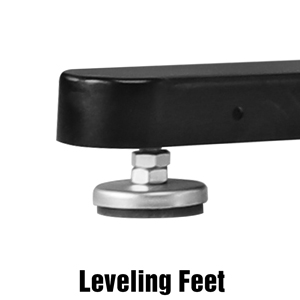
Close-up view of the stable leveling feet.

Close-up view of the universal casters with brakes.
- Casters: Provide 360-degree rotation for easy movement. Ensure brakes are engaged when the table is stationary.
- Leveling Feet: Offer maximum stability and prevent wobbling on uneven surfaces.
4.2 Crank Handle Installation
The crank handle can be attached to either side of the desktop for convenient height adjustment.
Detailed view of the crank handle mechanism.
4.3 Support Rail Placement
The support rail can be installed in three different locations to accommodate various storage solutions, such as tool storage or rolling cabinets underneath the table.

Image illustrating the sturdy steel frame and adjustable support rod.
5. Operating Instructions
5.1 Adjusting Table Height
The WORKPRO workbench features a manual crank handle for smooth height adjustment. The table height can be adjusted from 29 inches (73.66 cm) to 38 inches (96.52 cm).
- Locate the crank handle on either side of the table.
- Turn the crank handle clockwise to raise the table.
- Turn the crank handle counter-clockwise to lower the table.
- Adjust to your desired height for sitting or standing work.

Diagram showing the height adjustment range of the workbench.
5.2 Using Casters (if installed)
If your workbench is assembled with casters, you can easily move it around your workspace. Each caster is equipped with a brake for stability.
- To move the table: Unlock all four caster brakes by flipping the lever upwards.
- To secure the table: Lock all four caster brakes by pressing the lever downwards.

A person demonstrating the mobility of the workbench with casters.
6. Maintenance
- Cleaning: Wipe the wooden top with a damp cloth and mild detergent. Avoid abrasive cleaners. For the steel frame, use a soft cloth.
- Lubrication: Periodically apply a small amount of silicone spray or light oil to the height adjustment mechanism to ensure smooth operation.
- Fasteners: Check all bolts and screws regularly and tighten them as needed to maintain stability and prevent wobbling.
- Wood Top Care: The rubber wood top has a waterproof and scratch-resistant coating. Avoid placing extremely hot items directly on the surface.
7. Troubleshooting
| Problem | Possible Cause | Solution |
|---|---|---|
| Table is wobbly. | Loose fasteners; uneven floor (if using leveling feet); casters unlocked (if using casters). | Tighten all assembly bolts. Adjust leveling feet to compensate for unevenness. Ensure caster brakes are locked. |
| Difficulty adjusting height. | Mechanism needs lubrication; obstruction in the lifting columns. | Apply silicone spray or light oil to the lifting columns. Check for any obstructions and remove them. |
| Casters not rolling smoothly. | Debris in wheels; brakes partially engaged. | Clean any debris from the caster wheels. Ensure brakes are fully disengaged. |
8. Specifications
| Feature | Detail |
|---|---|
| Model Number | W082057AE |
| Tabletop Dimensions | 60 inches (W) x 24 inches (D) |
| Adjustable Height Range | 29 inches to 38 inches (73.66 cm to 96.52 cm) |
| Maximum Load Capacity | 500 lbs (226.8 kg) |
| Tabletop Material | 1-3/16 inch thick Rubber Wood with waterproof and scratch-resistant coating |
| Frame Material | Heavy-duty Alloy Steel |
| Assembly Options | Casters with brakes or Leveling Feet |
| Item Weight | 107.5 Pounds (48.76 kg) |
| UPC | 820909777526 |
9. Warranty and Support
WORKPRO stands behind the quality of its products. For warranty information, customer support, or to purchase replacement parts, please visit the official WORKPRO store or contact their customer service directly.
Official WORKPRO Store: WORKPRO Store on Amazon
Additional Resources: Download Installation Manual (PDF)
Related documentsW082057AE

Ask a question about this manual
Ask about setup, troubleshooting, compatibility, parts, safety, or missing instructions. Manuals+ will review the question and use this page’s manual context to help answer it.