
Einhell 4514210
Einhell Professional Cordless Drill Driver TP-CD 18/60 Li BL - Solo Power X-Change User Manual
Model: TP-CD 18/60 Li BL (4514210)
Introduction
This manual provides essential information for the safe and efficient operation, maintenance, and troubleshooting of your Einhell Professional Cordless Drill Driver TP-CD 18/60 Li BL. Please read this manual thoroughly before using the tool and keep it for future reference.
The Einhell TP-CD 18/60 Li BL is a versatile and powerful cordless drill driver, part of the Power X-Change series. It features a brushless motor for enhanced power and longer runtime, a 13 mm metal chuck, a two-speed gearbox, and integrated LED lighting. This model is supplied without a battery and charger, which are sold separately.
Safety Instructions
Always observe basic safety precautions when using power tools to reduce the risk of fire, electric shock, and personal injury.
- Work Area Safety: Keep your work area clean and well-lit. Cluttered or dark areas invite accidents. Do not operate power tools in explosive atmospheres, such as in the presence of flammable liquids, gases, or dust.
- Electrical Safety: Avoid body contact with earthed or grounded surfaces. Do not expose power tools to rain or wet conditions.
- Personal Safety: Always wear eye protection, hearing protection, and appropriate clothing. Use safety equipment such as dust masks, non-skid safety shoes, hard hats, or hearing protection when appropriate.
- Tool Use and Care: Do not force the power tool. Use the correct power tool for your application. Disconnect the battery pack from the power tool before making any adjustments, changing accessories, or storing power tools.
- Battery Pack Use and Care: Recharge only with the charger specified by the manufacturer. Use power tools only with specifically designated battery packs.
Product Overview
The Einhell TP-CD 18/60 Li BL Cordless Drill Driver is designed for powerful screwing and fast drilling tasks. Below are the key components and features:
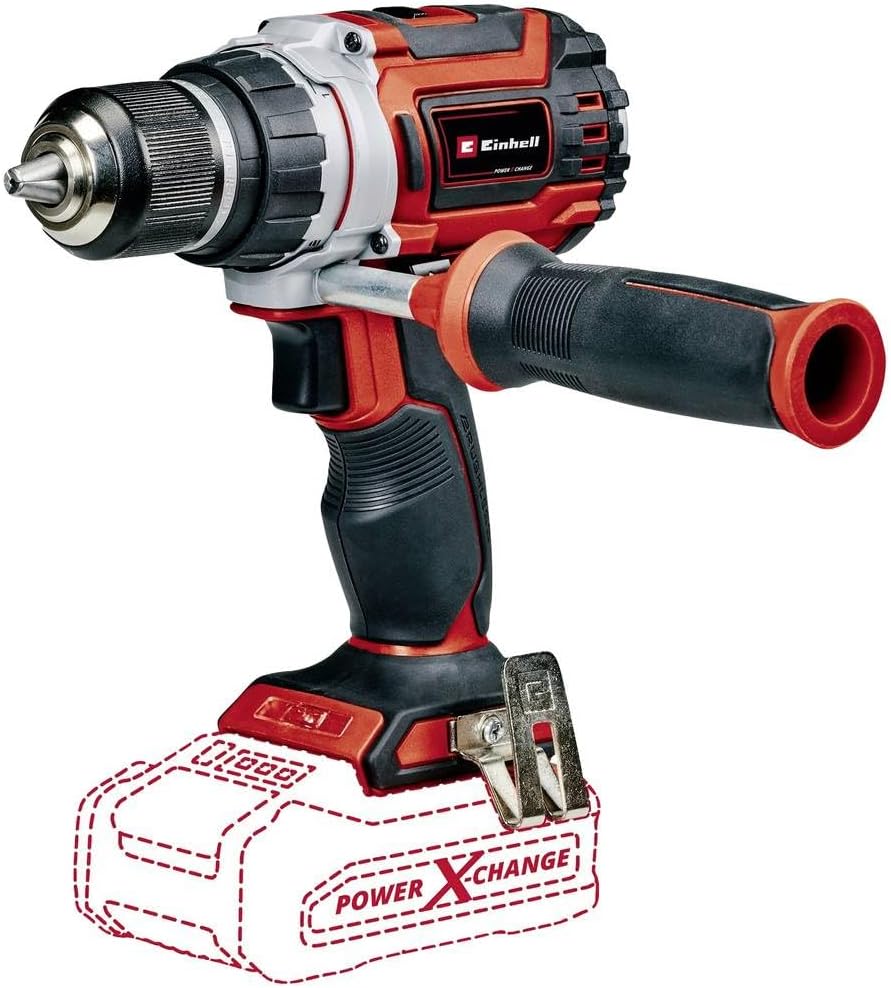
Figure 1: Einhell TP-CD 18/60 Li BL Cordless Drill Driver with auxiliary handle and an outline indicating where the Power X-Change battery connects. This image highlights the tool's compact design and key features like the chuck and handle.
- Brushless Motor: Provides maximum power and longer runtime compared to standard brush motors, requiring less maintenance.
- 13 mm Metal Chuck: A robust quick chuck with a sleeve for securely attaching accessories.
- Two-Speed Gearbox: Allows for powerful screwing and fast drilling, with 22 torque steps and 60 Nm of torque.
- LED Lighting: Integrated light ensures optimal visibility in dark or inaccessible work areas.
- Ergonomic Design with Softgrip: Ensures comfortable handling during extended use.
- Auxiliary Handle: Provides additional control and reduces strain on joints.
- Power X-Change Compatibility: Part of the Einhell Power X-Change family, allowing use with any PXC battery and charger (sold separately).
Setup
- Battery Installation:
Ensure the drill driver is switched off. Align the battery pack (sold separately) with the base of the tool and slide it in until it clicks securely into place. To remove, press the release button on the battery and slide it out.
- Charging the Battery:
Use an Einhell Power X-Change charger (sold separately) to charge the battery. Follow the charger's instructions for proper charging procedures. Do not use damaged batteries or chargers.
- Attaching the Auxiliary Handle:
The auxiliary handle can be attached to the front of the drill driver for improved control, especially during high-torque applications. Loosen the handle, slide it onto the tool, adjust to a comfortable position, and tighten securely.
- Inserting Drill Bits/Screwdriver Bits:
Open the 13 mm metal chuck by rotating it counter-clockwise. Insert the desired drill bit or screwdriver bit fully into the chuck. Rotate the chuck clockwise to tighten it securely around the bit. Ensure the bit is centered and firmly gripped before operation.
Operating Instructions

Figure 2: A user demonstrating the Einhell TP-CD 18/60 Li BL Cordless Drill Driver in action, drilling into a wooden beam. This illustrates the tool's practical application in woodworking.
- Powering On/Off:
Press the trigger switch to start the drill driver. The integrated LED light will illuminate the work area. Release the trigger to stop the tool.
- Speed Selection:
Use the two-speed gearbox selector switch (typically located on top of the tool) to choose between low speed (for high torque applications like screwing) and high speed (for fast drilling).
- Torque Setting:
Rotate the torque collar (located behind the chuck) to select one of the 22 torque settings. Lower settings are for smaller screws and softer materials, while higher settings are for larger screws and harder materials. The drill mode bypasses the clutch for maximum power.
- Forward/Reverse Rotation:
The forward/reverse switch (typically above the trigger) controls the direction of rotation. Push it to the left for forward (clockwise) rotation for drilling and tightening screws. Push it to the right for reverse (counter-clockwise) rotation for loosening screws or removing bits.
- Working with the Tool:
Hold the tool firmly with both hands, especially when using the auxiliary handle. Apply steady, even pressure. For drilling, start slowly to prevent the bit from wandering, then increase speed as needed. For screwing, select an appropriate torque setting to avoid over-tightening or stripping screw heads.
Maintenance
Regular maintenance ensures the longevity and optimal performance of your drill driver.
- Cleaning: After each use, clean the tool's ventilation slots and housing with a soft brush or compressed air. Do not use water or chemical cleaning agents.
- Chuck Maintenance: Periodically clean the chuck jaws to ensure proper gripping of bits.
- Battery Care: Store batteries in a cool, dry place. Do not store fully discharged batteries for extended periods.
- Storage: Store the drill driver and accessories in a dry, secure place, out of reach of children.
- Brushless Motor: The brushless motor requires no carbon brush replacement, reducing maintenance needs.
Troubleshooting
| Problem | Possible Cause | Solution |
|---|---|---|
| Tool does not start. | Battery not charged or not properly inserted. | Charge the battery. Ensure battery is fully inserted and clicked into place. |
| Reduced power or speed. | Battery charge is low. Overload protection activated. | Recharge the battery. Reduce pressure on the tool or use a lower speed setting. |
| Bit slips in chuck. | Chuck not tightened sufficiently. Bit shank is dirty or damaged. | Tighten chuck firmly. Clean or replace the bit. |
| Tool overheats. | Continuous heavy use. Blocked ventilation slots. | Allow the tool to cool down. Clean ventilation slots. |
Specifications
| Feature | Detail |
|---|---|
| Model Number | 4514210 |
| Voltage | 18 Volts |
| Motor Type | Brushless |
| Maximum Torque | 60 Newton Meters (531 Inch Pounds) |
| Chuck Size | 13 mm Metal Chuck |
| Number of Speeds | 2 |
| Maximum Rotational Speed | 2000 RPM |
| Torque Settings | 22 |
| Drilling Capacity (Wood) | 13 Millimeters |
| Drilling Capacity (Metal) | 13 Millimeters |
| Item Weight | 1.3 Kilograms (2.86 pounds) |
| Product Dimensions | 8.43"L x 7.2"W x 7.91"H |
| Included Components | Cordless Impact Drill Machine, 1x Auxiliary Handle, 1x Storage Hook + Screw |
Warranty and Support
For warranty information and customer support, please refer to the documentation provided with your purchase or visit the official Einhell website. Keep your proof of purchase for any warranty claims.
Note: Specific warranty terms and conditions may vary by region and retailer.
Related documents4514210


Ask a question about this manual
Ask about setup, troubleshooting, compatibility, parts, safety, or missing instructions. Manuals+ will review the question and use this page’s manual context to help answer it.