
JOLIKE M1
JOLIKE M1 Wearable MP3 Player User Manual
Model: M1
1. Introduction
Thank you for choosing the JOLIKE M1 Wearable MP3 Player. This device is designed for portable music enjoyment and recording, featuring a full touch screen and Bluetooth 5.2 connectivity. Its compact and wearable design makes it ideal for various activities such as hiking, jogging, and cycling. This manual provides detailed instructions for setup, operation, maintenance, and troubleshooting to ensure optimal performance and longevity of your device.

Image: The JOLIKE M1 MP3 Player, showcasing its wearable design and digital display.
2. Key Features
- Wearable Design: Compact and lightweight, designed to be worn on the wrist for convenience during activities.
- Full Touch Screen: 1.77-inch HD full touch screen for intuitive navigation and control.
- Bluetooth 5.2 Connectivity: Ensures stable and efficient wireless connection to Bluetooth earphones and speakers.
- 32GB Internal Storage: Ample space to store thousands of music files, effectively creating a portable music library.
- One-Click Voice Recording: Features a dedicated button for quick recording and voice-activated recording with a professional DAC noise reduction chip for clear audio.
- Long Battery Life: Equipped with a 300mAh Li-ion battery providing up to 12 hours of continuous Bluetooth playback.
- Fast Charging: Quick charging capability to minimize downtime.

Image: Multi-functional interface of the JOLIKE M1 MP3 Player, highlighting its touch screen capabilities.

Image: Visual summary of key features including screen size, design, Bluetooth version, battery capacity, charging time, storage, and playback duration.
3. Setup Guide
3.1. Initial Charging
Before first use, fully charge the device. Use the provided USB cable to connect the MP3 player to a computer's USB port or a compatible USB wall adapter (not included).
- Connect the small end of the USB cable to the charging port on the MP3 player.
- Connect the standard USB end to a power source.
- The screen will indicate charging status. A full charge typically takes approximately 1.5 hours.
3.2. Attaching the Wristband
The wristband may need to be attached upon unboxing. Carefully align the pins of the wristband with the holes on the MP3 player's body and secure them.
3.3. Powering On/Off
- To Power On: Press and hold the power button (usually located on the side) until the screen illuminates.
- To Power Off: Press and hold the power button until a power-off option appears on the screen, then confirm.
3.4. Language Selection
Upon first power-on, you may be prompted to select your preferred language. Follow the on-screen instructions to choose English or another desired language.
4. Operating Instructions
4.1. Navigating the Interface
The JOLIKE M1 features a full touch screen. Swipe left/right or up/down to navigate through menus and tap icons to select functions.
4.2. Transferring Music Files
To add music to your MP3 player:
- Connect the MP3 player to your computer using the provided USB cable.
- The device will appear as a removable disk drive on your computer.
- Drag and drop your desired music files (e.g., MP3, WAV, FLAC) into the designated music folder on the device.
- Once files are transferred, safely eject the device from your computer before disconnecting the USB cable.
4.3. Music Playback
- From the main menu, tap the "Music" icon.
- Browse your music library by artist, album, song, or folder.
- Tap on a song to begin playback.
- Use the on-screen controls for play/pause, skip track, and volume adjustment.
4.4. Bluetooth Connection
The Bluetooth function supports connecting to Bluetooth earphones and speakers only.
- Ensure your Bluetooth earphones or speaker are in pairing mode.
- On the MP3 player, go to the main menu and tap the "Bluetooth" icon.
- Turn Bluetooth on. The device will scan for available Bluetooth devices.
- Select your device from the list to pair. Once paired, audio will be routed through the connected Bluetooth device.
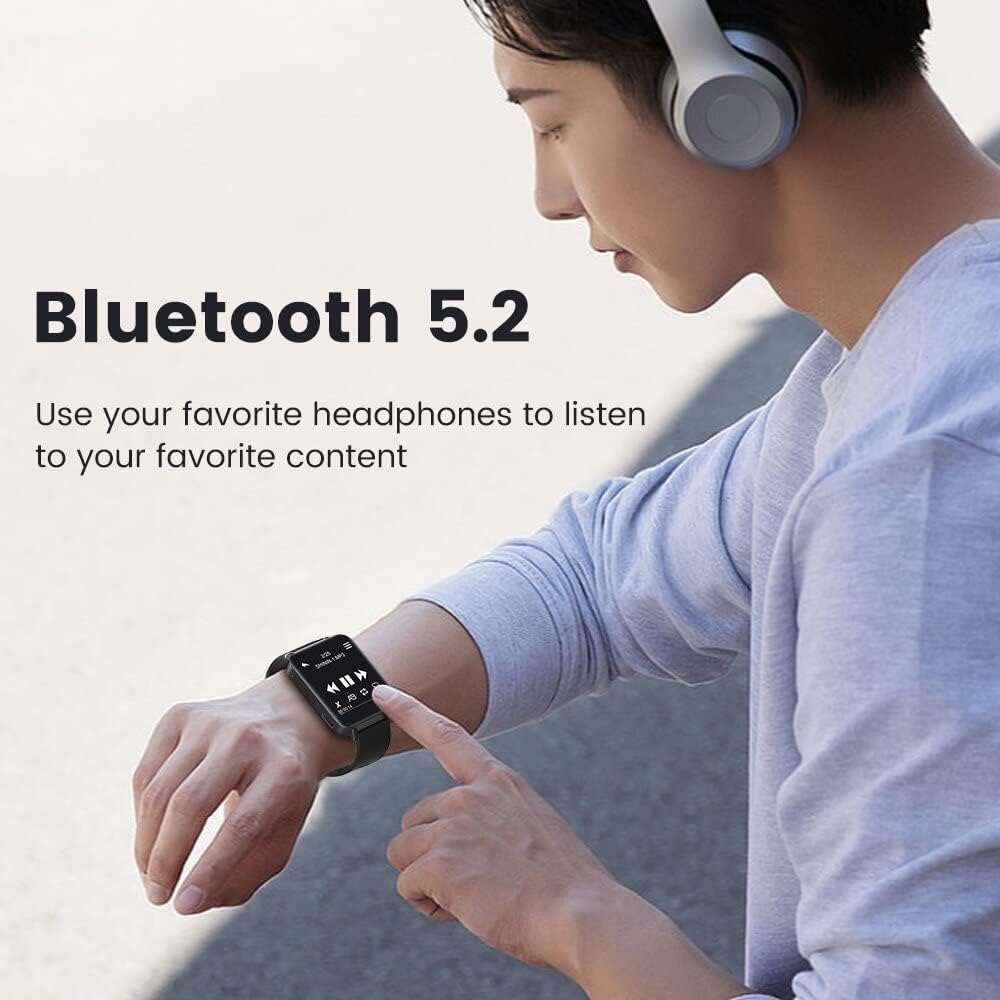
Image: Demonstrating Bluetooth 5.2 connectivity for wireless audio playback.
4.5. Voice Recording
The device supports one-click recording and voice-activated recording.
- One-Click Recording: Locate the dedicated REC/Save button (often a physical button on the side). Press it to start recording. Press again to save the recording.
- Voice-Activated Recording: Enable this feature in the recorder settings. The device will automatically start recording when sound is detected and pause when there is no sound, optimizing storage and power.
- Recordings are saved in high-definition audio (up to 3072kbps) thanks to the professional DAC noise reduction chip.

Image: The one-button recording feature in action, showing the recording interface.
5. Maintenance
5.1. Cleaning the Device
- Use a soft, dry, lint-free cloth to clean the screen and body of the device.
- Do not use abrasive cleaners, alcohol, or chemical solvents, as these may damage the surface.
- Avoid getting moisture into any openings.
5.2. Battery Care
- To prolong battery life, avoid fully discharging the battery frequently.
- Store the device in a cool, dry place when not in use for extended periods.
- Charge the device periodically if stored for a long time to prevent deep discharge.
5.3. Storage
Store the MP3 player in a safe place away from extreme temperatures, direct sunlight, dust, and moisture. Keep it away from strong magnetic fields.
6. Troubleshooting
| Problem | Possible Cause | Solution |
|---|---|---|
| Device does not power on. | Low battery; device frozen. | Charge the device for at least 10 minutes. If still unresponsive, try a soft reset (refer to manual for specific reset method, if available, or hold power button for 10-15 seconds). |
| Cannot connect to Bluetooth device. | Bluetooth not enabled; device not in pairing mode; interference. | Ensure Bluetooth is enabled on both devices. Put the earphones/speaker in pairing mode. Move closer to the device. Restart both devices. Note: Bluetooth only supports earphones/speakers. |
| Music files not playing or recognized. | Unsupported file format; files not transferred correctly. | Ensure music files are in supported formats (e.g., MP3, WAV, FLAC). Re-transfer files to the correct folder on the device. |
| Short battery life. | Frequent use of Bluetooth; high volume; old battery. | Reduce volume. Minimize Bluetooth usage when not needed. Ensure full charge before use. Battery performance may degrade over time. |
| Touch screen unresponsive. | Temporary software glitch; screen dirty. | Clean the screen with a soft cloth. Restart the device. If issue persists, contact customer support. |
7. Specifications
| Feature | Detail |
|---|---|
| Model Name | M1 |
| Brand | JOLIKE |
| Memory Storage Capacity | 32 GB |
| Connectivity Technology | Bluetooth 5.2 |
| Screen Size | 1.77 Inches (Full Touch Screen) |
| Special Feature | Wearable MP3 Player, Voice Recorder |
| Battery Type | 1 Lithium Metal battery (included) |
| Battery Capacity | 300mAh (approximate) |
| Playback Time | Up to 12 hours (continuous use with Bluetooth, approximate) |
| Charging Time | Approx. 1.5 hours |
| Product Dimensions | 1.65 x 1.34 x 0.04 inches |
| Item Weight | 2.47 ounces |
| Compatible Devices | XP (Home, Professional, with SP1, SP2, SP3), 32-bit / Windows 7-10 64-bit |
| Media Type Supported | MP3, WAV, FLAC (and other common audio formats) |
| Included Components | USB Cable |

Image: Dimensional overview of the JOLIKE M1 MP3 Player.
8. Warranty & Support
8.1. Warranty Information
JOLIKE provides a 12-month money-back warranty for this product. This warranty covers manufacturing defects and product quality issues. Please retain your proof of purchase for warranty claims.
8.2. Customer Support
For any product quality issues, Bluetooth connection problems, or other inquiries, please do not hesitate to contact JOLIKE customer service. We are committed to 100% customer satisfaction.
Contact information can typically be found on the product packaging, the official JOLIKE website, or through the retailer where the product was purchased.
You can also visit the JOLIKE Store on Amazon for more information and support resources.
Related documentsM1


Ask a question about this manual
Ask about setup, troubleshooting, compatibility, parts, safety, or missing instructions. Manuals+ will review the question and use this page’s manual context to help answer it.