
1. Introduction
This manual provides comprehensive instructions for the FOXWELL NT630 Plus and NT301 Plus diagnostic scan tool. It covers the setup, operation, maintenance, and troubleshooting of the device, which is designed for advanced automotive diagnostics including ABS, SRS, SAS systems, full OBD2 functions, and 12V battery testing. Please read this manual thoroughly before operating the device to ensure proper use and to maximize its capabilities.
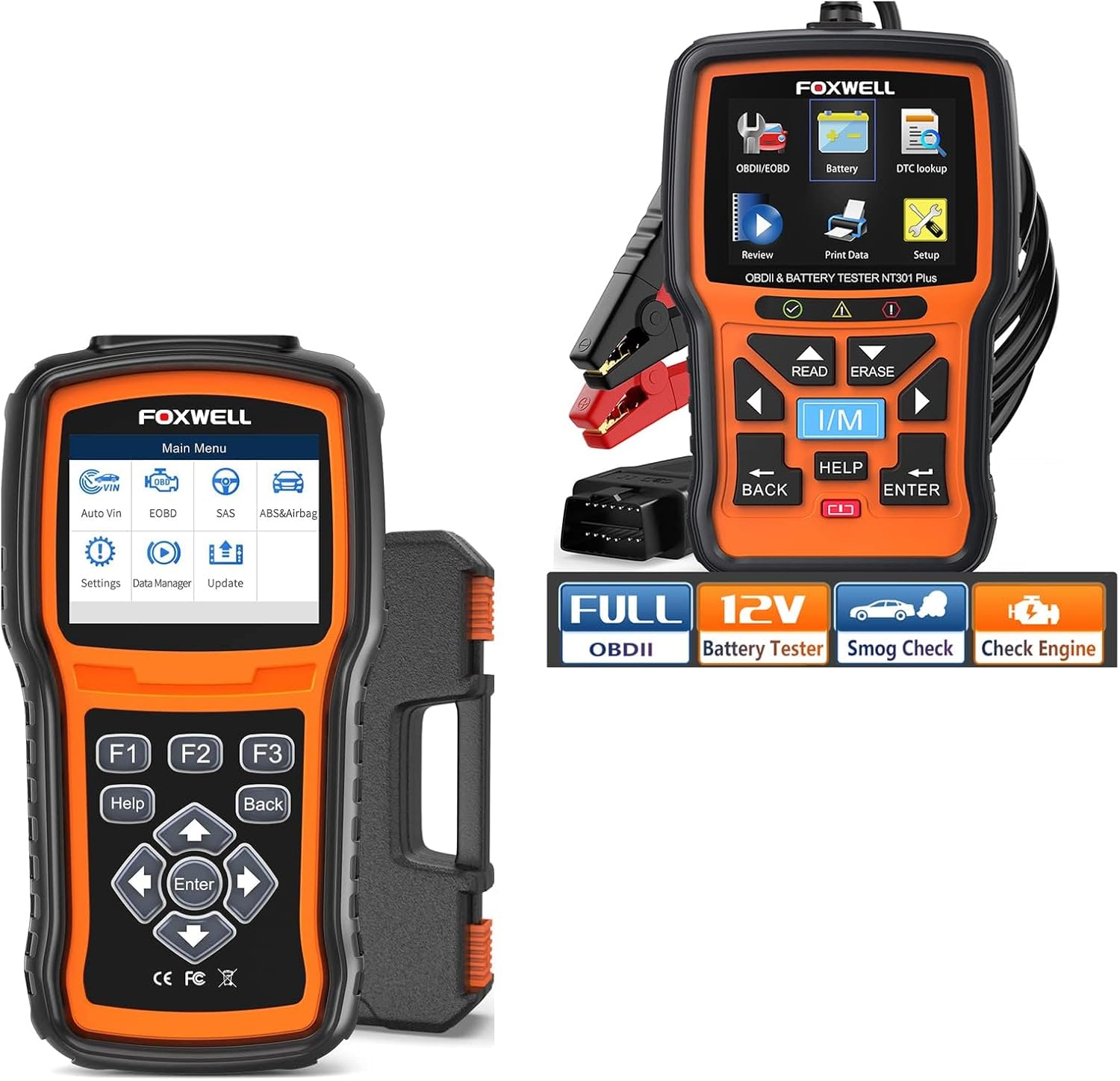
Figure 1: The FOXWELL NT630 Plus (left) and NT301 Plus (right) diagnostic scan tools. The NT301 Plus includes a 12V battery tester with alligator clips.
2. Setup
Before using your FOXWELL diagnostic tool, ensure it is properly set up.
- Powering On: The device typically powers on automatically when connected to a vehicle's OBD-II port. Alternatively, some models may have a power button.
- Connecting to Vehicle: Locate the 16-pin OBD-II diagnostic port in your vehicle. This port is usually located under the dashboard on the driver's side. Connect the diagnostic cable from the tool to the vehicle's OBD-II port.

Figure 2: The FOXWELL diagnostic tool connected to a vehicle's OBD-II port, ready for operation.
For the NT301 Plus, the 12V battery tester function requires connecting the alligator clips to the vehicle's battery terminals (red to positive, black to negative) for battery health, cranking, and charging system tests.
3. Operating Instructions
The FOXWELL NT630 Plus and NT301 Plus offer a range of diagnostic functions accessible via the main menu.
3.1. General Navigation
Use the directional buttons (UP, DOWN, LEFT, RIGHT) to navigate through menus and select options. The 'ENTER' button confirms selections, and 'BACK' returns to the previous screen. The 'HELP' button provides contextual information.
3.2. OBD2 Diagnostics (NT301 Plus & NT630 Plus)
Access the 'OBDII/EOBD' menu for standard engine diagnostics.
- Read Codes: Displays Diagnostic Trouble Codes (DTCs) stored in the vehicle's Engine Control Unit (ECU).
- Erase Codes: Clears DTCs from the ECU. Ensure the underlying issue is resolved before clearing codes.
- Live Data: Displays real-time sensor data from the vehicle, such as engine RPM, vehicle speed, oxygen sensor readings, etc.
- I/M Readiness: Checks the status of emission-related monitors to determine if the vehicle is ready for an emissions test.
- Smog Test: Provides a quick check for emissions readiness.

Figure 3: The FOXWELL tool displaying engine trouble codes and live data, assisting in identifying engine issues.

Figure 4: The FOXWELL tool's screen showing the results of an I/M Readiness test, indicating readiness for a smog check.
3.3. ABS/SRS/SAS Diagnostics (NT630 Plus)
The NT630 Plus specializes in Anti-lock Braking System (ABS), Supplemental Restraint System (SRS), and Steering Angle Sensor (SAS) diagnostics.
- Read/Clear Codes: Diagnose and clear fault codes related to ABS, SRS (airbag), and SAS systems.
- Bidirectional Control: Activate and test ABS/SRS components directly from the tool, such as ABS motor tests, solenoid tests, and actuator tests.
- Auto Bleed: Perform automated bleeding procedures for the ABS system, which is crucial after replacing brake components to remove air from the brake lines.
- Sensor Reset/Calibration: Reset and calibrate ABS, VSA, SRS, and SAS sensors after maintenance or component replacement.

Figure 5: The FOXWELL tool's interface showing options for professional-level ABS and SRS diagnostics, including checks for wheel speed sensor issues and control module faults.

Figure 6: The FOXWELL tool displaying real-time data for wheel speed sensors, crucial for diagnosing ABS issues.

Figure 7: The FOXWELL tool facilitating an ABS bleeding procedure, showing the brake fluid reservoir and brake pedal, essential after brake system maintenance.
3.4. 12V Battery Test (NT301 Plus)
The NT301 Plus includes a dedicated 12V battery testing function.
- Battery Health Test (SOH): Assesses the overall health and remaining life of the battery.
- Cranking Test: Measures the battery's ability to start the engine.
- Charging System Test (SOC): Evaluates the alternator and charging system performance.

Figure 8: The FOXWELL tool connected to a 12V car battery, displaying detailed battery test results including voltage, CCA, SOH, and SOC.
4. Maintenance
Proper maintenance ensures the longevity and optimal performance of your FOXWELL diagnostic tool.
- Software Updates: Regularly check for and install software updates. Updates often include new vehicle coverage, bug fixes, and improved functionalities. Connect the device to a computer and use the FOXWELL update software.
- Cleaning: Clean the device with a soft, dry cloth. Avoid using abrasive cleaners or solvents. Keep the screen free of dust and smudges.
- Storage: Store the tool in a dry, cool environment, away from direct sunlight and extreme temperatures. Keep it in its protective case when not in use.
5. Troubleshooting
If you encounter issues with your FOXWELL diagnostic tool, refer to the following common problems and solutions.
- Device Not Powering On:
- Ensure the OBD-II cable is securely connected to both the vehicle's port and the tool.
- Verify the vehicle's ignition is in the 'ON' position (engine off or running).
- Check the vehicle's fuse for the OBD-II port.
- Communication Error:
- Confirm the vehicle supports the OBD-II protocol (most vehicles after 1996 do).
- Try connecting to a different vehicle to rule out a vehicle-specific issue.
- Ensure the software is up to date.
- Codes Not Clearing:
- Diagnostic Trouble Codes (DTCs) will not clear if the underlying fault is still present. Address the issue first.
- Ensure the ignition is on and the engine is off when attempting to clear codes.
- Inaccurate Battery Test Results:
- Ensure battery terminals are clean and connections are secure.
- Verify the battery type and CCA rating entered into the tool (if applicable) match the battery being tested.
For persistent issues, refer to the 'Help' function on the device or contact FOXWELL customer support.
6. Specifications
| Feature | Description |
|---|---|
| Brand | FOXWELL |
| Model | NT630 Plus with NT301 Plus |
| ASIN | B09WK6NMTM |
| Date First Available | August 24, 2024 |
| Supported Systems | ABS, SRS (Airbag), SAS, OBD2 (Engine) |
| Special Functions | ABS Auto Bleed, Bidirectional Control (ABS/SRS), 12V Battery Test (Health, Cranking, Charging) |
| Connectivity | OBD-II 16-pin connector |
7. Warranty and Support
For warranty information and technical support, please refer to the documentation included with your product or visit the official FOXWELL website. You may also find support resources and contact information on the FOXWELL Store on Amazon.


