
Introduction
This manual provides comprehensive instructions for the safe and effective use of your TrustFire GM23 Pistol Light. Please read this manual thoroughly before operation and retain it for future reference.

Figure 1: TrustFire GM23 Pistol Light, showcasing its compact design and integrated rail mount.
What's in the Box
Verify that all components are present upon unboxing:
- GM23 Pistol Light with built-in rechargeable battery
- 1913 Rail Mount (for 1913 Rail)
- T6/T8 Socket Head Wrench
- Micro-USB Charging Cable
- User Manual (this document)

Figure 2: Packaging and included accessories for the GM23 Pistol Light.
Specifications
| Feature | Detail |
|---|---|
| Model | GM23 |
| Brand | TrustFire |
| Light Source Type | LED |
| Brightness | 800 Lumens (Max) |
| Power Source | Battery Powered (Built-in Lithium Ion) |
| Voltage | 3.6 Volts |
| Material | Aluminum |
| Color | Black |
| Product Dimensions (L x W x H) | 52.0mm x 25.3mm x 32.3mm (2.05"D x 1"W x 1.27"H) |
| Item Weight | 52.7 Grams (1.86 ounces) |
| Water Resistance Level | IP64 (Dust-proof and Waterproof) |
| Drop Resistance | 1 Meter |
| Optical System | MVB Optical System |
| UPC | 726972384145 |

Figure 3: Detailed dimensions and weight of the GM23 Pistol Light.
Features
- High Brightness: Delivers a maximum output of 800 lumens for clear illumination.
- Rechargeable Battery: Equipped with a built-in lithium-ion battery, rechargeable via Micro-USB.
- Quick Mount/Detach System: Designed for easy installation and removal on compatible rails (Glock or Picatinny/mil-std-1913).
- Dual-Mode Operation: Features both tactical locking mode (momentary-on) and daily-use mode (stay-on).
- Intelligent Temperature Control: Manages heat output to ensure stable performance and longevity.
- Low-Voltage Warning: Provides an alert when the battery level is low.
- Durable Construction: Made from aluminum, offering IP64 dust-proof and waterproof ratings, and 1-meter anti-drop resistance.
- MVB Optical System: Utilizes an ultra-thin optical lens for high light transmission efficiency.

Figure 4: The GM23's built-in rechargeable battery and charge indicator light.

Figure 5: Comparison of the GM23's MVB ultra-thin optical lens with standard TIR lenses.
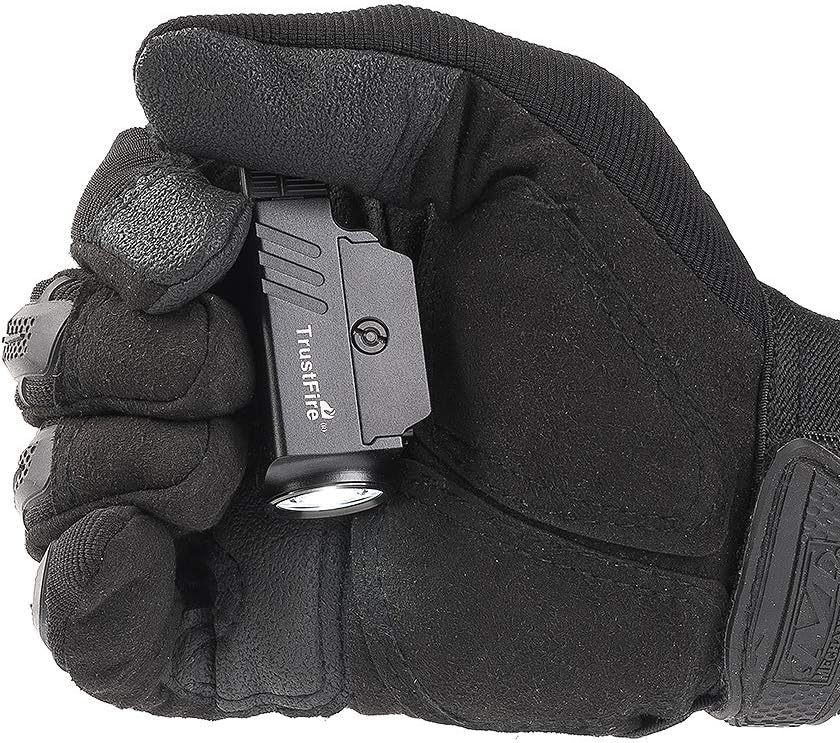
Figure 6: The GM23's intelligent temperature control system maintaining optimal performance during operation.

Figure 7: The compact size of the GM23 Pistol Light, easily held in one hand.
Setup
1. Charging the Battery
- Locate the Micro-USB charging port on the GM23 unit.
- Connect the provided Micro-USB charging cable to the port.
- Connect the other end of the cable to a USB power source (e.g., wall adapter, computer USB port).
- The indicator light will show charging status (e.g., red for charging, green for fully charged).
2. Mounting the Light
The GM23 comes with two mount adapters for Glock and Picatinny (mil-std-1913) type rails. Select the appropriate adapter for your firearm.
- Ensure the firearm is unloaded and safe before proceeding.
- Identify the rail on your firearm where the light will be mounted.
- Align the chosen mount adapter with the rail grooves.
- Utilize the quick release mechanism to secure the light firmly onto the rail. Ensure it clicks into place and is stable.
- Verify that the light is securely attached and does not wobble.

Figure 8: The GM23 Pistol Light securely mounted on a firearm rail, demonstrating its compact profile.
Operating Instructions
Modes of Operation
The GM23 features two primary operating modes:
- Tactical Locking Mode (Momentary-On): Press and hold the switch for momentary illumination. Release to turn off.
- Daily-Use Mode (Stay-On): Press the switch once to turn the light on continuously. Press again to turn off.
Switching Between Modes
Refer to the user manual included in the box for specific instructions on how to toggle between tactical and daily-use modes, as well as any additional functions like strobe mode.
Maintenance
Cleaning
- Wipe the light with a soft, damp cloth to remove dirt and debris.
- Do not use harsh chemicals or abrasive cleaners, as these may damage the finish or optical lens.
- Ensure the charging port cover is securely closed to maintain water resistance.
Storage
- Store the GM23 in a cool, dry place away from direct sunlight and extreme temperatures.
- For long-term storage, ensure the battery is partially charged (around 50%) to preserve battery health. Recharge every 3-6 months if not in use.
Troubleshooting
| Problem | Possible Cause | Solution |
|---|---|---|
| Light does not turn on. | Battery is depleted. | Charge the battery using the Micro-USB cable. |
| Light flickers or is dim. | Low battery or loose connection. | Recharge the battery. Ensure the light is securely mounted. |
| Light detaches from rail during use. | Improper mounting or incorrect adapter. | Ensure the correct rail adapter is used and the quick release mechanism is fully engaged and locked. Verify tightness. |
| Charging indicator light not working. | Faulty cable or power source. | Try a different Micro-USB cable or USB power source. |
Warranty and Support
Warranty Information
The TrustFire GM23 Pistol Light comes with a Limited Warranty. For specific details regarding warranty coverage and duration, please refer to the warranty card included with your product or contact TrustFire customer support.
Customer Support
For technical assistance, troubleshooting not covered in this manual, or warranty claims, please contact TrustFire customer support. You can often find contact information on the official TrustFire website or through the retailer where you purchased the product.
TrustFire is a high-tech enterprise specializing in designing and producing LED electronic products, committed to providing quality products and after-sales service.
You may also visit the official TrustFire store on Amazon for more information: TrustFire Amazon Store

