
AMIR HA104-AMUS
AMIR Portable Safe Box Instruction Manual
Model: HA104-AMUS
Brand: AMIR
Product Overview
The AMIR Portable Safe Box is a durable, waterproof, and anti-theft security case designed to protect your valuables. Its compact size and removable chain make it ideal for various uses, from home and office to travel and outdoor activities.

The AMIR Portable Safe Box includes the main unit with a 4-digit combination lock, a removable steel wire rope for securing the box, and an internal EVA liner for protecting contents.
Important Safety Information
- Do not store the combination inside the safe box.
- Ensure the safe box is properly closed and locked before leaving valuables unattended.
- Keep the safe box away from extreme temperatures or corrosive substances.
- This product is designed for temporary security and convenience; it is not a substitute for a high-security safe.
Setup and Initial Use
Setting Your Personal Combination
- Dial the default code (0-0-0-0) to align with the scale line and open the lock box.
- Locate the RESET button inside the box. Push the RESET button from position "A" to "B".
- While the button is in position "B", set your new desired 4-digit combination by scrolling the numbers on the dials.
- Push the RESET button back from "B" to "A" to lock in your new combination.
- Important: Take a photo or write down your new combination immediately. If forgotten, there is no way to reset it without the current combination.
Watch this video for a visual guide on how to set your personal 4-digit combination for the AMIR Portable Safe Box.

Detailed steps for setting a new combination, including the location of the A/B reset switch and the combination dials.
Attaching and Removing the Steel Wire Rope
- To attach the rope, slide the switch button up on the side of the safe box. This will open the metal brackets.
- Insert the ends of the steel wire rope into the open holes.
- Slide the switch button down to secure the rope in place.
- To remove the rope, repeat steps 1 and 2.
This video demonstrates the process of attaching and detaching the steel wire rope from the safe box for secure tethering.

Visual guide on how to use the side switch to insert and remove the steel wire rope, allowing the safe box to be secured to fixed objects.
Operating the Safe Box
Opening the Safe Box
- Input your correct 4-digit password by aligning the numbers with the indicator line.
- Due to the waterproof and fully sealed design, the box may create a vacuum. Gently knock the shell a few times to allow some air to enter and break the vacuum.
- Apply a little more force to firmly open the lid.
A quick demonstration on how to properly open the sealed safe box after entering the correct combination.

Step-by-step instructions for opening the safe box, emphasizing the need to break the vacuum seal due to its waterproof design.
Closing the Safe Box
- Ensure no items are obstructing the sealing ring.
- Close the lid firmly until you hear a click, indicating it is securely latched.
- Scramble the combination dials to lock the box.
Care and Maintenance
- Clean the exterior with a soft, damp cloth. Avoid abrasive cleaners.
- Periodically check the sealing ring for any debris or damage to maintain its waterproof integrity.
- Store the safe box in a cool, dry place when not in use.
Troubleshooting
Safe Box Does Not Open After Entering Correct Password
- Ensure each combination tumbler is perfectly aligned with the scale line.
- The waterproof design creates a strong seal. Gently tap the top of the box several times to release any vacuum pressure.
- Apply firm, consistent force to open the lid.
- If the issue persists, double-check your combination. If you suspect the combination was incorrectly set or forgotten, unfortunately, there is no master key or override.
Water Inside the Box
- Check the sealing ring around the lid for any tears, cracks, or debris that might compromise the waterproof seal.
- Ensure the lid was closed firmly and completely.
- While the box is waterproof, it is not designed for prolonged submersion or high-pressure water jets.
Product Specifications
| Feature | Detail |
|---|---|
| Brand | AMIR |
| Model Number | HA104-AMUS |
| Lock Type | Mechanical Code Lock (4-digit combination) |
| Material | High-strength ABS Plastic Shell, EVA Liner |
| Exterior Dimensions (L*W*H) | 8.5 in x 4.3 in x 2.6 in (21.6 cm x 10.9 cm x 6.6 cm) |
| Interior Dimensions (L*W*H) | 7.7 in x 3.9 in x 1.4 in (19.6 cm x 9.9 cm x 3.6 cm) |
| Wire Rope Length | 50 cm (20 in) |
| Wire Rope Diameter | 6.2 mm (0.25 in) |
| Product Weight | 640 g (1.41 lbs) |
| Water Resistance Level | Waterproof |
| Special Features | Portable, Anti-Theft, Removable Chain |
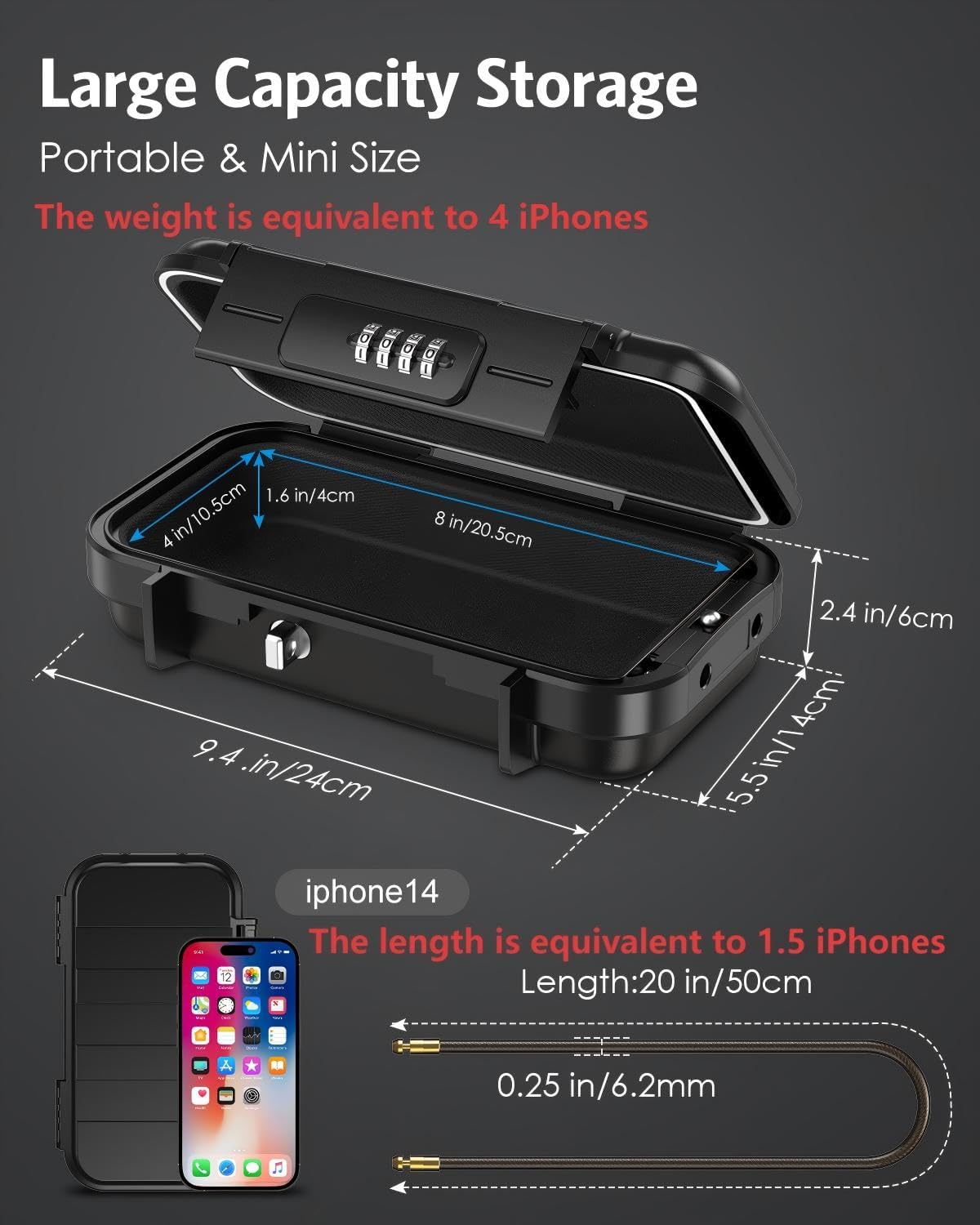
Detailed measurements of the safe box, highlighting its internal capacity suitable for phones, wallets, keys, and other small valuables.
Warranty and Customer Support
For any questions, concerns, or warranty claims regarding your AMIR Portable Safe Box, please contact AMIR customer support through the retailer's platform or the official AMIR website. Please have your model number (HA104-AMUS) and purchase details ready.
Related documentsHA104-AMUS


Ask a question about this manual
Ask about setup, troubleshooting, compatibility, parts, safety, or missing instructions. Manuals+ will review the question and use this page’s manual context to help answer it.