
Introduction
Thank you for choosing the Anker 737 GaNPrime 120W USB C Charger. This manual provides essential information for the safe and efficient use of your charger. Please read it thoroughly before use and retain it for future reference.

Image: The Anker 737 GaNPrime 120W USB C Charger powering a laptop, smartphone, and earbuds simultaneously.
What's in the Box
- Anker 737 Charger (GaNPrime 120W)
- Silicone Stabilizer
- Welcome Guide (physical or digital document)
Setup
1. Connecting the Charger
- Unfold the AC prongs from the charger body.
- Plug the charger into a compatible wall outlet (Input Voltage: 240 Volts).
2. Using the Silicone Stabilizer
If the charger feels loose when plugged into a wall outlet, use the included silicone stabilizer for added stability.
- Attach the silicone stabilizer to the charger, ensuring it fits snugly around the prongs.
- Plug the charger with the stabilizer into the wall outlet.
- Gently press the stabilizer against the wall plate to create suction and secure the charger.
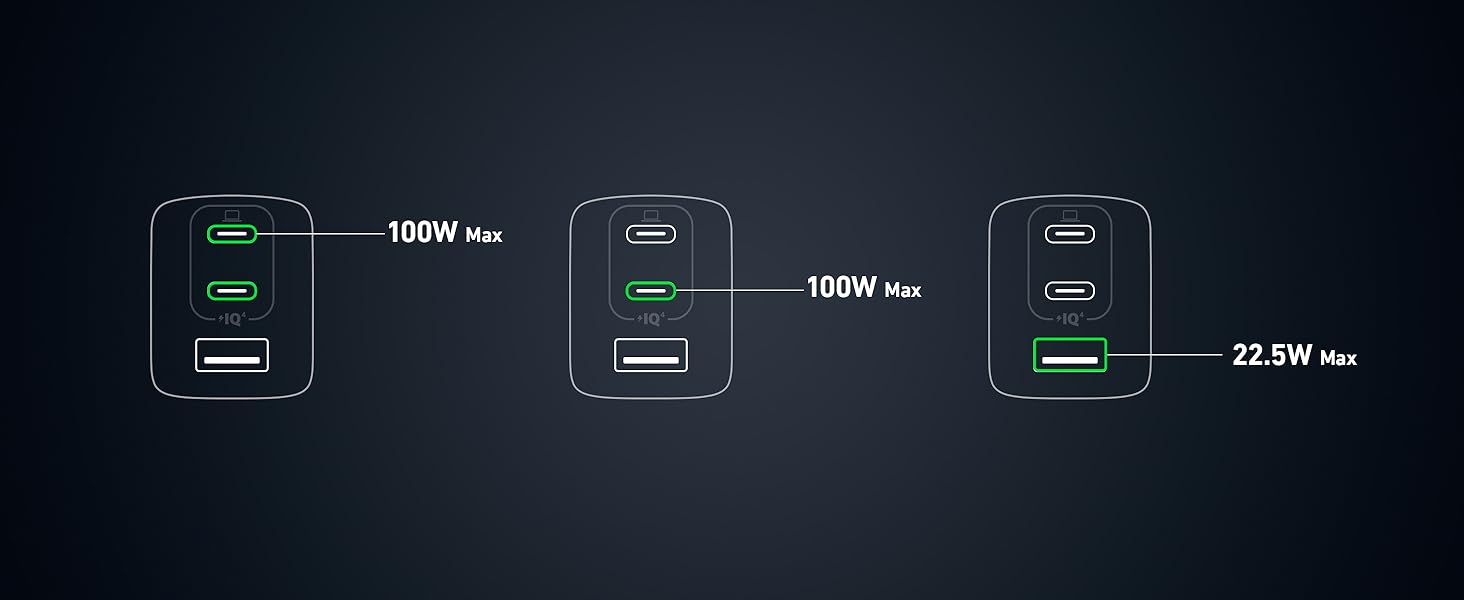
Image: Step-by-step guide on attaching the silicone stabilizer to the charger and securing it to a wall outlet.
Operating Instructions
Charging Your Devices
The Anker 737 GaNPrime charger features two USB-C ports and one USB-A port, designed to charge multiple devices simultaneously with dynamic power distribution.
- Connect your device(s) to the appropriate USB-C or USB-A port using compatible charging cables.
- The charger's PowerIQ 4.0 technology will automatically detect your device's power needs and adjust the output for optimal charging speed.
- A single USB-C port can deliver up to 100W of power. The total maximum output across all three ports is 120W.


Image: Various charging configurations and maximum power outputs for the Anker 737 GaNPrime charger.
Dynamic Power Distribution
The PowerIQ 4.0 with Dynamic Power Distribution feature intelligently allocates power to connected devices based on their charging needs, ensuring efficient and fast charging for all.

Image: Visual representation of PowerIQ 4.0 technology enabling faster charging.
Specifications
| Model Number | A2148 |
| Product Dimensions | 3.1 x 1.3 x 1.7 inches |
| Item Weight | 6.6 ounces |
| Input Voltage | 240 Volts |
| Total USB Ports | 3 (2x USB-C, 1x USB-A) |
| Max Single Port Output | 100W (USB-C) |
| Total Max Output | 120W |
| Form Factor | Foldable |
| Color | Black |
| Technology | GaNPrime, PowerIQ 4.0, ActiveShield 2.0 |

Image: Size comparison illustrating the compact design of the Anker 737 GaNPrime 120W charger compared to other models.
Maintenance
- Keep the charger away from liquids and extreme heat.
- Clean the charger with a dry, soft cloth. Do not use corrosive cleaners.
- Ensure the charger is unplugged when not in use or during cleaning.
Troubleshooting
Charger Not Providing Power
- Ensure the charger is securely plugged into a working wall outlet.
- Verify that the charging cable is properly connected to both the charger and your device.
- Try using a different cable or port to rule out cable or port issues.
- Confirm your device is compatible with the charger's output specifications.
Slow Charging
- Check if your device and cable support fast charging.
- Ensure no other devices are drawing excessive power from the charger, as total output is shared (120W max).
- The charger's ActiveShield 2.0 technology monitors temperature and may adjust power output to prevent overheating, which can temporarily slow charging.
Safety Information
- Do not expose the charger to water, moisture, or extreme temperatures.
- Avoid dropping or subjecting the charger to strong impacts.
- Do not attempt to disassemble or modify the charger.
- Keep out of reach of children.
- The ActiveShield 2.0 system continuously monitors temperature to protect your devices.

Image: ActiveShield 2.0 technology actively monitoring charger temperature for enhanced safety.
Warranty & Support
This product comes with a 24-month worry-free warranty. For any questions or support needs, please contact Anker customer service.
You can find more information and contact details on the official Anker website: www.anker.com
Official Product Video
Video: An official Anker video showcasing the GaNPrime technology and features of the charger.


