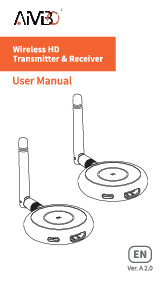
Product Overview

Figure 1: AIMIBO Wireless HDMI Transmitter TX Gray
The AIMIBO Wireless HDMI Transmitter TX Gray (Model Q3TX) is designed to provide a seamless wireless HDMI transmission solution. It is ideal for various environments such as meeting rooms, home theaters, and live streaming setups, allowing for flexible display connections without the need for extensive cabling. This device facilitates high-quality video and audio transmission, enhancing convenience and efficiency in multimedia presentations and entertainment.
Key Features
- Wireless HDMI Transmission: Eliminates the need for long HDMI cables, offering a clean and flexible setup.
- Multi-Transmitter Support: One receiver can be paired with up to 8 transmitters, allowing for easy switching between multiple video sources.
- Plug & Play Operation: Designed for quick and easy setup with minimal configuration required.
- Low Latency: Provides near real-time video transmission for a smooth viewing experience.
- Portable Design: Compact and lightweight, making it easy to transport and set up in different locations.
Setup Guide
Initial Pairing (First-Time Use)
For the first-time use or when pairing a new HDMI transmitter with the receiver, follow these steps:
- Step 1: Prepare the Receiver. Long press the receiver’s middle button until the display shows "release the button".
- Step 2: Prepare the Transmitter. Long press the transmitter’s middle button until its display shows "Pairing".
- Step 3: Auto Stream. Wait for approximately 5 seconds. The display will show "Paired is OK", and the video will automatically begin streaming.
Connecting Multiple Transmitters
One receiver can be paired with up to 8 transmitters. The connection method for additional transmitters is the same as the initial pairing process described above.

Figure 2: Visual guide for connecting the transmitter and receiver.

Figure 3: Diagram illustrating one receiver paired with multiple transmitters.
Operating Instructions
Switching Between Transmitters
To switch between different paired transmitters:
- One click the middle button of the currently active transmitter (TX1). This will return the display to the blue interface.
- Then, one click the middle button of the desired transmitter (e.g., TX2). The display will then show the content from TX2.
Usage Scenarios
The AIMIBO Wireless HDMI Transmitter is versatile for various applications:
- Meeting Rooms: Easily share presentations from multiple laptops to a single display.
- Home Theater: Stream content wirelessly from your devices to your TV or projector.
- Live Streaming/Vlogging: Connect cameras wirelessly to monitors for real-time viewing and adjustments.
- Gaming: Enjoy a low-latency wireless connection for gaming on larger screens.

Figure 4: Wireless HDMI setup in a professional meeting room environment.
Video 1: Demonstration of the AIMIBO Wireless HDMI Kit for camera live streaming, showcasing its ease of use and low latency.
Specifications
| Attribute | Detail |
|---|---|
| Brand Name | AIMIBO |
| Item Weight | 3.2 ounces |
| Product Dimensions | 10.24 x 8.66 x 0.79 inches |
| Item Model Number | Q3TX |
| Color Name | Gray |
| Special Features | Wireless |
| Connectivity Technology | HDMI |
| Connector Type | HDMI |
| Resolution | 4k |
| Controller Type | Button Control |
| Form Factor | TV Stick |
| Compatible Devices | Smartphone, Speaker |
Troubleshooting
- No Signal/Pairing Issues: Ensure both the transmitter and receiver are properly powered. Re-attempt the pairing process by long-pressing the buttons as described in the Setup Guide.
- Video Lag/Latency: If experiencing noticeable lag, try reducing the output resolution from your source device. Ensure there are no significant obstructions between the transmitter and receiver.
- Device Overheating: If the transmitter feels hot, ensure adequate ventilation. Unplug the unit when not in use to prevent prolonged heat exposure.
- Connection Stability: Verify that all HDMI and USB connections are secure. Consider using shorter, high-quality cables if issues persist.
Maintenance
- Cleaning: Use a soft, dry cloth to clean the device. Avoid liquid cleaners or abrasive materials.
- Storage: Store the transmitter and receiver in a cool, dry place away from direct sunlight and extreme temperatures.
- Cable Care: Avoid bending or twisting cables excessively to prevent internal damage.
Warranty and Support
AIMIBO products are designed for reliability and undergo strict quality control. For warranty information, technical support, or service inquiries, please refer to the contact details provided in your product packaging or visit the official AIMIBO website. Keep your purchase receipt for warranty claims.