
1. Introduction and Safety
This manual provides essential information for the safe operation, maintenance, and troubleshooting of the Baileigh Industrial IJ-1288P-HH 12" Parallelogram Jointer. Please read this manual thoroughly before operating the machine to ensure proper use and to prevent injury or damage.
The Baileigh Industrial IJ-1288P-HH is a robust 12-inch jointer designed for professional woodworking applications. It features a parallelogram design for enhanced safety and a powerful 5 hp motor, capable of handling large pieces of lumber. The machine operates on 220-volt single-phase power.
Key Features:
- Runs on 220-volt single-phase power.
- Straight 4-row spiral cutter head (4" diameter) spins at 5,500 rpm.
- Extra-long 88" bed for improved work support.
- Built-in rabbeting ledge for creating grooves.
- 6" x 47" fence with tilt capability and stops at 90° and 45°.
General Safety Precautions:
- Always wear appropriate personal protective equipment (PPE), including eye protection, hearing protection, and dust mask.
- Ensure the work area is clean, well-lit, and free of obstructions.
- Never operate the jointer without all guards in place and functioning correctly.
- Disconnect power before performing any maintenance, adjustments, or blade changes.
- Keep hands and fingers away from the cutter head. Use push sticks when jointing small or narrow workpieces.
- Do not wear loose clothing, gloves, or jewelry that could get caught in moving parts.
- Ensure the machine is properly grounded.
2. Setup and Installation
Proper setup is crucial for the safe and efficient operation of your jointer.
Unpacking and Placement:
- Carefully unpack the jointer and inspect for any shipping damage. Report any damage immediately to the carrier and supplier.
- Place the jointer on a level, stable surface capable of supporting its weight. Ensure adequate space around the machine for safe operation and material handling.
Electrical Connection:
The IJ-1288P-HH jointer requires a 220-volt single-phase power supply. Consult a qualified electrician for proper wiring and connection if you are unsure.
- Ensure the power supply matches the machine's requirements.
- Connect the machine to a dedicated circuit with appropriate overcurrent protection.
- Verify proper grounding before connecting to power.
Component Assembly and Adjustment:
Assemble any components that were not pre-assembled for shipping, such as the fence and control panel stand.

Figure 1: Front view of the Baileigh Industrial IJ-1288P-HH Jointer, showing the main machine body, long bed, fence, and control panel.

Figure 2: Close-up of the main control panel, featuring power key switch, emergency stop button, start button, and a remote digital readout for precise adjustments.

Figure 3: Handwheel mechanism for adjusting the jointer table height, allowing for precise depth of cut settings.
- Fence Adjustment: The 6" x 47" fence can be tilted and locked at various angles, with positive stops at 90° and 45°. Ensure the fence is square to the table for most operations.
- Table Adjustment: Use the handwheel (Figure 3) to adjust the height of the infeed table, which controls the depth of cut. Refer to the digital readout on the control panel for precise settings.
Dust Collection:
Connect the jointer to an adequate dust collection system. The machine features a dust collection port (Figure 4) to minimize airborne dust and maintain a clean workshop environment.

Figure 4: Side view of the jointer, highlighting the dust collection port for connection to an external dust extraction system.

Figure 5: Detailed view of the dust collection port, designed for efficient chip and dust removal during operation.
3. Operating Instructions
Follow these steps for safe and effective operation of the jointer.
Pre-Operation Checklist:
- Ensure all safety guards are in place and functioning.
- Verify the cutter head is clear of debris.
- Confirm the fence is securely locked at the desired angle.
- Set the desired depth of cut using the infeed table adjustment.
- Connect and activate the dust collection system.
Starting and Stopping the Machine:
- To start: Insert the key into the power switch on the control panel (Figure 2) and turn it to the "ON" position. Press the green "START" button.
- To stop: Press the red "STOP" button. In an emergency, press the large red "EMERGENCY STOP" button.
- Always turn the power key to "OFF" and remove the key when the machine is not in use or unattended.
Jointing Procedures:
- Edge Jointing: Place the edge of the workpiece flat against the fence and on the infeed table. Apply firm, even pressure to feed the material smoothly over the cutter head. Use push blocks or push sticks for safety, especially with shorter pieces.
- Face Jointing: Place the face of the workpiece flat on the infeed table. Apply downward pressure and feed the material over the cutter head. Ensure the workpiece remains flat against the table throughout the pass.
- Rabbeting: Utilize the built-in rabbeting ledge for creating grooves along the edge of a board. Adjust the fence and depth of cut as required for the desired rabbet dimensions.
Important: Never attempt to joint material that is too short, too thin, or has loose knots or defects. Always maintain control of the workpiece and keep hands clear of the cutter head.
4. Maintenance
Regular maintenance ensures the longevity and optimal performance of your jointer.
Daily Maintenance:
- Clean the tables and fence after each use to prevent resin and dust buildup. Use a non-abrasive cleaner.
- Inspect the cutter head and surrounding area for any lodged debris.
- Check all guards and safety features for proper operation.
Weekly/Monthly Maintenance:
- Cutter Head Inspection and Replacement: The jointer is equipped with a helical insert cutter head (Figure 6). Inspect the carbide inserts for wear, chips, or damage. Rotate or replace individual inserts as needed.
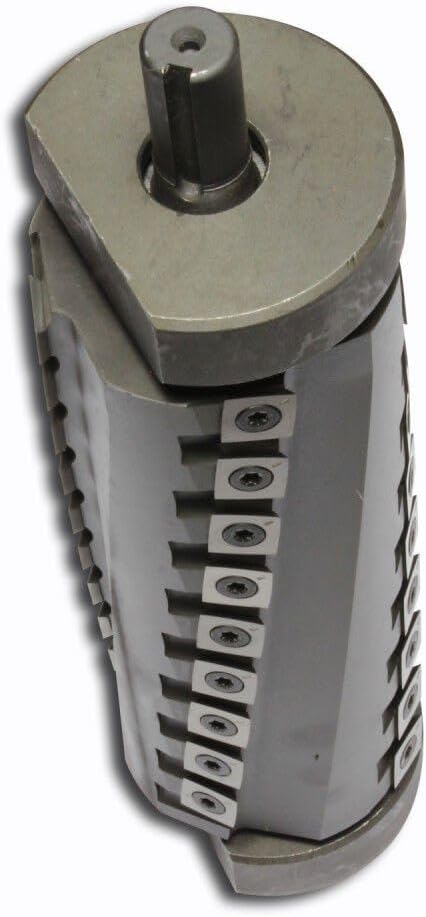
Figure 6: The 4-row spiral helical cutter head, featuring multiple small carbide inserts for efficient and smooth cutting.

Figure 7: A detailed view of the individual carbide inserts on the helical cutter head, which can be rotated or replaced when dull.
- Lubrication: Apply a light coat of machine wax or dry lubricant to the jointer tables to reduce friction and prevent rust.
- Check and tighten any loose fasteners.
- Inspect the power cord for damage.
Warning: Always disconnect the machine from the power source before performing any maintenance or blade changes.
5. Troubleshooting
This section addresses common issues you might encounter with your jointer.
| Problem | Possible Cause | Solution |
|---|---|---|
| Machine does not start. | No power, emergency stop engaged, key switch off. | Check power connection, reset emergency stop, turn key switch to ON. |
| Rough or uneven cut. | Dull or damaged cutter inserts, improper table alignment, inconsistent feed rate. | Rotate or replace cutter inserts, check and adjust table parallelism, maintain steady feed pressure. |
| Excessive vibration. | Unbalanced cutter head, loose components, machine not level. | Inspect cutter head for damage, tighten all fasteners, ensure machine is on a level surface. |
| Poor dust collection. | Clogged dust port, inadequate dust collector, loose hose connection. | Clear dust port, ensure dust collector is properly sized and running, check hose connections. |
6. Specifications
Technical specifications for the Baileigh Industrial IJ-1288P-HH Jointer.
| Feature | Detail |
|---|---|
| Model Number | 1020255 |
| Power Requirement | 230V, 1 Phase |
| Motor Horsepower | 5 hp |
| Jointer Width | 12 inches |
| Table Length | 88 inches |
| Cutter Head Type | 4-row Helical Insert Head |
| Cutter Head Diameter | 4 inches |
| Cutter Head Speed | 5500 rpm |
| Fence Dimensions | 6" x 47" |
| Fence Tilt | 90° and 45° stops |
| Item Weight | 1.1 pounds (Note: This seems to be a package weight, not machine weight. Actual machine weight will be significantly higher for a jointer of this size.) |
| Manufacturer | JPW Industries |
7. Warranty and Support
For warranty information, technical support, or to order replacement parts, please contact Baileigh Industrial directly.
Visit the official Baileigh Industrial website for the most up-to-date contact information and support resources: www.baileigh.com
When contacting support, please have your model number (IJ-1288P-HH) and serial number ready.


