
Important Safety Information
Please read this manual carefully before assembly and use to ensure safe operation and to prevent damage to the product or injury to yourself.
- Do not exceed the maximum load capacity of 100 kg. Overloading can cause instability and damage.
- Ensure all cables are properly managed and secured to prevent tripping hazards or damage during height adjustments.
- Keep children and pets away from the desk during operation.
- Do not place hands or other body parts near moving parts of the desk frame during height adjustment.
- Only use the desk for its intended purpose as a workstation.
- Regularly check all screws and bolts to ensure they are tightened.
Product Overview
The FLEXISPOT E1B Electric Standing Desk is designed to provide a versatile and ergonomic workspace. It features a robust dual-motor system for smooth height adjustments and a durable tabletop.
Key Features:
- Dual Motor System: Ensures stable and efficient height adjustment at 25 mm/s.
- Height Range: Adjustable from 70 cm to 119 cm to suit various user heights and work preferences.
- Load Capacity: Supports up to 100 kg, accommodating multiple monitors and office equipment.
- Memory Presets: Control panel with memory functions for saving preferred height settings.
- High-Quality Tabletop: 160x80cm black tabletop, made in the EU from FSC-certified MDF with scratch-resistant high-pressure laminate.
Package Contents
Before starting assembly, verify that all components listed below are present and undamaged. If any parts are missing or damaged, please contact customer support.
- Desk Frame (E1B) components (legs, feet, crossbar, motor, control box)
- Tabletop (DT1608-BLACK-EU18)
- Control Panel with Memory Functions
- Power Adapter and Cable
- Assembly Hardware (screws, bolts, Allen keys)
- Cable Management Accessories
- User Manual
Setup and Assembly Instructions
Assembly is designed to be straightforward. It is recommended to assemble the desk on a soft, clean surface to prevent scratches. Two people are recommended for easier assembly.
Step 1: Unpack Components
Carefully remove all parts from the packaging and lay them out. Check against the package contents list.
Step 2: Assemble the Desk Frame
- Attach the lifting columns to the crossbar using the provided screws.
- Secure the desk feet to the bottom of the lifting columns.
- Mount the control box to the designated area on the frame.
- Connect the motor cables from the lifting columns to the control box.
- Connect the control panel cable to the control box.

Image: The FLEXISPOT E1B desk frame in black and white, illustrating the height adjustment range from 70cm to 119cm, highlighting the dual motor system, 25mm/s adjustment speed, and low noise operation (less than 50dB).
Step 3: Attach the Tabletop
Carefully place the tabletop upside down on a soft surface. Position the assembled desk frame onto the tabletop, aligning the pre-drilled holes. Secure the tabletop to the frame using the provided screws.

Image: A FLEXISPOT desk with a black tabletop, featuring a laptop, books, and a pen holder, demonstrating a functional and organized workspace.
Step 4: Connect Power and Cable Management
Connect the power adapter to the control box and then to a power outlet. Use the included cable management accessories to organize and secure all cables, preventing them from interfering with the desk's movement.
Operating Instructions
Control Panel Overview:
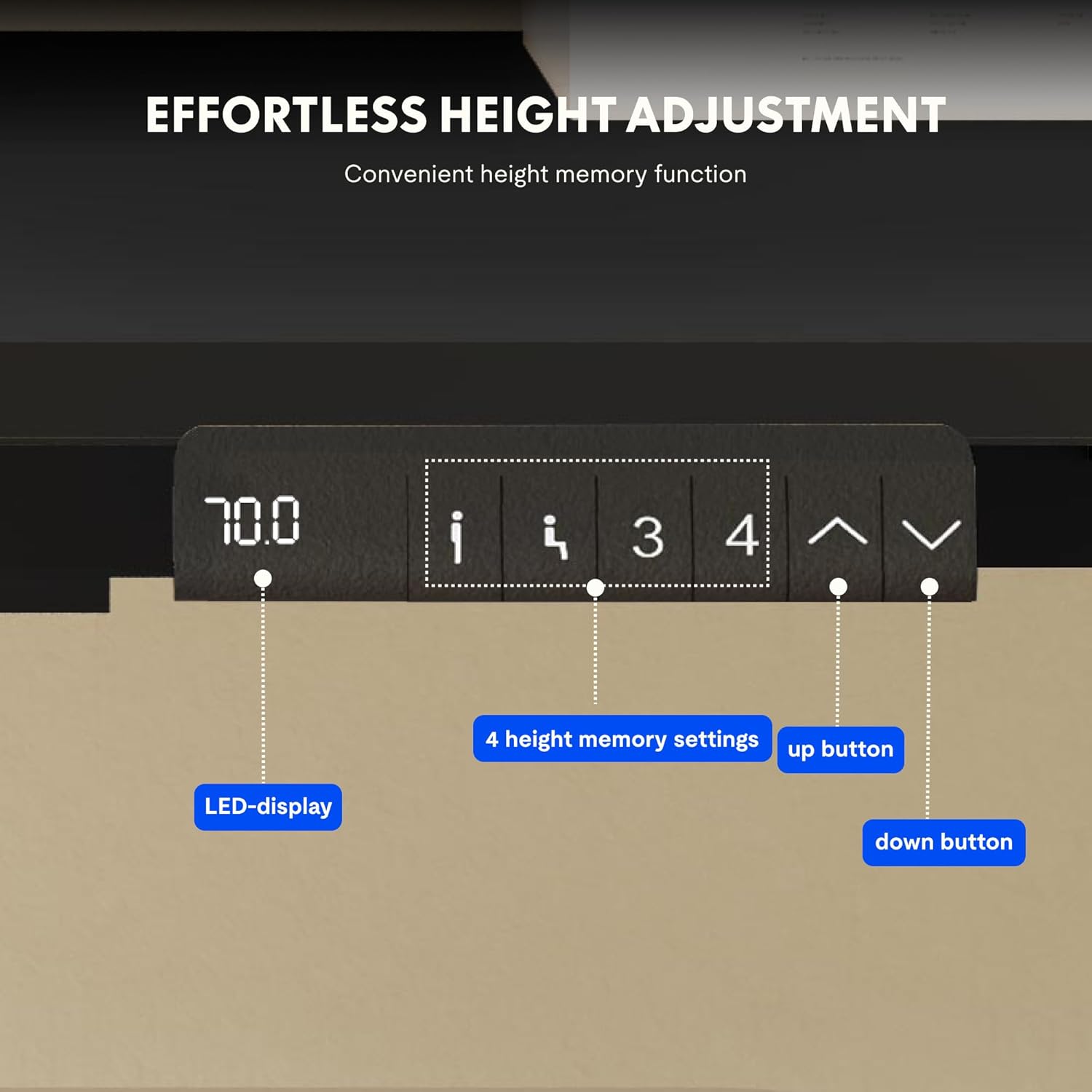
Image: Close-up of the FLEXISPOT desk control panel, showing the LED display for current height, up and down arrow buttons for manual adjustment, and four numbered buttons for saving and recalling height memory presets.
Manual Height Adjustment:
- Press and hold the Up arrow (^) button to raise the desk.
- Press and hold the Down arrow (v) button to lower the desk.
- Release the button at your desired height. The LED display will show the current height.
Setting Memory Presets:
- Adjust the desk to your desired height using the Up/Down arrows.
- Press the "M" or "SET" button (if available, otherwise proceed to step 3).
- Press one of the numbered memory buttons (1, 2, 3, or 4) within 3 seconds. The display will show "S-" followed by the number, indicating the height is saved.
Recalling Memory Presets:
Simply press the desired numbered memory button (1, 2, 3, or 4). The desk will automatically move to the saved height.
Reset Function:
If the desk encounters an error or does not move smoothly, a reset may be required. Press and hold the "Down" button until the desk reaches its lowest position, then release and press it again for 5-10 seconds until the display shows "RST" or "E-1" and then returns to the lowest height. The desk will then reset to its factory lowest position.
Maintenance
- Cleaning: Wipe the desk surface and frame with a soft, damp cloth. Avoid abrasive cleaners or harsh chemicals.
- Inspection: Periodically check all screws and connections to ensure they are tight. Retighten if necessary.
- Cable Management: Ensure cables remain tidy and do not obstruct the desk's movement.
- Weight Distribution: Distribute weight evenly on the tabletop to prevent strain on the motors and frame.
Troubleshooting
| Problem | Possible Cause | Solution |
|---|---|---|
| Desk does not move. | Power cable disconnected; control box error; overloaded desk. | Check power connections. Perform a reset (see Operating Instructions). Reduce weight on the desk. |
| Desk moves unevenly or makes unusual noises. | Loose connections; obstruction; uneven weight distribution. | Check all screws and connections. Remove any obstructions. Redistribute weight evenly. Perform a reset. |
| Display shows an error code (e.g., E01, E02). | Internal system error. | Perform a reset. If the error persists, contact customer support. |
| Memory presets not working. | Presets not saved correctly. | Re-save the memory presets following the instructions. |
Specifications
| Feature | Detail |
|---|---|
| Brand | FLEXISPOT |
| Model Number | E1B+DT1608-BLACK-EU18 |
| Tabletop Dimensions (L x W) | 160 cm x 80 cm |
| Height Adjustment Range | 70 cm - 119 cm |
| Load Capacity | 100 kg |
| Adjustment Speed | 25 mm/s |
| Motor Type | Dual Motors |
| Tabletop Material | FSC-certified MDF with high-pressure laminate |
| Frame Material | Alloy Steel |
| Color | Black Tabletop + Black Frame |
Warranty and Support
FLEXISPOT products are manufactured to high-quality standards. For warranty information and customer support, please refer to the official FLEXISPOT website or contact your retailer.
- Warranty: Specific warranty terms may vary by region and product. Please check your purchase documentation or the manufacturer's website for details.
- Customer Support: For technical assistance, missing parts, or operational questions, please visit the FLEXISPOT Brand Store or contact their official support channels.


