
Introduction
The Anker MagSafe 3-in-1 Cube Wireless Charger Stand (Model Y1811) provides a compact and efficient charging solution for your Apple devices. This foldable stand is designed to simultaneously charge your iPhone, Apple Watch, and AirPods, offering 15W ultra-fast charging for compatible iPhones. Its portable design and adjustable viewing angle make it suitable for various environments, from your bedside table to travel. This manual provides essential information for safe and optimal use of your device.
What's in the Box
- Magnetic Wireless Charger
- 30W Charger
- USB-C to USB-C Cable (5 ft / 1.5 m)
- Welcome Guide
Specifications
| Feature | Detail |
|---|---|
| Model Number | Y1811 |
| Product Dimensions | 2.36 x 2.36 x 2.48 inches (60 x 60 x 63 mm) |
| Item Weight | 14.4 oz (408.2 g) |
| Color | Black |
| Connectivity | USB, Wireless |
| Special Features | Fast Charging, Magnetic, Wireless Charging |
| Input Voltage | 240 Volts |
| Amperage | 3 Amps |
| Total USB Ports | 1 |
Compatibility
The Anker MagSafe 3-in-1 Cube is designed for seamless compatibility with a range of Apple devices:
- iPhones: iPhone 12 series, iPhone 13 series, iPhone 14 series, iPhone 15 series, iPhone 16 series, iPhone SE (2nd Gen and newer).
- Apple Watch: Apple Watch Series 1-8/Ultra, Apple Watch SE. Fast charging is supported for Apple Watch Series 7, Series 8, and Ultra.
- AirPods: AirPods Pro / 3 (1st and 2nd Generation), AirPods 3, AirPods 2 (with wireless charging case).
- Phone Cases: Compatible with magnetic phone cases. Non-magnetic cases are not supported for MagSafe charging.

Image: Compatible iPhone models for the Anker MagSafe 3-in-1 Cube.

Image: Compatible Apple Watch models for the Anker MagSafe 3-in-1 Cube.

Image: Compatible AirPods models for the Anker MagSafe 3-in-1 Cube.

Image: Illustration of magnetic and non-magnetic phone case compatibility.
Setup
- Unpack Components: Carefully remove the Magnetic Wireless Charger, 30W charger, and USB-C to USB-C cable from the packaging.
- Connect Power Adapter: Plug the 30W charger into a wall outlet.
- Connect USB-C Cable: Connect one end of the provided USB-C to USB-C cable to the 30W charger and the other end to the USB-C input port on the Anker MagSafe 3-in-1 Cube.
- Prepare for Use: Unfold the charging surfaces as needed. The iPhone charging pad can be tilted, and the Apple Watch module can be extended by pressing and pulling it out.

Image: The Anker MagSafe 3-in-1 Cube with its included 30W charger and USB-C cable.
Operating Instructions
Charging Your iPhone
- Ensure the charger is powered on.
- Place your MagSafe-compatible iPhone (or iPhone with a magnetic case) onto the upright magnetic charging pad. The iPhone will magnetically snap into place.
- The charger supports 15W ultra-fast charging for iPhone 12 series and newer.
- You can adjust the viewing angle of your iPhone up to 60° and rotate it between landscape and portrait modes while charging.

Image: iPhone charging on the magnetic pad, displaying 15W high-speed charging.

Image: Demonstrating the 360° rotation and 60° adjustable viewing angle of the iPhone charging pad.
Charging Your Apple Watch
- Press and pull the Apple Watch module to unfold it from the cube.
- Place your Apple Watch onto the extended charging module. It will magnetically attach and begin charging.
- Fast charging is supported for Apple Watch Series 7, Series 8, and Ultra.

Image: Apple Watch charging on the extended module, showing fast charging icon.
Charging Your AirPods
- Locate the wireless charging pad on the base of the cube.
- Place your AirPods charging case (with charging port facing inward) onto the center of the charging pad.
- Ensure the AirPods case is properly positioned for successful charging.

Image: AirPods charging on the base of the Anker 3-in-1 Cube, alongside an iPhone and Apple Watch.
Portability and Stability
- The charger features a foldable and ultra-compact design, making it easy to fit in your palm or pocket for travel.
- Despite its compact size, the charger is designed with sufficient weight (14.4 oz / 408.2 g) to ensure stability on your desk or nightstand, preventing tipping even with larger phones.
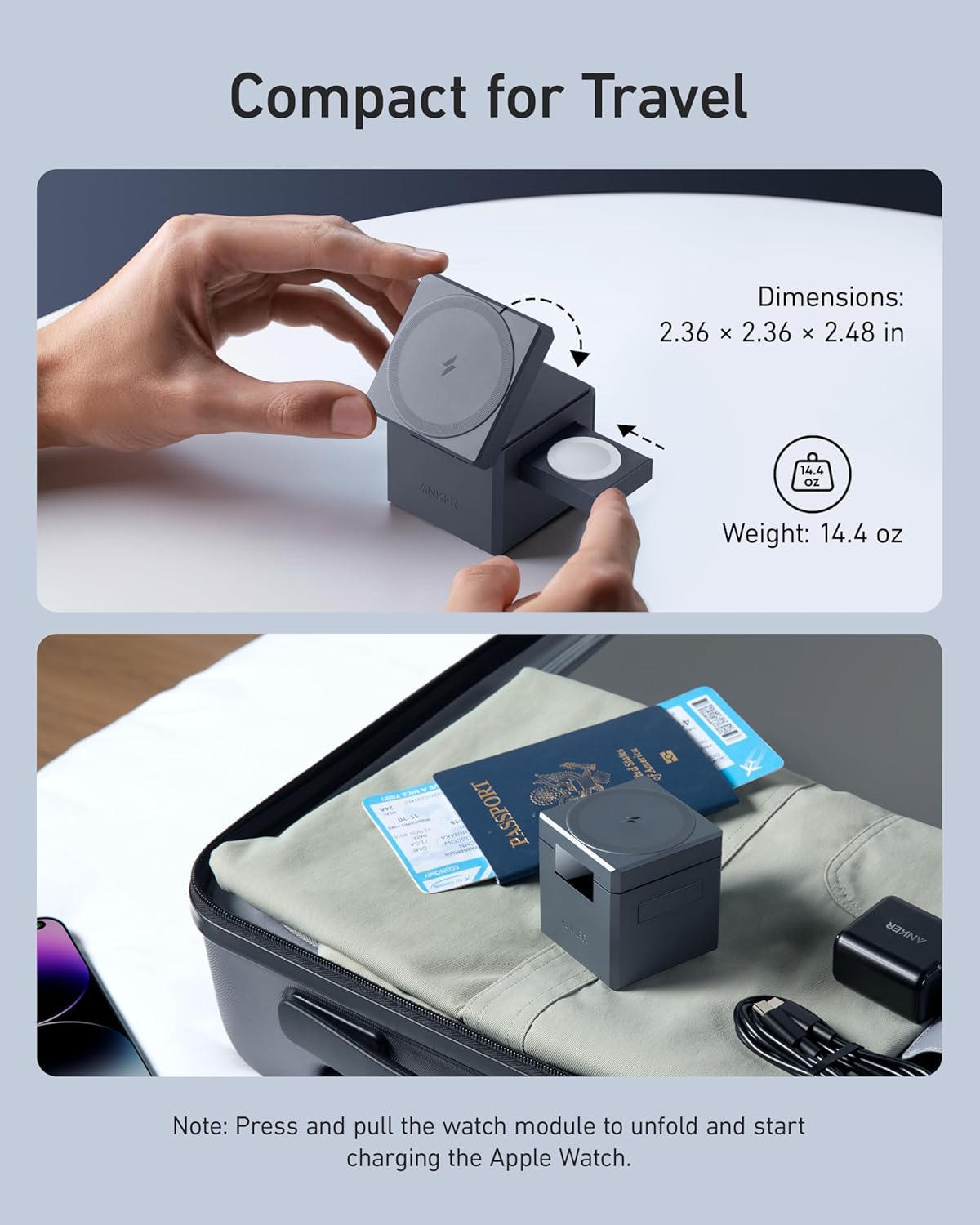
Image: The Anker 3-in-1 Cube folded into its compact form and placed in luggage for travel.

Image: Demonstrating the stability of the Anker 3-in-1 Cube on a desk with an iPhone attached.
Maintenance
- Keep the charging surfaces clean and free of dust or debris to ensure optimal charging performance. Use a soft, dry cloth for cleaning.
- Avoid exposing the charger to extreme temperatures, humidity, or liquids.
- Do not attempt to disassemble or repair the charger yourself. Contact customer service for assistance.
Troubleshooting
- Device not charging:
- Ensure the charger is properly connected to the 30W power adapter and a working wall outlet.
- Verify that your device is compatible with the charger (refer to the Compatibility section).
- Check if your iPhone case is magnetic. Non-magnetic cases may interfere with MagSafe charging.
- Ensure your device is correctly aligned on the charging pad.
- For AirPods, ensure the charging port is facing inward and the case is centered on the pad.
- Slow charging:
- Confirm you are using the provided 30W charger and USB-C cable, as lower wattage adapters may result in slower charging.
- Ensure no foreign objects are between the device and the charging surface.
- LED indicators: Refer to the welcome guide for specific LED indicator meanings, which typically show charging status for each device.
Warranty and Support
Anker provides an 18-month worry-free warranty for this product. For any issues or inquiries, please contact Anker customer service. Refer to the welcome guide for detailed contact information.


