
Soundstream VR-720B
SoundStream VR-720B Single DIN Car Stereo User Manual
Model: VR-720B | Brand: Soundstream
Introduction
This manual provides comprehensive instructions for the installation, operation, and maintenance of your SoundStream VR-720B Single DIN Car Stereo. Please read this manual thoroughly before using the product to ensure proper functionality and to prevent damage.
The SoundStream VR-720B is a versatile multimedia player featuring a motorized 7-inch flip-up touchscreen, DVD/CD playback, and Bluetooth connectivity, designed for in-dash vehicle installation.
Product Overview

Figure 1: Front view of the VR-720B with the 7-inch motorized screen extended, alongside the included remote control and an optional rear-view camera.
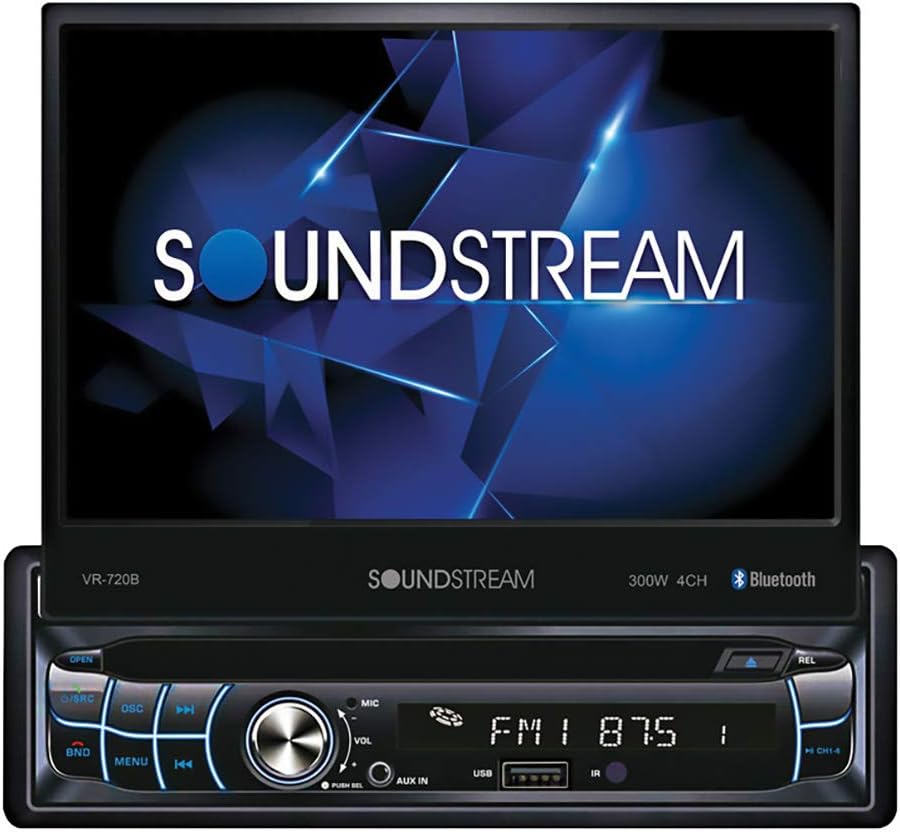
Figure 2: Close-up view of the VR-720B with the motorized screen fully extended, displaying the SoundStream logo. The main unit features control buttons, a volume knob, and a USB port.
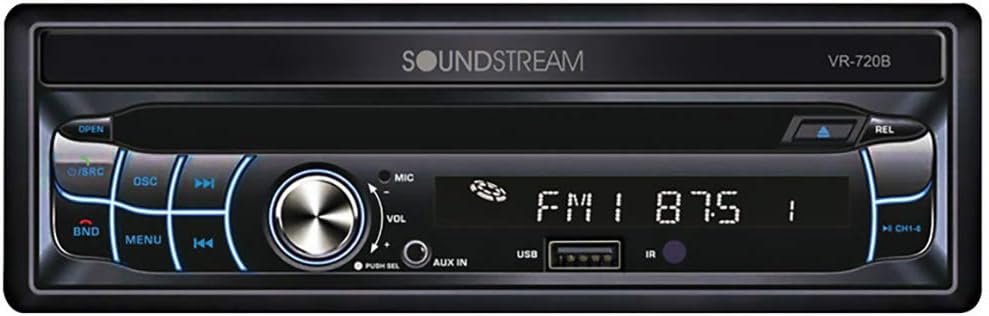
Figure 3: The VR-720B in its retracted single DIN configuration, showing the front panel with controls, display, and media slots when the screen is folded away.

Figure 4: The remote control unit for the VR-720B, featuring various buttons for media playback, volume, source selection, and menu navigation. A small, circular camera is also shown, which may be an accessory.
Setup and Installation
Proper installation is crucial for the performance and longevity of your VR-720B unit. It is highly recommended that installation be performed by a qualified professional.
Safety Precautions
- Disconnect the vehicle's negative battery terminal before beginning installation to prevent electrical shorts.
- Ensure all wiring is properly insulated to prevent short circuits.
- Do not install the unit where it will obstruct the driver's view or interfere with vehicle operation.
- Refer to your vehicle's service manual for specific wiring diagrams and dashboard disassembly instructions.
Wiring Diagram (General)
While a detailed wiring diagram is typically provided with the physical product, a general overview of common connections includes:
- Power Wires: Constant 12V (Yellow), Accessory 12V (Red), Ground (Black).
- Speaker Wires: Typically color-coded for front left, front right, rear left, and rear right speakers (e.g., White/White-Black, Gray/Gray-Black, Green/Green-Black, Purple/Purple-Black).
- Antenna Wire: For radio reception.
- Remote Turn-On Wire: For external amplifiers (Blue/White).
- Parking Brake Wire: For video playback safety (Light Green).
- Reverse Gear Wire: For automatic rear camera display (Brown/Orange).
Mounting the Unit
- Remove the existing car stereo and dashboard trim.
- Slide the supplied mounting sleeve into the dashboard opening. Bend the tabs outward to secure it.
- Make all necessary electrical connections according to the wiring diagram.
- Carefully slide the VR-720B unit into the mounting sleeve until it clicks into place.
- Reassemble the dashboard trim.
- Reconnect the vehicle's negative battery terminal.
Operating Instructions
Basic Operation
- Power On/Off: Press the PWR button (or equivalent) to turn the unit on or off.
- Volume Control: Rotate the VOL knob or use the VOL+/- buttons on the remote.
- Source Selection: Press the SRC or MODE button to cycle through available sources (Radio, DVD, CD, USB, AUX, Bluetooth).
- Motorized Screen: Use the OPEN/CLOSE button to extend or retract the 7-inch touchscreen.
Radio Operation
- Select RADIO source.
- Press BAND to switch between FM1, FM2, FM3, AM1, AM2.
- Use TUNE+/- or seek buttons to find stations.
- Press and hold a preset button (1-6) to save the current station.
DVD/CD Playback
- Insert a DVD or CD into the disc slot. The unit will automatically switch to DVD/CD mode.
- Use the PLAY/PAUSE, STOP, SKIP, and FAST FORWARD/REWIND buttons for playback control.
- Access the DVD menu using the MENU button on the remote or touchscreen.
Bluetooth Connectivity
- Select BLUETOOTH source.
- On your mobile device, search for Bluetooth devices and select "VR-720B" (or similar name).
- Enter the pairing code (usually "0000" or "1234") if prompted.
- Once paired, you can stream audio or make hands-free calls.
- Use the touchscreen or remote to answer/end calls, dial numbers, or control music playback.
USB/AUX Input
- Insert a USB drive into the USB port or connect an audio device to the AUX input.
- Select the corresponding USB or AUX source.
- Navigate files on the USB drive using the touchscreen or control buttons.
Maintenance
- Cleaning the Screen: Use a soft, lint-free cloth to gently wipe the touchscreen. For stubborn smudges, slightly dampen the cloth with water or a screen-safe cleaner. Do not use abrasive cleaners or solvents.
- Cleaning the Unit: Wipe the exterior of the unit with a dry, soft cloth.
- Disc Care: Handle discs by their edges. Keep them clean and free of scratches. Store discs in their cases when not in use.
- Ventilation: Ensure the unit's ventilation openings are not blocked to prevent overheating.
Troubleshooting
| Problem | Possible Cause | Solution |
|---|---|---|
| No Power | Blown fuse; Incorrect wiring; Loose connection. | Check vehicle's fuse box and unit's fuse; Verify wiring connections (Yellow, Red, Black wires); Ensure all connections are secure. |
| No Sound | Volume too low; Mute activated; Incorrect speaker wiring; Amplifier issue. | Increase volume; Deactivate mute; Check speaker wire connections; Consult an audio specialist if using an external amplifier. |
| Disc Error / Disc Not Playing | Dirty or scratched disc; Incorrect disc format; Unit lens dirty. | Clean disc or try a different disc; Ensure disc format is supported (CD-R, CD-RW, DVD-R, DVD-RW, VCD); Do not attempt to clean the lens yourself, consult service. |
| Bluetooth Pairing Failure | Device not in pairing mode; Incorrect pairing code; Interference. | Ensure VR-720B is in Bluetooth pairing mode; Re-enter pairing code; Move device closer to unit; Restart both devices. |
| Motorized Screen Not Responding | Obstruction; Power issue. | Check for any physical obstructions; Verify power supply to the unit. |
If the problem persists after attempting these solutions, please contact Soundstream customer support or a qualified service technician.
Specifications
- Model: VR-720B
- Brand: Soundstream
- Display Type: LCD
- Screen Size: 7 Inches (Motorized Flip-Up Touchscreen)
- Media Compatibility: CD-R, CD-RW, DVD-R, DVD-RW, VCD
- Connectivity: Bluetooth, USB, AUX Input
- Form Factor: Single DIN
- Color: Black
- First Available Date: March 3, 2022
- ASIN: B09TSZ7XCD
Warranty and Support
Specific warranty information for the SoundStream VR-720B is typically provided with the product packaging or on the manufacturer's official website. As this product may be a renewed item, warranty terms might differ from new products. Please refer to the documentation included with your purchase or contact the vendor for details regarding warranty coverage.
For technical support, troubleshooting assistance beyond this manual, or service inquiries, please contact Soundstream customer service directly. Contact information can usually be found on the manufacturer's website or in the product's original documentation.
Related documentsVR-720B


Ask a question about this manual
Ask about setup, troubleshooting, compatibility, parts, safety, or missing instructions. Manuals+ will review the question and use this page’s manual context to help answer it.