
ARGO ARGO POLIFEMO BEAR
Argo Polyphemo Bear Evaporative Cooler User Manual
Model: ARGO POLIFEMO BEAR
Introduction
This manual provides important information for the safe and efficient operation of your Argo Polyphemo Bear Evaporative Cooler. Please read this manual thoroughly before using the appliance and keep it for future reference.
The Argo Polyphemo Bear is designed to provide effective cooling and air purification through its evaporative cooling system. It features an intuitive LED control panel and a convenient remote control for ease of use.
Product Overview
The Argo Polyphemo Bear Evaporative Cooler is a compact and efficient appliance designed for cooling rooms or personal areas. It features a pure white, glossy finish and is equipped with multi-directional wheels for easy portability.

Figure 1: Front view of the Argo Polyphemo Bear Evaporative Cooler, showing the air outlet grille and water level indicator.

Figure 2: Top view of the control panel, featuring LED indicators and various function buttons.
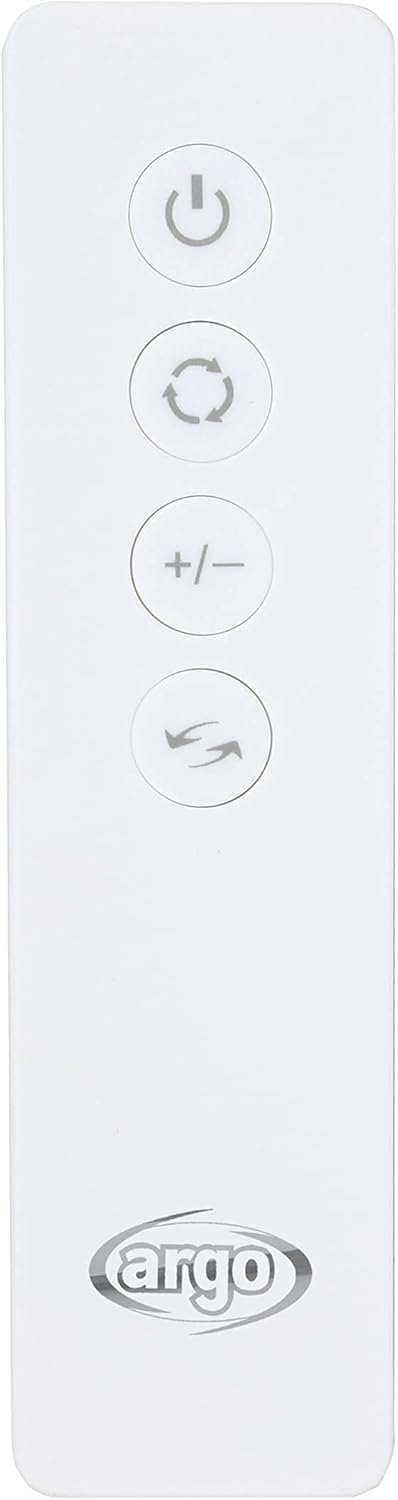
Figure 3: The infrared remote control, allowing convenient operation from a distance.

Figure 4: Product dimensions: 70cm height, 29cm depth, 30cm width.
Safety Instructions
Always follow basic safety precautions when using electrical appliances to reduce the risk of fire, electric shock, and injury to persons.
- Ensure the power supply voltage matches the appliance's rating.
- Do not immerse the appliance, cord, or plug in water or other liquids.
- Unplug from outlet when not in use, before putting on or taking off parts, and before cleaning.
- Do not operate any appliance with a damaged cord or plug, or after the appliance malfunctions or has been damaged in any manner.
- Keep the appliance out of reach of children.
- Do not block air inlets or outlets.
- Use only on a flat, stable surface.
- Do not use outdoors.
Setup
- Unpacking: Carefully remove the evaporative cooler from its packaging. Retain packaging for future storage or transport.
- Positioning: Place the unit on a flat, stable surface. Ensure there is adequate space around the unit for proper airflow. The multi-directional wheels allow for easy movement.
- Filling the Water Tank:
- Locate the removable 5-liter water tank at the bottom of the unit.
- Pull out the tank gently.
- Fill the tank with clean tap water. Do not exceed the "MAX" fill line.
- For enhanced cooling, you may add the included synthetic ice board (after freezing) into the water tank.
- Carefully slide the water tank back into its position until it clicks securely.

Figure 5: View of the water tank compartment, showing the removable tank and pump mechanism.
- Power Connection: Plug the power cord into a suitable electrical outlet.
Operating Instructions
The unit can be operated using the control panel on top of the unit or the infrared remote control.
Control Panel Functions:
Figure 6: Control panel layout with function icons.
- Power Button (⏻): Press to turn the unit ON or OFF.
- Mode Button (↻): Cycle through ventilation modes: Normal, Natural, Sleep.
- Speed Button (☰): Adjust fan speed: Low, Medium, High.
- Timer Button (⏱): Set the operating timer (1-7 hours). The unit will automatically turn off after the set time.
- Oscillation Button (⇆): Activate or deactivate automatic vertical oscillation of the air flaps. Horizontal flaps can be adjusted manually.
- Cooling/Humidification Button (❄): Activates the evaporative cooling function. Ensure water tank is filled.
Remote Control:
The remote control duplicates most functions of the control panel for convenient operation. Ensure the remote control is pointed towards the unit's receiver.
Figure 7: Remote control buttons.
- Power Button: Turns the unit ON/OFF.
- Mode Button: Cycles through Normal, Natural, Sleep modes.
- Speed Buttons (+/-): Adjusts fan speed up or down.
- Oscillation Button: Controls vertical oscillation.
- Cooling Button: Activates cooling function.
Maintenance
Regular maintenance ensures optimal performance and extends the lifespan of your evaporative cooler. Always unplug the unit before performing any maintenance.
- Water Tank Cleaning:
- The 5-liter water tank is easily removable for cleaning.
- Empty any remaining water and rinse the tank with clean water.
- For thorough cleaning, use a mild detergent and a soft brush. Rinse thoroughly to remove all detergent residue.
- Allow the tank to air dry completely before reinserting.
- Filter Cleaning:
The unit features a double filter system: a dust filter and a honeycomb evaporation panel. Both are easily removable for cleaning.

Figure 8: Rear view with the filter panel visible.
- Locate the filter panel at the rear of the unit.
- Gently remove the dust filter and the honeycomb evaporation panel.
- Rinse both filters under running water to remove dust and debris. For stubborn dirt, use a soft brush.
- Allow the filters to air dry completely before reinserting them into the unit.
- Clean filters regularly, especially in dusty environments, to maintain air quality and cooling efficiency.
- Exterior Cleaning: Wipe the exterior of the unit with a soft, damp cloth. Do not use abrasive cleaners or solvents.
Troubleshooting
| Problem | Possible Cause | Solution |
|---|---|---|
| Unit does not turn on. | No power supply; Power button not pressed. | Check power cord connection; Ensure outlet is functional; Press the power button. |
| No cooling effect. | Water tank empty; Cooling function not activated; Filters are dirty. | Fill water tank; Press the cooling button; Clean the dust filter and honeycomb panel. |
| Weak airflow. | Air inlets/outlets blocked; Filters are dirty; Fan speed set too low. | Clear any obstructions; Clean filters; Increase fan speed. |
| Unusual noise. | Unit not on a flat surface; Water pump issue; Foreign object inside. | Place on a stable surface; Check water level; Inspect for foreign objects (unplug first). If problem persists, contact support. |
| Remote control not working. | Batteries dead or incorrectly inserted; Obstruction between remote and unit. | Replace batteries; Ensure correct polarity; Remove obstructions; Point remote directly at unit. |
If the problem persists after trying these solutions, please contact customer support.
Specifications
| Brand | ARGO |
| Model Number | ARGO POLIFEMO BEAR |
| Model Name | Polifemo Bear |
| Color | White |
| Product Dimensions (L x W x H) | 29 x 30 x 70 cm |
| Item Weight | 6.1 Kilograms |
| Voltage | 230 Volt (2.3E+2 Volt) |
| Number of Speed Levels | 3 |
| Control Type | Remote Control, Control Panel |
| Tank Capacity | 5 Liters |
| Mounting Type | Floor Mount |
| Recommended Use | Cooling rooms or personal areas |
| Included Components | Product, User Manual, Warranty Card, Synthetic Ice Board |
Warranty and Support
Your Argo Polyphemo Bear Evaporative Cooler comes with a manufacturer's warranty. Please refer to the included warranty card for specific terms and conditions, including warranty period and coverage details.
For technical support, service, or questions regarding your product, please contact Argo customer service. Contact information can typically be found on the warranty card or the official Argo website.
Please retain your proof of purchase for warranty claims.
Related documentsARGO POLIFEMO BEAR


Ask a question about this manual
Ask about setup, troubleshooting, compatibility, parts, safety, or missing instructions. Manuals+ will review the question and use this page’s manual context to help answer it.